
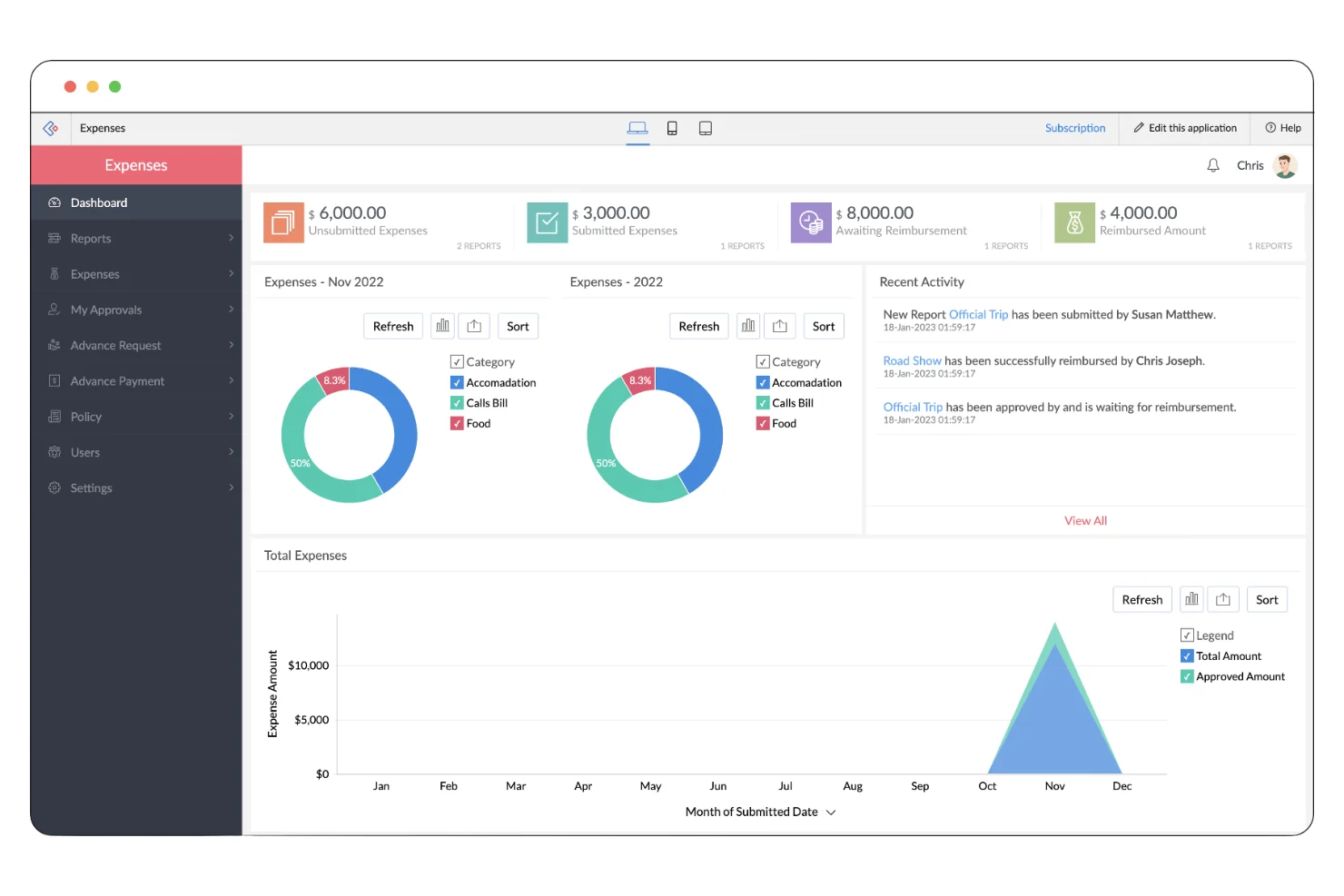
10 Expense Management System Features That Improve Financial Control
An expense management system helps businesses record, organize, approve, and monitor company spending from one central platform. Instead of relying on spreadsheets, email approvals, paper receipts, and scattered financial records, teams can use one system to manage expenses from submission through reporting.
This matters because expense data affects budgets, cash flow, reimbursements, financial reporting, and tax preparation. The IRS recordkeeping guidance for businesses, for example, emphasizes maintaining records that clearly show income and expenses and support financial reporting and tax-related claims. Therefore, businesses need more than a place to store receipts. They need a reliable process for capturing and reviewing spending.
In this guide, we will explain how an expense management system works, the key features to look for, its main benefits, common implementation mistakes, and how expense tracking software fits into a broader financial workflow.
What Is an Expense Management System?
An expense management system is software that helps a business control and organize employee and company expenses. It can handle tasks such as expense submission, receipt collection, approval workflows, reimbursement tracking, spending categorization, and financial reporting.
For example, an employee might purchase supplies for a client meeting. Instead of saving the receipt in an email and later entering the transaction into a spreadsheet, the employee can submit the expense through the system. The platform can then route it to the appropriate manager, record the expense category, and include the approved transaction in financial reports.
In practice, an expense management system creates a structured path for business spending:
- Employees submit expenses and supporting documents.
- The system categorizes and organizes the transaction.
- Managers review the expense against company rules.
- Approved expenses move into reimbursement or accounting workflows.
- Finance teams use the resulting data for reporting and analysis.
This approach gives finance teams better visibility while reducing the amount of manual work involved in managing everyday expenses.
How Does an Expense Management System Work?
Although systems differ in design, most follow a similar workflow. First, the employee records an expense and attaches a receipt or other supporting document. Next, the system checks the information and sends the expense through the required approval process.
After approval, the transaction can move into reimbursement, accounting, or financial reporting. Depending on the platform, the system may also connect with accounting software, payment systems, corporate cards, payroll tools, or broader business management platforms.
Key takeaway
The value of an expense management system comes from connecting individual transactions to a repeatable business process. It is not simply a digital replacement for a spreadsheet.
10 Key Features of an Expense Management System
1. Expense Submission
Employees need a simple way to submit expenses as soon as they occur. A good system can provide forms for details such as amount, date, category, business purpose, and payment method.
For example, a sales representative returning from a business trip can enter travel expenses immediately rather than waiting until the end of the month. As a result, finance teams receive more timely information and employees are less likely to forget transactions.
2. Receipt Management
Receipts provide important supporting information for many business expenses. An expense management system can allow users to attach digital copies of receipts directly to transactions.
Some platforms also support receipt scanning or data extraction. This can reduce manual data entry and make it easier to connect each receipt with the correct expense.
The IRS guidance on business records notes that supporting documents can include receipts, invoices, account statements, and other records that help substantiate expenses. Therefore, keeping supporting documents connected to expense records can make financial administration more organized.
3. Approval Workflows
Different expenses may require different levels of approval. For instance, a small office purchase might need one manager’s approval, while a larger purchase could require approval from both a department head and finance.
An expense management system can automate these approval paths. Instead of manually forwarding emails, the system sends each submission to the appropriate reviewer based on predefined rules.
This also creates a clearer record of who reviewed and approved each expense.
4. Expense Categorization
Businesses usually track spending across categories such as travel, meals, software subscriptions, office supplies, marketing, equipment, and professional services.
Consistent categorization makes financial data easier to analyze. Instead of seeing hundreds of individual transactions, finance teams can identify how much the business spends in each category and compare those amounts across periods.
5. Reimbursement Management
Employee reimbursements can become difficult to manage when businesses rely on spreadsheets and email. An expense management system can track submitted, approved, rejected, and reimbursed expenses in one place.
For example, an employee may submit $300 in approved travel expenses. The system can keep the reimbursement status visible to both the employee and finance team. This reduces repeated questions about whether a payment has been processed.
6. Expense Tracking and Reporting
Expense tracking software helps businesses monitor spending as transactions happen rather than waiting for month-end reporting.
Managers can review expenses by employee, department, category, project, location, or time period. Meanwhile, finance teams can use reports to identify unusual spending patterns, compare actual expenses with budgets, and prepare financial summaries.
For a deeper look at financial management tools, businesses can also explore best accounting software for efficient financial management.
7. Budget Monitoring
Tracking an expense is useful, but businesses also need to know whether spending aligns with their budgets. A stronger expense management process connects transactions with budget limits.
For example, a marketing department may have a monthly advertising budget. As employees submit expenses, the system can help managers understand how much of that budget has already been used.
Therefore, teams can identify potential overspending before it becomes a larger financial issue.
8. Policy Enforcement
Every business can establish its own expense rules. These rules may cover spending limits, eligible categories, approval requirements, travel expenses, or documentation requirements.
Instead of expecting employees to remember every rule, companies can configure software to support those policies. For example, a system might flag an expense that exceeds a predefined limit or lacks the required receipt.
However, software should support company policies rather than replace thoughtful policy design. Businesses still need clear and practical expense rules.
9. Accounting Integration
Expense data often needs to reach the company’s accounting system. Manual re-entry creates extra work and can introduce inconsistencies.
Integration allows approved expense information to move between systems more efficiently. Depending on the software, businesses may connect expense workflows with accounting platforms, payment tools, payroll systems, or other financial applications.
This becomes particularly useful as transaction volume increases because finance teams can spend less time transferring information between separate systems.
10. Audit Trails and Access Controls
Financial information needs careful handling. An expense management system can maintain records of submissions, changes, approvals, and other actions.
Access controls can also limit what different users can view or change. For example, employees may submit their own expenses, managers may approve team expenses, and finance administrators may have broader reporting access.
These controls help create a more structured financial workflow and make it easier to understand how a transaction moved through the organization.
Expense Management System vs. Expense Tracking Software
The terms expense management system and expense tracking software often overlap, but they can describe different levels of functionality.
| Area | Expense Tracking Software | Expense Management System |
|---|---|---|
| Transaction tracking | Core function | Core function |
| Receipt storage | Common | Common |
| Approvals | May be limited | Usually central to the workflow |
| Reimbursements | May be available | Often integrated into the process |
| Policy controls | Varies | Usually more advanced |
| Reporting | Basic to advanced | Often broader and more configurable |
| Integrations | Depends on the product | Often designed for connected workflows |
In simple terms, expense tracking software focuses primarily on recording and monitoring expenses. An expense management system typically extends that process into approvals, policies, reimbursements, reporting, and integrations.
However, the distinction is not universal. Software vendors may use these terms differently, so businesses should evaluate actual features rather than relying on the product name alone.
Benefits of Using an Expense Management System
Better spending visibility
Finance and management teams can see where company money goes without collecting information from multiple spreadsheets and email threads.
Less manual administration
Automated submissions, approvals, categorization, and reporting can reduce repetitive data entry and administrative tasks.
Faster approvals
Digital workflows can move expenses to the right reviewer without requiring employees to manually forward requests.
More consistent records
Standardized categories, required fields, and supporting documents can create more consistent expense records.
Stronger budget control
Teams can compare spending with budgets and investigate unusual transactions earlier.
Easier financial analysis
Structured expense data makes it easier to analyze spending by department, category, employee, project, or period.
When Should a Business Use an Expense Management System?
A basic spreadsheet may work for a very small business with a low number of transactions and few employees. However, manual processes become harder to manage as the organization grows.
An expense management system becomes especially useful when several employees submit expenses, multiple managers approve spending, employees travel frequently, departments have separate budgets, or finance teams need regular expense reports.
It can also make sense when a business has trouble answering basic questions such as:
- How much did each department spend this month?
- Which employees have outstanding reimbursements?
- Which expense categories are increasing?
- Which expenses still need approval?
- Which transactions lack supporting documentation?
- How much of a department’s budget remains?
If answering these questions requires collecting data from several spreadsheets, emails, receipts, and accounting records, a centralized system may provide a more practical workflow.
How to Choose the Right Expense Management System
Businesses should start with their actual expense process rather than choosing software based only on a feature list. First, document how employees submit expenses, who approves them, how finance records them, and where reporting problems occur.
Next, compare potential systems against those requirements.
Check the expense workflow
Make sure employees can submit expenses easily and that the approval process matches your organizational structure. A complicated interface can reduce adoption even when the software has powerful features.
Review integration options
Check whether the platform connects with the accounting, payroll, banking, corporate card, or business management tools your organization already uses.
Evaluate reporting
Look for reports that answer practical business questions. Useful reports should help you understand spending trends, outstanding approvals, reimbursement status, and budget performance.
Consider security and permissions
Expense data can contain sensitive financial and employee information. Review user permissions, access controls, data handling practices, and available security features before selecting a platform.
Think about future growth
A system should support your current workflow without creating unnecessary complexity. At the same time, consider whether it can handle additional employees, departments, locations, transactions, and integrations as your business grows.
Pro tip
Do not judge an expense platform only by the number of features it offers. A simpler system that employees use consistently can provide more practical value than a complex platform that creates friction.
Common Expense Management Mistakes to Avoid
Relying on spreadsheets for everything
Spreadsheets can work for basic tracking, but they can become difficult to maintain when many people edit them or when approval workflows become complex.
Ignoring receipt and documentation rules
Recording an amount without adequate supporting information can create problems during financial reviews. Businesses should define what documentation employees need to submit and make those requirements clear.
Using inconsistent categories
If one employee records a software subscription as technology while another uses office expenses, financial reports become less useful. Standard categories help keep the data consistent.
Creating overly complex approval processes
Controls matter, but too many approval steps can slow routine purchases. Instead, create approval levels that reflect spending risk and company policy.
Choosing software without checking integrations
A system may look impressive on its own but create extra work if it does not connect well with your existing financial tools. Therefore, review integration requirements before making a final decision.
How to Implement an Expense Management System
Successful implementation depends on more than installing software. Start by mapping your current expense process and identifying the steps that create the most delays or manual work.
- Define expense policies: Establish spending limits, documentation requirements, approval rules, and eligible categories.
- Set up categories: Create a consistent structure for organizing expenses.
- Configure approval workflows: Assign reviewers based on departments, spending levels, projects, or other business rules.
- Connect financial tools: Integrate accounting and other systems where appropriate.
- Set user permissions: Give employees and managers only the access they need.
- Train employees: Show users how to submit expenses, attach receipts, and check reimbursement status.
- Review reports: Monitor spending data after launch and adjust workflows when recurring issues appear.
For businesses with specialized workflows, custom software can also provide a way to connect expense processes with broader business operations. For example, custom CRM development can support tailored business workflows when standard software does not align with an organization’s processes.
Frequently Asked Questions
Frequently Asked Questions
What is an expense management system?
An expense management system is software that helps businesses record, categorize, approve, reimburse, track, and report company expenses through a centralized workflow.
What is expense tracking software used for?
Expense tracking software records business spending and helps users monitor transactions by category, employee, department, project, or time period.
Can an expense management system handle employee reimbursements?
Yes. Many expense management platforms support reimbursement workflows by tracking submitted expenses, approvals, payment status, and supporting documents.
Can expense management software integrate with accounting systems?
Many platforms offer accounting integrations. The exact options depend on the software, so businesses should verify compatibility with their existing accounting system before choosing a solution.
Is an expense management system useful for small businesses?
It can be useful when a small business has multiple employees, frequent reimbursements, several approval steps, or growing transaction volume. Very small businesses with simple spending may still manage effectively with basic tools.
Final Thoughts
An expense management system gives businesses a structured way to control spending from the initial transaction through approval, reimbursement, accounting, and reporting. More importantly, it turns scattered expense information into organized data that finance and management teams can use.
Expense tracking software can provide a useful starting point for monitoring transactions. However, businesses with more complex approval, reimbursement, budgeting, and integration needs should look beyond basic tracking and evaluate the complete expense workflow.
Start by identifying where your current process creates delays, errors, or limited visibility. Then choose a solution that fits those needs, supports clear expense policies, integrates with your existing financial tools, and can grow with your organization.
