
Manufacturing Management System: 8 Key Features for Smarter Production
A manufacturing management system gives manufacturers one place to plan production, track materials, manage work orders, monitor quality, and understand what is happening on the shop floor. For businesses that still rely on spreadsheets, disconnected tools, or manual updates, the right system can connect production and inventory data so teams can make faster decisions. A manufacturing inventory management system also helps keep raw materials, work in progress, and finished goods visible throughout the production cycle.
In this guide, we’ll explain what a manufacturing management system does, how it works, the core features to look for, the role of inventory management, key benefits, implementation considerations, common mistakes, and when a custom solution may make sense.
What Is a Manufacturing Management System?
A manufacturing management system is software that helps a manufacturer coordinate production activities from planning through completion. Depending on the platform, it can manage production schedules, work orders, bills of materials, material usage, inventory, quality checks, labor, equipment, and reporting.
The main goal is simple: connect the information needed to turn materials into finished products while giving managers a clear view of production.
For example, imagine a manufacturer receives an order for 500 units. The system can help the team check material availability, create or release a work order, assign production steps, track progress, record material consumption, and update finished-goods inventory. As a result, production and management teams work from the same operational data.
A manufacturing management system can overlap with an ERP or manufacturing execution system (MES), but these terms are not always interchangeable. IBM’s explanation of manufacturing execution systems describes MES as software that monitors and controls production processes on the shop floor while connecting operational information with systems such as ERP and supply chain platforms.
How Does a Manufacturing Management System Work?
Most manufacturing systems follow the flow of a production order. First, the business defines what it needs to make and what resources the product requires. Next, the system helps plan materials, labor, machines, and production steps.
A typical workflow looks like this:
- Product setup: The manufacturer defines products, components, bills of materials, and production routes.
- Demand and production planning: Managers review orders, forecasts, capacity, and available resources.
- Material planning: The system checks inventory and identifies shortages or purchasing needs.
- Work order creation: Production teams receive instructions for what to make, when to make it, and how to make it.
- Shop-floor tracking: Teams record progress, material consumption, labor, machine status, and production quantities.
- Quality control: Inspections and quality results can be captured at defined production points.
- Completion: Finished goods move into inventory, while production records remain available for reporting and traceability.
This connected flow matters because production problems often involve more than one department. A material shortage can affect scheduling, while a machine delay can affect delivery dates. Therefore, shared data helps teams see these relationships earlier.
8 Core Features to Look For
A manufacturing management system should support the workflows that matter most to your operation. However, the right feature set depends on whether you use discrete, process, batch, make-to-order, or mixed-mode manufacturing.
1. Production Planning and Scheduling
Production planning helps managers decide what to produce and when. Scheduling then turns those plans into practical work sequences.
Look for tools that account for orders, material availability, work-center capacity, production priorities, and due dates. Good scheduling visibility can also help managers identify bottlenecks before they disrupt the production plan.
2. Work Order Management
Work orders connect production plans with shop-floor execution. A useful system should let teams create, assign, update, and complete work orders without relying on separate spreadsheets.
For instance, a work order may include the product, quantity, required materials, routing steps, assigned work center, planned dates, and production status.
3. Bill of Materials and Routing
A bill of materials, or BOM, defines the components required to make a product. Routing defines the steps required to turn those components into the finished item.
Together, they help the system understand what each production order requires. This also makes material planning and production costing more consistent.
4. Manufacturing Inventory Management
Inventory management plays a central role in manufacturing because production depends on having the right materials available at the right time.
A manufacturing inventory management system should track raw materials, components, work in progress, and finished goods. It should also provide visibility into stock movements, quantities, locations, reorder points, and material usage.
NIST research on inventory and flow time in manufacturing examines inventory and flow time as important areas for understanding efficiency and waste. Therefore, inventory data should connect closely with production activity rather than remain in a separate system.
For a deeper look at inventory capabilities, see inventory management software features.
5. Quality Management
Quality features help manufacturers record inspections, test results, defects, nonconformances, and corrective actions.
The exact workflow varies by industry. However, the system should make it easy to connect quality records with products, batches, work orders, materials, or production steps. This creates a clearer history when a quality issue needs investigation.
You can also explore quality control software for manufacturing for a closer look at this part of the production workflow.
6. Equipment and Maintenance Tracking
Production depends on available equipment. Consequently, a manufacturing system may track machine status, maintenance activities, downtime, and equipment-related work.
This information can help production managers understand why a schedule changed and whether recurring equipment issues affect output.
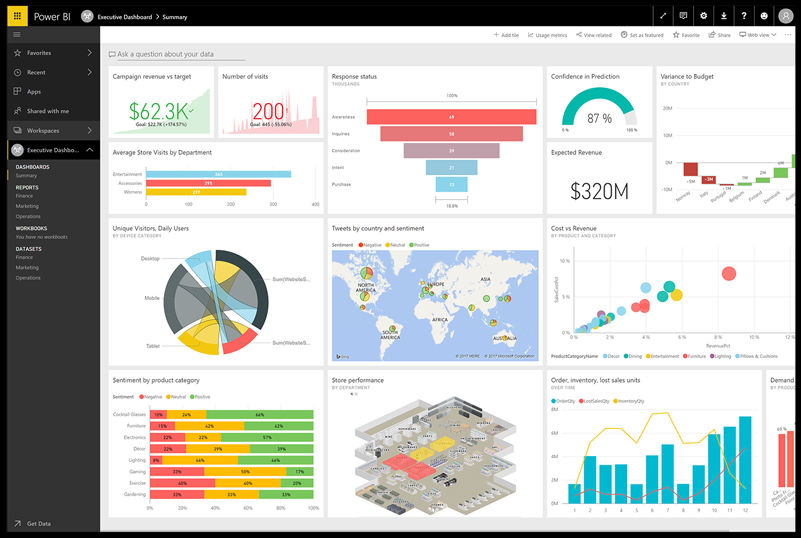
7. Reporting and Dashboards
Managers need more than raw production records. They need practical views of orders, inventory, output, delays, quality issues, and resource use.
Useful dashboards can bring these indicators together so managers can identify exceptions quickly. Meanwhile, detailed reports can support planning, operational reviews, and continuous improvement.
8. Integration
Manufacturing rarely operates as an isolated function. Sales, purchasing, accounting, inventory, logistics, product data, and production often share related information.
Therefore, integration should be a key selection criterion. A system may connect with ERP, accounting, purchasing, warehouse, e-commerce, CRM, machine data, or other business tools depending on the operation.
For example, Oracle’s manufacturing inventory documentation describes inventory processes working alongside bills of materials, shop-floor control, production planning, and related manufacturing functions.
Why Manufacturing Inventory Management Matters
Inventory problems can quickly become production problems. If a critical component runs out, the production team may have to stop, reschedule, or switch priorities.
At the same time, excess stock creates another challenge. Too much material can tie up cash, consume storage space, and make inventory harder to manage.
A manufacturing inventory management system helps create a clearer link between production demand and stock levels. For example, when a production order requires 1,000 components, the system can compare that requirement with available inventory and identify a potential shortage.
The best approach also tracks inventory through different stages:
- Raw materials waiting for production
- Components issued to production
- Work in progress
- Finished goods awaiting shipment
- Materials stored across multiple locations
This visibility helps teams understand not only how much stock they have, but also where that stock sits within the production process.
Key Benefits for Manufacturers
A well-configured manufacturing management system can improve several connected areas of the business.
Better production visibility: Managers can see order status, production progress, material availability, and exceptions in one place.
Fewer manual updates: Automated workflows can reduce repeated data entry between spreadsheets and disconnected applications.
Stronger inventory control: Production and inventory data can work together, making material requirements easier to monitor.
Improved scheduling: Planners can consider resource and material constraints when organizing production.
Better traceability: Digital records can connect materials, production orders, inspections, and finished products.
Faster decisions: Current operational data gives managers a stronger basis for responding to shortages, delays, and quality issues.
More consistent processes: Standard workflows can help teams follow the same production and reporting procedures across shifts or locations.
Manufacturing Management System vs. ERP vs. MES
These terms often overlap, so it helps to understand the difference.
| System | Primary focus | Typical use |
|---|---|---|
| Manufacturing management system | Manufacturing operations and coordination | Production planning, work orders, inventory, quality, and operational reporting |
| ERP | Business-wide resource planning | Finance, purchasing, sales, inventory, production, and other enterprise processes |
| MES | Shop-floor execution and visibility | Production tracking, machine and operator data, quality, traceability, and real-time execution |
In practice, businesses may use these systems together rather than choosing only one. NIST research on manufacturing operations management describes production, quality, maintenance, and inventory as connected operational areas that can benefit from integrated data.
The important question is not which label sounds best. Instead, identify the processes you need to manage and then determine which system architecture supports them.
How to Choose the Right System
Start with your production workflow rather than a feature checklist.
First, document how an order moves from demand to finished goods. Then identify where teams currently enter data, where delays occur, and where managers lack visibility.
Next, evaluate these areas:
- Production model: Confirm that the system supports your manufacturing method.
- Inventory complexity: Check support for multiple locations, lots, batches, units, and material movements if you need them.
- Scheduling: Review how the system handles capacity, priorities, and production constraints.
- Quality: Check whether inspections and defects can connect to production records.
- Integration: Identify the systems that must exchange data.
- Reporting: Make sure managers can access the operational information they actually use.
- Scalability: Consider future products, facilities, users, and production volume.
- Usability: Shop-floor teams should be able to record information without unnecessary complexity.
You can also review manufacturing software options when comparing broader capabilities and use cases.
Common Implementation Mistakes
Even strong software can produce weak results when the implementation lacks planning.
One common mistake involves trying to automate a process before understanding it. Instead, map the current workflow and remove unnecessary steps before configuring the software.
Another problem occurs when teams keep important data in separate spreadsheets after deployment. This creates competing versions of the truth. Therefore, define which system owns each type of data and establish clear processes for updates.
Poor product and inventory data can also cause problems. Before launch, review product codes, bills of materials, units of measure, locations, supplier information, and other core records.
Finally, do not overlook user training. Production employees need simple instructions that match their daily tasks. Managers also need training on reports, dashboards, and exception handling.
Important
Do not choose a manufacturing platform only because it has many features. A smaller system that fits your production workflow can be more useful than a complex platform that teams struggle to adopt.
When Should You Consider a Custom Manufacturing System?
Off-the-shelf software can work well when your production processes match the workflows supported by the product. However, custom development can make sense when your operation has specialized rules, unusual approval flows, unique production data, or integration requirements that standard software cannot handle cleanly.
A custom approach can also help when you need one connected workflow across production, inventory, purchasing, customer orders, reporting, and other business functions.
Before choosing custom development, define the specific gap you need to solve. Then compare the cost and complexity of customization with the operational value it could provide.
Pro tip
Build around the highest-impact workflow first. For many manufacturers, that means connecting production orders, material availability, inventory movements, and production status before adding advanced automation.
Frequently Asked Questions
What is a manufacturing management system?
A manufacturing management system is software that helps coordinate production planning, work orders, materials, inventory, quality, equipment, and manufacturing reports.
What is a manufacturing inventory management system?
A manufacturing inventory management system tracks materials and products across purchasing, storage, production, work in progress, and finished goods. It helps teams connect stock availability with production needs.
What is the difference between ERP and manufacturing management software?
ERP typically manages broader business processes such as finance, purchasing, sales, inventory, and production. Manufacturing management software focuses more closely on manufacturing workflows and operational control.
Can manufacturing software track work orders?
Yes. Work order management is a common manufacturing capability. It can help teams assign production tasks, track quantities and progress, record material usage, and close completed orders.
How do manufacturers choose the right management system?
Start by mapping your production workflow and then evaluate production planning, inventory, quality, scheduling, integrations, reporting, usability, and scalability against those needs.
Conclusion
A manufacturing management system can connect production planning, work orders, inventory, quality, equipment, and reporting into a more coordinated workflow. More importantly, a manufacturing inventory management system can connect material availability with actual production demand, helping teams see shortages and stock movements earlier.
The right solution depends on your manufacturing model, operational complexity, existing systems, and future needs. Therefore, start with your real workflow, identify the gaps that slow production or limit visibility, and choose technology that solves those problems without adding unnecessary complexity.
For manufacturers with specialized processes, a tailored software approach may also provide a practical way to connect production and inventory workflows around how the business actually operates.
