
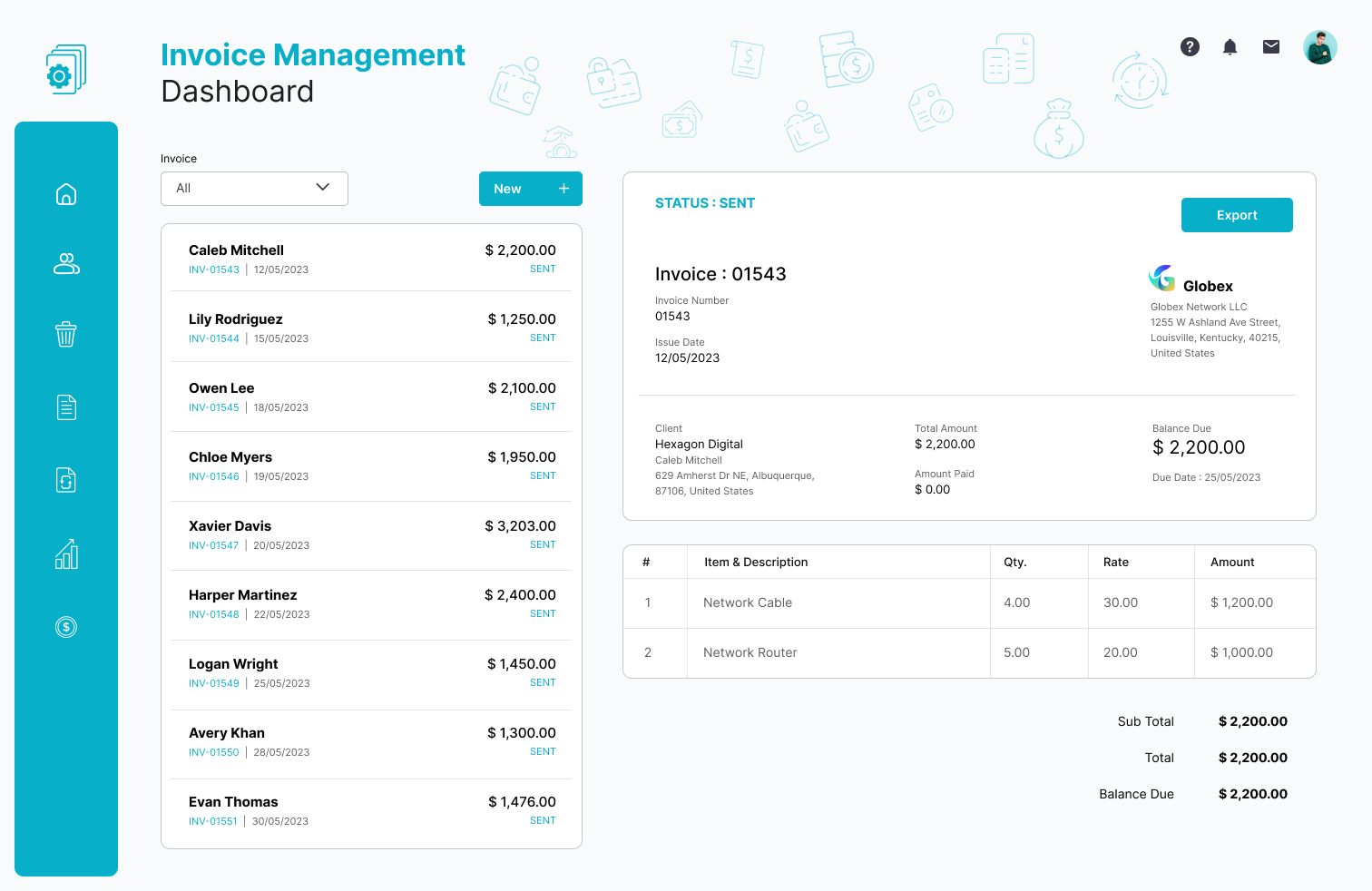
8 Automated Invoice Processing Software Features That Transform Accounts Payable
Automated invoice processing software helps businesses capture vendor invoices, extract key data, validate information, route invoices for approval, and prepare them for payment with less manual work. Instead of relying on spreadsheets, email threads, and repeated data entry, finance teams can move invoices through a structured digital process.
This matters because accounts payable teams often handle large volumes of invoices while also managing approvals, purchase orders, vendor records, payment deadlines, and exceptions. With the right automation, businesses can create a more consistent process and give employees more time to focus on financial control and analysis.
In this guide, we will explain how automated invoice processing works, the key features to look for, how accounts payable workflow automation fits into the process, common challenges, and practical considerations for choosing a solution.
What Is Automated Invoice Processing Software?
Automated invoice processing software is a business application that digitizes and automates the steps involved in handling supplier invoices. Depending on the platform, it can capture invoices from email, uploads, scans, or other sources, extract invoice information, check the data, send invoices through approval rules, and connect approved invoices with accounting or ERP systems.
For example, an invoice may contain the supplier name, invoice number, purchase order number, tax, line items, due date, and total amount. Instead of an employee typing these details into an accounting system, invoice processing software can extract the information and prepare it for review.
Microsoft’s documentation for invoice automation describes workflows that can import vendor invoices, match product receipts, submit invoices to workflow, and provide automation history. These capabilities show how invoice automation can extend beyond simple data extraction into the wider accounts payable process.
Microsoft’s documentation on automated vendor invoicing processes provides a practical example of how invoice automation can support matching, workflow submission, validation, and exception handling.
Key takeaway
Invoice automation works best when it connects invoice capture, validation, approvals, matching, accounting, and exception handling into one connected process.
How Automated Invoice Processing Works
Although implementations differ between platforms, most automated invoice processes follow a similar sequence. First, the system receives an invoice. Next, it extracts and validates the information before applying business rules.
- Invoice capture: The system receives invoices from supported digital or scanned sources.
- Data extraction: Relevant information such as supplier, invoice number, dates, amounts, and line items is identified.
- Validation: The system checks the invoice against configured rules and available business data.
- Matching: Where applicable, the invoice can be compared with purchase orders and receiving information.
- Approval: The invoice moves to the appropriate person based on approval rules.
- Exception handling: Invoices with missing or conflicting information are sent for human review.
- Accounting: Approved information moves into the accounting or ERP environment.
- Payment preparation: The organization can continue with its normal payment process.
As a result, automation does not necessarily mean removing people from the process. Instead, it allows software to handle predictable steps while employees focus on invoices that genuinely require judgment.
8 Key Features to Look For
1. Automated Invoice Capture
Invoice capture is the starting point of the workflow. A useful system should make it easy to bring invoices into one processing environment rather than forcing employees to manage separate inboxes, folders, and spreadsheets.
Modern solutions can work with digital invoice files and scanned documents. For example, Microsoft describes invoice capture capabilities that can create vendor invoices from digital invoice images and use OCR technology to turn printed information into machine-readable data.
This first step matters because automation becomes difficult when invoices remain scattered across different channels.
2. Intelligent Data Extraction
Data extraction reduces the need for employees to manually enter information from every invoice. The software identifies fields such as vendor details, invoice dates, invoice numbers, tax amounts, totals, and purchase order references.
However, extraction should not be treated as the entire automation process. A system may correctly read an invoice but still need to determine whether the invoice belongs to the correct vendor, matches a purchase order, or requires approval.
Therefore, look for software that combines extraction with validation and workflow rules.
3. Invoice Validation and Matching
Validation helps businesses identify invoices that do not meet defined rules. For example, a system can check whether required fields exist or whether an invoice matches relevant purchasing information.
Matching becomes particularly useful when an organization uses purchase orders and receiving records. A three-way matching process can compare the purchase order, receipt information, and invoice to identify differences before payment.
Microsoft’s accounts payable documentation explains how invoice matching can compare invoices with purchase orders and product receipts to help identify discrepancies and support financial control.
Microsoft’s training material on accounts payable invoice matching offers additional detail on invoice matching and discrepancy detection.
4. Automated Approval Routing
Approval routing is a major part of accounts payable workflow automation. Instead of forwarding invoices manually, the system can route them according to rules such as department, amount, location, vendor, or cost center.
For example, an invoice below a defined threshold might go to a department manager, while a higher-value invoice could require additional approval. The exact rules depend on the organization’s internal controls.
This approach creates a predictable path for invoices and reduces the chance that an invoice sits unnoticed in an inbox.
5. Exception Management
Even highly automated processes need exception handling. An invoice may have a missing purchase order, an incorrect total, a duplicate invoice number, or information that does not match the organization’s records.
Instead of treating these situations as failures, good software separates exceptions from invoices that can move through the normal workflow.
As a result, accounts payable employees can focus their attention on problems that require investigation while straightforward invoices continue through the automated path.
Important
Do not choose invoice software based only on its ability to read invoice data. Exception handling, approval controls, matching, audit visibility, and accounting integration can have an equally important impact on the overall workflow.
6. Accounting and ERP Integration
Invoice automation creates the most value when it connects with the systems your finance team already uses. Integration can allow invoice information, vendor records, purchase orders, accounting codes, approval statuses, and payment information to move between systems.
Without integration, employees may still need to copy information from the automation platform into an accounting application. That creates another manual step and reduces the benefit of automation.
Businesses should therefore review available integrations before selecting a platform. If standard integrations do not support an organization’s workflow, a custom integration may provide another option.
7. Audit Trails and Workflow Visibility
Finance teams need to know what happened to an invoice after it entered the system. A useful platform should provide visibility into invoice status, approvals, exceptions, and relevant processing history.
For example, employees may need to determine whether an invoice is waiting for approval, requires correction, or has already moved through the accounting workflow.
In practice, clear workflow visibility also helps managers identify bottlenecks. If invoices frequently wait at one approval stage, the business can investigate the underlying process instead of simply processing each invoice manually.
8. Reporting and Performance Monitoring
Automation generates useful process information. Depending on the platform, businesses may be able to monitor invoice volumes, exception patterns, approval activity, processing stages, and other workflow information.
These insights can help accounts payable teams understand where work accumulates and which types of invoices require the most attention.
Therefore, reporting should not be an afterthought. A good system should help finance leaders understand the workflow as well as automate it.
How Accounts Payable Workflow Automation Fits In
Accounts payable workflow automation covers more than invoice data entry. It focuses on creating a structured process for receiving, checking, approving, recording, and managing supplier invoices.
For example, consider a company that receives 500 supplier invoices each month. Without a structured workflow, employees may download attachments, enter invoice data, email managers, check purchase orders, update spreadsheets, and manually record approval decisions.
With automation, the same process can follow defined rules. The system captures invoices, extracts information, checks available records, identifies exceptions, routes invoices to the right approvers, and sends approved information to the accounting system.
In other words, automated invoice processing is one important component of a broader AP workflow.
| Process | Manual approach | Automated approach |
|---|---|---|
| Invoice capture | Employees collect invoices from different sources | Invoices enter a centralized workflow |
| Data entry | Employees type invoice information | Software extracts invoice fields |
| Validation | Employees perform repeated checks | Rules identify issues automatically |
| Approval | Invoices move through manual emails | Rules route invoices to assigned approvers |
| Exceptions | Employees identify and track problems manually | Exceptions enter a dedicated review process |
| Visibility | Teams rely on spreadsheets and email updates | Workflow status remains visible in the system |
Benefits of Automated Invoice Processing
The main benefit of automation comes from reducing repetitive work across the invoice lifecycle. However, the impact can extend beyond saving data-entry time.
- Less manual data entry: Employees spend less time transferring information between documents and systems.
- More consistent processing: Standard rules create a repeatable workflow for routine invoices.
- Faster approvals: Automated routing can send invoices to the appropriate reviewers without manual forwarding.
- Better exception visibility: Teams can separate routine invoices from transactions that require investigation.
- Improved process control: Defined approval and validation rules make the workflow easier to manage.
- Better financial visibility: Centralized invoice information can make it easier to monitor outstanding work.
- Scalable operations: A structured digital workflow can support growing invoice volumes without relying entirely on additional manual steps.
For organizations already exploring broader financial automation, an accounting software features guide can provide useful context on how accounting platforms support wider financial operations.
Common Challenges to Consider
Automation can improve a process, but it does not automatically fix poor process design. Businesses should address several issues before implementation.
Inconsistent Vendor Data
Suppliers may use different invoice formats, naming conventions, and layouts. Therefore, the system should support the types of documents and vendors the business actually handles.
Unclear Approval Rules
Automation depends on clear rules. If employees cannot determine who should approve an invoice or when additional approval is required, software cannot reliably solve the underlying problem.
Integration Gaps
A platform may automate invoice capture but still create manual work if it cannot exchange data with the accounting or ERP system. Always evaluate the complete process rather than one isolated feature.
Too Much Automation
Not every invoice should move through the same path. High-risk, unusual, or disputed transactions may require human review. The goal should be controlled automation, not automation for its own sake.
Pro tip
Map your current invoice process before selecting software. Identify where employees capture data, check information, request approvals, resolve exceptions, and update accounting records. Then compare those steps with the automation capabilities of each platform.
How to Choose Automated Invoice Processing Software
Start by defining the problems you want to solve. For some businesses, the biggest issue may be manual data entry. For others, approval delays, invoice matching, poor visibility, or accounting integration may create more friction.
Use the following checklist when comparing solutions:
- Does it support your invoice sources and file types?
- Can it extract the fields your finance team needs?
- Does it support validation and invoice matching?
- Can you configure approval rules?
- How does it handle exceptions?
- Does it integrate with your accounting or ERP system?
- Can users track invoice status and workflow history?
- Does it provide useful reporting?
- Can administrators configure permissions and approval controls?
- Can the platform scale with your invoice volume?
Additionally, consider usability. A technically capable system can still create problems if finance employees struggle to review invoices, resolve exceptions, or find workflow information.
When Should a Business Consider Invoice Automation?
Invoice automation can make sense when finance teams repeatedly perform the same manual tasks across large numbers of invoices. It can also help when invoices frequently get delayed because employees rely on email, spreadsheets, or disconnected systems.
However, businesses with a very small invoice volume may not need an advanced platform. In that case, a basic accounting system may provide enough functionality.
On the other hand, growing organizations often benefit from evaluating automation before manual processes become difficult to manage. Building clear workflows early can make future growth easier to support.
Automated Invoice Processing vs. Basic Invoice Software
Basic invoice software often focuses on creating, sending, or managing invoices. Automated invoice processing software addresses a different problem: handling invoices received from suppliers and moving them through accounts payable.
For example, an invoice generator may help a business create a customer invoice. An AP automation platform, meanwhile, helps a business receive a vendor invoice, extract its information, validate it, route it for approval, and prepare it for accounting.
Therefore, businesses should identify whether they need accounts receivable invoicing, accounts payable automation, or both before choosing a solution. You can also explore the best invoice software guide for broader invoice software considerations.
Best Practices for Successful Implementation
Successful automation starts with process clarity. Before configuring rules, document how invoices currently move through your organization.
- Map the existing process: Document every major invoice step and identify unnecessary manual work.
- Standardize approval rules: Define who approves invoices and under which conditions.
- Clean vendor information: Review supplier records before connecting automation to accounting systems.
- Start with common invoice types: Automate predictable workflows first, then expand to more complex cases.
- Define exception procedures: Decide who investigates mismatches, missing data, and disputed invoices.
- Test integrations: Verify that data moves correctly between invoice software and financial systems.
- Train users: Employees should understand how to approve invoices, resolve exceptions, and monitor workflow status.
- Review performance: Monitor workflow bottlenecks and adjust rules as business requirements change.
In addition, organizations with complex business processes may need workflows that standard software cannot fully accommodate. In those cases, custom CRM development can be considered when invoice workflows need to connect with customer, sales, or operational data through a tailored business system.
The Future of Invoice Processing
Invoice automation continues to move toward more intelligent document recognition, automated validation, exception handling, and workflow assistance. Modern platforms increasingly combine document processing with rules and AI-based capabilities.
However, human oversight still matters. Finance teams need appropriate controls for unusual transactions, policy exceptions, fraud risks, and accounting decisions.
The practical direction is therefore not simply “remove people from invoice processing.” Instead, businesses can use automation to handle predictable work while directing human attention toward exceptions, controls, and decisions that require context.
Key takeaway
The strongest invoice workflows combine automation with clear business rules, reliable integrations, human review, and strong visibility. The software should support the finance process rather than force the business into an unsuitable workflow.
Frequently Asked Questions
What does automated invoice processing software do?
It automates tasks such as invoice capture, data extraction, validation, matching, approval routing, exception handling, and accounting system updates.
What is accounts payable workflow automation?
Accounts payable workflow automation uses software and business rules to manage invoice intake, validation, approvals, exceptions, accounting, and related AP tasks with fewer manual steps.
Can automated invoice processing work with purchase orders?
Yes. Many systems support invoice matching against purchase orders and receiving information. This can help identify discrepancies before an invoice proceeds through the payment process.
Does invoice automation eliminate human review?
No. A well-designed workflow sends routine invoices through automated steps while directing exceptions, unusual transactions, and policy issues to employees for review.
How do I choose the right invoice automation software?
Compare invoice capture, data extraction, matching, approval workflows, exception management, integrations, reporting, security controls, usability, and scalability against your actual AP process.
Conclusion
Automated invoice processing software can turn a fragmented accounts payable process into a structured digital workflow. By automating invoice capture, data extraction, validation, matching, approvals, and exception handling, businesses can reduce repetitive work while improving process visibility.
However, the best results come from matching automation to real business requirements. Start by mapping your current AP workflow, identify the most time-consuming steps, define approval and exception rules, and then evaluate software based on how well it supports the complete process.
When standard tools cannot accommodate complex requirements, businesses can also explore tailored software and integrations that connect invoice processing with their wider financial and operational systems.
