
Estimating Software for Contractors: 11 Features That Make Bidding Faster and More Accurate
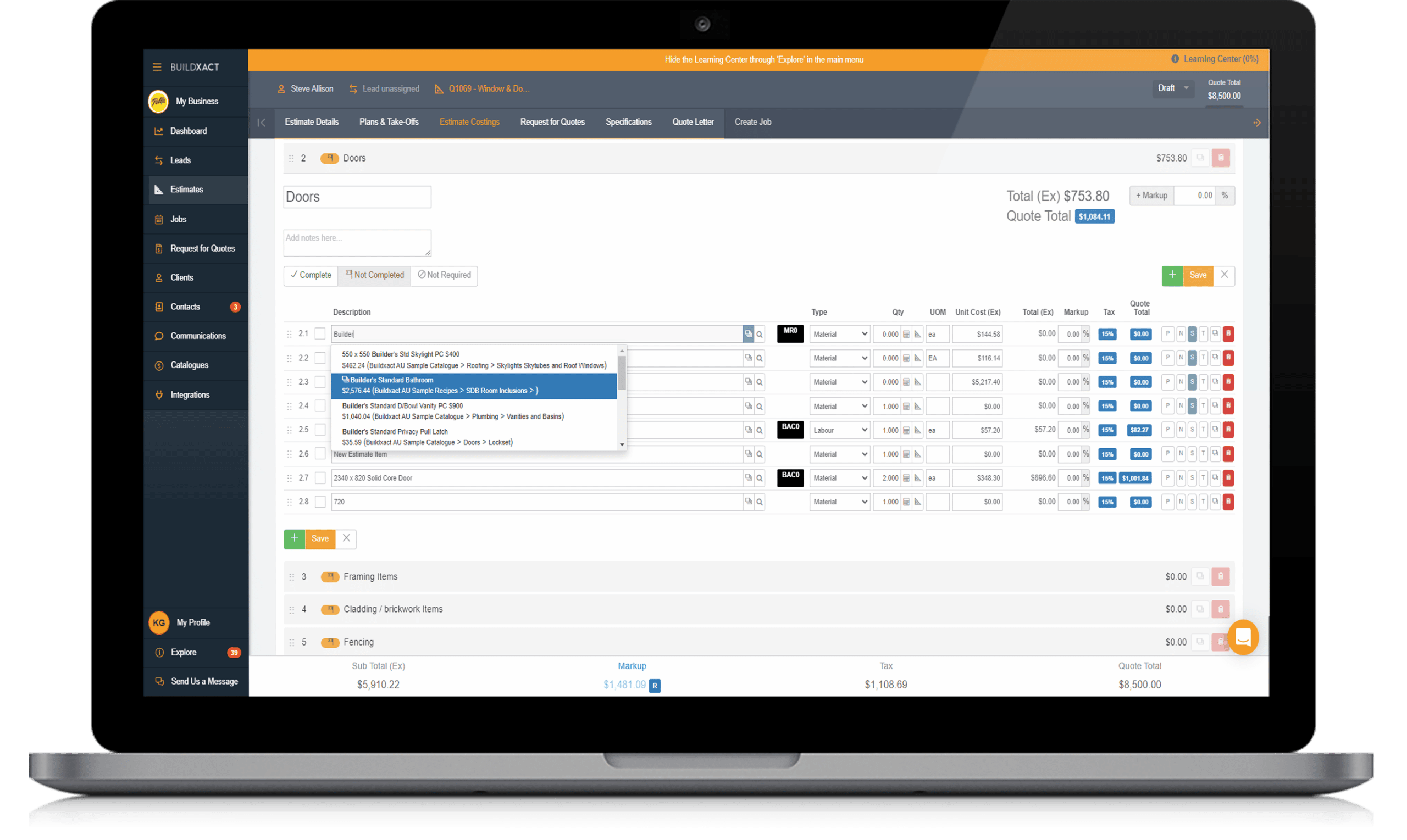
Estimating software for contractors helps construction businesses turn project plans, quantities, labor rates, material costs, and overhead into clear, detailed estimates. Instead of relying on disconnected spreadsheets and manual calculations, contractors can organize estimating work in one place and prepare bids with greater consistency.
For contractors competing for new projects, an efficient estimating process matters because small pricing errors can affect both bid competitiveness and project profitability. In this guide, we will explain how contractor estimating software works, the features to look for, how it supports construction bidding software workflows, common mistakes to avoid, and practical steps for choosing the right solution.
Key takeaway
The right estimating platform should do more than calculate costs. It should connect takeoffs, pricing, labor, subcontractor costs, markups, proposals, and bid tracking into a workflow your team can actually use.
What Is Estimating Software for Contractors?
Estimating software for contractors is a digital tool that helps construction businesses calculate the expected cost of completing a project. It can organize material quantities, labor expenses, equipment costs, subcontractor pricing, overhead, markup, and other project costs.
In practice, an estimator starts with project information such as drawings, specifications, scope documents, or quantities. The software then helps the team build an estimate from that information and turn the final numbers into a professional bid or proposal.
For example, a general contractor estimating a commercial renovation might need to calculate flooring, drywall, electrical work, painting, equipment, labor, subcontractor quotes, permits, overhead, and profit. Instead of keeping each cost in a separate spreadsheet, the contractor can organize these items within a centralized estimating workflow.
Modern tools may also connect quantity takeoffs with cost data. Autodesk, for example, describes digital takeoff as a process that measures quantities from drawings or models and uses those quantities to support estimates. Its estimating workflow also connects takeoffs, estimates, project documents, and reports. Learn more about construction takeoff software.
How Contractor Estimating Software Works
Although platforms differ, most estimating workflows follow a similar sequence. First, the contractor collects project documents and defines the scope. Next, the estimator identifies quantities, applies costs, adds indirect expenses, reviews the numbers, and prepares the bid.
- Import project information: Add drawings, specifications, scope documents, or other relevant files.
- Perform quantity takeoffs: Measure areas, lengths, counts, volumes, and other quantities required for the estimate.
- Apply material and labor costs: Assign current rates to the required quantities.
- Add subcontractor and equipment costs: Include quotes and expected equipment expenses.
- Calculate overhead and markup: Account for business costs, contingencies, and the desired margin.
- Review the estimate: Check quantities, rates, exclusions, assumptions, and scope.
- Create the bid: Turn the approved estimate into a client-ready proposal or bid.
As a result, the estimating process becomes easier to track and repeat. More importantly, teams can establish a consistent method instead of rebuilding every estimate from scratch.
11 Features to Look for in Estimating Software for Contractors
1. Digital Quantity Takeoffs
Quantity takeoffs form the foundation of many construction estimates. A good system should help estimators measure quantities from digital drawings and organize those quantities by material, trade, location, or cost category.
For larger projects, 2D and 3D takeoff capabilities can make it easier to work with different types of project documents. Digital takeoffs can also reduce repetitive measurement work and create a clearer connection between project scope and estimated costs.
However, contractors should still review automated quantities. Software can accelerate measurement, but an estimator remains responsible for checking scope, drawings, and project-specific requirements.
2. Cost Databases and Cost Libraries
Estimators often work with hundreds or thousands of material and labor costs. A centralized cost library lets teams store commonly used items and apply consistent pricing across estimates.
For example, a contractor could maintain standard cost items for concrete, framing, drywall, electrical fixtures, equipment, labor categories, and other frequently estimated work. When prices change, the team can update the relevant cost information rather than manually changing every estimate.
3. Labor and Material Cost Tracking
A useful estimating system should separate major cost categories so contractors can understand where project expenses come from. Material and labor costs often represent major parts of a construction estimate, but equipment, subcontractors, overhead, and other expenses can also affect the final number.
Therefore, look for software that lets you create detailed cost structures instead of treating the project as one large total.
4. Subcontractor Quote Management
Many contractors rely on subcontractor quotes when preparing bids. However, collecting quotes through email, spreadsheets, and separate folders can make comparisons difficult.
Estimating software can provide a central place to organize subcontractor pricing and associate quotes with the relevant project scope. This helps estimators compare costs before they finalize a bid.
In addition, bid management tools can help teams organize bid invitations, due dates, and trade partners. Autodesk’s construction bid management workflow, for example, focuses on centralized bid management, bid tracking, partner qualification, and collaboration. Explore construction bid management workflows.
5. Markup and Profit Calculations
A contractor needs more than a raw project cost. The final bid may need to account for overhead, contingencies, risk, and the company’s desired markup.
Good estimating software makes these calculations easier to manage. Instead of adding markup manually at the end, contractors can build consistent rules into their estimating workflow and review how each adjustment affects the final price.
Pro tip
Keep direct costs, indirect costs, overhead, and markup visible during the estimating process. A transparent estimate makes it easier to spot pricing mistakes before the bid reaches the client.
6. Estimate Templates
Contractors often estimate similar types of work repeatedly. Templates can help teams create a consistent starting point for common project types.
For instance, a remodeling contractor could create a template that includes common demolition, framing, flooring, painting, electrical, and cleanup categories. The estimator can then adjust the template for the specific project rather than starting with an empty estimate.
As a result, templates can improve consistency while reducing repetitive setup work.
7. Bid and Proposal Generation
An estimate becomes useful to the sales process when the contractor can turn it into a clear proposal. Look for software that supports professional proposal creation and lets teams present project costs, scope, exclusions, terms, and other important details clearly.
This feature becomes especially useful when contractors manage multiple bids at the same time. Instead of copying numbers from a spreadsheet into another document, the team can use information from the approved estimate.
8. Change and Version Tracking
Construction documents can change during preconstruction. A revised drawing or specification can affect quantities, materials, labor, or subcontractor requirements.
Therefore, estimating software should help teams track estimate versions and identify changes. A clear revision history can reduce the risk of using outdated quantities or pricing when preparing a bid.
9. Collaboration and Cloud Access
Estimators, project managers, owners, and other team members may need access to the same project information. Cloud-based estimating tools can give authorized users access to current estimates and project documents from different locations.
More importantly, centralized information reduces the need to send multiple spreadsheet versions between team members. Everyone can work from a more consistent set of project data.
10. Reporting and Estimate Analysis
Reports can help contractors understand how estimates come together. Useful reports may show material costs, labor costs, subcontractor pricing, overhead, markup, and other categories.
Over time, historical estimate information can also help contractors review previous projects and identify recurring cost patterns. However, historical data should support professional judgment rather than replace project-specific analysis.
11. Integration With Construction Management Tools
Estimating does not exist in isolation. Once a contractor wins a project, information from the estimate may need to move into project management, scheduling, accounting, purchasing, or other systems.
That is why integrations matter. A connected workflow can reduce duplicate data entry and make it easier to move from preconstruction into project delivery.
If your business needs a broader construction technology workflow, you can also explore Anomoz’s commercial construction project management software guide for features that support projects after the estimating stage.
Estimating Software vs. Construction Bidding Software
Estimating software and construction bidding software overlap, but they serve different parts of the preconstruction process.
| Area | Estimating Software | Construction Bidding Software |
|---|---|---|
| Primary purpose | Calculate project costs | Manage the bidding process |
| Core workflow | Takeoff, pricing, labor, overhead, markup | Bid invitations, vendors, deadlines, submissions |
| Main users | Estimators and contractors | Estimators, general contractors, and preconstruction teams |
| Typical output | Detailed estimate and cost breakdown | Bid package, bid tracking, and proposal workflow |
In practice, contractors may benefit from using both capabilities together. The estimating side answers, “What should this project cost?” The bidding side answers, “How do we organize, manage, and submit this opportunity?”
Therefore, when comparing construction bidding software, check whether it includes estimating capabilities or integrates with a dedicated estimating platform.
Benefits of Using Estimating Software for Contractors
The biggest benefit is not simply faster calculations. Instead, the value comes from creating a more structured estimating process.
- Less manual calculation: Automated formulas reduce repetitive arithmetic and data entry.
- Better cost visibility: Contractors can see how materials, labor, subcontractors, and overhead contribute to the final bid.
- More consistent estimates: Templates and centralized cost libraries help teams follow repeatable processes.
- Faster bid preparation: Digital takeoffs, reusable templates, and proposal tools can shorten administrative work.
- Improved collaboration: Teams can work from shared project information rather than disconnected files.
- Better document control: Version tracking can help teams identify current drawings and estimate revisions.
- Stronger historical insight: Previous estimates can provide useful reference points for future projects.
Still, software does not guarantee an accurate bid. The quality of the result depends on the quality of project information, cost data, scope review, and estimator judgment.
How to Choose the Right Estimating Software
Start by identifying the problems you want the software to solve. A small residential contractor may need simple estimates, templates, and proposal tools, while a commercial general contractor may need advanced takeoffs, subcontractor quote management, collaboration, and integrations.
Next, evaluate the workflow rather than the feature count. A platform can have many features and still create unnecessary work if your team cannot move smoothly from drawings to takeoff, takeoff to estimate, and estimate to bid.
Consider these questions before choosing a platform:
- Does it support the types of projects you estimate?
- Can it handle your preferred takeoff workflow?
- Can you maintain your own material and labor cost library?
- Can you compare and manage subcontractor quotes?
- Does it support estimate templates and reusable assemblies?
- Can you control overhead and markup calculations?
- Does it provide useful reports and historical information?
- Can it integrate with accounting or construction management systems?
- Does it provide appropriate access controls for your team?
- Can your estimators learn the system without excessive complexity?
Important
Do not choose software only because it offers the largest feature list. Focus on whether it fits your estimating process, project types, team size, budget, and existing technology.
Common Mistakes Contractors Should Avoid
Even strong estimating software cannot fix an inconsistent estimating process. For that reason, contractors should address workflow problems alongside technology decisions.
Using Outdated Cost Data
If your material, labor, or subcontractor rates no longer reflect current conditions, the software can still produce an unreliable estimate. Review pricing regularly and establish a process for updating cost libraries.
Ignoring Project Scope
A detailed calculation does not help if the estimator misses part of the scope. Always review drawings, specifications, exclusions, allowances, and project requirements before finalizing the bid.
Relying Completely on Automation
Automation can reduce repetitive work, but estimators still need to review quantities and assumptions. Unusual site conditions, ambiguous drawings, exclusions, and project-specific requirements require human judgment.
Failing to Track Estimate Revisions
When project documents change, update the estimate and keep the revision history clear. Otherwise, your team may accidentally submit pricing based on an older version of the project scope.
Choosing Software Without Testing the Workflow
Before committing to a platform, test a real project or representative sample. Use the same drawings, cost categories, and workflow your team normally uses. This approach can reveal usability problems that a feature checklist may miss.
When Should a Contractor Invest in Estimating Software?
Estimating software can make sense when manual estimating starts consuming too much time or creates avoidable inconsistencies. It can also help when several people contribute to estimates and the business needs a shared process.
For example, a growing contractor that manages several bids each week may benefit from centralized estimates, reusable cost items, digital takeoffs, and bid tracking. Similarly, a contractor expanding from smaller jobs into larger commercial projects may need stronger document control and collaboration.
On the other hand, a contractor handling only a few simple projects may not need an advanced platform. In that case, a simpler estimating solution may provide enough functionality without adding unnecessary complexity.
Frequently Asked Questions
Frequently Asked Questions
What is estimating software for contractors used for?
Estimating software helps contractors calculate material, labor, equipment, subcontractor, overhead, and other project costs. It can also support takeoffs, estimate revisions, reports, and proposal creation.
What is the difference between estimating and bidding software?
Estimating software focuses mainly on calculating project costs, while construction bidding software focuses on organizing and managing the bid process. Some platforms combine both capabilities.
Can estimating software perform construction takeoffs?
Many modern platforms support digital takeoffs. Depending on the product, they may provide 2D measurement, 3D quantity extraction, or both. Contractors should verify takeoff capabilities before choosing a solution.
Is estimating software useful for small contractors?
Yes. Small contractors can use estimating software to standardize pricing, create reusable templates, organize costs, and prepare professional bids. However, the right level of functionality depends on project complexity and estimating volume.
What should contractors look for in construction bidding software?
Look for bid tracking, deadline management, subcontractor quote organization, document management, collaboration, proposal tools, and integration with estimating or project management systems.
Final Thoughts
Estimating software for contractors can bring structure to one of the most important stages of construction work. By connecting takeoffs, cost data, labor, subcontractor pricing, overhead, markup, and proposals, contractors can build a more consistent process for preparing bids.
However, software should support the estimator rather than replace professional judgment. Start by identifying your current bottlenecks, then choose a platform that fits your project types, team workflow, cost structure, and existing systems.
For contractors that need broader construction software capabilities, estimating can also become part of a connected workflow that continues through project management, scheduling, cost control, and field operations. The goal is not simply to produce an estimate faster. The goal is to create a reliable process that helps your team move from project opportunity to well-informed bid and, ultimately, project delivery.
