
Tenant Management Software: 9 Features That Simplify Rental Property Management
Tenant management software helps landlords and property managers organize tenant records, leases, rent, maintenance requests, communication, and day-to-day rental tasks from one place. Instead of relying on spreadsheets, paper files, email threads, and separate payment records, property teams can use a centralized system to manage the tenant lifecycle more consistently.
As a rental portfolio grows, keeping tenant information accurate and accessible becomes more difficult. A good tenant management system connects tenant data with properties, units, leases, payments, documents, and service requests. As a result, property managers can spend less time searching for information and more time handling issues that need their attention.
In this guide, we will explain how tenant management software works, the key features to look for, its main benefits, common limitations, and practical steps for choosing the right solution.
What Is Tenant Management Software?
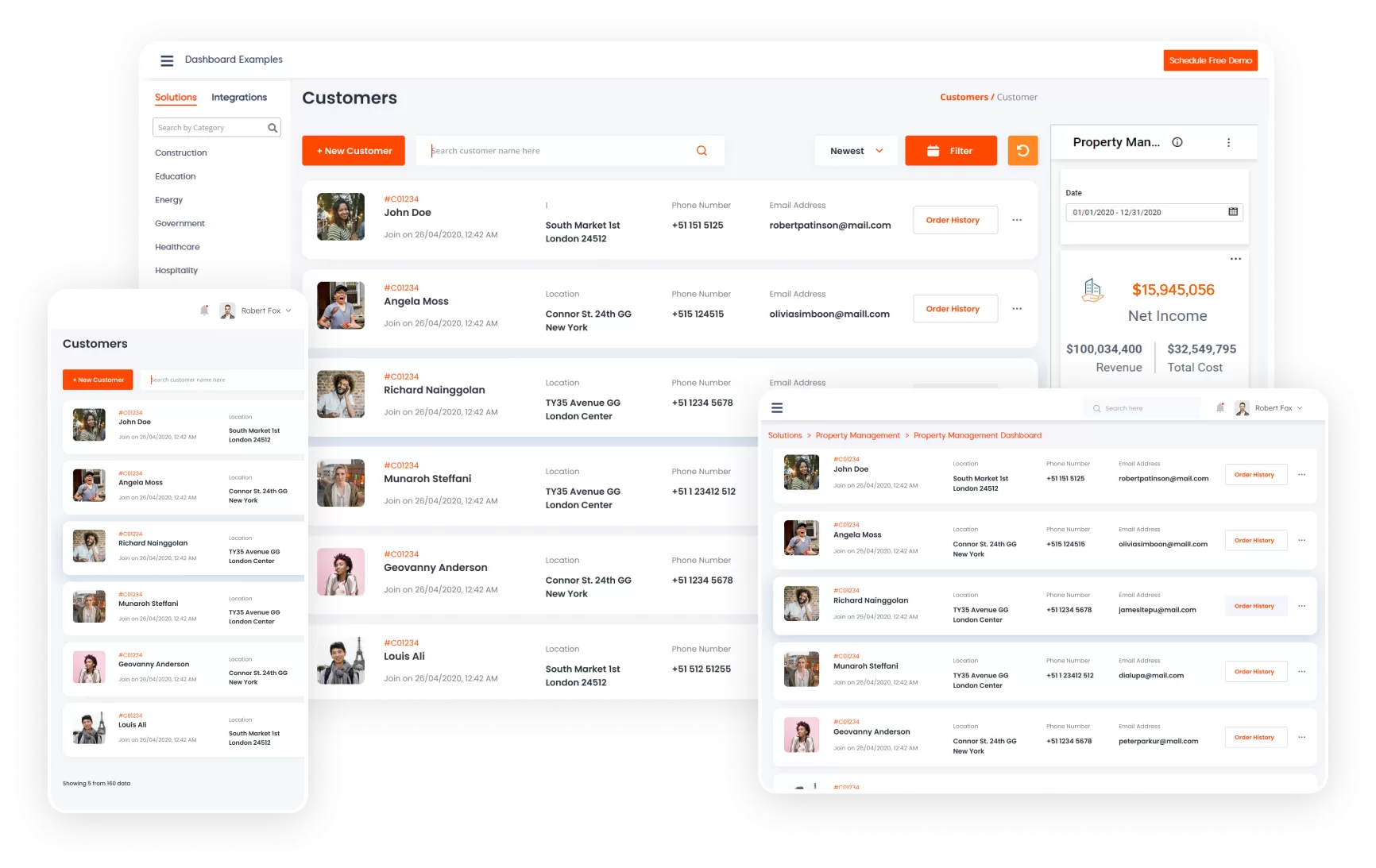
Tenant management software is a digital platform designed to help landlords, property managers, and rental businesses manage tenant-related operations. It typically stores tenant profiles, lease details, payment information, documents, communication records, maintenance requests, and other tenancy data in one system.
For example, a property manager may need to know when a lease expires, whether rent has been recorded, which unit a tenant occupies, or whether an open maintenance request still needs attention. Instead of checking several systems, the manager can find this information through a centralized dashboard.
The exact feature set varies between platforms. However, most solutions focus on organizing tenant information, automating repetitive tasks, improving communication, and giving property teams better visibility into rental operations.
Key takeaway
A tenant management system should do more than store tenant names and contact details. It should connect tenants with leases, units, payments, documents, maintenance, and communication.
How Does a Tenant Management System Work?
A tenant management system usually starts with a centralized database. Property managers add properties, units, tenants, lease information, and related records. The system then connects these records so users can follow each tenancy from application and move-in through renewal or move-out.
For instance, a tenant profile can connect to a specific unit and lease. That lease can contain the rental amount, start date, end date, renewal information, and required documents. Meanwhile, payment records and maintenance requests can remain connected to the same tenant and property.
Some platforms also provide tenant portals. Through a portal, residents may access selected tenancy information, submit maintenance requests, communicate with management, or view payment-related details. This creates a clearer process for both sides.
9 Key Features of Tenant Management Software
1. Centralized Tenant Records
A centralized tenant database gives property teams one place to manage important resident information. Depending on the system, records may include contact details, occupancy information, lease dates, payment history, documents, and communication records.
More importantly, centralized records reduce the need to search through multiple spreadsheets or email conversations. Staff can also apply consistent recordkeeping practices across properties and units.
2. Lease and Renewal Management
Lease administration is one of the most important parts of tenant management. Software can connect each tenant with their lease terms, rental amount, start date, expiration date, renewal status, and relevant documents.
Managers can then monitor upcoming expirations and plan renewal conversations earlier. A system may also provide reminders for important dates, although the exact automation depends on the platform.
For housing programs that involve formal tenant records and certifications, systems may need to handle additional information. For example, HUD’s TRACS platform includes tenant, voucher, certification, and unit-related queries for applicable multifamily housing programs. HUD’s TRACS resources provide more detail on those processes.
3. Rent and Payment Tracking
Tenant management software can help property teams track rent charges, payment status, outstanding balances, and transaction records. Some platforms also connect to online payment tools so tenants can pay without relying on manual processes.
This feature becomes especially useful when managers oversee multiple properties. Instead of checking individual records, they can review payment activity through a centralized dashboard.
However, payment features vary widely. Before choosing a platform, confirm whether it supports the payment methods, accounting workflows, fees, and reporting requirements your business actually uses.
4. Maintenance Request Management
Maintenance issues can quickly become difficult to track when tenants report them through phone calls, texts, emails, and informal messages. Tenant management software can bring those requests into one workflow.
A typical process might allow a tenant to submit a request, describe the issue, attach a photo, and receive updates. The property team can then assign the request, track its status, add notes, and close it after completion.
As a result, managers get a clearer view of open maintenance work while tenants get a more structured way to report problems.
5. Tenant Communication
Clear communication matters throughout the tenancy. Property teams may need to send reminders, renewal notices, maintenance updates, payment messages, or general property announcements.
A centralized communication feature can keep these interactions connected to the appropriate tenant or property record. Therefore, staff can spend less time searching through separate inboxes and messaging platforms.
For broader customer and relationship workflows, businesses may also explore CRM for real estate agencies, especially when tenant management overlaps with lead management, client relationships, and business development.
6. Document Management
Rental operations often involve leases, applications, inspection records, notices, identification documents, payment records, and other files. A tenant management platform can organize these documents alongside the appropriate tenant and property.
This approach makes documents easier to locate when staff need them. It can also reduce dependence on scattered folders and email attachments.
Because tenant records may contain sensitive personal information, access controls matter. For example, tenant screening can involve information such as rental history, credit information, and other personal data. The Federal Trade Commission explains that landlords using consumer reports must follow applicable requirements under the Fair Credit Reporting Act. FTC guidance for landlords using consumer reports outlines important responsibilities.
7. Tenant Portal
A tenant portal gives residents a dedicated place to interact with property management. Instead of asking staff for every update, tenants may be able to submit requests, view selected documents, check account information, or communicate with the management team.
For example, a tenant who notices a leaking faucet could submit a maintenance request through the portal. The property team can then review the request and manage the follow-up from the same system.
However, portal access should follow the principle of least privilege. Tenants should only see information that belongs to them or that management intentionally makes available.
8. Reporting and Dashboards
Property managers need visibility into what is happening across their rental portfolio. Reporting tools can help summarize occupancy, leases, payments, maintenance requests, outstanding balances, and other operational information.
For example, a dashboard could show leases approaching expiration alongside open maintenance requests and overdue payments. Therefore, managers can identify tasks that need attention without manually reviewing every tenant record.
9. User Roles and Access Controls
Not every employee needs access to every tenant record. A tenant management system should allow administrators to control what different users can view or change.
For example, a property manager may need broad access, while a maintenance employee may only need access to assigned work orders. Similarly, accounting staff may need payment information without requiring access to every operational feature.
Role-based access can make internal workflows clearer while reducing unnecessary exposure of sensitive information.
Benefits of Using Tenant Management Software
Less manual administration
Centralized records reduce repetitive data entry and make routine tenant tasks easier to organize.
Faster access to information
Property teams can find tenant, lease, payment, and maintenance information from a central workspace.
Better tenant communication
Structured communication and tenant portals give residents clearer ways to submit requests and receive updates.
More consistent workflows
Standardized processes can help teams handle leases, payments, maintenance, and documentation more consistently.
Improved visibility
Dashboards and reports help managers understand open tasks, upcoming lease events, payment activity, and property operations.
Tenant Management Software vs. Property Management Software
Tenant management software and property management software often overlap. However, their focus can differ.
| Area | Tenant Management Software | Property Management Software |
|---|---|---|
| Primary focus | Tenant records and tenancy workflows | Broader property operations |
| Tenant profiles | Core feature | Usually included |
| Lease management | Common | Common |
| Maintenance | Often included | Often included |
| Accounting | May be limited or integrated | Often broader |
| Property operations | Usually focused | Typically broader |
In practice, the distinction depends on the product. Some platforms combine tenant management, property management, accounting, maintenance, leasing, and reporting into one solution.
If your primary challenge involves tenant records and communication, a tenant-focused platform may provide enough functionality. On the other hand, a larger portfolio may require a broader property management platform with financial and operational tools.
How to Choose the Right Tenant Management System
Start by identifying the problems you want the software to solve. Do not choose a platform based only on the number of features listed on its website.
- Map your current workflow. Document how your team handles applications, leases, payments, maintenance, documents, and communication today.
- Identify repetitive tasks. Look for work that staff repeat every day or week, such as reminders, data entry, status updates, and document searches.
- Check integration options. Confirm whether the platform can connect with your accounting, payment, communication, maintenance, or other business tools.
- Review user permissions. Make sure administrators, property managers, accountants, maintenance staff, and tenants can receive the right level of access.
- Evaluate reporting. Check whether the available reports answer the questions your team actually asks.
- Test the tenant experience. If the platform includes a portal, test it from the tenant’s perspective. A complicated portal can create more support work instead of reducing it.
- Review data security. Ask how the provider protects tenant information, manages access, handles backups, and responds to security incidents.
- Consider scalability. Choose a system that can support your expected portfolio growth without forcing an expensive migration later.
Pro tip
Create a short checklist of your five most important workflows before comparing vendors. Then test every shortlisted platform against the same checklist. This makes the comparison more practical and less dependent on marketing claims.
When Custom Tenant Management Software Makes Sense
Off-the-shelf software can work well when your processes match the workflows supported by the product. However, some property businesses have specialized requirements that standard platforms cannot handle efficiently.
For example, a company may need a custom tenant portal, unique approval workflows, specialized reporting, multiple user roles, or integrations with existing business systems. In that situation, custom software can align the platform with the company’s actual processes instead of forcing employees to change every workflow around a generic product.
Businesses that need broader relationship management can also consider custom crm development when tenant communication, property leads, customer records, and internal workflows need to work together.
Nevertheless, customization adds development, testing, maintenance, and ongoing support requirements. Therefore, it makes the most sense when the business has clear workflow needs that standard software cannot address effectively.
Common Mistakes to Avoid
Choosing Based Only on Price
A low subscription price does not necessarily mean lower total cost. Consider implementation, payment fees, integrations, support, training, migration, and future upgrades before making a decision.
Ignoring the Tenant Experience
Property managers are not the only people who use modern tenant systems. If tenants struggle to submit requests or find basic information, your team may receive more calls and messages.
Overlooking Data Access
Tenant records can contain sensitive information. Therefore, businesses should review permissions, authentication, data handling, and retention practices before moving important records into a platform.
Adding Too Many Features
More features do not automatically create a better workflow. Instead, focus on the features your team will actually use. A simpler platform that supports your core processes can be more practical than a complex system with dozens of unused tools.
Skipping the Implementation Plan
Moving from spreadsheets or older software requires preparation. Clean duplicate records, define data fields, assign user permissions, prepare staff training, and establish a process for handling support issues before launch.
What Should You Track in a Tenant Management System?
The exact data depends on your business and local requirements. However, a well-structured system may organize information across several categories:
- Tenant contact information
- Property and unit details
- Lease start and end dates
- Rent and payment records
- Security deposit information
- Maintenance requests
- Communication history
- Lease and tenancy documents
- Move-in and move-out records
- Renewal and expiration dates
However, businesses should only collect and retain information that they genuinely need and can manage appropriately. Local housing, privacy, consumer reporting, and recordkeeping rules can vary by jurisdiction, so software configuration should support the legal requirements that apply to your operation.
Frequently Asked Questions
Frequently Asked Questions
What is tenant management software used for?
Tenant management software helps landlords and property managers organize tenant records, leases, payments, maintenance requests, documents, communication, and related rental workflows from one platform.
What is the difference between a tenant management system and property management software?
A tenant management system usually focuses on tenant records and tenancy workflows, while property management software may cover a wider range of property, accounting, leasing, maintenance, and operational activities. Many modern platforms combine both.
Can tenant management software track rent payments?
Many platforms can track rent charges, payment status, balances, and transaction records. Some also support online payments, but available payment features vary by provider.
Does tenant management software include maintenance requests?
Many systems include maintenance workflows that let tenants submit requests and property teams assign, track, update, and close them.
Is a tenant portal necessary?
A tenant portal is not required for every rental business. However, it can provide a structured way for residents to submit requests, access selected information, and communicate with property management.
Conclusion
Tenant management software can bring tenant records, leases, payments, maintenance, documents, communication, and reporting into one organized workflow. As a result, property managers can reduce manual administration and gain a clearer view of daily rental operations.
The right tenant management system should fit the way your business actually works. Therefore, evaluate your workflows first, then compare features, integrations, permissions, tenant experience, security practices, reporting, scalability, and total cost.
For businesses with specialized workflows, custom development may provide another option when standard platforms cannot meet specific operational or integration requirements. The key is to choose an approach that makes tenant management simpler for both your team and your residents.
