
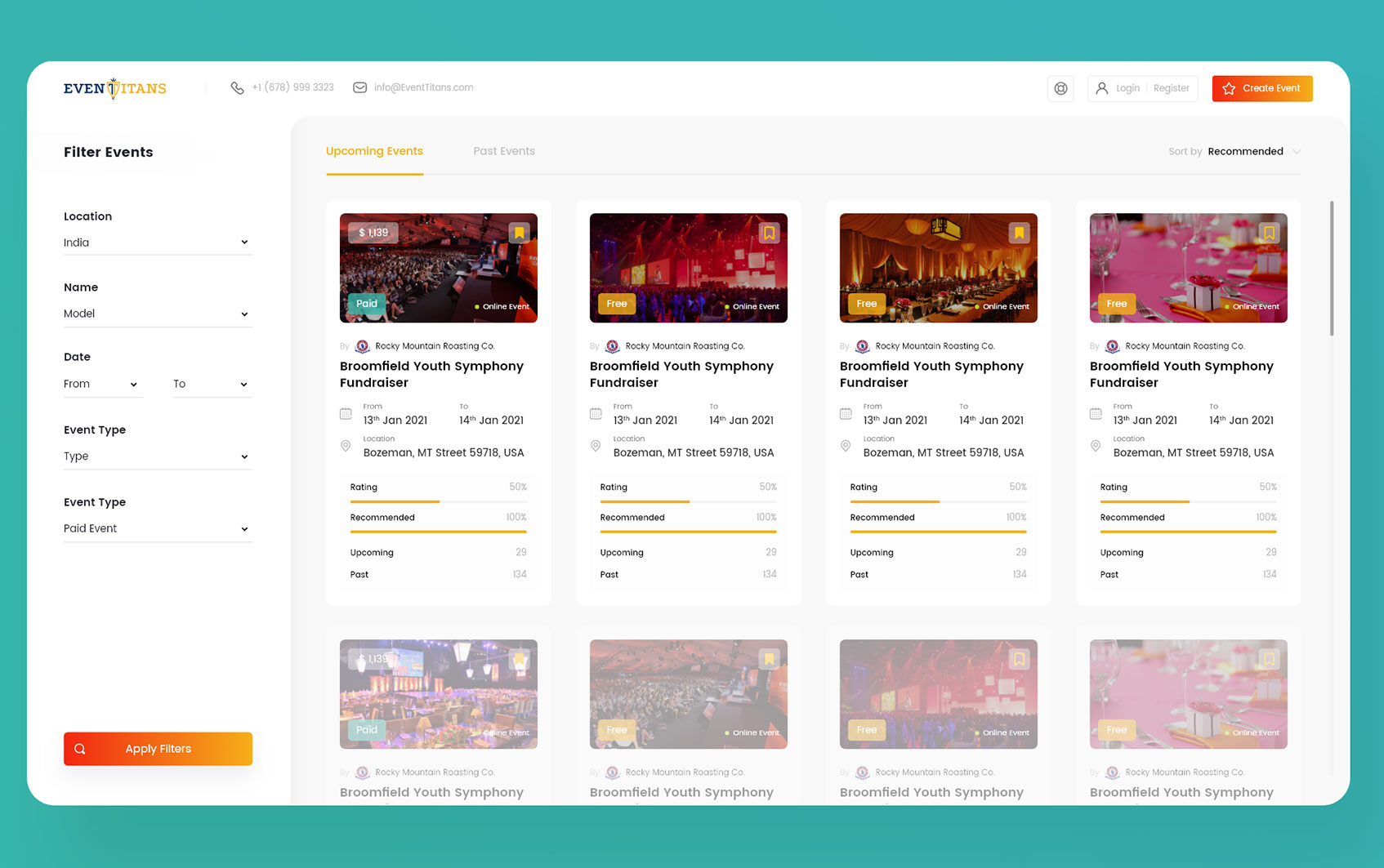
Event Management System: 11 Key Features for Smarter Event Planning
Planning an event involves far more than choosing a venue and setting a date. An event management system brings planning, registration, scheduling, attendee data, communication, payments, and reporting into one organized workflow. As a result, event teams can reduce manual work, keep information in one place, and manage each stage of an event more consistently.
Modern event teams may handle conferences, trade shows, workshops, corporate meetings, fundraisers, festivals, or virtual and hybrid events. Because each format has different requirements, the right event management software should support the entire event lifecycle rather than solving only one task.
In this guide, we will explain what an event management system is, how it works, the key features to look for, its benefits and limitations, and practical tips for choosing the right solution.
What Is an Event Management System?
An event management system is software that helps organizations plan, organize, execute, and evaluate events from one centralized platform. Instead of managing registrations, schedules, attendee information, communications, payments, and reports across separate spreadsheets and applications, teams can connect these activities within one system.
Event management covers the full event lifecycle, from early planning through post-event reporting. This can include in-person, virtual, hybrid, and other event formats. Cvent also describes event management as covering activities from planning through execution and post-event reporting. Cvent’s event management guide provides additional context on the process.
Key takeaway
An event management system connects the operational parts of an event so teams can spend less time coordinating scattered information and more time managing the attendee experience.
How Does an Event Management System Work?
An event management system typically starts with event setup. An organizer creates the event, defines its dates and locations, establishes registration options, and adds important event details.
Next, the system can manage registration and attendee information. Depending on the platform, attendees may register online, select ticket types, make payments, receive confirmations, and get event updates.
Meanwhile, event teams can manage schedules, speakers, vendors, venues, tasks, and communications from the same platform. Because these activities share information, a change in one area can become easier to track across the event workflow.
Finally, after the event, organizers can review attendance, registration activity, revenue, feedback, and other available metrics. This creates a useful record for evaluating the event and improving future planning.
10 Key Features of an Event Management System
1. Event Registration and Ticketing
Registration is one of the most important parts of event administration. An event management system can provide online registration forms, ticket types, attendee categories, confirmation messages, and registration tracking.
For example, a conference may offer general admission, premium passes, speaker passes, and staff registrations. Instead of tracking each category manually, the system can keep registration information organized in one location.
Ticketing can also connect registration with payment processing, making it easier to track who registered, which ticket they selected, and whether payment has been completed.
2. Attendee Management
Large events can generate significant amounts of attendee information. Names, contact details, registration status, ticket type, preferences, and attendance records all need accurate management.
An event management system creates a central attendee database that authorized team members can use throughout the event lifecycle. Therefore, organizers can reduce duplicate records and avoid switching between multiple spreadsheets.
For organizations that need more advanced customer data management, event platforms can also work alongside CRM systems. In some cases, businesses may consider custom CRM development when standard systems cannot support their specific workflows or integration requirements.
3. Event Scheduling
Events often contain multiple sessions, speakers, activities, and locations. A scheduling feature helps organizers create a structured agenda and assign sessions to specific times and spaces.
For instance, a business conference could run several sessions at the same time in different rooms. The system can help organizers maintain the schedule while giving attendees clear information about where and when each session takes place.
Furthermore, event schedules can support speaker management and session planning. Teams can assign responsibilities, track deadlines, and update schedules when changes occur.
4. Venue and Space Management
The venue affects almost every part of an event. Organizers may need to manage rooms, seating arrangements, capacity, equipment, layouts, and availability.
A venue management feature can make this information easier to organize. It can also help event teams coordinate room assignments and prevent scheduling conflicts.
If venue operations are a major part of your event workflow, the key features of venue management software can provide useful context on bookings, events, and operational coordination.
5. Communication and Notifications
Clear communication keeps attendees and event teams informed. An event management system may support email notifications, registration confirmations, reminders, schedule updates, and other event-related messages.
For example, an organizer can send a registration confirmation immediately after someone signs up. Later, the same attendee can receive a reminder with the event date, location, agenda, or virtual access details.
Centralized communication also reduces the risk of sending outdated information. When organizers manage event data from one system, they have a better foundation for keeping messages consistent.
6. Task and Team Management
Event planning involves many small tasks that can easily become difficult to track. Teams may need to coordinate vendors, speakers, marketing activities, venue preparation, catering, equipment, registration desks, and event-day responsibilities.
Task management helps assign work to specific team members and establish deadlines. As a result, everyone can understand what they need to complete and when it needs to happen.
Event planning guides also emphasize clear goals, timelines, responsibilities, budgets, venues, and marketing activities as important parts of the planning process. Cvent’s event planning guide provides a practical overview of these planning elements.
7. Payment and Financial Tracking
Paid events require careful financial coordination. Organizers may collect registration fees, process ticket payments, issue refunds, and monitor revenue.
Event management software can connect registration data with payment information so teams can more easily understand transaction status. Depending on the platform, it may also provide invoices, receipts, refunds, or financial reports.
However, businesses should check exactly which payment features a platform provides before choosing it. Some systems may require separate payment providers or integrations.
8. Event Marketing Support
Getting people to register is just as important as managing them after registration. Event management platforms may provide tools for event pages, registration campaigns, email communication, promotional tracking, or integrations with marketing platforms.
For example, an organization promoting a professional conference can use an event page to explain the agenda, speakers, venue, ticket options, and registration process. This creates a more connected journey from event discovery to registration.
Moreover, event marketing data can help teams understand which promotional activities generate registrations and where attendees enter the registration process.
9. Check-In and Attendance Tracking
The event-day experience matters. Long registration queues or unclear check-in procedures can create unnecessary friction for attendees.
An event management system can support digital check-in, attendee verification, badge management, and attendance tracking. The exact capabilities depend on the platform, but the goal remains the same: make arrival faster and keep attendance records accurate.
For a conference with several sessions, attendance tracking can also help organizers understand which activities attracted participants.
10. Reporting and Analytics
After an event ends, organizers need more than a final attendee count. They may want to understand registrations, attendance, ticket sales, revenue, session participation, cancellations, and other available data.
Reporting features bring this information together so teams can evaluate performance and identify areas for improvement.
For example, if one session attracts significantly more attendees than another, organizers can examine the topic, schedule, speaker, or room assignment when planning the next event.
Planning
Define the event, goals, dates, venues, sessions, tasks, and responsibilities.
Registration
Collect attendee information, manage tickets, and track registration activity.
Execution
Coordinate schedules, check-in, communications, teams, vendors, and attendees.
Analysis
Review attendance, financial activity, engagement, feedback, and other available metrics.
Benefits of Using Event Management Software
Centralizes Event Information
Without a centralized system, event information can become scattered across spreadsheets, emails, documents, calendars, and messaging tools. An event management system gives teams a common place to manage core event information.
Therefore, staff can spend less time searching for the latest version of a schedule or attendee list.
Reduces Manual Administrative Work
Manual data entry creates additional work and can introduce mistakes. Automation can handle routine activities such as registration confirmations, reminders, status updates, and certain reports.
As a result, event teams can focus more attention on planning and attendee service.
Improves Team Coordination
Events often involve internal teams, speakers, vendors, sponsors, venues, and other stakeholders. A shared system gives authorized users access to the information they need.
More importantly, task assignments and schedules can make responsibilities clearer before the event begins.
Creates a Better Attendee Experience
Attendees expect simple registration, accurate information, clear schedules, and smooth check-in. A connected event workflow can support each of these touchpoints.
For example, an attendee can register online, receive confirmation, access event information, check in, and receive schedule updates without requiring the organizer to manage every step manually.
Supports Better Post-Event Decisions
Event data becomes more useful when teams can review it after the event. Reports can help organizers identify registration patterns, popular sessions, attendance gaps, and financial results.
Consequently, future events can use previous information as a starting point instead of relying entirely on guesswork.
Event Management System vs. Event Planning Software
The terms event management system and event planning software often overlap. Both can help teams organize event activities, but their scope can differ depending on the product.
| Area | Event Management System | Event Planning Software |
|---|---|---|
| Planning | Usually supports broader event operations | Often focuses strongly on planning workflows |
| Registration | Commonly included | May be included depending on the product |
| Attendee management | Usually supported | May vary by platform |
| Event-day operations | Often supports check-in and coordination | Depends on the software |
| Reporting | Often includes event performance reporting | May focus more on planning progress |
In practice, the distinction depends on the platform. Therefore, businesses should evaluate the actual features rather than choosing software based only on its product name.
For a deeper look at planning-focused tools, see this guide to event planning software features.
What Should You Consider Before Choosing a System?
The right event management system depends on your event type, team size, workflow, and technical requirements. Before choosing a platform, consider the following areas.
- Event type: Check whether the platform supports conferences, meetings, workshops, fundraisers, virtual events, or other formats you organize.
- Registration needs: Review forms, ticket types, attendee categories, payments, confirmations, and refunds.
- Scalability: Consider whether the system can handle your current event volume and future growth.
- Integrations: Check whether it connects with the CRM, payment tools, email platforms, calendars, or other systems your team already uses.
- Reporting: Identify the metrics and reports your team needs before, during, and after an event.
- Ease of use: A powerful system still creates problems if your team cannot learn and use it efficiently.
- Security: Review how the provider handles attendee information, user permissions, authentication, backups, and data protection.
- Support: Check available documentation, onboarding resources, and customer support options.
Pro tip
Map your event workflow before comparing platforms. List the tasks your team performs from initial planning to post-event reporting, then check which system features support each step.
Common Mistakes to Avoid
Choosing event management software based only on the number of features can create problems. More features do not automatically mean a better fit for your organization.
Instead, avoid these common mistakes:
- Ignoring your actual workflow: A system should fit the way your team works, not force every process into an unnecessary structure.
- Overlooking integrations: A disconnected platform can create additional manual work.
- Skipping a test run: Test registration, payments, communications, check-in, reporting, and other important workflows before a live event.
- Ignoring user permissions: Give team members access based on their responsibilities.
- Failing to plan for event-day issues: Prepare backup procedures for connectivity problems, payment failures, registration issues, and schedule changes.
- Choosing based only on price: Compare the total cost with the time, integrations, support, and operational value the platform provides.
When Should You Use an Event Management System?
An event management system becomes especially useful when an organization handles recurring events, large attendee lists, multiple sessions, several team members, paid registrations, or complex event logistics.
For a small internal meeting with ten participants, a calendar and simple registration form may be enough. However, a multi-day conference with hundreds of attendees, several speakers, multiple ticket types, and detailed reporting needs a more structured system.
Similarly, organizations running recurring workshops or training sessions can benefit from reusable event workflows. Instead of rebuilding every process from scratch, teams can create repeatable structures for registration, communication, scheduling, and reporting.
How to Implement Event Management Software Successfully
Technology alone does not create an efficient event process. The implementation also matters.
- Define your goals: Decide what the system needs to improve, such as registration, coordination, reporting, or attendee communication.
- Map your workflow: Document what happens before, during, and after each event.
- Choose the required features: Separate essential functions from features that your team may never use.
- Connect important tools: Integrate systems that already hold customer, payment, communication, or operational data when appropriate.
- Train your team: Make sure each user understands the parts of the platform relevant to their role.
- Run a test event: Test the full workflow before using the system for an important event.
- Review the results: After the event, evaluate what worked and where the workflow needs improvement.
This structured approach helps teams introduce technology without disrupting the event process.
Frequently Asked Questions
Frequently Asked Questions
What is an event management system used for?
An event management system helps organizations plan, register attendees, manage schedules, coordinate teams, process event-related payments, communicate with participants, track attendance, and review event data.
What is the difference between event management software and event planning software?
The terms often overlap. Event planning software may focus more heavily on planning tasks, while event management software can cover a broader range of registration, attendee, operational, and reporting activities. However, the exact scope depends on the platform.
Can an event management system handle online registration?
Yes, many event management platforms support online registration. Depending on the system, they may also handle ticket types, payments, confirmation messages, attendee records, and check-in.
Can event management software integrate with a CRM?
Many platforms offer integrations or APIs that can connect event data with CRM systems. The available options vary, so businesses should check supported integrations before selecting a platform.
Is an event management system useful for small businesses?
It can be useful when a small business runs recurring events, paid registrations, larger attendee groups, or complex workflows. For very small events, simpler tools may provide enough functionality.
What should I look for in event management software?
Focus on the features that match your workflow, including registration, attendee management, scheduling, communication, payments, check-in, reporting, integrations, security, ease of use, and support.
Final Thoughts
An event management system can bring the many moving parts of event planning into one connected workflow. From registration and attendee management to scheduling, communication, check-in, payments, and reporting, the right platform can make complex event operations easier to coordinate.
However, the best solution depends on how your organization actually runs events. Therefore, start with your workflow, identify the problems you need to solve, and then compare platforms based on their features, integrations, usability, scalability, and support.
For organizations with specialized workflows, a standard platform may not cover every requirement. In that situation, a tailored software solution can connect event processes with the systems and business rules your team already uses.
Build software around how your business works
When standard event tools do not fit your workflow, custom software can connect your event operations with the systems, processes, and data your organization relies on.Talk to our team
