
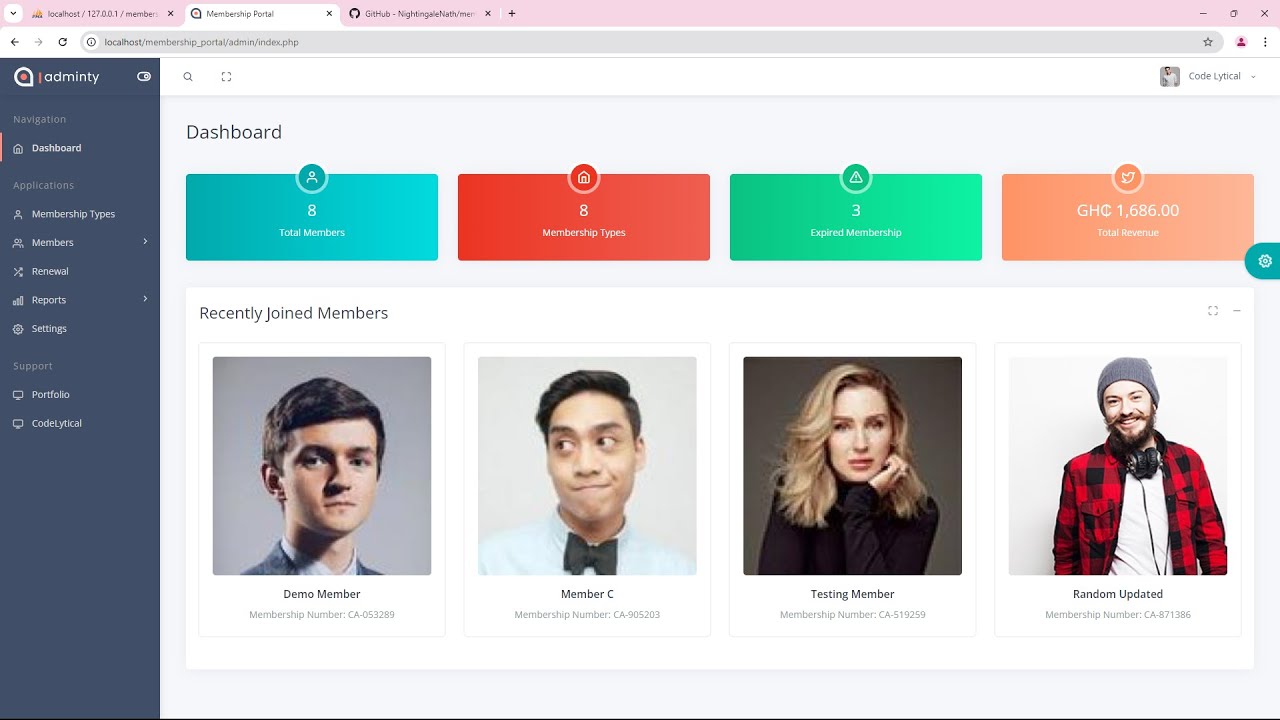
Membership Management System: 10 Essential Features for Better Member Management
A Membership Management System helps organizations manage member records, memberships, renewals, payments, communication, and engagement from one central platform. Instead of relying on spreadsheets, disconnected tools, or manual processes, organizations can use a structured system to keep membership data organized and make everyday administration easier.
For clubs, associations, nonprofits, gyms, professional organizations, and other member-based businesses, effective membership management can directly affect the member experience. In this guide, we will explain what a Membership Management System is, how it works, the key features to look for, its benefits and limitations, and the important factors to consider before choosing a solution.
Key takeaway
A good membership system should do more than store member names. It should connect member records, membership plans, payments, renewals, communication, reporting, and engagement in one practical workflow.
What Is a Membership Management System?
A Membership Management System is software designed to organize and manage the full membership lifecycle. It gives an organization a central place to store member information, manage membership plans, track active and expired memberships, process renewals, and communicate with members.
For example, a professional association may use the system to register new members, assign membership levels, collect annual dues, send renewal reminders, and track participation. Similarly, a fitness organization can use it to manage memberships, payments, class access, and member communication.
In practice, the system replaces many manual tasks with structured workflows. Staff can find member information faster, monitor upcoming renewals, and generate reports without searching through multiple spreadsheets or applications.
How Does a Membership Management System Work?
A typical system follows the membership lifecycle from registration to renewal or cancellation. First, an organization collects member information through a registration form or staff entry. The system then creates a member profile containing relevant details such as contact information, membership type, status, payment history, and renewal date.
Next, administrators can manage the member’s account throughout the relationship. For instance, they may change a membership plan, record a payment, send an email, update contact details, or review engagement activity.
When a renewal date approaches, the system can help staff identify members who need attention. Depending on the platform, automated reminders, recurring payments, and renewal workflows can reduce the amount of manual follow-up required.
Therefore, the main value comes from connecting separate membership activities into one workflow rather than treating registration, billing, communication, and reporting as unrelated tasks.
10 Essential Features of Membership Management Software
1. Centralized Member Profiles
A centralized member database gives staff one reliable location for member information. Profiles can include names, contact details, membership types, registration dates, renewal dates, payment records, and other relevant information.
As a result, staff spend less time searching through separate files. They can also maintain a more consistent view of each member’s history.
2. Membership Plan Management
Organizations often offer multiple membership options. These may include individual, family, student, professional, corporate, monthly, or annual plans.
Membership management software can organize these plans and associate each member with the correct pricing, duration, benefits, and status. This makes it easier to manage upgrades, downgrades, cancellations, and changes in membership terms.
3. Registration and Online Applications
Online registration can make joining easier for new members. Instead of requiring staff to manually enter every application, organizations can collect information through digital forms.
Furthermore, automated registration workflows can help route applications to the right team, create member profiles, and trigger confirmation messages. This creates a smoother onboarding experience while reducing repetitive data entry.
4. Payment and Billing Management
Membership organizations need a clear way to track dues and other member-related payments. A membership platform can connect payment information with individual member records so staff can see payment status in context.
Depending on the software, organizations may also support recurring payments, invoices, payment reminders, refunds, and transaction history. These capabilities can reduce manual billing work and make outstanding balances easier to identify.
However, organizations should carefully review payment processing options, transaction fees, supported payment methods, and integration requirements before selecting a platform.
5. Renewal and Expiration Tracking
Renewals are an important part of membership administration. A system can show which memberships are active, approaching expiration, expired, or canceled.
For example, administrators can create a workflow that identifies memberships expiring within the next 30 days. Staff can then send reminders or allow the software to trigger an automated renewal message.
Pro tip
Build renewal workflows around the member’s actual expiration date. A useful system should help staff identify upcoming renewals early instead of waiting until a membership has already expired.
6. Member Communication
Regular communication helps organizations maintain relationships with their members. Membership software can support email communication, announcements, reminders, newsletters, and other member messages.
More importantly, organizations can often segment members based on factors such as membership type, status, location, or interests. This allows staff to send more relevant messages instead of sending every announcement to every member.
For organizations focused on improving communication and relationship management, a broader customer engagement strategy can complement the capabilities of a membership platform.
7. Member Self-Service
A member portal can allow members to manage parts of their own accounts. Depending on the system, members may update their contact details, view membership information, renew their plans, make payments, or access documents.
This approach benefits both sides. Members get faster access to routine services, while staff receive fewer requests for simple account changes.
8. Reporting and Analytics
Reports help administrators understand how the membership program is performing. Useful reports can cover active memberships, expired memberships, renewals, revenue, new registrations, cancellations, and payment activity.
For example, an organization could compare new memberships with cancellations over a selected period. It could also review renewal activity by membership type to identify areas that need attention.
Good reporting should turn stored data into information that administrators can use for planning rather than simply displaying large amounts of raw data.
9. Member Engagement Tracking
Membership does not end with registration. Organizations also need to understand how members interact with their services and programs.
Depending on the organization, engagement data might include event attendance, class participation, volunteer activity, purchases, or other interactions. Tracking relevant activity can help teams understand which programs members use and where engagement opportunities exist.
This also connects with broader customer loyalty strategies, especially when an organization wants to encourage repeat participation and long-term relationships.
10. Security and Access Controls
Membership databases often contain personal information, so organizations need appropriate controls around access and data handling. A system should allow administrators to control who can view or change sensitive information.
Security should also cover authentication, backups, account permissions, and protection against unauthorized access. NIST provides a practical Cybersecurity Framework 2.0 Small Business Quick-Start Guide that organizations can use when developing their broader cybersecurity approach.
Privacy also matters. For organizations that operate under the GDPR, the European Commission explains key principles such as data minimization, purpose limitation, storage limitation, accuracy, and confidentiality in its GDPR principles for personal data processing.
Benefits of Using a Membership Management System
The right platform can improve several parts of membership administration at the same time. However, the benefits depend on how well the system matches the organization’s processes.
Less manual administration
Automated registration, reminders, payments, and status updates can reduce repetitive administrative work.
Better member data organization
A centralized database gives staff a consistent place to access current member information and history.
Improved renewal management
Expiration tracking and reminders help organizations manage upcoming renewals more systematically.
Faster member service
Self-service tools and accessible member records can help staff respond to routine requests more quickly.
Clearer reporting
Centralized data makes it easier to monitor membership activity, revenue, retention, and engagement.
More consistent communication
Member segments and automated messages can help organizations communicate with the right groups at the right time.
Membership Management Software vs. Manual Tracking
Small organizations sometimes manage members with spreadsheets, email, payment applications, and separate documents. This approach can work at a limited scale, but it becomes harder to maintain as membership activity grows.
| Area | Manual tracking | Membership management software |
|---|---|---|
| Member records | Often spread across files | Centralized profiles |
| Renewals | Manual monitoring | Expiration tracking and reminders |
| Payments | May require separate records | Connected payment history |
| Communication | Manual lists and messages | Segments and automated workflows |
| Reporting | Manual spreadsheet analysis | Centralized reports and dashboards |
| Member self-service | Usually limited | Can include a member portal |
Therefore, the decision should depend on the organization’s size, workflow complexity, member volume, budget, and need for automation. A spreadsheet may remain practical for a very small organization, while a dedicated platform becomes more useful as processes become more complex.
How to Choose the Right Membership Management System
Choosing software based only on the number of features can create problems. Instead, organizations should start with their actual workflows and identify which activities consume the most time or create the most errors.
Define Your Membership Model
First, document your membership types, pricing rules, renewal periods, benefits, and cancellation policies. Then confirm that the platform can support those rules without requiring complicated workarounds.
Review Payment Requirements
Next, examine the payment methods you need and determine whether the platform supports them. Consider recurring payments, invoices, refunds, payment records, and integrations with your existing financial tools.
Check Communication Features
Look at how the software handles announcements, renewal reminders, newsletters, and targeted communication. Also consider whether it integrates with the email or marketing tools your team already uses.
Evaluate Integrations
A membership platform rarely operates in isolation. You may need connections with accounting software, email platforms, payment gateways, event systems, websites, or CRM platforms.
For example, a professional association may want membership data to connect with its CRM so staff can maintain a broader view of member relationships. In that situation, CRM and relationship management concepts can help shape the integration requirements.
Consider Scalability
Choose a platform that can support your expected growth. Consider not only the number of members but also the number of administrators, membership types, locations, integrations, and workflows you may need later.
Review Data Security and Privacy
Ask where the system stores member information, how access works, what backup processes exist, and how the provider handles data deletion and export. Also review the privacy obligations that apply to your organization and members.
Common Mistakes to Avoid
Even a capable Membership Management System can create problems if an organization implements it without a clear plan. Fortunately, most common issues are preventable.
- Choosing too many features: More features do not automatically mean a better fit. Focus on the workflows your organization actually needs.
- Ignoring data cleanup: Moving outdated or duplicate member records into a new platform can create confusion later.
- Skipping user permissions: Give staff access based on their responsibilities rather than providing unrestricted access to every user.
- Forgetting member experience: A system should make registration, payment, renewal, and account management simple for members as well as staff.
- Neglecting integrations: A standalone system may create new manual work if it cannot connect with important tools.
- Failing to plan for growth: Review future requirements before committing to a platform that may become restrictive later.
When Should You Consider a Custom Membership System?
Off-the-shelf membership management software can work well when an organization has standard requirements. However, some organizations have workflows that do not fit neatly into a prebuilt platform.
A custom system may make sense when you need specialized membership rules, unique approval processes, complex integrations, custom reporting, multiple organizational levels, or a member portal designed around a specific workflow.
For example, an association may need membership management to work alongside a custom CRM, accounting platform, event system, and internal approval process. In that case, a tailored solution can connect these workflows instead of forcing staff to maintain several disconnected systems.
Important
Custom software requires more planning, development, testing, and ongoing maintenance than an off-the-shelf platform. Consider it when your business processes justify that additional investment, not simply because customization sounds attractive.
Frequently Asked Questions
Frequently Asked Questions
What is the main purpose of a Membership Management System?
Its main purpose is to centralize member records and simplify tasks such as registration, membership tracking, renewals, payments, communication, reporting, and engagement management.
What is the difference between membership management software and a CRM?
Membership software focuses on member-specific workflows such as plans, renewals, dues, and member status. A CRM generally focuses on broader relationship management, including leads, contacts, sales, communication, and customer interactions. Some organizations use both systems together.
Can membership software automate renewals?
Many membership platforms can track expiration dates and support automated renewal reminders. Some also support recurring payments, although the exact capabilities depend on the platform and payment integrations.
Who can use a Membership Management System?
Clubs, associations, nonprofits, professional organizations, gyms, educational organizations, member-based businesses, and other groups can use membership systems to manage recurring relationships with members.
What should I look for in membership management software?
Look for centralized member profiles, membership plan management, registration, payment tracking, renewal tools, communication, reporting, security, integrations, self-service options, and scalability.
Final Thoughts
A Membership Management System can bring member records, plans, payments, renewals, communication, reporting, and engagement into one organized workflow. As a result, organizations can reduce manual administration while giving staff a clearer view of member activity.
However, the right solution depends on how your organization operates. Start by mapping your membership lifecycle, identifying repetitive tasks, reviewing integration needs, and deciding which features members and administrators actually need.
For standard requirements, membership management software may provide everything you need. On the other hand, organizations with specialized workflows may benefit from a tailored system that connects membership management with their existing business processes.
