
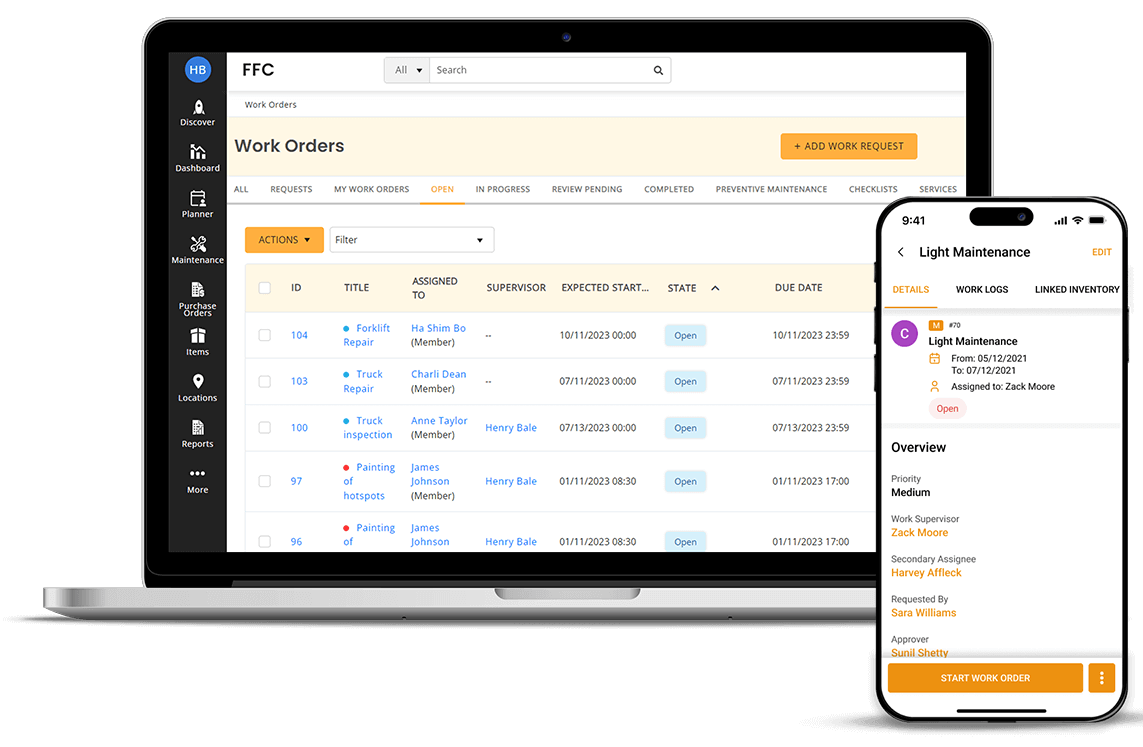
Work Order Management System: 9 Features That Keep Jobs on Track
A work order management system helps businesses organize, assign, schedule, track, and complete service or maintenance jobs from one central platform. Instead of relying on paper forms, spreadsheets, emails, or scattered messages, teams can manage each work order through a clear workflow. As a result, managers gain better visibility into ongoing jobs while technicians know what work they need to complete, where they need to go, and what resources they need.
In this guide, we will explain how work order management works, the features businesses should look for, the benefits it can provide, common use cases, and mistakes to avoid when choosing a solution.
Key takeaway
A good work order system connects requests, planning, scheduling, execution, documentation, and reporting in one workflow. That connection helps teams replace scattered processes with a more organized way to manage work.
What Is a Work Order Management System?
A work order management system is software that helps businesses manage work requests from the moment someone reports a task until the team completes and closes it. A work order can include the job description, location, priority, assigned technician, required parts, labor, due date, notes, and completion details.
For example, imagine a property manager receives a request about a leaking air conditioner. The manager can create a work order, record the property and equipment details, set the priority, assign a technician, and schedule the visit. The technician can then update the job, record the repair, add notes, and close the work order.
In practice, this creates a digital record of the entire job. IBM describes work orders as records that can contain tasks, labor, materials, services, and tools needed to complete maintenance work. IBM’s work order documentation provides additional detail on how work orders support maintenance processes and historical records.
How Does Work Order Management Work?
Although workflows vary between businesses, most work order processes follow a similar sequence. First, someone submits a request. Next, a manager reviews the request and determines its priority. The team then plans and assigns the work before a technician completes the job.
- Submit the request: A customer, employee, tenant, manager, or system reports a maintenance or service need.
- Review the request: A supervisor checks the details and determines whether the request requires action.
- Create the work order: The team adds the job description, location, priority, assets, required skills, and other relevant information.
- Schedule the job: A dispatcher or manager selects a suitable time based on technician availability, workload, location, and required skills.
- Assign the technician: The system sends the job details to the appropriate worker.
- Complete the work: The technician performs the assigned tasks and records labor, parts, notes, photos, or other details.
- Close the work order: The manager or technician confirms completion and stores the final record.
- Review the results: Managers analyze completed work to identify recurring problems, delays, workload issues, and maintenance trends.
Therefore, the system does more than simply store work orders. It connects each stage so managers can follow a job without repeatedly checking spreadsheets, emails, or messages.
9 Important Features of Work Order Management Software
1. Centralized Work Order Creation
Work order management software should make it easy to create and organize new jobs. A centralized system can store information such as the customer, property, asset, location, issue, priority, assigned worker, and expected completion date.
This approach gives everyone access to the same job information. Consequently, managers spend less time searching for details, while technicians receive clearer instructions before starting work.
2. Work Request and Approval Workflows
Not every request requires immediate action. Some jobs need approval, additional information, or a priority review before a technician receives an assignment.
A good system can route incoming requests through defined stages. For example, a request might move from New to Under Review, then to Approved, Scheduled, In Progress, and finally Completed.
This structured workflow reduces confusion because employees can see where each request stands. It also helps managers identify jobs that remain stuck in one stage.
3. Scheduling and Technician Assignment
Scheduling becomes difficult when managers handle multiple technicians, locations, appointments, and urgent jobs at the same time. Work order software can bring these details into one scheduling workflow.
Managers can consider technician skills, availability, workload, location, and job requirements before assigning work. In addition, some systems connect scheduling with maps and mobile tools so field teams can receive assignments while working away from the office.
For businesses with large field teams, dedicated technician scheduling software can also help organize appointments and technician workloads.
4. Priority and Status Management
Different jobs have different levels of urgency. A routine inspection should not necessarily compete with a critical equipment failure or an emergency service request.
A work order management system can assign priorities and statuses to help teams decide what needs attention first. Managers can also use status information to identify overdue, delayed, or waiting jobs.
For instance, a business might use statuses such as:
- New
- Pending approval
- Scheduled
- Assigned
- In progress
- Waiting for parts
- Completed
- Closed
As a result, the team gets a simple view of the current workload and the next action required for each job.
5. Mobile Access for Field Technicians
Field technicians often work away from the main office. Therefore, they need access to job details without returning to a computer after every appointment.
Mobile access allows technicians to view assignments, update statuses, add notes, record time, upload photos, and document completed work from the job location. This can reduce delays between field activity and office records.
Microsoft’s Field Service work order architecture documentation illustrates a typical workflow in which a work order moves from creation to scheduling, field execution, and completion.
6. Asset and Maintenance History
Many work orders relate to specific equipment, buildings, vehicles, or other assets. Linking the work order to an asset creates a useful history of previous service activity.
For example, if a technician repeatedly repairs the same commercial HVAC unit, managers can review previous work orders to see the repair history, parts used, labor time, and recurring issues. This information can support better maintenance planning and asset decisions.
For organizations that manage buildings, a facilities management system can also connect maintenance activities with broader building operations.
7. Parts, Materials, and Resource Tracking
A technician cannot always complete a job without the right parts or tools. Because of this, work order software should provide a way to record required materials and resources.
For example, a repair order might require a replacement motor, electrical components, safety equipment, and two hours of technician labor. Recording these requirements helps managers prepare before assigning the job.
It can also reveal patterns in material usage. Over time, managers may identify frequently used parts and improve purchasing or inventory planning.
8. Work Order Documentation
Complete documentation helps businesses understand what happened during each job. A technician may need to record the problem, actions taken, parts installed, labor hours, readings, photos, customer notes, or follow-up recommendations.
Keeping these details with the work order creates a searchable record. Therefore, another employee can review the job later without relying on the technician’s memory or separate paperwork.
Pro tip
Define the information technicians must record before closing a work order. A simple checklist can improve consistency and prevent important details from disappearing from the service history.
9. Reporting and Performance Tracking
Work order data becomes more useful when managers can turn it into operational insights. Reporting tools can help teams review open jobs, completed work, overdue requests, response times, labor usage, recurring issues, and technician workloads.
For example, if reports show repeated repairs on one asset, management can investigate whether the business should repair, replace, or change the maintenance schedule for that asset.
Similarly, managers can compare workload patterns across locations or service categories. As a result, reporting supports decisions instead of simply storing historical information.
Key Benefits of a Work Order Management System
The right system can improve several parts of daily operations. However, the exact results depend on the quality of the workflow, data, implementation, and team adoption.
Better visibility
Managers can see open, assigned, scheduled, overdue, and completed jobs from a centralized system.
Less manual administration
Digital workflows reduce the need to move information between paper forms, spreadsheets, emails, and separate calendars.
Clearer accountability
Each job can have a defined owner, deadline, status, and completion record.
Improved maintenance history
Teams can connect completed jobs with assets, locations, customers, and previous service activity.
Faster access to information
Technicians and managers can find job details without searching through disconnected records.
More informed planning
Reports help managers understand recurring issues, workloads, resource usage, and operational bottlenecks.
Who Uses Work Order Management Software?
Work order systems can support many industries because the underlying process remains similar: someone requests work, a team plans it, a worker completes it, and the business records the result.
Common users include:
- Facilities teams: Manage building repairs, inspections, cleaning, electrical work, and equipment maintenance.
- Field service companies: Organize customer requests, technician assignments, appointments, and service records.
- Property managers: Track tenant maintenance requests and building repairs.
- Manufacturers: Manage equipment inspections, preventive maintenance, repairs, and production-related tasks.
- HVAC companies: Coordinate installation, inspection, repair, and maintenance jobs.
- Construction teams: Track site tasks, repairs, inspections, and service activities.
- Utilities: Manage service requests, inspections, repairs, and infrastructure maintenance.
For service businesses that rely heavily on field operations, field service management software can complement work order workflows by connecting job management with broader field operations.
Work Order Management Software vs. Spreadsheets
Spreadsheets can work for small teams with simple workflows. However, they often become harder to manage as the number of jobs, technicians, locations, and assets grows.
| Area | Spreadsheet-Based Process | Work Order Management Software |
|---|---|---|
| Job tracking | Often requires manual updates | Centralized status tracking |
| Assignment | Manual coordination | Structured technician assignment |
| Scheduling | Usually handled separately | Can connect jobs with schedules |
| Mobile access | Depends on the spreadsheet setup | Often designed for field access |
| Work history | Can become difficult to organize | Linked job and asset records |
| Reporting | Often requires manual analysis | Built-in dashboards and reports may be available |
Therefore, the decision should depend on operational complexity rather than company size alone. A small business with many mobile workers may need dedicated software sooner than a larger company with a simple internal workflow.
What to Consider Before Choosing a System
Buying software without first mapping the existing process can create unnecessary complexity. Instead, identify how your team currently receives, assigns, schedules, completes, and reviews work.
Then evaluate potential systems against practical requirements such as:
- Ease of creating and updating work orders
- Mobile access for field workers
- Scheduling and dispatch capabilities
- Asset and customer records
- Priority and status workflows
- Parts and inventory tracking
- Time and labor tracking
- Photo and document attachments
- Reporting and dashboards
- Integration with existing business software
- User permissions and access controls
- Scalability as the workload grows
More importantly, consider how easily employees can adopt the system. A platform with many features may still create problems if technicians find it difficult to use during a busy service call.
Common Work Order Management Mistakes
Even good software cannot fix an unclear process. Therefore, businesses should address workflow problems before and during implementation.
Using Too Many Manual Steps
If employees must copy the same information into several systems, errors and delays can continue. Whenever possible, connect related workflows and remove duplicate data entry.
Creating Unclear Work Order Priorities
Without clear priority rules, employees may treat routine and urgent requests in the same way. Define what makes a job low, medium, high, or emergency priority.
Closing Jobs Without Enough Details
A closed work order should tell the business what happened. Require useful completion notes, labor information, parts used, and follow-up actions when the job requires them.
Ignoring Mobile Users
Field technicians have different needs from office staff. If workers complete jobs at customer locations or remote sites, test the mobile experience before choosing the platform.
Collecting Data Without Reviewing It
Data only becomes useful when someone uses it. Set regular reviews for overdue work, recurring failures, workload, response times, and other relevant operational measures.
When Should a Business Consider a Custom System?
Off-the-shelf work order management software can cover many common workflows. However, some organizations have processes that do not fit neatly into standard software.
A custom solution may make sense when a business needs unique approval rules, specialized job forms, complex integrations, custom dashboards, industry-specific workflows, or a close connection between work orders and an existing CRM or ERP.
For businesses that need software designed around their existing customer and operational workflows, custom CRM development can be one option to consider when work order processes need deeper integration with customer records and business operations.
Important
Custom development does not automatically make a system better. Consider it when standard software cannot support important business requirements without excessive workarounds or disconnected processes.
Frequently Asked Questions
What is a work order management system?
A work order management system is software that helps businesses create, assign, schedule, track, document, and close maintenance or service jobs from a centralized platform.
What is the difference between a work order and a work request?
A work request usually starts the process by reporting a problem or asking for a task. A work order turns that request into a structured job with details such as priority, assignment, schedule, resources, and completion requirements.
What does work order management software do?
Work order management software helps teams organize requests, assign technicians, schedule jobs, track progress, record materials and labor, maintain service histories, and analyze completed work.
Can work order software be used for preventive maintenance?
Yes. Many systems support recurring maintenance schedules that create or organize work before equipment fails. This approach can help teams plan inspections and routine service more consistently.
Can technicians use a work order system from a phone?
Many modern systems provide mobile access. Technicians can use it to view assignments, update job status, record work, attach photos, and add notes while working in the field.
Conclusion
A work order management system gives businesses a structured way to manage service and maintenance work from request to completion. Instead of keeping job details across separate spreadsheets, emails, forms, and messages, teams can bring requests, assignments, schedules, field updates, documentation, and reports into one workflow.
The most useful system is not necessarily the one with the longest feature list. Instead, look for a solution that matches your actual workflow, supports the people who use it every day, provides useful operational data, and can grow with your business.
Start by mapping your current work order process. Identify where requests get delayed, information gets lost, technicians lack visibility, or managers spend too much time on manual coordination. Then use those problems as your criteria when evaluating work order management software.
