
Asset Management Software: 10 Features for Better Asset Control
Asset management software helps businesses track, maintain, and control physical and digital assets throughout their useful life. Instead of relying on spreadsheets, emails, and disconnected records, teams can use one system to see what they own, where each asset sits, who uses it, what it costs, and when it needs attention. An asset inventory software solution adds a structured way to keep those records accurate and easy to update.
In this guide, we will explain how asset management software works, the key features to look for, its main benefits, common use cases, implementation considerations, and mistakes to avoid when choosing a solution.
What Is Asset Management Software?
Asset management software is a business system that helps organizations manage assets from acquisition to retirement. An asset can include equipment, vehicles, computers, tools, machinery, furniture, facilities, or other valuable resources that a company needs to track.
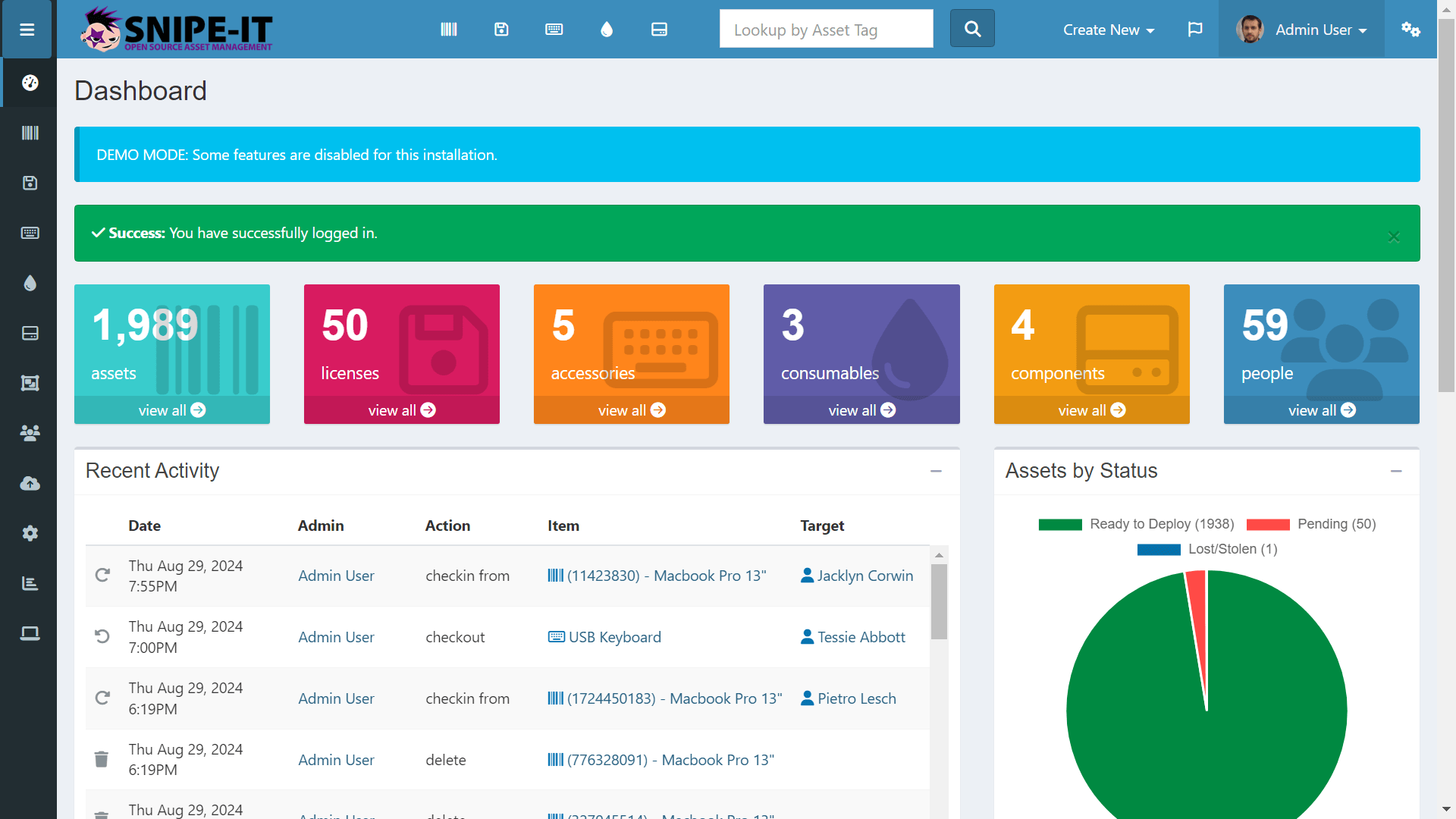
The software creates a central record for each asset. Depending on the system, that record can include the asset name, category, serial number, purchase date, purchase cost, location, assigned employee, warranty details, maintenance history, condition, and current status.
More importantly, modern asset management goes beyond simply creating an inventory list. ISO 55000:2024 describes asset management as a structured approach for realizing value from assets across their life cycles. Therefore, businesses can use asset management practices to connect asset decisions with cost, performance, risk, and organizational goals.
ISO 55000:2024 asset management principles provide useful context for organizations that want to develop a more structured asset management approach.
Key takeaway
Asset management software is not only an inventory tool. It helps businesses maintain accurate asset records, manage maintenance, monitor costs, assign responsibility, and make better decisions throughout the asset lifecycle.
How Does Asset Management Software Work?
Most asset management platforms follow a straightforward process. First, the business creates asset records and organizes them into useful categories. Next, employees can assign assets to locations, departments, projects, or individuals.
As assets move through their lifecycle, the system stores important events and updates. For example, a company might record a purchase, transfer a laptop to another employee, schedule maintenance for a vehicle, renew a warranty, or retire an old machine.
Instead of searching through multiple spreadsheets, managers can use dashboards, filters, reports, and asset histories to find the information they need.
For organizations managing technology or operational equipment, maintaining a complete inventory also supports visibility and risk management. NIST has highlighted asset inventory as a foundational part of understanding an organization’s environment and cybersecurity risks.
10 Key Features of Asset Management Software
1. Centralized Asset Records
A centralized asset register gives teams one place to store important asset information. Each record can include identification details, ownership, location, purchase information, condition, warranty data, and related documents.
As a result, employees spend less time searching through spreadsheets or asking different departments for basic information.
2. Asset Inventory Management
Asset inventory software helps businesses create and maintain a structured inventory of their resources. Teams can categorize assets by type, department, location, status, or other business rules.
For example, an organization might separate laptops, monitors, printers, vehicles, tools, and production equipment. This structure makes it easier to locate assets and identify gaps in inventory.
NIST’s guidance on asset management also emphasizes the importance of maintaining inventories of physical devices, systems, software platforms, and applications in relevant environments.
3. Asset Tracking and Location History
Businesses often move assets between offices, departments, warehouses, job sites, and employees. Without accurate tracking, an asset can quickly become difficult to locate.
Asset tracking allows teams to record where an asset currently sits and review its movement history. This feature becomes particularly useful for companies with field teams, multiple facilities, or mobile equipment.
For instance, a construction company could track which job site currently has a generator, excavator, or specialized tool.
4. Assignment and Ownership Tracking
Businesses need to know who currently uses or manages an asset. Assignment tracking connects an asset with an employee, department, location, project, or customer.
This creates clearer accountability. When an employee receives a laptop or a technician takes a specialized tool to a job site, the system can record the assignment and its relevant details.
5. Maintenance Scheduling
Asset management software can also support preventive maintenance. Teams can schedule inspections, servicing, repairs, and recurring maintenance tasks based on dates, usage, or other conditions.
Consequently, businesses can move from reactive maintenance toward a more organized maintenance process. This can help teams identify upcoming work before an asset requires urgent attention.
For a deeper look at the relationship between asset reliability and maintenance processes, see our guide to maintenance management systems and asset reliability.
6. Warranty and Contract Tracking
Warranty information often gets lost when companies store it in separate documents or emails. Asset management software can associate warranty dates, service agreements, vendors, and contract information with individual assets.
Therefore, teams can check coverage before paying for a repair or replacement. Automated reminders can also help staff review upcoming warranty expirations and contract renewals.
7. Depreciation and Cost Tracking
Asset costs can extend far beyond the original purchase price. Businesses may also spend money on maintenance, repairs, upgrades, insurance, transportation, and disposal.
Asset management software can organize relevant cost information so managers can better understand the financial impact of an asset over time. Depending on the system, businesses may also connect asset records with accounting or financial workflows.
This information can support decisions about whether to repair, replace, upgrade, or retire an asset.
8. Barcode and QR Code Support
Large inventories can become difficult to manage manually. Barcode and QR code functionality can simplify the process by giving each asset a scannable identifier.
For example, an employee can scan a QR code on a piece of equipment and quickly access its record, location, status, maintenance history, or assigned user.
This approach can reduce manual data entry and make physical inventory checks more efficient.
9. Reports and Dashboards
Managers need more than individual asset records. They also need a clear view of the overall asset portfolio.
Reporting features can help teams review assets by category, location, condition, status, cost, maintenance activity, or assigned department. Dashboards can then turn this information into a simpler operational view.
For example, a facilities manager might want to see all assets that require maintenance within the next 30 days. A finance team might instead review assets nearing replacement or retirement.
10. Alerts and Workflow Automation
Manual reminders can easily get missed. Asset management software can automate notifications for maintenance dates, warranty expirations, inspections, transfers, renewals, and other important events.
As a result, teams can spend less time monitoring calendars and more time acting on tasks that require attention.
Pro tip
Choose automation based on real business workflows. A simple reminder for an upcoming maintenance task can be more useful than a large collection of complex features that your team rarely uses.
Asset Management Software vs. Asset Inventory Software
Asset inventory software and asset management software overlap, but they do not always serve the same purpose.
Asset inventory software focuses heavily on knowing what assets exist, where they are, who has them, and how they are categorized. Asset management software usually takes a broader approach by adding maintenance, lifecycle tracking, costs, workflows, reporting, and other operational functions.
| Area | Asset Inventory Software | Asset Management Software |
|---|---|---|
| Asset records | Core function | Core function |
| Location tracking | Common | Common |
| Asset assignments | Common | Common |
| Maintenance | Limited or optional | Usually included |
| Lifecycle management | Limited | Broader support |
| Cost tracking | Varies | Common |
| Workflow automation | Varies | Common |
In practice, the right choice depends on the complexity of your asset processes. A small company that mainly needs an accurate equipment register may need fewer capabilities. On the other hand, a business with frequent maintenance, transfers, compliance requirements, and multiple locations may benefit from a broader asset management platform.
Benefits of Using Asset Management Software
The value of asset management software comes from bringing asset information and related processes into one organized system.
Better asset visibility
Teams can quickly see what assets they have, where those assets are, and who currently manages them.
Fewer manual records
Centralized records reduce dependence on scattered spreadsheets, emails, and paper documents.
More organized maintenance
Scheduled tasks and reminders help teams manage inspections and maintenance before issues become urgent.
Improved accountability
Assignment records make it easier to identify the person, department, or location responsible for an asset.
Better replacement decisions
Historical cost, condition, maintenance, and usage information gives managers more context when evaluating replacement options.
Stronger operational visibility
Dashboards and reports help managers understand asset status across departments, locations, and operations.
Who Uses Asset Management Software?
Asset management software can support many industries because most organizations rely on valuable resources that require tracking and maintenance.
- Manufacturing: Track machinery, production equipment, tools, and maintenance schedules.
- Construction: Manage equipment, vehicles, tools, and assets assigned to different job sites.
- Healthcare: Organize medical equipment, devices, locations, service records, and ownership details.
- IT departments: Track computers, networking equipment, software, devices, and employee assignments.
- Property management: Manage building equipment, facilities, appliances, and maintenance-related assets.
- Field service: Track mobile equipment, tools, vehicles, and assets used by technicians.
Similarly, organizations with multiple locations can use centralized asset records to create a consistent view across offices, warehouses, branches, and field operations.
How to Choose Asset Management Software
Choosing a platform should start with your actual workflows rather than a long feature checklist. First, identify the assets you need to manage and the information your team must maintain for each one.
Define your asset types
List the assets you currently track. Include equipment, vehicles, devices, tools, machinery, furniture, or other resources. Then identify which information matters for each asset type.
Map your current workflow
Document what happens when the business purchases, receives, assigns, moves, repairs, upgrades, and retires an asset. This process helps you identify where software can remove manual work.
Check integration requirements
Consider whether the platform needs to connect with accounting software, procurement tools, maintenance systems, HR platforms, CRM software, or other business applications.
For organizations with complex workflows, custom software can also connect asset records with broader business processes. For example, a custom ERP solution can bring procurement, inventory, maintenance, financial, and operational data into a connected workflow. Businesses exploring that approach can review custom ERP development as one option.
Review reporting needs
Ask which reports managers need regularly. Useful examples include assets by location, assets by employee, maintenance due dates, warranty expirations, asset costs, inactive assets, and assets approaching retirement.
Consider scalability
Your asset inventory may grow as the company expands. Therefore, select a system that can handle additional users, locations, asset categories, and workflows without creating unnecessary administrative work.
Common Asset Management Mistakes to Avoid
Relying on incomplete records
A software system cannot provide useful visibility when employees leave important fields empty or create duplicate records. Establish clear rules for asset creation and updates from the beginning.
Tracking assets without ownership
Knowing that an asset exists is only part of the process. Teams should also know who uses it, where it is located, and which department manages it.
Ignoring the full asset lifecycle
Do not focus only on purchasing and inventory. Track what happens after acquisition, including assignments, transfers, maintenance, upgrades, and retirement.
Adding too much complexity
A system with every possible feature may still fail if employees find it difficult to use. Instead, prioritize the workflows that matter most to your organization.
Failing to review data quality
Even a strong asset inventory can become outdated. Schedule periodic reviews to identify duplicate records, missing information, incorrect locations, and assets that no longer exist.
Best Practices for Asset Inventory Management
Start with a consistent naming and identification system. Each asset should have a clear identifier that employees can recognize and use throughout its lifecycle.
Next, define required fields for different asset categories. A vehicle may need registration and mileage information, while an employee laptop may need a serial number, assigned user, operating system, and warranty date.
In addition, establish responsibility for keeping records current. When employees move assets, return equipment, or send machinery for repair, the responsible team should update the record promptly.
Finally, review asset data regularly. Accurate inventory information supports operational planning and can also improve visibility into risks. NIST’s current work on operational technology asset management highlights inventory, configuration management, and change management as important areas for maintaining visibility into OT environments.
When Should a Business Use Asset Management Software?
A spreadsheet may work when an organization has a small number of simple assets and very few changes. However, spreadsheets become harder to maintain as asset volume, locations, users, maintenance needs, and reporting requirements increase.
Consider dedicated asset management software when employees frequently ask where assets are located, who has them, when equipment needs maintenance, or how much an asset has cost over time.
It can also make sense when different departments maintain separate asset lists. A centralized platform can provide one consistent source of information and reduce the need to reconcile records manually.
Important
Do not choose software simply because it has the largest feature list. Focus on accurate records, simple workflows, useful reporting, integrations, and features that match the way your business actually manages assets.
Frequently Asked Questions
What is asset management software used for?
Asset management software helps businesses track assets, manage assignments and locations, schedule maintenance, monitor costs, store asset history, and manage assets throughout their lifecycle.
What is asset inventory software?
Asset inventory software helps organizations maintain an organized record of their assets, including information such as asset type, location, assigned user, status, identification details, and ownership.
What is the difference between asset management and asset inventory?
Asset inventory focuses mainly on identifying and tracking assets. Asset management takes a broader approach by also covering maintenance, lifecycle planning, costs, assignments, workflows, and reporting.
Can asset management software track maintenance?
Yes. Many asset management systems support maintenance schedules, service records, recurring tasks, repair histories, and alerts for upcoming maintenance.
Can asset management software track assets across multiple locations?
Yes. A suitable system can organize assets by office, warehouse, branch, department, job site, or other locations and maintain assignment and movement information.
Conclusion
Asset management software gives businesses a structured way to control assets from acquisition through retirement. By combining asset records, inventory tracking, assignments, maintenance, costs, reporting, and workflow automation, it can give teams a clearer view of the resources they rely on every day.
However, successful asset management depends on more than choosing software. Businesses also need consistent data, clear ownership, defined workflows, and regular inventory reviews. Therefore, start by mapping your current asset processes, identify the gaps, and choose a solution that fits those requirements.
Build software around how your business works
If your asset workflows span multiple departments, locations, procurement processes, maintenance activities, or financial operations, custom software can connect those processes in one system. Explore custom ERP development to discuss a solution built around your business requirements.Talk to our team
