
Budget Software: 10 Features for Smarter Budget Management
Budget software helps businesses plan spending, track actual costs, compare budgets with results, and make better financial decisions. Instead of relying on scattered spreadsheets, emails, and manual calculations, teams can use budget management software to keep financial plans organized and easier to review.
However, choosing the right system requires more than looking for a basic budgeting template. The software should fit your planning process, expense structure, reporting needs, and business goals. In this guide, we will explain how budget software works, the key features to look for, its main benefits, common mistakes, and practical steps for choosing a solution.
What Is Budget Software?
Budget software is a business tool that helps organizations create, manage, monitor, and review financial budgets. Depending on the system, it can support income planning, expense tracking, budget approvals, forecasting, reporting, and comparisons between planned and actual spending.
For example, a company may create an annual operating budget and divide it into departments such as marketing, sales, operations, payroll, and technology. Managers can then track spending against each allocation throughout the year.
In practice, budget software turns budgeting from a static document into an ongoing management process. Instead of creating a budget once and checking it months later, teams can review financial performance regularly and adjust plans when business conditions change.
Key takeaway
Good budget software connects planned spending with actual financial activity, giving managers a clearer view of where money goes and where adjustments may be needed.
How Does Budget Management Software Work?
Most budget management software follows a straightforward process. First, a business defines its financial goals, revenue expectations, and planned expenses. Next, managers assign amounts to departments, projects, cost centers, or expense categories.
Once the budget is active, the system records or imports financial activity. It can then compare actual spending with planned amounts and highlight differences.
For instance, suppose a marketing department has a monthly advertising budget of $10,000 but spends $12,000. A budgeting system can show the $2,000 variance and help the manager investigate the reason.
More advanced systems can also use historical information and current financial data to support forecasts. This helps businesses move from simply recording expenses to planning future financial needs.
10 Features to Look for in Budget Software
1. Budget Creation and Planning
The foundation of any budgeting system is the ability to create structured budgets. Look for tools that let you define revenue, expenses, departments, projects, and financial periods without creating complicated manual worksheets.
Flexible budget templates can also make recurring planning easier. For example, a business may create separate monthly, quarterly, annual, departmental, or project budgets depending on its operating model.
2. Budget vs. Actual Tracking
Budgeting becomes much more useful when you can compare planned amounts with real spending. Budget software should make these comparisons easy to understand.
A simple variance view can show whether a department remains within its allocation or has exceeded the planned amount. Therefore, managers can investigate issues before they become larger financial problems.
This approach also supports regular reviews. The U.S. Small Business Administration recommends tracking financial information and comparing expectations with actual performance as part of ongoing business planning. SBA guidance on lean business planning provides additional context on reviewing plans, managing cash, and adjusting spending.
3. Expense Tracking
Accurate expense tracking gives your budget real-world context. The system should help categorize expenses and connect them to the correct department, project, account, or budget category.
For example, software might separate office costs, software subscriptions, travel, marketing, equipment, payroll, and vendor expenses. This structure makes it easier to understand which areas consume the largest share of the budget.
If expense tracking remains disconnected from budgeting, employees may need to reconcile multiple systems manually. That process can take time and increase the chance of missing or duplicated information.
For more detail on organizing business spending, see expense management system features.
4. Forecasting and Financial Planning
A budget tells you what you plan to spend. Forecasting helps you estimate what may happen next.
Budget management software can support forecasts by using historical figures, current spending, expected revenue, and planned costs. Managers can then adjust assumptions and review different scenarios.
For example, a company planning to hire five employees may create a forecast that includes salaries, benefits, equipment, software licenses, and recruitment costs. The business can then see how the hiring plan may affect future spending.
The SBA also recommends using financial projections and detailed expense estimates when businesses plan their finances. Its financial planning guidance covers projections, expenses, and cash flow considerations for businesses.
5. Department and Project Budgets
Not every business manages one single budget. Many organizations need separate allocations for departments, locations, projects, products, or business units.
Therefore, choose budget software that supports multiple budget structures. A project manager might need to monitor project costs, while a finance manager may need a company-wide view.
For example, a construction company could create separate budgets for labor, materials, equipment, subcontractors, and individual projects. A marketing agency might instead organize budgets by client or campaign.
Businesses that already manage complex projects can also connect budgeting with project planning. For example, project management software can help teams coordinate project activities while keeping financial planning connected to project work.
6. Approval Workflows
Budget control often depends on clear approval processes. A budgeting system should allow businesses to define who can create, review, approve, or modify budgets.
This matters because not every employee should have unrestricted control over financial allocations. Instead, approval rules can help maintain accountability while keeping routine requests moving.
For example, a department manager could prepare a proposed budget, a finance manager could review it, and an executive could provide final approval. The exact workflow should match the organization’s structure.
7. Variance Analysis
Variance analysis helps explain the difference between planned and actual financial results. A useful system should make these differences easy to identify and investigate.
Consider a company that planned $25,000 for quarterly equipment purchases but spent $31,000. The software can flag the $6,000 variance and allow managers to examine the underlying transactions.
However, a variance does not automatically mean something went wrong. Higher spending may result from an approved expansion, an unexpected repair, or a change in business priorities. Therefore, managers should use variance information as a starting point for analysis rather than treating every difference as a problem.
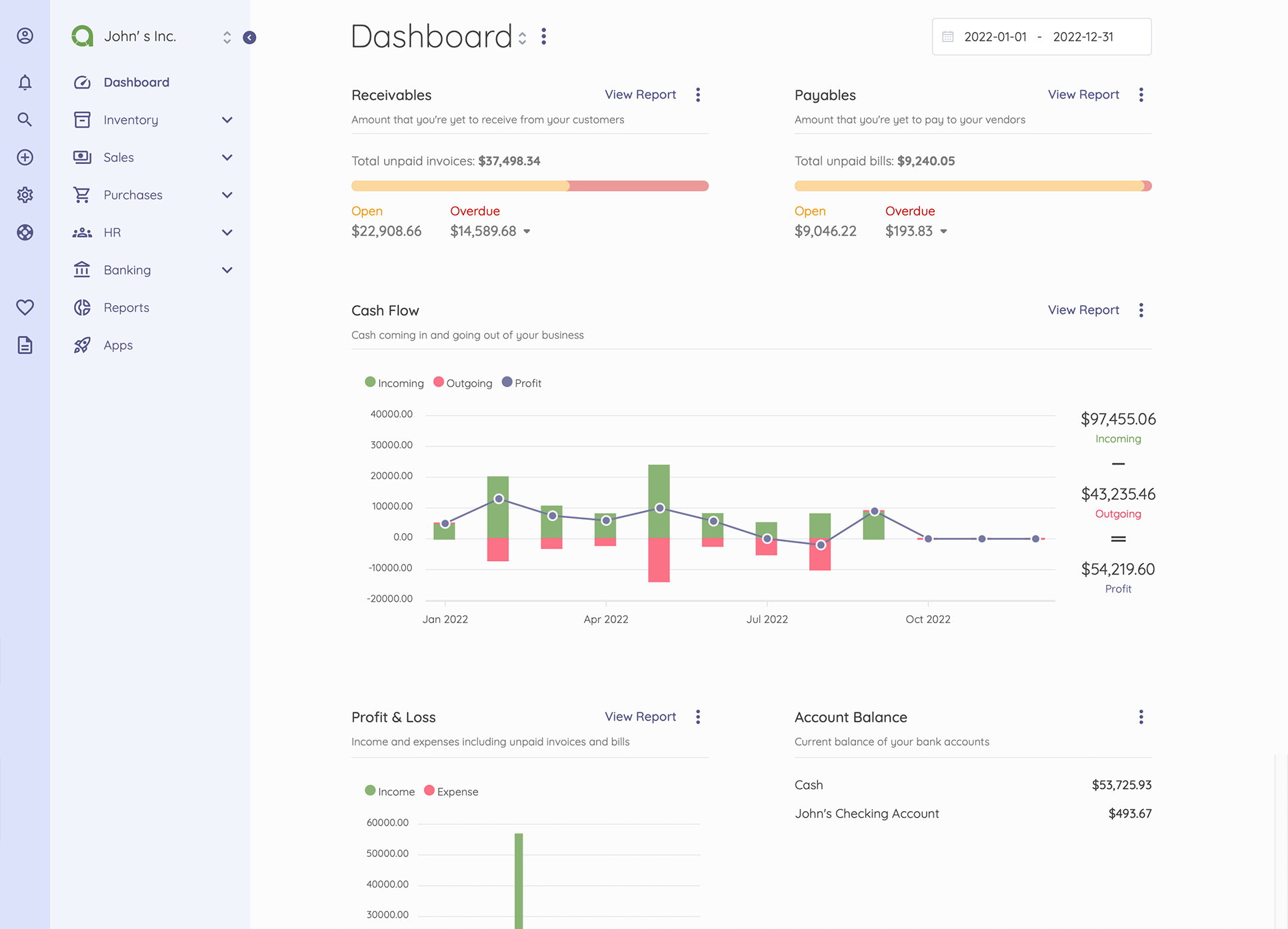
8. Reporting and Dashboards
Financial data becomes more useful when decision-makers can understand it quickly. Budget software should provide clear reports and dashboards for different users.
A finance team may need detailed category-level reports, while executives may prefer a high-level view of revenue, spending, cash requirements, and major variances.
Useful reports can include:
- Budget vs. actual spending
- Department budget reports
- Monthly expense summaries
- Revenue and expense forecasts
- Project budget reports
- Variance reports
- Budget utilization reports
More importantly, reports should help people take action. A dashboard filled with numbers but no useful context can make financial management harder rather than easier.
9. Integration With Financial and Business Systems
Budgeting works best when relevant financial information can move between connected business systems. Depending on your needs, you may want integrations with accounting software, expense systems, payroll, procurement, invoicing, banking, or enterprise resource planning platforms.
For example, purchase information from a procurement process can help managers understand how committed spending affects a department’s remaining budget.
This becomes particularly valuable as a company grows. Instead of entering the same information into multiple spreadsheets and applications, connected systems can reduce duplicate data entry and improve visibility.
Businesses with more specialized workflows may also consider custom ERP development when standard budgeting tools cannot support their financial and operational processes.
10. Access Controls and Audit Trails
Financial information needs appropriate access controls. Budget software should let administrators decide which users can view, create, edit, approve, or export information.
An audit trail can also show important changes, such as who modified a budget and when the change occurred. This creates greater accountability and can make financial reviews easier.
In addition, businesses should maintain reliable financial records. The IRS notes that good business records can support financial statements, expense tracking, and tax-related reporting. Its guidance on keeping business records explains why accurate records matter for business management.
Benefits of Using Budget Software
Moving from spreadsheets to dedicated budget software can change how a business handles financial planning. The value depends on the system and implementation, but several benefits commonly make budgeting more manageable.
Better financial visibility
Managers can see planned spending, actual expenses, and variances in one place instead of combining information manually.
Less manual work
Automated calculations, recurring budgets, reports, and data connections can reduce repetitive spreadsheet work.
Faster decision-making
Current budget information helps managers review spending and make adjustments without waiting for lengthy manual reports.
Stronger accountability
Approval rules, permissions, and audit records can clarify who manages different parts of the budget.
More consistent planning
Standardized categories and templates can help teams follow a common budgeting process across departments.
Budget Software vs. Spreadsheets
Spreadsheets still work well for simple budgets. A small business with limited transactions and one decision-maker may not need a dedicated budgeting platform immediately.
However, spreadsheets can become harder to manage as budgets grow more complex. Multiple versions, manual formulas, disconnected data, and limited approval controls can create additional administrative work.
| Area | Spreadsheets | Budget Software |
|---|---|---|
| Simple budgets | Often sufficient | Useful but may provide more features than needed |
| Multiple departments | Can require complex files | Designed for structured budget management |
| Approvals | Usually manual | Can support defined workflows |
| Variance tracking | Often requires formulas | Usually built into reporting |
| Integration | Depends on tools and setup | Can connect with business systems |
Therefore, the right choice depends on complexity rather than company size alone. A small organization with several departments and frequent financial changes may benefit from dedicated software, while a simple operation may continue using a spreadsheet effectively.
How to Choose the Right Budget Management Software
Before selecting a platform, define what you actually need. A long feature list does not automatically make one solution suitable for your business.
- Identify your budgeting process. Document how your team creates, reviews, approves, and updates budgets today.
- List your data sources. Determine which accounting, expense, payroll, procurement, or ERP systems contain information the budgeting system needs.
- Define user roles. Decide who needs access and what each person should be able to do.
- Choose required reports. Identify the financial reports and dashboards managers need regularly.
- Consider scalability. Choose a system that can support additional departments, projects, users, and reporting requirements as the business changes.
- Review integration options. Check whether the software can connect with the systems your team already uses.
- Evaluate usability. A powerful platform still creates problems if employees struggle to use it.
- Test with real scenarios. Before committing, use sample or controlled business data to test budget creation, approvals, reporting, and variance analysis.
Pro tip
Do not choose budget management software based only on its dashboard. Test the complete workflow from budget creation and approval to expense tracking, variance review, and reporting.
Common Budgeting Mistakes to Avoid
Software can improve the budgeting process, but it cannot replace good financial practices. Businesses should avoid several common mistakes.
Ignoring Actual Spending
A budget loses value when teams create it once and rarely compare it with real results. Review actual spending regularly and investigate meaningful differences.
Using Unrealistic Estimates
A budget should reflect realistic assumptions. Overly optimistic revenue estimates or underestimated costs can make the entire plan difficult to use.
Creating Too Many Categories
Detailed categories can help, but excessive detail can make budgeting harder to maintain. Use categories that provide useful information for decisions.
Failing to Update the Budget
Business conditions change. New projects, hiring, supplier price changes, unexpected repairs, and revenue shifts can all affect financial plans. Therefore, review and update budgets when significant circumstances change.
Keeping Budget Data Isolated
If budget information never connects with actual financial activity, managers may struggle to understand current performance. Wherever practical, connect budgeting with relevant operational and financial systems.
When Should a Business Use Budget Software?
Budget software can make sense when financial planning becomes difficult to manage manually. Signs include multiple departments, frequent budget revisions, complex project costs, recurring approval processes, or a growing need for management reporting.
For example, a company that operates several projects may need separate budgets for each project while still maintaining a company-wide financial view. A spreadsheet can handle this structure, but dedicated software may simplify the process when the number of users, transactions, and budget categories grows.
On the other hand, a very small business with straightforward income and expenses may not need advanced budgeting software. In that case, a well-structured spreadsheet and consistent financial review process may meet current needs.
Final Thoughts
Budget software gives businesses a structured way to plan spending, monitor actual results, analyze variances, and improve financial visibility. The most useful systems do more than store numbers. They connect budgeting with everyday business activity and help managers understand what is changing.
When evaluating budget management software, focus on the features that match your workflow. Budget creation, expense tracking, forecasting, variance analysis, reporting, approvals, integrations, and access controls can all contribute to a more organized process.
Ultimately, the goal is not simply to create a budget. It is to create a repeatable financial planning process that helps your team review performance, respond to changes, and allocate resources with greater clarity.
Build software around how your business works
If your budgeting process involves unique departments, approval rules, financial workflows, or integrations, custom business software can help bring those processes into one system.Talk to our team
Frequently Asked Questions
What is budget software used for?
Budget software helps businesses create budgets, assign spending limits, track actual expenses, compare planned and actual results, forecast future costs, and generate financial reports.
What is the difference between budget software and accounting software?
Accounting software primarily records and manages financial transactions, while budget software focuses on planning, monitoring, and comparing expected financial results with actual performance. Some business platforms combine both capabilities.
Can budget management software replace Excel?
It can replace spreadsheets for many budgeting processes, especially when a business needs multiple users, approval workflows, automated reporting, integrations, or detailed variance tracking. However, simple businesses may still find spreadsheets sufficient.
What features should I look for in budget management software?
Look for budget creation, budget vs. actual tracking, expense management, forecasting, variance analysis, reporting, approval workflows, integrations, user permissions, and audit trails.
How often should a business review its budget?
The right schedule depends on the business. Many teams review financial performance regularly and update forecasts when significant changes occur. Businesses with rapidly changing revenue or costs may need more frequent reviews.
