
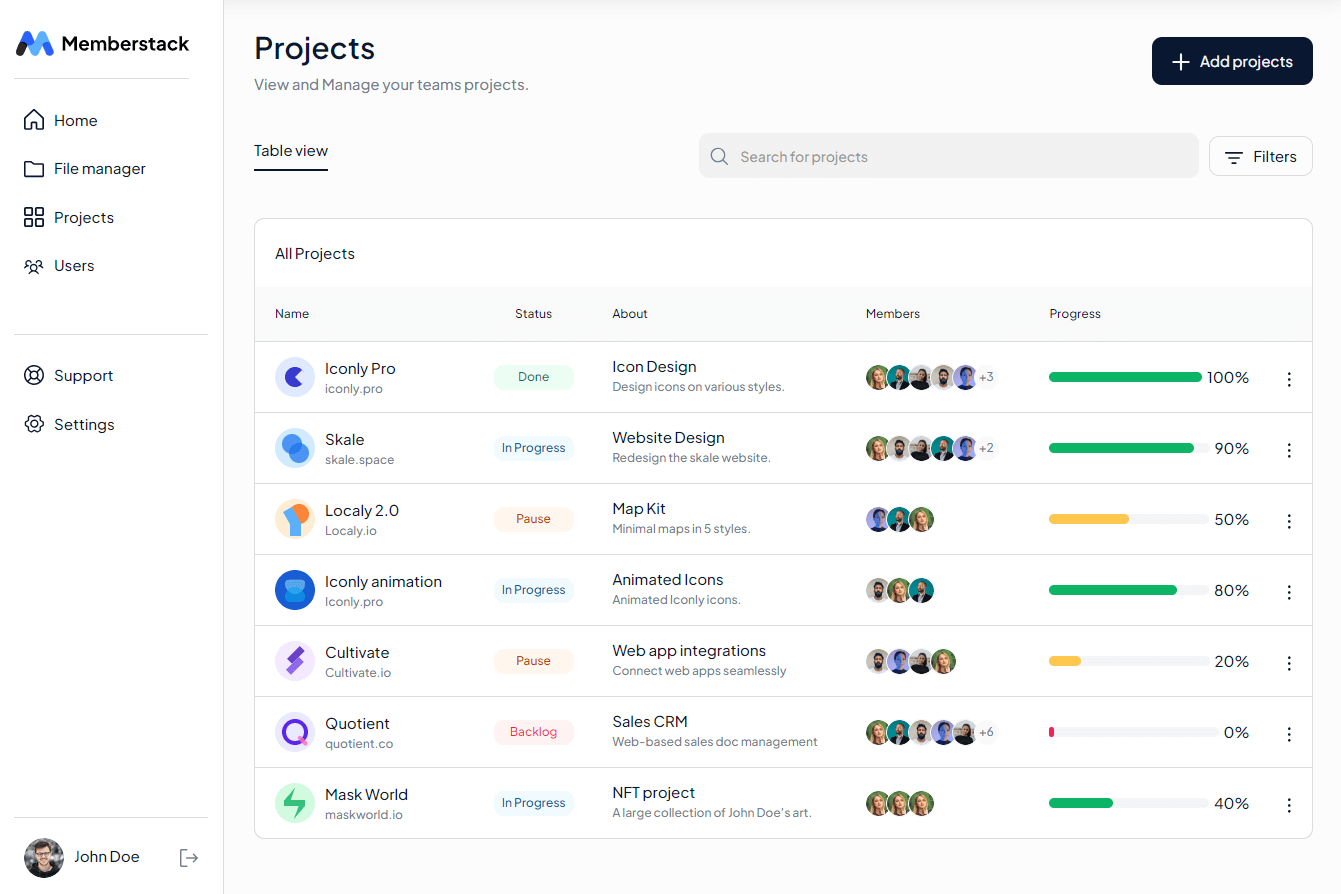
Project Management Software: 10 Features That Keep Projects on Track
Project management software helps teams plan, assign, track, and complete work from one central place. It turns project goals into tasks, deadlines, milestones, and clear ownership, so teams can coordinate work with less confusion. For businesses managing multiple projects, the right platform can also improve visibility into progress, resources, risks, and upcoming work.
In this guide, we will explain how project management software works, the key features to look for, how project planning software supports better execution, common benefits and limitations, and practical mistakes to avoid when choosing a platform.
What Is Project Management Software?
Project management software is a digital platform that helps teams organize and manage projects from planning through completion. Instead of keeping project details across spreadsheets, emails, chat messages, and separate documents, teams can bring tasks, deadlines, files, communication, and progress updates into one workspace.
The goal is not simply to create a digital task list. Effective project management connects individual tasks to larger project goals. For example, a website redesign might include research, wireframes, content creation, development, testing, approval, and launch. A project management system can assign each activity to the right person, set due dates, identify dependencies, and show how the work fits into the overall schedule.
The Project Management Institute describes project management as applying knowledge, skills, tools, and techniques to project activities to meet project requirements. PMI’s explanation of project management provides useful background on scope, deliverables, risk, and communication.
Key takeaway
Project management software gives teams a shared view of what needs to happen, who owns each task, when work is due, and whether the project remains on track.
How Does Project Management Software Work?
Most platforms follow a similar workflow, although the interface and available features can vary. First, a team creates a project and defines its goals. Next, the team breaks the project into smaller tasks and assigns responsibility.
After that, team members update task status as work moves forward. Managers can review deadlines, dependencies, workloads, and progress without asking every employee for a separate update.
For example, a marketing team launching a new campaign could create tasks for keyword research, landing page design, copywriting, email creation, ad setup, testing, and reporting. Each task can have an owner, deadline, priority, attachment, and status.
As a result, everyone works from the same project information instead of maintaining separate versions of the plan.
10 Key Features of Project Management Software
1. Task Management
Task management forms the foundation of most project management systems. Teams can create tasks, assign owners, set deadlines, add priorities, and track status.
Instead of writing “finish website” as one large task, a team can divide it into smaller actions such as create wireframes, approve the design, develop the homepage, test forms, and publish the site. Smaller tasks make ownership and progress easier to understand.
2. Project Planning and Scheduling
Project planning software helps teams turn objectives into an organized schedule. Managers can define milestones, set target dates, arrange tasks, and establish the sequence of work.
This matters because a project plan should show more than a list of activities. It should show how those activities connect and when the team needs to complete them.
For example, a testing task may depend on development finishing first. When the software shows that relationship, the team can identify scheduling problems earlier.
Asana’s project planning resources provide an example of how teams can use project planning tools to organize tasks, milestones, due dates, communication, and progress.
3. Multiple Project Views
Different teams understand work in different ways. Therefore, useful software often provides several project views, such as list, board, calendar, timeline, or Gantt-style views.
A board can work well for teams that move tasks through stages such as To Do, In Progress, Review, and Done. Meanwhile, a timeline can help managers understand schedules, dependencies, and major milestones.
The important point is flexibility. Teams should be able to review the same project from different perspectives without creating duplicate information.
4. Team Collaboration
Projects often involve designers, developers, managers, clients, sales teams, and other stakeholders. Collaboration features help these people communicate around the work itself.
Comments, mentions, file attachments, notifications, and project updates can reduce the need for long email threads. In addition, keeping discussions near the relevant task gives team members useful context when they return to the work later.
5. Deadline and Milestone Tracking
Deadlines give projects structure, while milestones mark important points in the project lifecycle. A milestone might represent a completed design phase, approved prototype, finished testing cycle, or product launch.
Project management software can make these dates visible to the people responsible for the work. Therefore, managers can identify upcoming deadlines before they become urgent problems.
6. Task Dependencies
Some tasks cannot start until another task finishes. These relationships are known as dependencies.
For instance, a developer may need an approved design before development can begin. Similarly, a QA team may need a completed build before it can test a new feature.
Dependency tracking helps teams understand the effect of delays. If one task moves, the project manager can review the connected tasks and adjust the schedule when necessary.
7. Resource and Workload Management
A project can have a realistic schedule on paper but still struggle if one employee has too much work. Resource management helps managers understand who is handling which assignments and whether workloads are balanced.
For example, if one designer owns tasks across five active projects, a manager can review those assignments before adding another urgent request. This visibility supports more realistic planning and better use of available capacity.
8. File and Document Management
Projects often depend on documents, images, specifications, spreadsheets, presentations, and other files. Keeping relevant files with project tasks can make information easier to find.
Instead of searching through old email attachments, team members can open the relevant task and review its supporting material. However, businesses should still consider access permissions, file retention, and security before storing sensitive information in any platform.
9. Reporting and Dashboards
Managers need more than individual task updates. They also need a broader view of project health.
Dashboards and reports can summarize open tasks, completed work, overdue assignments, upcoming milestones, workload, and project status. As a result, managers can spend less time collecting updates and more time addressing blockers.
Reporting also helps leadership review several projects at once. That view becomes especially useful when a business runs multiple client projects or internal initiatives simultaneously.
10. Automation and Integrations
Automation can handle repetitive project activities. For example, a system might create recurring tasks, notify an employee when a task changes status, or assign work after a specific trigger.
Integrations can also connect project information with communication, storage, calendar, customer management, accounting, or other business systems. However, teams should avoid adding integrations simply because they exist. Each connection should solve a real workflow problem.
Project Management Software vs. Project Planning Software
Project management software and project planning software overlap significantly, but the terms can emphasize different parts of the project lifecycle.
| Area | Project Planning Software | Project Management Software |
|---|---|---|
| Primary focus | Planning and scheduling | Planning, execution, tracking, and reporting |
| Typical tools | Milestones, timelines, task plans | Tasks, timelines, collaboration, reporting, automation |
| Best used for | Defining how work should happen | Managing work throughout the project |
| Typical outcome | A structured project plan | A complete workflow for managing delivery |
In practice, many modern platforms combine both functions. A team can create a plan, assign tasks, manage execution, communicate with stakeholders, and review results in the same system.
What Are the Benefits of Project Management Software?
The value of project management software depends on how well it fits the team’s workflow. When implemented correctly, it can provide several practical benefits.
Better project visibility
Managers and team members can see project status, deadlines, ownership, and outstanding work from a shared workspace.
Clearer accountability
Assigning specific tasks to specific people makes responsibility easier to understand and follow.
More organized planning
Teams can connect goals, tasks, milestones, deadlines, and dependencies instead of managing them separately.
Faster status updates
Shared dashboards and task updates reduce the need to collect basic progress information manually.
Better collaboration
Comments, files, notifications, and project discussions keep important context closer to the work.
Earlier problem detection
Overdue tasks, blocked work, and overloaded team members become easier to identify before they affect larger milestones.
How to Choose Project Management Software
There is no single platform that fits every business. Instead, start with your team’s actual workflow and identify the problems the software needs to solve.
Define Your Project Types
First, consider what your business manages. A software development team may need sprints, issue tracking, dependencies, and integrations. A marketing agency may need client approvals, content calendars, recurring tasks, and file sharing.
List Your Essential Features
Next, separate must-have features from nice-to-have features. A small team may need simple task management and deadlines, while a larger organization may need resource planning, portfolio reporting, permissions, and automation.
Check Ease of Use
A feature-rich platform can still create problems if employees struggle to use it. Therefore, test the workflow from a normal employee’s perspective, not only from an administrator’s perspective.
Review Integrations and Data Access
Check whether the platform connects with the tools your business already uses. Also, review user permissions, data export options, security controls, and administrative settings before making a long-term commitment.
Consider Scalability
Your requirements may change as the company grows. Therefore, consider whether the system can support more users, projects, workflows, and reporting needs without creating unnecessary complexity.
Pro tip
Do not choose project management software based only on the number of features. Choose a platform that makes your most important workflows easier to manage every day.
Common Project Management Software Mistakes
Even good software can fail when teams implement it poorly. Fortunately, most problems are avoidable.
- Adding too many features at once: Start with the workflows your team needs most. Add advanced features after employees understand the basics.
- Creating unclear tasks: Write tasks with a clear outcome, owner, and deadline. “Work on campaign” provides less direction than “Approve the campaign landing page copy.”
- Ignoring dependencies: Identify tasks that rely on other work. Otherwise, teams may discover critical blockers too late.
- Failing to update project data: A dashboard only helps when task statuses, deadlines, and assignments remain accurate.
- Using the software as another communication silo: Define when employees should use comments, chat, email, meetings, or project updates. This prevents information from becoming scattered again.
When Does a Business Need Custom Project Management Software?
Off-the-shelf project management software can meet the needs of many teams. However, some businesses have workflows that do not fit standard project structures.
Custom development may make sense when project management connects closely with other business processes, such as customer management, inventory, finance, field operations, approvals, or internal ERP workflows.
For example, a company might need every project to automatically connect with a customer record, purchase requirements, employee assignments, billing stages, and operational reports. In that situation, building a connected workflow can reduce duplicate data entry and give managers a broader view of the business.
Before choosing custom development, however, document the workflow and identify the limitations of existing tools. Custom software requires planning, development, testing, maintenance, and ongoing improvements, so the business should have a clear reason for building instead of buying.
Frequently Asked Questions
Frequently Asked Questions
What is project management software used for?
It helps teams plan projects, create and assign tasks, manage deadlines, collaborate, track progress, manage resources, and report on project performance.
What is the difference between project management and project planning software?
Project planning software focuses mainly on creating schedules, tasks, milestones, and plans. Project management software usually covers planning plus execution, collaboration, tracking, reporting, and workflow management.
What features should project management software have?
Common features include task management, scheduling, project views, collaboration, deadlines, dependencies, resource management, file sharing, reporting, automation, and integrations.
Is project management software useful for small businesses?
Yes. Small businesses can use it to organize responsibilities, deadlines, client work, internal projects, and recurring processes. The key is choosing a system that matches the team’s size and workflow.
Can project management software integrate with ERP systems?
Many platforms support integrations, while custom solutions can connect project workflows directly with ERP processes. The right approach depends on the systems, data, and workflows a business needs to connect.
Final Thoughts
Project management software gives teams a structured way to plan work, assign responsibilities, monitor deadlines, and keep projects moving. The most useful platforms combine planning, execution, collaboration, reporting, and visibility without making everyday work unnecessarily complicated.
Therefore, start by identifying the problems your team needs to solve. Then compare features, usability, integrations, scalability, and workflow fit. If standard tools cannot support important business processes, custom development may provide a more connected approach.
Ultimately, the right system should make project information easier to manage and help people understand what needs to happen next.
For additional guidance on organizing operational workflows, see our resources on warehouse management system features, work order management software, event management system planning, and work order management system workflows.
Build software around how your business works
When standard tools do not fit your processes, a custom business system can connect project workflows with the other operations your team manages.Talk to our team
