
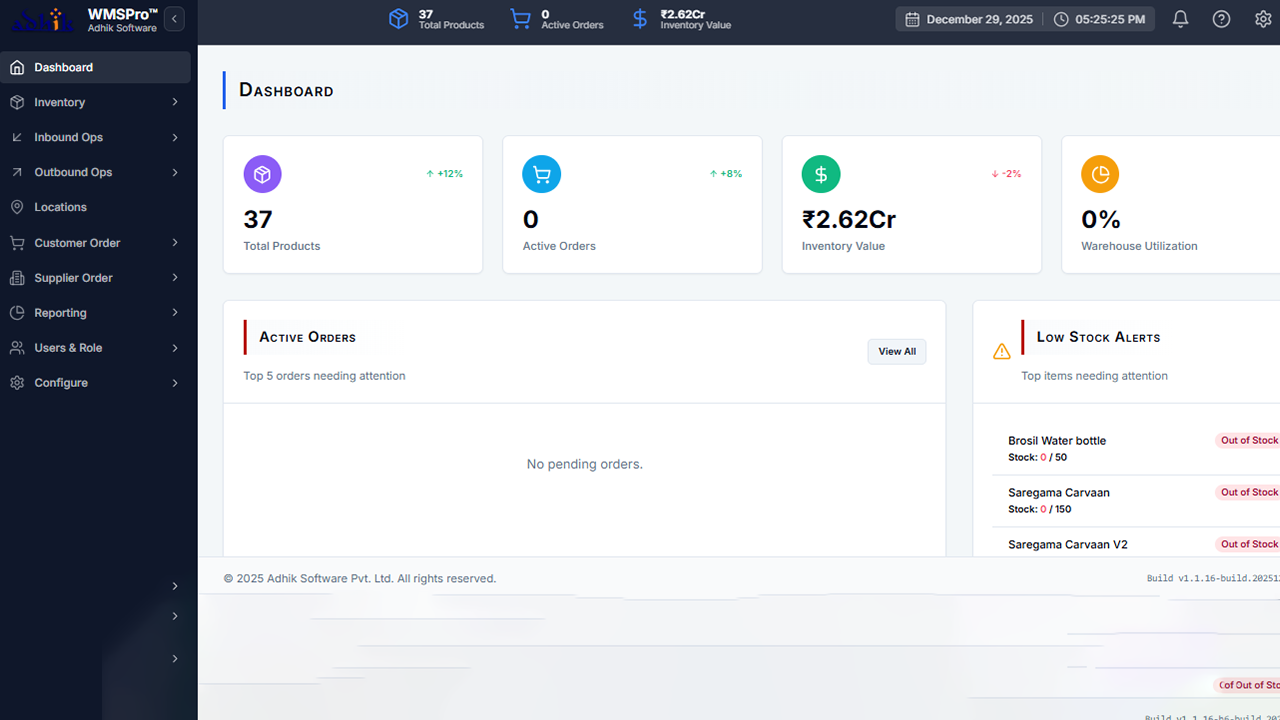
Warehouse Management System: 10 Features That Improve Inventory and Warehouse Operations
A warehouse management system (WMS) is software that helps businesses control and coordinate warehouse activities, from receiving goods to storing, picking, packing, and shipping orders. By bringing inventory and warehouse workflows into one system, a WMS can give teams better visibility, reduce manual work, and improve order accuracy.
However, choosing or building the right system requires more than looking at an inventory screen. The software should match how your warehouse actually operates. In this guide, we will explain how a warehouse management system works, its key features and benefits, important integrations, implementation considerations, common mistakes, and when a custom solution may make sense.
What Is a Warehouse Management System?
A warehouse management system is a software platform designed to manage inventory and day-to-day warehouse operations. It helps teams track where products are stored, what comes into the warehouse, what leaves it, and which tasks employees need to complete.
For example, when a shipment arrives, the system can record the received items, assign storage locations, update inventory quantities, and make the products available for future orders. Later, when a customer order arrives, the system can guide workers through picking, packing, and shipping.
According to Oracle’s overview of warehouse management systems, modern WMS solutions can provide visibility into inventory and help coordinate fulfillment, labor, space, and material flows.
Key takeaway
A WMS does more than count products. It connects inventory data with the physical movement of goods and the tasks employees perform inside the warehouse.
How Does a Warehouse Management System Work?
A warehouse management system typically follows the movement of goods through several connected stages. While workflows vary by business, the basic process often looks like this:
- Receiving: Employees record incoming products and compare them with purchase orders or expected shipments.
- Putaway: The system assigns or recommends storage locations based on warehouse rules and available space.
- Storage: Inventory records show where products are located and how much stock each location contains.
- Picking: Workers receive instructions for collecting products needed for customer or internal orders.
- Packing: Picked items move through packing and verification before shipment.
- Shipping: The system records outgoing goods and updates inventory after dispatch.
- Returns: Returned products can enter a separate workflow for inspection, restocking, repair, or disposal.
As a result, warehouse employees do not need to rely entirely on spreadsheets, paper lists, or memory. Instead, the system creates a shared operational record that different teams can use.
10 Key Features of Warehouse Management Software
The exact feature set depends on the size and complexity of a warehouse. Nevertheless, several capabilities provide the foundation for effective warehouse management software.
1. Inventory Tracking
Inventory tracking gives businesses a current view of products across warehouse locations. Users can monitor quantities, product identifiers, storage locations, and inventory movements.
This becomes particularly useful when a business manages thousands of products or operates multiple storage areas. Instead of asking employees to search through separate files, managers can use one system to locate inventory information.
For businesses that also need broader customer and stock visibility, a CRM inventory management system can connect customer information with inventory data.
2. Receiving Management
Receiving is the first major checkpoint for incoming inventory. A WMS can help employees record shipments, verify quantities, identify discrepancies, and update stock records.
For example, if a supplier sends 95 units instead of the expected 100, employees can record the actual quantity rather than manually changing inventory later. This creates a clearer record of what arrived and when it arrived.
3. Putaway and Location Management
After receiving, products need suitable storage locations. Warehouse management software can organize warehouses into zones, aisles, racks, shelves, bins, or other locations.
The system can also support rules for assigning products to locations. For instance, frequently picked items may need convenient locations, while products with special storage requirements may need dedicated areas.
4. Picking and Order Fulfillment
Picking directly affects order fulfillment. A WMS can create picking tasks and help workers identify the products and quantities required for each order.
Depending on the warehouse, businesses may use single-order picking, batch picking, zone picking, or other methods. The right method depends on order volume, product characteristics, warehouse layout, and staffing.
5. Barcode Scanning
Barcode scanning connects physical products with digital inventory records. Workers can scan products, bins, pallets, or shipments instead of typing information manually.
GS1 explains how standardized identifiers can help warehouse operators identify products, locations, and logistics units consistently. This matters because accurate identification makes it easier to connect physical warehouse activity with inventory records.
Businesses can review GS1’s warehouse management guidance for additional information about inventory visibility and standardized identification.
6. Stock Counting and Inventory Accuracy
Warehouse teams need regular checks to confirm that recorded inventory matches physical stock. A WMS can support cycle counting, physical counts, and inventory adjustments.
Instead of shutting down an entire warehouse for every stock check, businesses can use cycle counting to review selected products or locations at scheduled intervals. The exact approach should match the organization’s inventory control process.
7. Packing and Shipping
Once workers pick an order, the system can move it through packing and shipping workflows. Employees can verify the contents, record package information, and update the order status.
Therefore, warehouse teams gain a clearer connection between the original order and the goods that actually leave the facility.
8. Returns Management
Returns can create confusion when businesses handle them outside their normal inventory process. A warehouse management system can create a structured workflow for returned products.
For example, employees can classify a returned item as ready for resale, damaged, pending inspection, or requiring repair. This helps prevent returned products from disappearing into an unclear inventory status.
9. Reporting and Dashboards
Managers need more than raw transaction records. They also need a clear view of warehouse activity.
Useful dashboards may show inventory levels, receiving activity, pending orders, picking progress, stock adjustments, shipment status, and other operational information. As a result, managers can identify bottlenecks and investigate unusual activity sooner.
10. Integration With Business Systems
A WMS rarely operates in isolation. Businesses often need it to exchange information with ERP, accounting, e-commerce, purchasing, order management, transportation, or customer systems.
For example, an order system may send an order to the warehouse. The WMS then manages picking and shipping and sends the updated fulfillment status back. This reduces the need for employees to enter the same information into multiple systems.
Oracle’s warehouse documentation also describes integrations across inventory, purchasing, order management, receiving, shipping, and other supply chain functions. Oracle’s WMS documentation provides a practical example of how these warehouse processes connect.
Warehouse Management System vs. Inventory Management Software
These terms often overlap, but they are not always the same.
| Area | Inventory Management | Warehouse Management System |
|---|---|---|
| Primary focus | Stock quantities and inventory records | Warehouse operations and inventory movement |
| Location tracking | May be basic | Usually more detailed |
| Picking workflows | Often limited | Core capability |
| Receiving | Basic stock updates | Detailed receiving workflows |
| Warehouse tasks | Limited | Task-based management |
| Barcode and scanning | May be available | Commonly integrated into workflows |
In practice, the right choice depends on operational complexity. A small business with a simple storage setup may only need inventory software. Meanwhile, a business with multiple warehouse zones, frequent orders, complex picking processes, or several facilities may benefit from a dedicated WMS.
Benefits of a Warehouse Management System
A warehouse management system can improve several areas of daily operations when the software matches the business process.
Better inventory visibility
Teams can see inventory quantities and locations through a centralized system instead of relying on disconnected records.
More consistent workflows
Standardized receiving, picking, packing, and shipping processes give employees clearer instructions for routine tasks.
Fewer manual entries
Barcode scanning, automated status updates, and integrations can reduce repetitive data entry.
Improved order visibility
Managers can track orders as they move through warehouse stages and identify delays more easily.
Better use of warehouse space
Structured location management can help teams understand where inventory sits and how storage areas are organized.
However, software alone cannot fix an inefficient warehouse layout or unclear operating procedures. The system should support a well-defined process rather than simply digitizing a confusing one.
When Should a Business Use a WMS?
A WMS becomes more valuable as warehouse operations become harder to manage manually. Consider it when your business experiences problems such as:
- Frequent inventory discrepancies
- Difficulty finding products inside the warehouse
- Growing order volumes
- Multiple warehouse locations
- Slow receiving or picking processes
- Heavy dependence on spreadsheets
- Limited visibility into order status
- Complex product or storage requirements
- Frequent returns or inventory adjustments
- Need for integration with an ERP or e-commerce platform
On the other hand, a very small operation with limited inventory and simple order flows may not need a full WMS. In that case, simpler inventory or order management tools may provide enough functionality without adding unnecessary complexity.
How to Choose the Right Warehouse Management Software
Start with your warehouse processes, not with a feature checklist. Document how products arrive, where employees store them, how orders enter the warehouse, how workers pick products, and how shipments leave.
Next, identify the points where errors or delays occur. These problems should guide your software requirements.
- Define warehouse requirements: List locations, products, order volumes, users, workflows, and integration needs.
- Check core functionality: Confirm that the software supports receiving, putaway, inventory tracking, picking, packing, shipping, and returns where needed.
- Evaluate usability: Warehouse employees should be able to complete routine tasks without unnecessary complexity.
- Review integration options: Check how the WMS exchanges data with your ERP, accounting, e-commerce, purchasing, and other systems.
- Consider scalability: Make sure the system can support additional users, products, locations, and transaction volume as your business grows.
- Review reporting: Identify the operational information managers need for daily decisions.
- Test real workflows: Use realistic receiving, picking, shipping, and return scenarios during evaluation.
Pro tip
Ask warehouse employees to test the system before deployment. A feature that looks useful on a product page may still create friction during a busy receiving or picking shift.
Common Warehouse Management Mistakes to Avoid
Choosing software without mapping processes
Businesses sometimes purchase software first and attempt to adapt their workflows afterward. Instead, document the current process and identify what needs improvement before selecting the system.
Ignoring integrations
A WMS that cannot exchange reliable data with your other systems may create new manual work. Therefore, integration requirements should form part of the initial evaluation.
Overcomplicating the user experience
Warehouse workers often need fast access to a small number of actions. If every task requires too many screens or fields, adoption can suffer.
Skipping data cleanup
Incorrect product names, duplicate SKUs, missing locations, and outdated inventory records can undermine a new system. Clean data before migration whenever possible.
Ignoring warehouse safety
Software should support warehouse operations, but it does not replace safety procedures or worker training. OSHA identifies hazards such as powered industrial trucks, material handling, ergonomics, falls, and robotics in warehouse environments. Businesses should therefore consider safety requirements alongside operational technology.
For additional guidance, review the OSHA warehousing safety resources relevant to your facility and jurisdiction.
Custom vs. Off-the-Shelf Warehouse Management Software
Off-the-shelf software can work well when a business follows common warehouse workflows. It may offer standard inventory, receiving, picking, shipping, reporting, and integration features without requiring a system to be built from scratch.
Custom development becomes more relevant when a business has unique processes that standard products cannot support efficiently. For example, a company may need specialized approval flows, unusual inventory rules, custom dashboards, or deep integration with an existing ERP.
Before choosing custom development, compare the cost and complexity against the value of the required functionality. A custom system should solve a real operational problem, not simply provide different screens.
For businesses that need warehouse workflows as part of a broader enterprise platform, purchase order management software and warehouse processes can also work together. Purchase information can provide context for incoming inventory, while the warehouse system manages physical receiving and storage.
How a WMS Can Fit Into an ERP Environment
An ERP system manages broad business functions such as finance, purchasing, sales, inventory, and operations. A WMS focuses more deeply on warehouse execution.
For example, an ERP may contain a purchase order for 500 units. The WMS can use that information during receiving, record the actual quantity received, assign storage locations, and track subsequent inventory movements.
Similarly, when an order reaches the warehouse, the WMS can manage the physical fulfillment process while the ERP maintains the wider business transaction.
This connection becomes especially important when businesses operate manufacturing or distribution processes. A manufacturing management system, for example, may need to coordinate with warehouse inventory so materials and finished products remain visible across production and storage workflows.
Warehouse Management System Implementation Checklist
A successful implementation requires more than installing software. Use the following checklist as a starting point:
- Map current warehouse processes.
- Define required user roles and permissions.
- Clean product, SKU, location, and supplier data.
- Define warehouse zones and storage locations.
- Configure receiving and putaway workflows.
- Configure picking, packing, and shipping workflows.
- Set up barcode scanners or other required devices.
- Connect the WMS with relevant business systems.
- Test realistic warehouse scenarios.
- Train employees on their daily workflows.
- Monitor errors and process bottlenecks after launch.
More importantly, introduce changes in manageable stages when possible. Teams can learn faster when they understand how each new workflow affects their daily tasks.
Important
Do not measure implementation success only by whether the software goes live. Track whether employees can use the system correctly and whether the new workflow improves visibility, accuracy, and operational control.
Frequently Asked Questions
What is the main purpose of a warehouse management system?
The main purpose is to coordinate warehouse operations and provide better control over inventory movement. A WMS can support receiving, storage, picking, packing, shipping, returns, and inventory tracking.
What is the difference between WMS and inventory management software?
Inventory management software primarily tracks stock and inventory records. A WMS goes further by managing physical warehouse workflows such as receiving, putaway, picking, packing, and shipping.
Can a warehouse management system integrate with an ERP?
Yes. Many WMS platforms integrate with ERP systems to exchange information about products, purchase orders, sales orders, inventory, receiving, fulfillment, and shipments.
Does a small business need warehouse management software?
Not always. A small business with simple inventory and order processes may only need basic inventory tools. A WMS becomes more useful when inventory, locations, order volume, or warehouse workflows become difficult to manage manually.
Can a WMS manage multiple warehouses?
Many warehouse management systems support multiple facilities or warehouse locations. However, businesses should verify multi-location capabilities before selecting a platform.
Final Thoughts
A warehouse management system can bring inventory, warehouse tasks, and fulfillment workflows into one operational platform. The strongest results come when the software matches the way employees actually receive, store, pick, pack, ship, and return products.
Start by mapping your current processes and identifying the biggest sources of errors or delays. Then evaluate the features, integrations, usability, scalability, and reporting capabilities that address those problems. If standard warehouse management software cannot support important business-specific workflows, custom development may provide a more suitable path.
Build software around how your business works
If your warehouse requires workflows that standard software cannot handle efficiently, a custom enterprise solution can connect warehouse operations with your broader business processes.Talk to our team
