
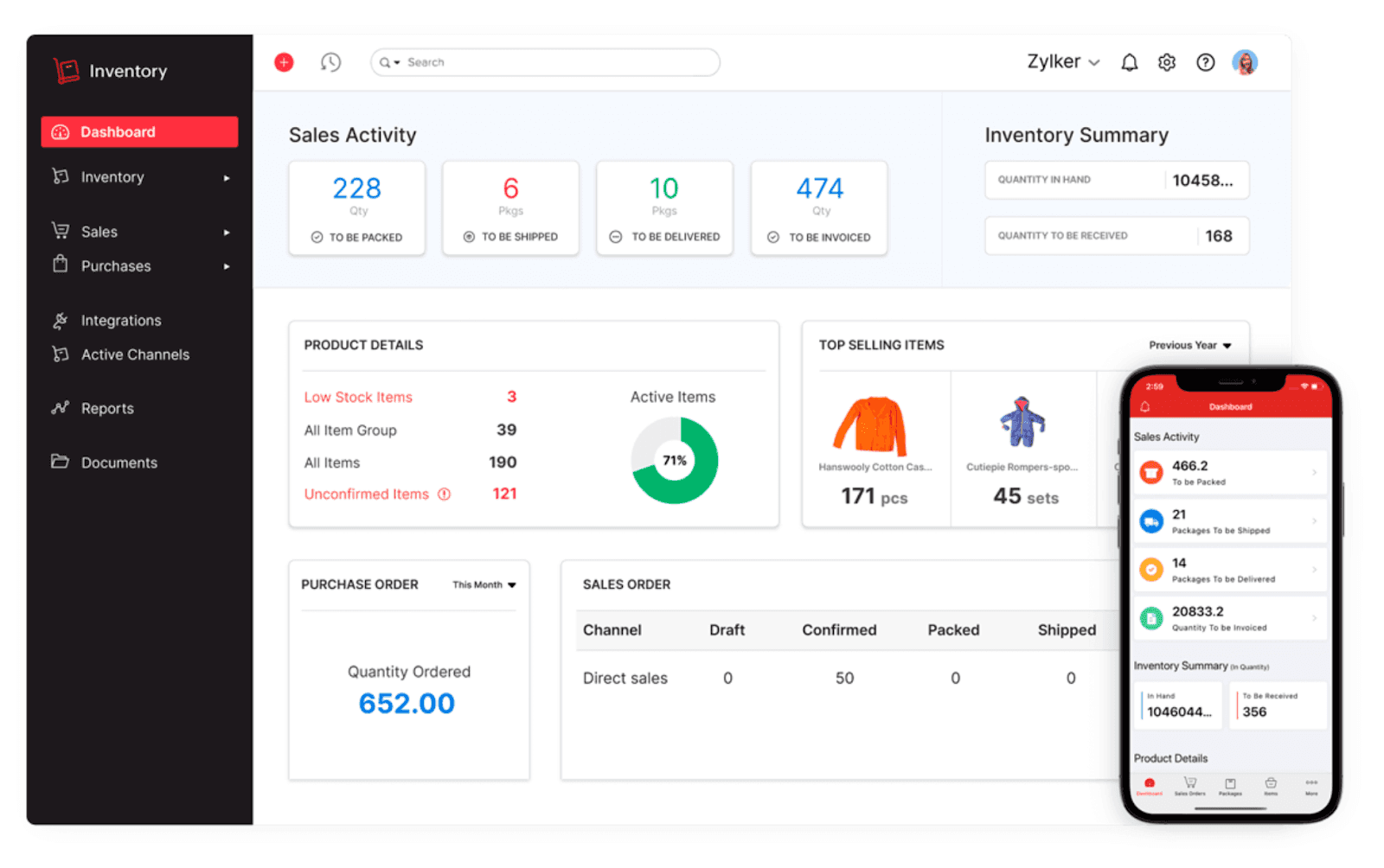
CRM Inventory Management Software: 9 Features to Improve Stock and Customer Management
CRM inventory management software connects customer relationships with stock, orders, products, and sales activity in one system. Instead of asking sales teams to check a separate inventory tool before promising a product, businesses can give them access to relevant stock information alongside customer records. This helps teams coordinate sales and inventory decisions with fewer gaps.
In this guide, we will explain how CRM inventory management works, the features businesses should look for, how it supports sales and customer service, and when an integrated or custom solution makes sense. We will also cover common mistakes and explain how complaints management software can fit into the same workflow.
Key takeaway
The value of CRM inventory management comes from connecting customer information with product and stock data. The goal is not simply to store more records, but to help teams make better decisions using the same business information.
What Is CRM Inventory Management Software?
CRM inventory management software combines customer relationship management with inventory-related processes. A traditional CRM focuses on leads, contacts, accounts, deals, and customer interactions. An inventory system, meanwhile, focuses on products, stock levels, warehouses, purchase activity, and orders.
When these functions work together, sales and operations teams can share information instead of maintaining disconnected records. For example, a salesperson can review a customer’s previous purchases while checking whether the requested product is available.
Inventory management itself involves tracking stock as products move through an organization. The Association for Supply Chain Management’s inventory management overview explains how businesses track products as they move in and out of warehouses and balance supply with demand.
Therefore, CRM inventory management is particularly useful for businesses that sell physical products and need customer, sales, and stock information to work together.
How Does CRM Inventory Management Work?
The basic process starts with a shared customer and product database. When a sales representative creates or updates a customer record, the system can connect that customer to quotes, orders, products, invoices, and other relevant transactions.
For example, imagine a distributor receives an order request for 50 units. The sales representative can review the customer’s account, check product availability, confirm the order details, and move the opportunity forward without relying on several disconnected spreadsheets.
In an integrated system, information can also move between CRM and inventory modules. For example, Zoho’s CRM and Inventory integration documentation describes syncing customers, vendors, items, and transaction information between the two systems.
In practice, the workflow can look like this:
- A lead becomes a customer or sales opportunity.
- The sales team selects the required products or services.
- The system checks relevant inventory information.
- The team creates a quote, sales order, or other transaction.
- Inventory records update according to the configured workflow.
- Customer and order information remains available for future interactions.
The exact workflow depends on the business. However, the central idea remains the same: connect customer activity with operational information.
9 Key Features of CRM Inventory Management Software
1. Customer and Product Records in One Place
A connected system should let users view customer information alongside relevant products and transactions. This gives sales representatives more context before they make an offer or respond to a request.
For instance, a customer record might show previous purchases, open opportunities, recent orders, outstanding issues, and products that the customer regularly buys. As a result, employees spend less time searching across different systems.
2. Real-Time or Synchronized Stock Information
Stock visibility is one of the most important reasons to connect CRM and inventory processes. Sales teams need reliable information before they commit to product quantities or delivery expectations.
Depending on the platform, inventory information may update in real time or through scheduled synchronization. Either way, businesses should define which records need immediate updates and which can tolerate a delay.
Important
Do not assume that every CRM inventory integration provides real-time synchronization. Check the platform’s actual sync rules, update frequency, supported modules, and error handling before implementation.
3. Product and SKU Management
Businesses with many products need more than simple product names. A useful system can store information such as SKU, product description, pricing, availability, categories, and other fields that sales and operations teams need.
Furthermore, consistent product records reduce confusion when several departments work with the same catalog. Sales can use the same product information that operations uses for inventory and order processing.
4. Sales Orders and Transaction Management
CRM inventory management becomes more useful when sales activity connects directly to orders. Instead of treating a closed deal as the end of the CRM process, the system can continue the workflow into order fulfillment and related operations.
For example, a sales opportunity can lead to a quote, then a sales order, and finally an invoice or fulfillment process. This creates a clearer connection between what the customer requested and what the business needs to deliver.
5. Low-Stock Alerts and Reorder Workflows
Inventory teams need to know when stock approaches a defined threshold. A CRM inventory solution can support alerts or workflows that bring low-stock products to the attention of the right team.
However, an alert should not automatically mean that a business should purchase more inventory. Teams should consider demand, open orders, supplier lead times, storage capacity, and purchasing rules before placing an order.
For businesses that already use a dedicated inventory platform, CRM integration can provide sales teams with the relevant information without replacing the existing inventory system.
6. Customer Order History
Order history gives sales and support teams useful context. A representative can see what a customer purchased previously, identify recurring products, and understand the relationship beyond a single sales opportunity.
This information can also help customer service teams investigate questions about orders. Instead of asking the customer to repeat basic details, employees can start with the records already available in the system.
7. Complaint and Issue Tracking
Inventory problems can sometimes create customer complaints. A delayed order, incorrect item, unavailable product, or fulfillment issue may require follow-up from customer service.
That is where complaints management software can complement CRM inventory management. The complaint record can connect the customer’s issue with the related order, product, employee, or transaction.
For example, if a customer reports receiving the wrong product, the support team could record the complaint, associate it with the customer and order, assign it to the responsible team, and track the resolution.
Businesses that need more detailed complaint workflows can also use the complaint management system features covered by Oxen Softwares as a reference when defining their requirements.
8. Reports and Dashboards
Connected data becomes more valuable when managers can turn it into useful reports. A CRM inventory dashboard might show sales activity, product demand, open orders, low-stock items, and customer-related information.
More importantly, reports should answer practical business questions. For example:
- Which products generate the most sales?
- Which products have low available stock?
- Which customers place repeat orders?
- Which orders remain open?
- Which inventory issues create customer complaints?
These questions are more useful than dashboards filled with metrics that no team actually uses.
9. Integrations and Workflow Automation
Businesses often rely on accounting tools, ecommerce platforms, payment systems, shipping services, and other applications. CRM inventory management software should therefore support integrations that fit the existing workflow.
Automation can also reduce repetitive work. For example, a completed sales stage could trigger a quote or order workflow, while a low-stock condition could notify an inventory manager.
At the same time, automation needs clear rules. Poorly designed workflows can create duplicate records, incorrect updates, or unnecessary notifications.
CRM Inventory Management vs. Separate CRM and Inventory Systems
Businesses generally have two approaches. They can use a platform that combines CRM and inventory capabilities, or they can connect separate CRM and inventory applications.
| Area | Combined System | Separate Systems |
|---|---|---|
| Customer data | Centralized in one environment | Requires synchronization or shared access |
| Inventory data | Available within the same workflow | Usually managed in a dedicated system |
| Implementation | Can be simpler when modules already work together | May require integration and field mapping |
| Customization | Depends on the platform | Can combine specialized tools, but integration adds complexity |
| Data synchronization | Handled within the platform | Requires defined sync rules |
Neither approach fits every business. A smaller company with straightforward operations may prefer one connected platform. On the other hand, a company with an established inventory system may gain more value by integrating that system with its CRM.
Benefits of Connecting CRM and Inventory Data
The main benefit is better information flow between teams. Sales can understand product availability, while operations can see the customer and order context behind demand.
Fewer information gaps
Teams work from connected customer, product, and transaction records instead of maintaining separate versions of the same information.
Better sales coordination
Sales representatives can consider inventory information when discussing products, quantities, and orders with customers.
Faster customer support
Support teams can review order and product information while handling customer questions or complaints.
More consistent reporting
Managers can connect sales activity with product and order information to understand business performance in context.
Less duplicate entry
When systems synchronize appropriate records, employees do not need to repeatedly enter the same customer or product information.
How to Choose CRM Inventory Management Software
Start with the business process rather than the feature list. Before comparing software, document how a lead becomes a customer, how customers place orders, how inventory changes, and how teams handle product-related issues.
Next, identify the data that must move between CRM and inventory. This might include customers, contacts, products, stock levels, vendors, quotes, sales orders, invoices, and order status.
Then evaluate the following areas:
- Customer and product data structure
- Inventory visibility
- Order and transaction workflows
- Integration capabilities
- Automation rules
- Reporting and dashboards
- User permissions
- Data import and migration
- Synchronization frequency
- Error handling and audit history
- Scalability and customization
Most importantly, test the workflows with realistic business scenarios. A software demo may look impressive, but the real question is whether employees can complete everyday tasks without unnecessary workarounds.
Common Mistakes to Avoid
Using Inventory Data Without Clear Ownership
Teams should know who owns product records, stock adjustments, and synchronization rules. Otherwise, users may make conflicting changes or lose track of which system contains the authoritative record.
Ignoring Data Quality
Duplicate customers, inconsistent SKUs, missing product fields, and outdated records can undermine an otherwise capable system. Therefore, clean the data and define naming rules before connecting systems.
Automating Every Possible Task
Automation should solve a real problem. If a workflow does not save time, improve accuracy, or create better visibility, adding it may create more complexity instead of less.
Choosing Software Before Mapping Processes
Businesses sometimes select a tool based on its feature list and only later discover that it does not match their workflow. Instead, map the process first and use those requirements to evaluate the software.
Pro tip
Create a simple process map before selecting a CRM inventory solution. Include sales, inventory, purchasing, order fulfillment, customer service, and complaint handling. This makes missing integrations and duplicate steps easier to spot.
When Does a Custom CRM or ERP Solution Make Sense?
Off-the-shelf software can work well when a business follows standard processes. However, some companies have unique product structures, approval workflows, pricing rules, warehouse processes, or customer service requirements.
In those cases, forcing the business to change every process around a generic platform may create unnecessary work. A custom solution can instead connect the required CRM, inventory, order, reporting, and workflow functions around the company’s actual operating model.
For businesses that need broader business process integration, custom ERP development can provide a way to build connected workflows around specific operational requirements.
The right choice depends on the gap between the business process and the available software. Custom development makes more sense when the required workflows are important enough to justify the additional planning, development, testing, and maintenance involved.
Frequently Asked Questions
Frequently Asked Questions
What is CRM inventory management software?
CRM inventory management software connects customer relationship data with product, stock, order, and sales information. It helps teams manage customer activity and inventory-related processes within a connected workflow.
Can CRM software track inventory?
Some CRM platforms include inventory features, while others connect to dedicated inventory systems. The available functions depend on the software and its integrations.
What is the difference between CRM and inventory management?
CRM focuses mainly on customers, leads, sales, and relationships. Inventory management focuses on products, stock, purchasing, warehouses, and order fulfillment. Integrating the two connects customer demand with product availability.
How does complaints management software work with inventory systems?
Complaints management software can connect customer complaints with related orders, products, and transactions. This helps support teams investigate issues and track their resolution.
Should a small business use CRM inventory management software?
It can make sense when sales teams need regular access to inventory information or when disconnected systems create duplicate work. However, businesses should choose a solution that matches their actual process and operational complexity.
Conclusion
CRM inventory management software brings customer, sales, product, stock, and order information closer together. When implemented around clear business processes, it can improve visibility between sales, operations, and customer service teams.
Start by mapping your current workflow, identifying the information teams need, and deciding which processes require synchronization or automation. Then compare integrated platforms with separate CRM and inventory systems based on your actual requirements.
If standard software cannot support important workflows without repeated workarounds, custom development may provide a more suitable path. The key is to build around the way your business operates, rather than adding technology without a clear process goal.
Build software around how your business works
If your CRM, inventory, sales, and operational workflows need to work together, a custom solution can be designed around your specific business processes and data requirements.Talk to our team
