
Best Booking Software for Salons: 9 Features to Look For in 2026
Finding the best booking software for salons can make appointment management much easier. The right system lets clients book online, helps staff manage schedules, reduces booking conflicts, and keeps important client details in one place. For a busy salon, these features can save time and create a smoother experience for both staff and customers.
However, not every booking platform offers the same tools. Some focus mainly on online appointments, while others combine scheduling with payments, client management, reminders, reporting, and other business functions. In this guide, we will explain the key features to look for, compare common types of salon booking software, discuss pricing considerations, and show how to choose a system that fits your salon.
What Is Salon Booking Software?
Salon booking software is a digital system that helps salons manage appointments and client bookings. Customers can usually view available services, choose a preferred date and time, select a stylist, and confirm an appointment without calling the salon.
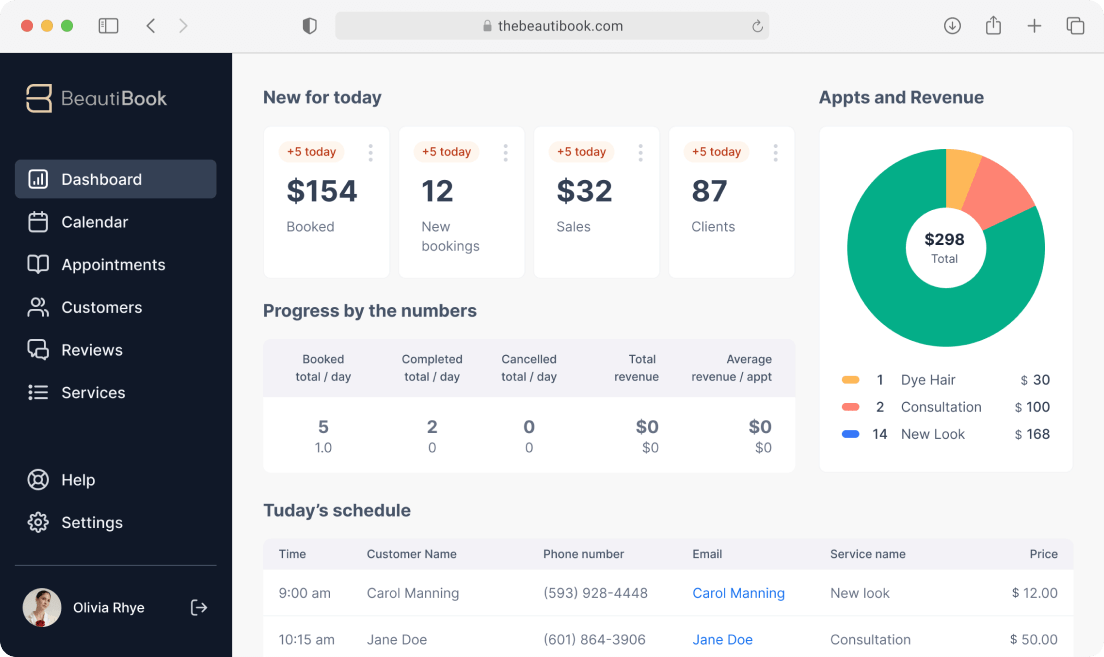
Meanwhile, salon staff can manage the appointment calendar, update availability, reschedule clients, track cancellations, and send appointment reminders. Depending on the platform, the system may also connect bookings with payments, customer records, memberships, and reporting.
For example, a customer might visit a salon website after business hours and book a haircut for the following week. The software checks the selected stylist’s availability, adds the appointment to the calendar, and sends a confirmation. Therefore, staff do not need to handle every booking manually.
Why Salons Need a Booking and Scheduling System
Manual appointment books and phone-based scheduling can work for a very small salon. However, they become harder to manage as the number of clients, stylists, and services grows.
A digital booking system can centralize appointment information and give customers a self-service option. In addition, staff can spend less time answering routine scheduling calls and more time serving clients.
- 24/7 booking: Clients can request appointments outside normal business hours.
- Fewer scheduling conflicts: The system can check availability before confirming appointments.
- Better staff coordination: Each stylist can have separate working hours and availability.
- Automated reminders: Clients can receive appointment confirmations and reminders.
- Easier rescheduling: Staff and clients can update appointments without rewriting a paper calendar.
- Centralized client information: Appointment history and preferences can stay connected to customer profiles.
For a broader look at how digital systems can support recurring customer relationships, see this guide to membership management system features.
9 Features to Look for in the Best Booking Software for Salons
1. Online Appointment Booking
Online booking should sit at the center of a modern salon scheduling system. Customers should be able to view available services and appointment times without contacting the front desk.
More importantly, the booking experience should work well on smartphones. Many customers search for services and manage appointments from mobile devices, so a complicated booking form can create unnecessary friction.
Look for software that supports a simple flow such as service selection, stylist selection, date and time selection, customer details, and confirmation. Square also highlights mobile-friendly online booking and real-time availability as important considerations when choosing salon scheduling software. Square’s guide to hair salon booking systems provides additional guidance on features to evaluate.
2. Multi-Staff Calendar Management
A salon rarely has just one appointment schedule. Several stylists may work at different times, offer different services, or take time off during the week.
Therefore, the best salon scheduling software should provide a clear calendar that shows staff availability in one place. Managers should be able to see who is working, which slots are occupied, and where open appointments remain.
Drag-and-drop scheduling can also make daily changes easier. For example, if a client needs to move an appointment from Tuesday to Wednesday, staff can update the calendar without rebuilding the entire schedule.
3. Service and Staff Availability Rules
Not every stylist offers every service. One stylist may specialize in hair coloring, while another focuses on cuts, styling, or treatments.
A useful booking system should connect services with the right staff members. It should also account for working hours, breaks, holidays, and blocked time.
This prevents customers from seeing appointment slots that a particular stylist cannot actually provide. As a result, the booking process becomes more accurate and reduces unnecessary staff corrections.
4. Automated Appointment Reminders
Appointment reminders are another important feature to consider. A salon can lose valuable time when clients forget appointments or arrive at the wrong time.
With automated reminders, the software can send appointment details before the scheduled visit. Depending on the platform, customers may also receive options to confirm, cancel, or reschedule.
For example, a salon could configure a reminder shortly before an appointment and give the customer a simple way to respond. This creates a more organized process without requiring staff to contact every customer manually.
Key takeaway
Do not evaluate booking software only by its calendar. Check how well the system handles reminders, cancellations, rescheduling, and customer communication around each appointment.
5. Waitlist and Cancellation Management
Cancellations can leave empty spaces in a salon’s schedule. Instead of relying entirely on staff to call customers, a booking system can help manage a digital waitlist.
For instance, if a popular stylist has no appointments available on Saturday, interested customers can join a waitlist. When a cancellation creates an opening, staff can contact an appropriate customer from that list.
This feature becomes particularly useful for salons with high-demand stylists or services. It can also make schedule management easier during busy periods.
6. Recurring Appointment Scheduling
Many salon customers return on a regular basis. Haircuts, color appointments, treatments, and other services may follow a recurring schedule.
Instead of creating each appointment manually, recurring scheduling lets staff set future appointments based on an agreed pattern. This can save administrative time and make it easier for regular clients to maintain their preferred schedule.
Recurring appointments can also work alongside customer memberships or subscription-style services. If your salon offers recurring customer programs, you can also review these subscription management software features to understand how recurring business workflows can be organized.
7. Client Profiles and Appointment History
The best booking software for salons should do more than store a date and time. It should help staff understand the customer’s relationship with the salon.
A useful client profile may include contact information, previous appointments, selected services, preferences, and relevant notes. When a returning customer books again, staff can access this information instead of starting from scratch.
For example, a stylist may want to review a client’s previous service before the next appointment. A connected customer record makes that information easier to access and can support a more consistent service experience.
8. Payments, Deposits, and Business Management
Some salon booking platforms connect appointments with payments. This can allow salons to collect deposits, process payments, or manage charges associated with services.
Deposit functionality can also support a salon’s cancellation policy. For example, a salon might require a deposit for a longer or higher-demand service. The important point is to choose a system that matches the salon’s actual payment process rather than paying for features the business will never use.
Cost should also include more than the monthly software fee. Consider payment processing fees, additional staff accounts, messaging charges, setup costs, and optional modules. For salons that want better visibility into operating costs, an expense management system can provide useful context around how businesses organize and monitor expenses.
9. Reporting and Business Insights
Booking data can reveal useful patterns about salon operations. For example, managers may want to know which services receive the most bookings, which days have the highest demand, or where appointment gaps appear most often.
A booking platform with reporting tools can turn appointment data into practical information. Instead of relying only on intuition, salon owners can review their scheduling activity and identify areas that need attention.
However, reports should remain easy to understand. A small salon may need simple appointment and revenue summaries, while a multi-location business may require more advanced reporting and staff performance views.
Best Salon Scheduling Software: What Should You Compare?
When comparing the best salon scheduling software, avoid choosing a platform based only on its feature count. A long list of features does not automatically mean the system fits your business.
Instead, compare platforms against the way your salon actually operates.
| Area | What to Check |
|---|---|
| Booking | Online, mobile-friendly, 24/7 appointment booking |
| Scheduling | Staff availability, service duration, breaks, and rescheduling |
| Communication | Appointment confirmations and automated reminders |
| Client management | Profiles, appointment history, preferences, and notes |
| Payments | Deposits, payment processing, and cancellation policies |
| Reporting | Bookings, services, staff activity, and business performance |
| Growth | Multiple staff, locations, integrations, and customization |
For example, a solo stylist may need only online booking, reminders, payments, and a simple calendar. In contrast, a salon with several stylists may need staff-specific schedules, room management, waitlists, reporting, and integrations.
Types of Salon Booking Software
Standalone Booking Tools
Standalone booking tools focus mainly on appointments and scheduling. They can suit small businesses that want a simple way to move away from phone-based booking.
However, these tools may provide fewer features for payments, client management, inventory, or broader business operations.
All-in-One Salon Management Platforms
All-in-one platforms combine booking with other salon functions. Depending on the provider, these systems may include scheduling, payments, client management, marketing, reporting, and staff tools.
They can make sense when a salon wants several business functions connected within one system. However, they may also cost more and require more setup.
Custom Salon Booking Software
Some salons have workflows that standard booking platforms cannot handle easily. For example, a business may operate multiple service types, locations, staff roles, membership plans, or custom approval processes.
In those cases, custom software can connect booking with the salon’s specific business rules. A custom solution may also integrate appointment data with existing CRM, ERP, payment, or communication systems. If your workflow requires this level of flexibility, custom crm development can be considered as part of a broader software strategy.
How to Choose the Right Booking Software for Your Salon
Start by documenting your current booking process. Write down how customers book, how staff manage appointments, how cancellations work, and where mistakes usually happen.
Next, separate essential features from optional ones. For example, online booking and staff availability may be essential, while advanced reporting may be something you can add later.
- Define your salon’s needs. Consider staff size, services, locations, appointment volume, and booking channels.
- List your must-have features. Include scheduling, online booking, reminders, payments, and client management where relevant.
- Test the customer booking flow. Make an appointment from a phone and see how many steps it takes.
- Test the staff calendar. Check how easily your team can create, move, cancel, and update appointments.
- Review the total cost. Include subscriptions, payment fees, messaging costs, and additional users.
- Check integrations. Confirm that the platform works with the tools your salon already uses.
- Ask about scalability. Make sure the system can support additional staff or locations if your business grows.
Most importantly, involve the people who will use the software every day. A system may look impressive during a sales demo but still create extra work if the interface does not fit your team’s workflow.
Common Mistakes When Choosing Salon Booking Software
One common mistake is choosing software based only on price. A low-cost system may appear attractive, but missing features can force staff to continue using spreadsheets, messaging apps, or manual processes.
Another mistake is buying too many features. A small salon does not necessarily need a complex enterprise platform. Therefore, focus on the problems you need to solve today while leaving room for future growth.
It is also easy to overlook the customer experience. Before committing to a platform, test the booking process from the customer’s perspective. If clients struggle to find a service, choose a stylist, or select a time, the system may create more friction than it removes.
Finally, check how the platform handles cancellations, rescheduling, waitlists, and staff availability. These details often matter more to daily operations than flashy features.
Can Salon Booking Software Support Event-Based Appointments?
Some salons also manage appointments connected to special occasions, group bookings, or promotional events. For example, a salon might prepare clients for weddings, parties, photo sessions, or seasonal promotions.
In these situations, the salon may need to coordinate multiple services and staff members around specific dates. An organized event workflow can help teams plan these activities alongside normal appointments. You can also explore event management system features for a broader look at how structured event workflows work.
Frequently Asked Questions
Frequently Asked Questions
What is the best booking software for salons?
The best booking software for salons depends on your salon size, staff, services, budget, and workflow. Compare online booking, scheduling, reminders, client management, payments, reporting, and integrations before choosing a platform.
What features should salon booking software have?
Important features include online booking, staff calendars, availability management, automated reminders, rescheduling, cancellation management, waitlists, client profiles, payments, and reporting.
Is salon scheduling software useful for small salons?
Yes. Small salons can use scheduling software to manage appointments, provide online booking, automate reminders, and reduce manual calendar work. A smaller salon can choose a simpler platform instead of paying for advanced enterprise features.
Can clients book salon appointments online?
Yes. Most modern salon booking platforms allow clients to select services, choose available appointment times, and submit bookings online. Some also support booking through websites and social channels.
How does salon booking software reduce manual work?
It can automate online bookings, appointment confirmations, reminders, schedule updates, and some cancellation or waitlist tasks. As a result, staff spend less time managing routine appointment requests.
Final Thoughts
The best booking software for salons should make appointments easier for both customers and staff. Online booking, accurate staff availability, automated reminders, client records, waitlists, payments, and reporting can create a more organized scheduling process.
However, the right choice depends on how your salon operates. Start with your current workflow, identify the biggest scheduling problems, and then compare platforms against those needs. A simple salon may need only core booking features, while a growing business may benefit from connected scheduling, customer management, payments, and reporting.
Pro tip
Before choosing a platform, test both sides of the experience: make a booking as a customer and manage the same appointment as a staff member. This simple test can reveal workflow problems that a feature list will not show.
Build software around how your business works
If your salon needs a booking workflow that connects with its existing business processes, a custom solution can provide greater flexibility for scheduling, client management, payments, and other operational needs.Talk to our team
