
10 Work Order Tracking Software Features That Keep Maintenance on Track
What Is Work Order Tracking Software?
Work order tracking software helps businesses create, assign, monitor, update, and close work orders from one central system. Instead of relying on paper forms, spreadsheets, emails, or scattered messages, teams can see what work needs attention, who owns each task, its current status, and what remains before completion. For maintenance teams, this makes tracking maintenance work orders more organized and gives managers better visibility into workload, equipment issues, delays, and completed work.
In this guide, we will explain how work order tracking works, the key features to look for, the benefits of digital tracking, how it compares with spreadsheets, practical ways to improve the process, common mistakes, and when a custom solution may make sense.
How Does Work Order Tracking Work?
A work order contains the information a team needs to complete a specific maintenance or service task. IBM describes work orders as structured records that can include details such as the asset, location, assigned technician, required materials, priority, and completion dates.
In practice, a typical work order moves through several stages:
- A user submits a maintenance or service request.
- A manager reviews and prioritizes the request.
- The team creates the work order with the required details.
- A technician or team receives the assignment.
- The technician performs the work and records updates.
- The team documents labor, parts, notes, and results.
- A supervisor reviews the completed work when necessary.
- The system closes the order and preserves its history.
For example, imagine that a facility manager reports unusual noise from a machine. The maintenance team can create a work order, connect it to the machine, assign a technician, set its priority, add instructions, and track the repair until completion. As a result, everyone involved can follow the same record instead of relying on separate updates.
For a broader look at how work orders support maintenance workflows, see this guide to work order management system features.
10 Key Features of Work Order Tracking Software
1. Centralized Work Order Management
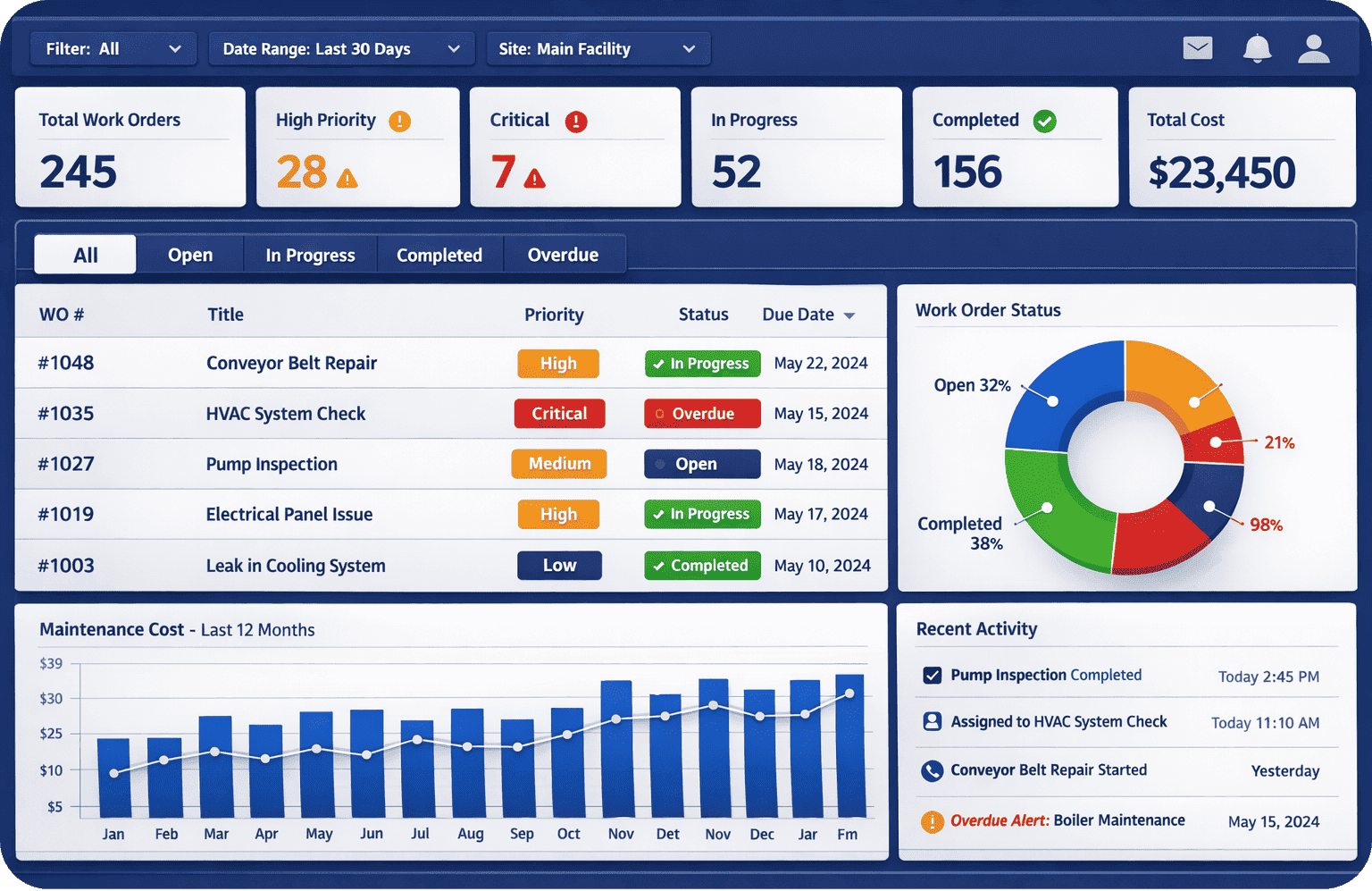
A centralized work order system keeps requests, active jobs, completed tasks, and historical records in one place. Therefore, employees do not have to search through different spreadsheets or conversations to find the latest information.
Look for filters that let users sort work orders by status, priority, technician, asset, location, category, or due date. This makes it easier for supervisors to identify urgent work and manage the overall queue.
2. Real-Time Status Tracking
Status tracking shows where each work order stands. Common statuses include New, Pending Approval, Assigned, In Progress, On Hold, Completed, and Closed.
However, a status alone may not provide enough context. A useful system should also record updates and timestamps so managers can understand how a job progressed and where delays occurred.
Key takeaway
Good tracking does more than show whether a job is open or closed. It gives teams enough context to understand what happened, what needs attention, and what should happen next.
3. Technician Assignment and Scheduling
Maintenance managers need to assign jobs to the right people at the right time. Work order tracking software can make this process easier by showing technician assignments, workloads, schedules, and job priorities.
For example, an electrical repair may require a technician with specific skills, while a routine inspection may require less specialized work. By keeping assignments in the same system as the work order, managers can reduce confusion and make responsibilities clear.
4. Priority and Due Date Management
Maintenance requests do not all have the same urgency. A failed safety control, production equipment breakdown, and routine inspection may require very different response times.
Therefore, work order software should allow teams to set priorities and due dates. Managers can then focus on urgent jobs while routine tasks continue through the normal workflow.
Clear priority rules also prevent teams from treating every request as an emergency. Instead, employees can use defined criteria to determine which jobs require immediate attention.
5. Asset and Location Tracking
Connecting a work order to a specific asset or location creates a useful maintenance history. Managers can then review previous repairs, inspections, recurring problems, and service activity for that asset.
This approach also supports broader asset management practices. ISO 55000:2024 provides vocabulary, principles, and an overarching framework for managing assets across their life cycles.
For businesses that manage equipment, facilities, vehicles, or other physical assets, linking work orders to those assets can provide valuable context for future maintenance decisions.
Teams that want to explore the broader maintenance side can also review these maintenance management system features.
6. Parts, Materials, and Labor Tracking
Maintenance teams often need to record more than the task itself. They may also need to track labor hours, replacement parts, tools, and other resources used during the job.
When these details stay inside the work order, managers can understand the resources associated with individual jobs. In addition, historical records can help teams identify recurring material needs and maintenance costs.
This becomes particularly useful when a repair requires purchasing replacement components. In such cases, a connected purchase management system can complement the maintenance workflow.
7. Mobile Access for Technicians
Technicians often perform work away from a desk. Mobile access lets them view assignments, update statuses, add notes, upload photos, and record completion details from the job location.
As a result, technicians can update work orders while the information remains fresh. Managers can also see more current information instead of waiting for paper forms or end-of-day reports.
Mobile access becomes especially useful for organizations that operate across multiple buildings, facilities, properties, or field locations.
8. Notifications and Alerts
Automated notifications can help teams stay aware of important changes. For example, the system can notify a technician about a new assignment or alert a supervisor when a high-priority job becomes overdue.
However, notifications should support the workflow rather than create unnecessary noise. Configure alerts around meaningful events such as new assignments, overdue work, approval requests, priority changes, and completed jobs that require review.
9. Dashboards and Reporting
Individual work orders contain useful information, but managers often need a broader view. Dashboards can show open work, overdue jobs, workload by technician, recurring asset problems, and completion activity.
For example, if overdue work continues to increase, managers can investigate whether the problem comes from staffing, parts availability, approval delays, scheduling, or changing priorities.
Reporting also helps organizations identify patterns instead of relying only on individual job updates.
10. Audit Trails and Work History
A complete work history shows who created, assigned, updated, and closed a work order. It can also preserve notes, timestamps, attachments, parts, labor details, and completion information.
This record becomes valuable when a team needs to understand what happened during a previous repair. Furthermore, technicians can use historical information when diagnosing recurring issues.
Benefits of Tracking Maintenance Work Orders Digitally
Tracking maintenance work orders manually can become difficult as the number of requests, technicians, and assets increases. A digital workflow gives teams a more structured way to manage this information.
Better visibility
Managers can see open, active, overdue, and completed work without collecting separate updates from each technician.
Fewer missed tasks
A centralized work queue makes outstanding jobs easier to find and prioritize. Automated reminders can also help teams follow up on important tasks.
Stronger asset history
When work orders connect to assets, teams can review previous repairs and inspections when planning future maintenance.
Improved workload planning
Managers can compare technician workloads, priorities, due dates, and required resources before assigning new work.
Consistent documentation
Standard work order fields encourage technicians to record important details in a consistent format.
Work Order Tracking Software vs. Spreadsheets
Spreadsheets can work for a small team with a limited number of simple jobs. However, they can become harder to manage when multiple employees update records, work changes status frequently, or technicians need information while working in the field.
| Capability | Spreadsheet | Work Order Tracking Software |
|---|---|---|
| Work queue | Usually manual | Centralized workflow |
| Status tracking | Manual updates | Structured status changes |
| Technician assignment | Often manual | Built into work orders |
| Notifications | Limited | Can be automated |
| Asset history | Requires manual organization | Can connect jobs to assets |
| Reporting | Often requires manual analysis | Dashboards and reports |
The right approach depends on the complexity of your workflow. A small operation may manage a few simple tasks with a spreadsheet. On the other hand, a growing maintenance operation may need stronger assignment controls, work history, automation, mobile access, and reporting.
How to Improve Your Work Order Tracking Process
1. Standardize Work Order Information
Start by deciding which information every work order should contain. Useful fields can include the requester, asset, location, issue type, priority, assigned technician, due date, required parts, instructions, notes, and completion details.
Keep the form practical. If employees must complete too many fields for a simple task, they may enter incomplete information or avoid using the system correctly.
2. Create Clear Status Definitions
Use a small set of statuses that everyone understands. For example, New can mean that the team has received the request, while Assigned means someone owns the job and In Progress means active work has started.
Similarly, define what happens when a job enters On Hold. The team should know whether the status means waiting for parts, approval, customer access, or another dependency.
3. Establish Priority Rules
Define what makes a work order urgent, high, normal, or low priority. This helps employees make consistent decisions when several requests arrive at the same time.
For safety-related maintenance, teams should also follow applicable workplace safety requirements. OSHA recommends tracking progress toward hazard controls and conducting routine preventive maintenance of equipment, facilities, and controls.
4. Document Completed Work
A work order should contain more than a final “Completed” status. Ask technicians to record what they found, what they repaired, which parts they used, and whether the asset needs follow-up work.
That information becomes part of the asset history and can help future technicians understand previous issues.
5. Review Overdue Work
Managers should regularly review overdue work orders and investigate the reason for each delay. The cause may involve missing parts, approval bottlenecks, technician availability, unclear instructions, or changing priorities.
Once the cause becomes visible, managers can adjust the process instead of simply moving the due date.
6. Use Historical Data
Completed work orders contain operational information that teams can use later. Review recurring repairs, common failure types, completion times, parts usage, and workload patterns.
Over time, this analysis can help managers identify assets that need closer attention and maintenance processes that need adjustment.
Important
Work order software supports maintenance management, but it does not replace proper safety procedures. OSHA recommends routine preventive maintenance and follow-up checks to help ensure that hazard controls remain effective.
When Should You Use Work Order Tracking Software?
A dedicated work order system can become useful when maintenance activity grows beyond what a basic spreadsheet or paper process can handle comfortably.
Consider work order tracking software when:
- Employees frequently lose track of maintenance requests.
- Managers cannot quickly see open or overdue jobs.
- Technicians rely on paper forms or scattered messages.
- Your team needs a history for individual assets.
- Multiple technicians handle work across different locations.
- Maintenance requests require different priority levels.
- Parts and labor need to connect to individual jobs.
- You need recurring preventive maintenance tasks.
- Managers need workload and completion reports.
However, you do not need to adopt every advanced feature at once. Start with the workflow problems that create the most friction, then expand the system as your needs grow.
Common Work Order Tracking Mistakes
Choosing software does not automatically create an effective maintenance process. Teams also need clear rules and consistent usage.
One common mistake is creating too many mandatory fields. While detailed records have value, excessive data entry can slow technicians down and reduce adoption.
Another mistake is using vague status names. If employees interpret “Pending” differently, managers may struggle to understand which jobs actually need attention.
Teams can also lose valuable information when technicians close jobs without documenting the work performed. Consequently, future users have less context when a similar problem appears.
Finally, avoid measuring success only by the number of closed work orders. A large number of closed jobs does not explain whether the team addressed recurring problems, handled priorities correctly, or documented work properly.
Can Custom Software Improve Work Order Tracking?
Off-the-shelf maintenance systems can support many standard workflows. However, some businesses need work orders to connect with processes that generic software does not handle in the desired way.
For example, a company may need work orders to connect with purchasing, inventory, customer records, contracts, accounting, field service, or an existing ERP. In such cases, custom ERP development can provide a way to build workflows around the company’s specific operating model.
A custom system may also make sense when you need specialized approval rules, role-based dashboards, unique reports, asset structures, or integrations with existing business applications. Before choosing custom development, map the current process and identify exactly where standard software falls short.
For businesses that manage suppliers as part of their maintenance process, vendor management system features can also be relevant when external contractors or suppliers contribute to maintenance work.
Pro tip
Map your current work order process before selecting software. Identify where requests enter, who approves them, how teams assign jobs, what technicians record, and how managers review completed work.
Work Order Tracking and Preventive Maintenance
Work order tracking can support both reactive and planned maintenance. Reactive work responds to an issue, while preventive maintenance follows a planned schedule designed to keep equipment and facilities in working condition.
For example, a facility may create recurring work orders for inspections, lubrication, filter replacement, equipment checks, or other scheduled tasks. The system can then give technicians a structured record for each activity.
Tracking these jobs also creates a history that managers can review later. Therefore, the system becomes more than a task list. It becomes a record of maintenance activity across the organization’s assets.
For asset-intensive operations, this history can support broader asset management practices. ISO 55000:2024 describes asset management as a systematic approach that considers assets throughout their life cycles and connects asset management with organizational objectives.
Frequently Asked Questions
Frequently Asked Questions
What is work order tracking software?
Work order tracking software helps teams create, assign, monitor, update, and close work orders in one system. It can also maintain job history, asset information, notes, and resource details.
How does software help with tracking maintenance work orders?
It gives maintenance teams a central place to manage requests, assignments, priorities, statuses, due dates, notes, parts, and completion details. Managers can also review open and overdue work.
What is the difference between work order management and work order tracking?
Work order management covers the broader process of creating, assigning, scheduling, completing, and closing jobs. Work order tracking focuses on monitoring each job’s progress and history throughout that process.
Can work order tracking software support preventive maintenance?
Yes. A system can support recurring maintenance tasks and create structured work orders for inspections, servicing, and other planned activities.
When should a business move from spreadsheets to work order software?
Consider dedicated software when spreadsheets make it difficult to manage assignments, overdue work, asset history, technician workloads, recurring maintenance, or reporting.
Conclusion
Work order tracking software gives maintenance teams a structured way to manage requests from submission through completion. More importantly, it connects assignments, status updates, asset history, resources, notes, and job records in one workflow.
However, effective tracking starts with a clear process. Standardize work order information, define priorities, keep statuses simple, document completed work, and review historical data regularly.
If your business needs specialized workflows, integrations, approval rules, or reporting, custom software may provide a better fit than adapting your operations to a generic system. The right approach depends on your maintenance volume, asset complexity, existing systems, and business requirements.
Build software around how your business works
Need a work order workflow that connects with your existing business processes? Explore a custom ERP solution designed around your operational requirements.Talk to our team
