
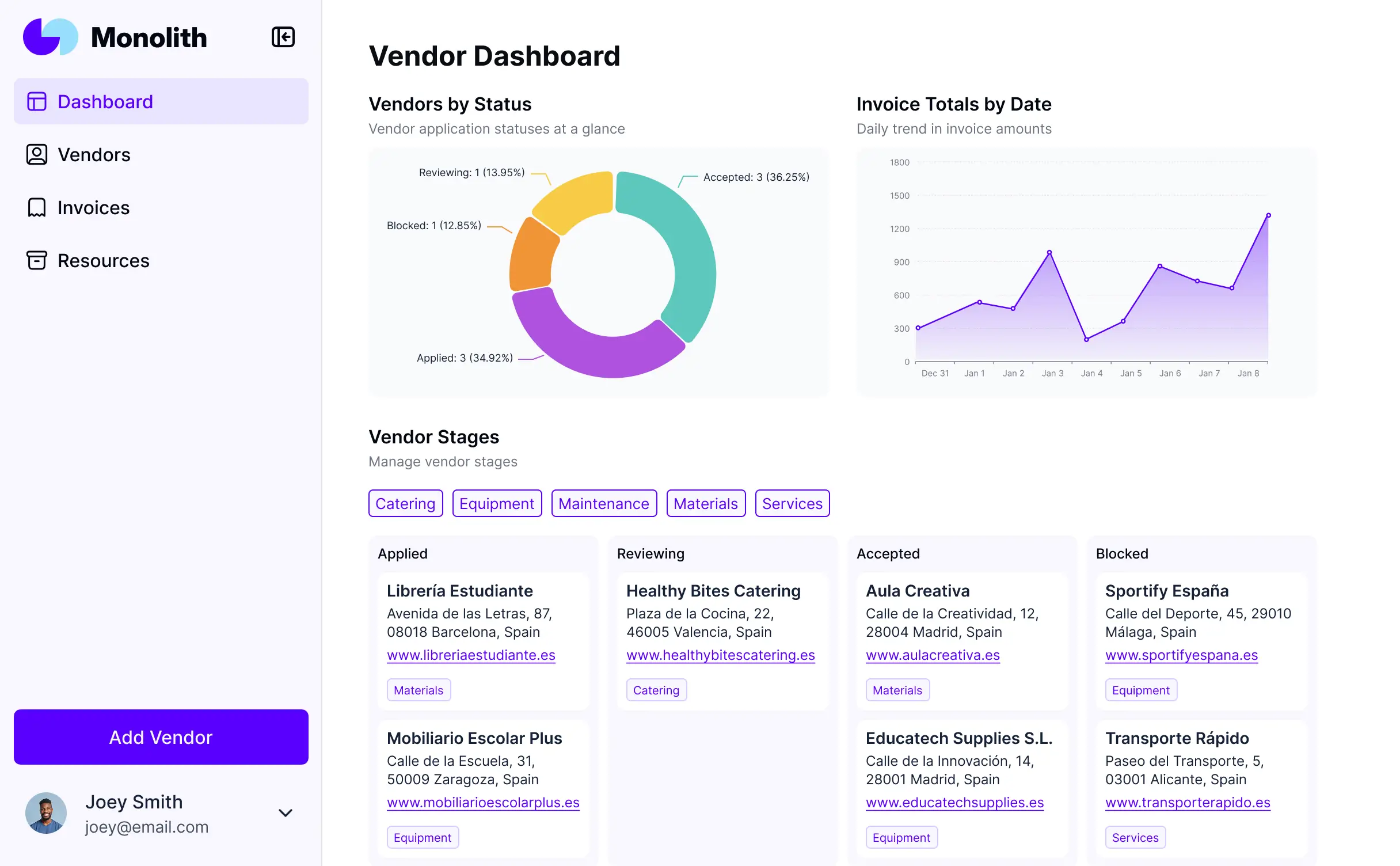
Vendor Management System: 9 Key Features for Better Supplier Control
A vendor management system gives businesses a centralized way to organize, evaluate, onboard, monitor, and communicate with vendors. Instead of managing supplier details across spreadsheets, emails, shared folders, and disconnected tools, teams can use one system to keep vendor information and workflows organized.
This matters because vendor relationships affect purchasing, costs, quality, compliance, delivery, and day-to-day operations. A structured approach can also make it easier to identify supplier issues before they disrupt the business. In this guide, we will explain how a vendor management system works, the key features to look for, its benefits, implementation considerations, common mistakes, and how vendor management software compares with related procurement tools.
What Is a Vendor Management System?
A vendor management system is a software solution that helps businesses manage their relationships and interactions with suppliers from one central platform. Depending on the business, this can include supplier profiles, onboarding, documentation, contracts, approvals, performance tracking, compliance records, purchase activity, and communication.
In practice, vendor management covers more than simply keeping a list of suppliers. Effective supplier management involves identifying suitable vendors, qualifying them, setting expectations, monitoring their performance, and maintaining the relationship throughout its lifecycle.
IBM describes supplier management as a set of processes used to identify, qualify, onboard, transact with, and collaborate with suppliers. That lifecycle approach helps explain why modern vendor management extends beyond purchasing alone. IBM’s supplier management overview provides additional context on supplier onboarding, lifecycle management, information management, and collaboration.
Key takeaway
A vendor management system creates a structured source of vendor information and workflows, helping procurement, finance, operations, and other teams work from consistent supplier data.
How Does a Vendor Management System Work?
Although features vary by platform, most vendor management systems follow a similar lifecycle. First, a business collects vendor information and evaluates potential suppliers. Next, approved vendors move through onboarding, documentation, contracts, and internal approvals.
Once a vendor becomes active, the system can help teams monitor performance, manage documents, track important dates, review compliance information, and maintain communication. Finally, the business can use historical information to evaluate whether a vendor should continue, change terms, or leave the approved supplier list.
- Vendor discovery: Identify potential suppliers based on business requirements.
- Qualification: Review capabilities, pricing, documentation, certifications, and other requirements.
- Onboarding: Collect required information and complete approval workflows.
- Contract management: Store agreements, terms, renewal dates, and related documents.
- Ongoing management: Monitor performance, compliance, spending, and communication.
- Review and renewal: Assess the relationship and make decisions based on current vendor data.
Therefore, the system supports a continuous process rather than a single procurement transaction.
9 Key Features of Vendor Management Software
1. Centralized Vendor Profiles
A centralized vendor profile gives authorized employees one place to view important supplier information. Depending on the system, profiles may include contact details, tax information, payment information, contracts, certifications, service categories, performance records, and internal notes.
As a result, employees spend less time searching through different systems to find basic vendor information. Centralized records can also reduce duplicate data and make internal handoffs easier.
2. Vendor Onboarding and Approval
Vendor onboarding often requires multiple steps. A supplier may need to submit company details, banking information, insurance documents, certifications, tax forms, or other records before employees can approve the relationship.
Vendor management software can turn these steps into a defined workflow. For example, a new supplier could submit information, procurement could review it, finance could verify payment details, and an authorized manager could provide final approval.
Instead of relying on email chains, teams can track the vendor’s status and identify outstanding actions.
3. Document and Contract Management
Vendor relationships often involve contracts, statements of work, certificates, policies, pricing agreements, and other documents. A vendor management system can organize these records and associate them with the correct supplier.
This becomes especially useful when contracts contain renewal dates, service requirements, pricing terms, or compliance obligations. Automated reminders can also help teams review important documents before deadlines arrive.
For businesses that need deeper contract workflows, contract management automation can complement the vendor management process by improving how agreements and compliance tasks move through the organization.
4. Vendor Performance Tracking
Choosing a vendor is only the beginning of the relationship. Businesses also need to understand whether suppliers meet agreed expectations.
A vendor management system can track performance indicators such as delivery reliability, product or service quality, response times, issue resolution, pricing changes, and compliance status. Teams can then use these records during periodic supplier reviews.
For example, a company might notice that one supplier repeatedly misses delivery commitments. Instead of relying on memory, procurement can review the vendor’s historical records and use that information during a performance discussion.
5. Compliance and Risk Management
Vendor relationships can introduce operational, financial, legal, security, and regulatory risks. The specific risks depend on the type of supplier and the nature of the relationship.
Vendor management software can help businesses collect required documents, track certifications, record assessments, and monitor expiration dates. It can also provide a clearer audit trail of approvals and vendor-related activities.
However, software does not eliminate vendor risk on its own. Teams still need appropriate policies, reviews, approval rules, and risk criteria.
6. Purchase and Procurement Integration
Vendor management works closely with procurement. Once a supplier becomes approved, employees may need to create purchase requests, purchase orders, receive goods or services, verify invoices, and process payments.
For this reason, integration with procurement and financial systems can make vendor data more useful. It can connect supplier information with purchasing activity and reduce the need for employees to enter the same data into multiple systems.
Businesses exploring the broader procurement technology landscape can also review procurement software to understand how sourcing, purchasing, approvals, and supplier-related processes fit together.
7. Reporting and Analytics
Vendor data becomes more valuable when teams can turn it into useful reports. A vendor management system may provide dashboards for supplier status, spending, performance, contract dates, compliance, and other business metrics.
For example, procurement managers can use reports to identify vendors with frequent performance problems or contracts approaching renewal. Finance teams may also use supplier data to support payment and spending reviews.
More importantly, reporting helps replace decisions based purely on assumptions with decisions based on available business records.
8. Communication and Collaboration
Vendor relationships involve multiple teams, including procurement, finance, operations, legal, and department managers. Without a shared process, communication can become fragmented.
Vendor management software can provide notes, activity histories, notifications, tasks, and other collaboration tools. This gives teams greater visibility into previous actions and outstanding responsibilities.
As a result, employees can continue a vendor relationship without starting from scratch every time ownership changes.
9. Vendor Lifecycle Management
A strong vendor management process should cover the entire relationship, from initial evaluation to offboarding. Lifecycle management helps businesses maintain consistent procedures as suppliers move through different stages.
For instance, a vendor may start as a prospect, become qualified, receive approval, become an active supplier, undergo periodic reviews, and eventually become inactive. A centralized system can track these stages and preserve the relevant history.
Vendor Management System vs. Procurement Software
Vendor management and procurement are closely connected, but they do not serve exactly the same purpose. Procurement generally covers the broader process of acquiring goods and services, including sourcing, purchasing, contracts, orders, invoices, and supplier relationships.
Vendor management focuses more specifically on the supplier relationship and lifecycle. Therefore, a business may use both technologies together rather than treating them as competing systems.
| Area | Vendor Management System | Procurement Software |
|---|---|---|
| Primary focus | Managing supplier relationships and lifecycle | Managing purchasing and procurement processes |
| Vendor onboarding | Core capability | Often supported |
| Supplier performance | Strong focus | Usually connected to procurement activity |
| Purchase orders | May integrate with purchasing | Core capability |
| Contracts | Supplier-focused management | Often part of procurement workflows |
| Supplier lifecycle | Central focus | Part of a broader procurement process |
In other words, procurement answers questions about what the business needs to buy and how it should purchase it, while vendor management focuses more heavily on who the business buys from and how that relationship performs over time.
Benefits of Using a Vendor Management System
A well-designed vendor management system can create practical improvements across several departments.
Better visibility
Teams can view vendor information, documents, status, and activity from a centralized location.
More consistent onboarding
Standardized workflows help teams follow the same onboarding and approval process for different suppliers.
Improved compliance tracking
Organizations can track required documents, certifications, approvals, and expiration dates more systematically.
Stronger supplier oversight
Performance records help procurement teams evaluate suppliers using documented information instead of informal feedback alone.
Reduced administrative work
Automation can handle reminders, approvals, notifications, and repetitive data collection.
Better purchasing decisions
Historical vendor and procurement information gives decision-makers more context when reviewing suppliers and agreements.
In addition, a centralized supplier database can support broader supply chain visibility. Businesses with complex supplier networks may benefit from connecting vendor information with inventory, procurement, finance, and operational systems. For a broader look at this technology area, see supply chain software.
How to Choose Vendor Management Software
The right platform depends on the size of the vendor network, workflow complexity, industry requirements, existing software, and internal approval processes. Therefore, businesses should define their requirements before comparing products.
Start With the Vendor Lifecycle
Map the process from vendor discovery through onboarding, active management, performance review, renewal, and offboarding. Then identify where employees currently rely on spreadsheets, email, or manual reminders.
Check Integration Requirements
Consider the systems that already contain important business data. These may include ERP, accounting, procurement, CRM, inventory, document management, or payment platforms.
Integration can prevent duplicate data entry and help different departments work with consistent information. However, every integration also adds implementation and maintenance considerations, so prioritize the connections that provide clear operational value.
Review Security and Access Controls
Vendor records can contain sensitive business and financial information. Therefore, evaluate user permissions, authentication, audit trails, data protection, and administrative controls before selecting a platform.
Evaluate Reporting
Ask whether the system can answer practical questions such as which vendors need document updates, which contracts are approaching renewal, which suppliers have recurring issues, and which vendors require review.
Consider Scalability
A system should support the organization’s expected growth. A small vendor database may require only basic workflows, while a larger organization may need advanced approval routing, integrations, analytics, multiple business units, and more detailed access controls.
Pro tip
Do not choose vendor management software based only on the number of features. Start with your most important vendor workflows, then evaluate whether each feature solves a real operational problem.
Common Vendor Management Mistakes to Avoid
Technology can improve vendor management, but poor processes can still create problems. Fortunately, many common issues are preventable.
- Keeping duplicate vendor records: Establish clear ownership of vendor data and consistent naming rules.
- Skipping supplier qualification: Define the information and checks required before approving a new vendor.
- Ignoring contract dates: Track renewals, expirations, and important contractual obligations.
- Tracking performance informally: Establish measurable criteria that match the supplier’s role.
- Giving everyone the same access: Use role-based permissions so employees see and edit only the information they need.
- Automating a broken process: Review and simplify workflows before moving them into software.
Moreover, businesses should avoid treating vendor management as a procurement-only responsibility. Finance, legal, operations, IT, and other departments may interact with suppliers, so the process should reflect how the organization actually works.
When Should a Business Use a Vendor Management System?
A vendor management system becomes more useful as supplier relationships become more numerous, complex, or important to daily operations. Businesses may consider one when employees struggle to locate vendor information, track renewals, coordinate approvals, monitor performance, or maintain consistent supplier records.
It can also make sense when a company relies on many external suppliers across different departments. In that situation, a centralized system can give teams a shared process instead of allowing every department to manage vendors differently.
For organizations with highly specific workflows, a custom solution may provide more flexibility than an off-the-shelf platform. In those cases, custom CRM development can be considered when vendor-related relationship data needs to connect closely with customer, sales, service, or other business workflows.
Frequently Asked Questions
Frequently Asked Questions
What is a vendor management system used for?
A vendor management system helps businesses manage supplier information, onboarding, approvals, contracts, compliance, performance, communication, and vendor lifecycle activities from a centralized platform.
What is the difference between vendor management software and procurement software?
Vendor management software focuses on supplier relationships and lifecycle management, while procurement software focuses more broadly on sourcing, purchasing, orders, contracts, invoices, and related procurement processes.
What features should vendor management software include?
Important features can include centralized vendor profiles, onboarding workflows, document management, contract tracking, performance monitoring, compliance tracking, reporting, collaboration, and integrations.
Can a vendor management system integrate with an ERP?
Yes. Many vendor management platforms can integrate with ERP, procurement, accounting, CRM, inventory, and other business systems. The exact integrations depend on the software and the organization’s requirements.
How does vendor management improve supplier relationships?
It gives teams clearer vendor information, defined processes, performance records, communication history, and visibility into obligations. This can make supplier reviews and ongoing collaboration more structured.
Conclusion
A vendor management system brings supplier information, workflows, documents, approvals, performance data, and lifecycle activities into a more organized process. As a result, businesses can gain better visibility into vendor relationships while reducing reliance on scattered spreadsheets and manual follow-ups.
The best approach starts with the business process rather than the software itself. Define how vendors should be evaluated, approved, onboarded, monitored, reviewed, and offboarded. Then choose vendor management software that supports those workflows, integrates with the systems you already use, and can scale with your organization.
Build software around how your business works
If your vendor workflows need to connect with CRM, procurement, finance, or other business processes, a custom software approach can help create a solution around your specific requirements.Explore custom CRM development
