
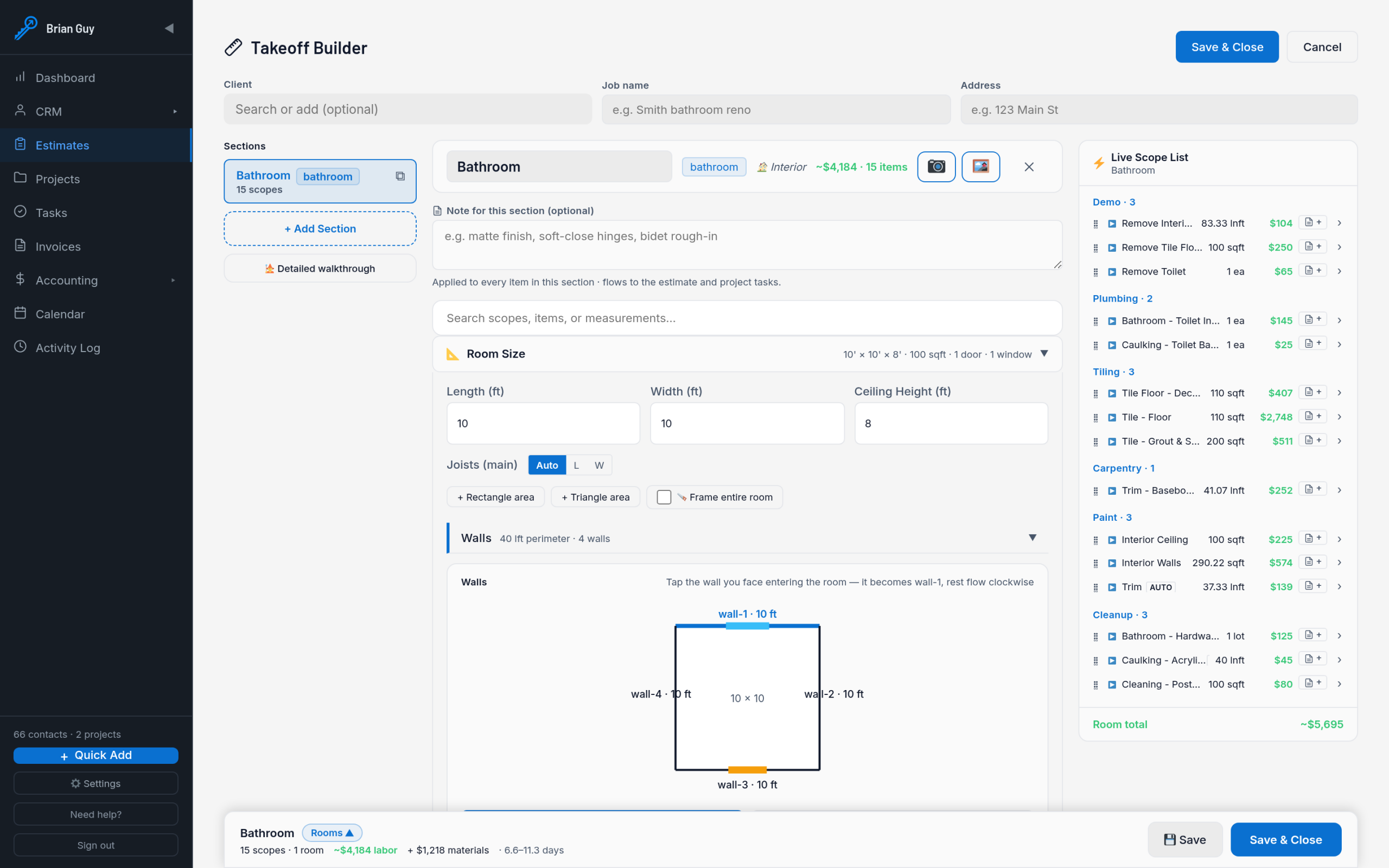
Roofers Software: 11 Features to Manage Leads, Jobs, and Customers
What Is Roofers Software?
Roofers software is a business management solution that helps roofing contractors organize leads, customers, estimates, inspections, schedules, crews, jobs, documents, and follow-ups in one place. Instead of switching between spreadsheets, calendars, emails, paper forms, and separate apps, roofing teams can manage their daily workflow through a connected system.
For roofing companies, this matters because a single project can involve many steps. A new lead may need an inspection, an estimate, several follow-ups, material planning, crew scheduling, job updates, and final documentation. Therefore, the right software can help teams keep each step connected from the first customer inquiry to project completion.
In this guide, we will look at 11 useful features to consider, explain how CRM for roofers supports sales and customer relationships, compare general business tools with roofing-focused software, and cover the key factors to consider before choosing a platform.
Why Do Roofing Companies Need Software?
Roofing businesses often manage several active jobs at different stages. Meanwhile, sales teams may be handling new inquiries while estimators visit properties and crews work on existing projects. Without a central system, important information can become scattered across different tools.
Roofing management software gives teams a shared place to organize this information. For example, an office manager can review a customer’s contact details, inspection notes, estimate status, scheduled work, and previous communication without searching through multiple systems.
As a result, software can make everyday processes easier to track. It can also give managers better visibility into open opportunities, upcoming jobs, active projects, and tasks that need attention.
Key takeaway
The value of roofers software comes from connecting related processes. A useful platform should help your team move smoothly from lead generation and estimating to scheduling, field work, customer communication, and job completion.
11 Features to Look for in Roofers Software
1. Lead Management
Every roofing project starts somewhere, often with a phone call, website inquiry, referral, advertisement, or repeat customer. Therefore, lead management should be one of the first features you evaluate.
A roofing software system should let your team capture contact details, property information, lead source, project requirements, notes, and follow-up tasks. Sales staff should also be able to see which leads are new, contacted, qualified, estimated, or awaiting a decision.
This organized approach helps prevent promising opportunities from getting lost in inboxes or spreadsheets. For a deeper look at this process, you can explore lead tracking software features.
2. CRM for Roofers
A CRM for roofers helps contractors manage customer relationships alongside their sales process. It can store customer details, property information, communication history, appointments, estimates, follow-up activities, and project history in a central record.
For example, imagine a homeowner requests a roof inspection. A salesperson can create the customer record, schedule the inspection, add notes after the visit, prepare an estimate, and record follow-up conversations within the same system.
More importantly, a roofing CRM should connect sales information with operational work. Once the customer accepts an estimate, the team should be able to move that opportunity into the next stage without manually rebuilding the customer record.
3. Estimating and Quote Management
Accurate estimates play an important role in roofing sales. Software can help teams organize project details, materials, labor, pricing, scope, and other costs when preparing a quote.
It should also make estimate status easy to track. For example, an estimate might move from draft to sent, under review, approved, rejected, or expired.
Because estimating connects closely with sales, contractors can also review estimating software for contractors for additional ideas on organizing the bidding process.
The goal is not simply to create estimates faster. Instead, the system should make it easier to understand which estimates need follow-up and which approved estimates should become active jobs.
4. Inspection and Property Information
Roofing work often begins with an inspection. Therefore, software should make it easy to connect inspection information with the customer and property record.
Useful fields may include property address, roof type, measurements, visible issues, recommended work, inspection notes, photos, and follow-up requirements. Field staff can then record information while the office team can access the same record later.
In practice, centralized inspection information can also reduce repeated questions. A salesperson, project manager, and office administrator can review the same information instead of maintaining separate notes.
5. Scheduling and Dispatch
Roofing companies must coordinate inspections, repairs, installations, deliveries, and follow-up visits. Therefore, scheduling features should give managers a clear view of appointments and assigned work.
A useful system can show which crews are assigned to specific jobs and which appointments remain open. When schedules change, staff should be able to update the job without rebuilding the entire workflow.
For example, if bad weather delays an installation, the office team can update the scheduled date and notify the relevant people. This keeps the customer record and operational schedule aligned.
6. Work Order Management
Work orders give roofing teams a structured description of what needs to happen at a property. They can include customer details, job location, scope of work, assigned crew, priority, instructions, materials, notes, and status.
For example, a repair work order could specify the areas that require attention, the materials needed, and the tasks the crew must complete. Managers can then track whether the work remains pending, has started, or has been completed.
For more information about organizing jobs through work orders, see work order management software.
7. Crew and Field Management
Roofing companies may have several crews working at different properties at the same time. Consequently, managers need a simple way to see who is responsible for each job and what work remains.
Field management features can connect crews with job instructions, customer information, property details, photos, documents, and status updates. This gives field workers the information they need while helping office staff stay informed.
However, the field experience matters just as much as the office dashboard. If employees need too many steps to find job details or update progress, adoption can become difficult.
8. Job Progress Tracking
A roofing project can move through several stages before it reaches completion. These stages may include inspection, estimating, approval, scheduling, material preparation, work in progress, inspection, and completion.
Roofers software can represent these stages in a workflow or pipeline. Therefore, managers can quickly identify which projects need attention.
For instance, a manager might notice several approved jobs that have not yet received a scheduled date. That information can prompt the team to address the scheduling backlog before it affects customers.
9. Document and Photo Management
Roofing projects can generate many files, including estimates, contracts, inspection reports, property photos, invoices, warranties, and project documentation. Keeping those files connected to the appropriate customer or job makes them easier to find.
Photo management can prove especially useful for inspection and project records. Teams can store images alongside job information so staff can understand the condition of the property without relying only on written descriptions.
Before selecting a platform, check its storage limits, file organization, access permissions, and backup approach. Those details can become important as the number of customers and projects grows.
10. Customer Communication and Follow-Ups
Roofing customers may need updates about inspections, estimates, scheduling, materials, delays, progress, and completion. A system that tracks communication can help teams manage those interactions more consistently.
For example, a salesperson can check whether a customer received an estimate and whether a follow-up task remains open. Meanwhile, another team member can review previous notes before contacting the same customer.
This shared history can reduce duplicate communication and help employees understand what has already happened. In addition, automated reminders can help teams stay on top of important follow-up activities.
11. Reporting and Dashboards
Managers need more than individual customer records. They also need a clear view of overall business activity.
Roofing software can provide reports for open leads, estimates, scheduled jobs, active projects, completed work, overdue tasks, and other operational information. For example, a sales manager may want to see how many estimates remain open, while an operations manager may need to review upcoming jobs.
However, useful reporting should focus on practical decisions. A dashboard with dozens of numbers does not help if managers cannot understand what action those numbers require.
Roofers Software vs. General Business Software
General business software can handle contacts, calendars, tasks, and documents. However, roofing companies often need those functions to connect with inspections, estimates, properties, crews, and jobs.
| Business need | General business software | Roofing-focused software |
|---|---|---|
| Lead management | Basic contacts and tasks | Leads, opportunities, inspections, and follow-ups |
| Estimating | May require separate tools | Estimates connected to customers and jobs |
| Scheduling | Calendar appointments | Inspections, crews, jobs, and field schedules |
| Job tracking | Generic project tasks | Roofing-specific work stages and job information |
| Customer records | General contact history | Customer, property, inspection, and project history |
The better choice depends on how your company works. A small contractor with a simple workflow may need only a few core functions. On the other hand, a growing company with multiple crews, salespeople, and active projects may benefit from a more connected platform.
How CRM for Roofers Can Improve the Sales Process
A CRM for roofers can organize the sales journey from the first inquiry through customer approval. First, the system captures the lead and stores the relevant customer and property information.
Next, the team can schedule an inspection and record its findings. After that, the salesperson can prepare an estimate and track the customer’s response.
- Capture the new roofing inquiry.
- Create the customer and property record.
- Schedule the inspection.
- Record inspection notes and photos.
- Create and send the estimate.
- Schedule follow-up activities.
- Record the customer’s decision.
- Convert approved work into a scheduled job.
This process creates a connection between sales and operations. Instead of treating an approved estimate as the end of the sales process, the CRM can help move the opportunity into project management.
For companies that want to improve opportunity management more broadly, sales pipeline software provides another useful model for organizing deals and sales stages.
How to Choose the Right Roofers Software
Start with your workflow instead of starting with a feature checklist. Write down what happens when a new roofing lead enters the business and follow the process until the job closes.
Then identify where your team loses time. You may find duplicate data entry, missed follow-ups, scheduling problems, unclear job ownership, or difficulty finding project information.
Next, evaluate software against those actual problems. Consider these questions:
- Can the platform manage leads and customers together?
- Can salespeople track estimates and follow-ups?
- Can employees schedule inspections and jobs?
- Can managers assign work to crews?
- Can field employees access job details?
- Can users upload photos and documents?
- Can managers create useful reports?
- Can the system connect with existing business tools?
- Can administrators customize fields and workflows?
- Can the platform support more users and projects as the company grows?
Pro tip
Ask a software provider to demonstrate a complete roofing workflow. Instead of reviewing isolated features, ask them to create a lead, schedule an inspection, prepare an estimate, assign a crew, update job progress, and close the project.
Common Mistakes When Choosing Roofing Software
Choosing Features Instead of Workflow
A long feature list does not guarantee a useful system. Therefore, focus on whether the platform supports the way your company actually works.
Ignoring Field Employees
Office users and field users have different needs. A system may offer powerful administrative tools, but field employees still need quick access to customer information, job instructions, photos, and status updates.
Keeping Sales and Operations Separate
A CRM that only tracks leads can leave another information gap after the customer approves the work. Instead, look for a workflow that can connect sales records with estimates, scheduling, work orders, and projects.
Overlooking Data Migration
If your company already has customer records, project history, estimates, and documents, plan how you will move that information into the new system. Before implementation, decide which data should move, which records need cleaning, and who will manage the process.
Ignoring Customization
Not every roofing company follows the same process. A residential roofing contractor may need different workflows from a commercial roofing business or a contractor focused mainly on repairs.
Therefore, check whether the software lets you customize fields, statuses, forms, workflows, reports, and user permissions where needed.
When Should a Roofing Company Consider Custom Software?
Off-the-shelf software can work well when its features match your business process. However, some roofing companies have workflows that require more flexibility.
Custom development may make sense when a business needs specialized approval processes, unique job stages, custom dashboards, integrations with existing systems, or a CRM that connects closely with internal operations.
For example, a roofing company may need a system that connects lead management, inspection forms, estimating, crew scheduling, project tracking, and management reports in one workflow. In that situation, custom ERP development can provide a way to build business processes around the company’s specific requirements.
Important
Custom development should solve a defined business problem. Before investing in a custom platform, document your workflow and identify which limitations of existing software are causing measurable operational issues.
Safety and Compliance Considerations
Software can help roofing businesses organize safety documentation, training records, inspections, and related administrative tasks. However, software does not replace proper safety procedures, training, protective equipment, or qualified supervision.
For U.S. contractors, OSHA provides dedicated fall protection resources for construction. OSHA also provides residential construction fall protection guidance that roofing businesses can review when developing their safety processes.
Therefore, when evaluating software, consider whether it can support the documentation and workflow your company needs while keeping compliance responsibilities with the appropriate safety professionals and managers.
Frequently Asked Questions
Frequently Asked Questions
What is roofers software?
Roofers software is a business management platform that helps roofing contractors manage leads, customers, estimates, inspections, scheduling, crews, work orders, projects, documents, and reporting.
What is a CRM for roofers?
A CRM for roofers helps contractors manage customer information, leads, sales opportunities, estimates, communication, appointments, and follow-ups while connecting sales activity with roofing projects.
Can roofers software manage estimates?
Yes. Depending on the platform, roofing software can help teams create estimates, organize project details, track estimate status, and connect approved estimates with the next stage of the workflow.
Can roofing software manage field crews?
Many roofing platforms can support crew assignment, job instructions, scheduling, status updates, photos, and field communication. The exact capabilities depend on the software.
Should roofing companies use custom software?
Custom software can make sense when a company’s workflow, integrations, reporting requirements, or approval processes do not fit well within available off-the-shelf platforms.
Final Thoughts
The right roofers software can connect the many moving parts of a roofing business. Lead management, CRM, estimating, inspection records, scheduling, work orders, crew management, customer communication, and reporting can work together instead of operating as separate tasks.
For many roofing companies, the CRM layer provides the foundation for managing prospects and customers. Meanwhile, operational features help turn approved opportunities into scheduled and completed jobs.
Therefore, start by mapping your current workflow and identifying the points where information gets lost or work slows down. Then compare software based on those needs rather than choosing a platform simply because it has the largest feature list.
When standard tools cannot support important business processes, custom development may provide a practical alternative. The key is to build around real workflow requirements and make the system simple enough for both office and field teams to use consistently.
Build software around how your business works
Connect customer management, sales, operations, and reporting through software designed around your roofing business processes.Talk to our team
