
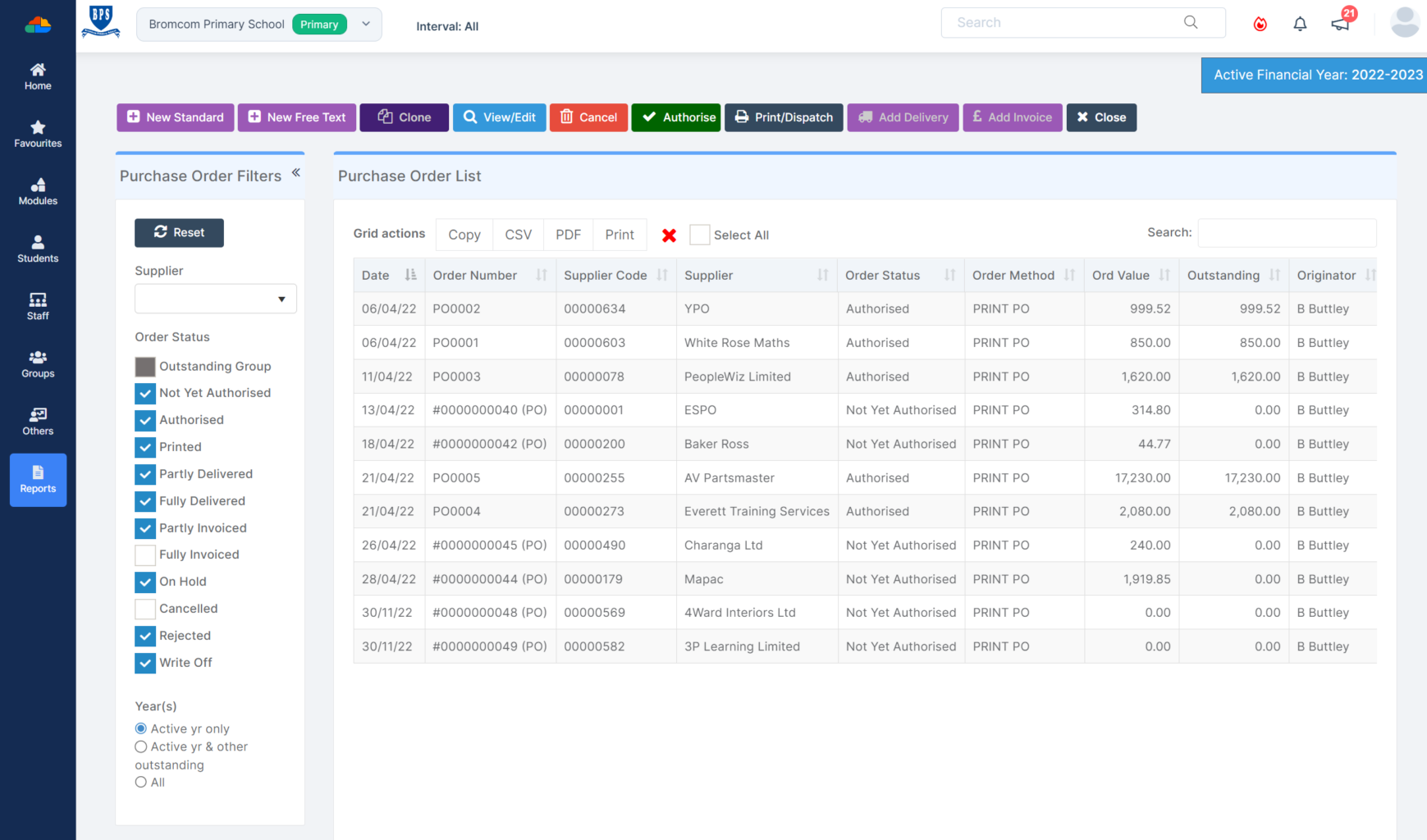
Purchase Order Management Software: 10 Features to Streamline Procurement
Purchase order management software helps businesses create, approve, send, track, and manage purchase orders from one central system. Instead of relying on spreadsheets, email threads, and manual follow-ups, purchasing teams can organize the entire PO process in a structured workflow. As a result, businesses can improve purchasing visibility, reduce manual errors, and keep supplier orders moving.
In this guide, we will explain how purchase order management works, the key features to look for, its main benefits, how it compares with manual processes, common mistakes to avoid, and what to consider before choosing a solution.
What Is Purchase Order Management Software?
Purchase order management software is a business application that helps organizations manage purchase orders throughout their lifecycle. A purchase order, or PO, records what a company wants to buy from a supplier, including products or services, quantities, prices, delivery requirements, and other purchasing details.
For example, imagine a company needs 100 units of packaging material. An employee submits a purchase request, a manager approves it, and the purchasing team creates a PO for the supplier. The team can then track the order, record what arrives, and connect the purchase with the related invoice.
In practice, PO management software brings these activities into one workflow. Users can create purchase orders, route them for approval, communicate with suppliers, monitor order status, and maintain purchasing records without moving between multiple spreadsheets and email conversations.
Clear purchase order information also matters because an order should identify important details such as the quantity or scope of the purchase and the required delivery date. For example, the U.S. Federal Acquisition Regulation includes these elements in its guidance for purchase orders. Federal purchase order requirements provide a useful reference for understanding the importance of clear order details.
How Does PO Management Software Work?
A typical purchase order workflow starts with a purchasing need and ends when the business completes the order. However, each organization can configure the process around its own approval rules and purchasing policies.
- Purchase request: An employee or department identifies a need and submits a request.
- Review: The appropriate manager or purchasing team reviews the request.
- Approval: The request moves through the required approval levels.
- PO creation: The purchasing team creates the purchase order with supplier and item details.
- Supplier communication: The approved PO goes to the supplier.
- Order tracking: The purchasing team monitors the order and delivery status.
- Receiving: Employees record the products or services received.
- Invoice matching: Finance compares the purchase order with receiving and invoice information.
- Completion: The business closes the PO when the purchasing process ends.
Modern procurement systems can automate several steps in this workflow. For instance, Oracle documentation describes automated order creation that can convert an approved requisition into a purchase order and communicate it to a supplier without manual intervention. Oracle’s purchase order automation documentation explains this process in more detail.
10 Features to Look for in Purchase Order Management Software
1. Easy Purchase Order Creation
The software should make it simple to create accurate purchase orders. Users should be able to select a supplier, add products or services, enter quantities and prices, specify delivery details, and include relevant terms.
Templates can make recurring purchases faster. In addition, automatic PO numbering helps teams maintain consistent records and locate individual orders more easily.
A good system should also make it easy to edit draft orders while preserving important changes and maintaining a clear record of the final purchase order.
2. Approval Workflows
Approval workflows help businesses control who can approve different types of purchases. For example, a department manager may approve a routine purchase, while a larger purchase may require additional financial approval.
Instead of sending approval requests through separate email conversations, PO management software can route requests to the right people. Therefore, teams can reduce unnecessary follow-ups and create a more consistent purchasing process.
Key takeaway
Your approval workflow should match your actual purchasing rules. More approval steps do not always create better control, so use the levels that your business genuinely needs.
3. Supplier Management
Purchase orders depend on accurate supplier information. Therefore, the software should let teams maintain supplier names, contact details, payment terms, shipping information, and other relevant data.
This becomes especially useful when a company works with many vendors. Instead of searching through separate files, employees can access supplier information alongside purchasing activity.
For broader supplier oversight, businesses can also connect their PO process with a vendor management system to organize supplier-related information and workflows.
4. Purchase Order Status Tracking
Creating a PO is only the beginning. Once the order reaches the supplier, purchasing teams need to know what happens next.
A useful system should show whether an order is pending, approved, sent, acknowledged, partially received, completed, cancelled, or waiting for action. As a result, employees can quickly identify delayed or outstanding purchases.
Status tracking also gives managers a clearer view of open commitments. Instead of asking several employees for updates, they can review the current status within the system.
5. Search and Filtering
As purchasing activity grows, finding an individual PO through spreadsheets or email can become difficult. Search and filtering tools make it easier to locate orders using PO number, supplier, date, department, status, or other fields.
This feature can save time during supplier discussions, invoice reviews, internal checks, and purchasing audits. More importantly, centralized records give users a consistent source of information.
6. Budget and Spending Visibility
Purchase orders should support financial control, not operate separately from it. PO management software can help teams monitor purchasing commitments and understand how planned purchases affect departmental budgets.
For example, a department may have a defined purchasing budget for a specific period. Before approving another order, a manager can review existing commitments and determine whether the new purchase fits within the department’s spending plan.
This approach can also complement broader expense management processes by giving finance teams more context around planned and completed spending.
7. Receiving and Order Tracking
Businesses need to track more than the PO itself. They also need to know what suppliers have delivered and whether the received quantity matches the original order.
For example, a business may order 500 units but receive only 400 in the first shipment. A useful system can help employees record the partial delivery and keep the remaining quantity visible.
Therefore, receiving features become particularly useful for businesses that handle physical goods, recurring deliveries, or partial shipments.
8. Invoice Matching
Purchase orders can provide an important reference for accounts payable. When a supplier sends an invoice, finance teams can compare the invoice with the related PO and receiving information.
This process helps teams identify differences in quantities, prices, or other order details before they process payment. Consequently, finance staff can work with more complete purchasing information.
Businesses that want to improve this stage can also connect their PO workflow with automated invoice processing software.
9. Reporting and Analytics
Purchase orders create useful business data. Reporting tools can help managers review purchasing activity by supplier, department, date, category, status, or other relevant criteria.
For instance, a purchasing manager might review open POs to identify orders that need follow-up. Similarly, finance teams can review purchasing records when investigating spending or invoice differences.
More importantly, reporting turns individual transactions into information that managers can use to review procurement processes and supplier activity.
10. Integrations and Automation
Purchase order management works best when it connects with other business systems. Depending on the organization, useful integrations may include accounting software, inventory systems, ERP platforms, supplier portals, and financial applications.
Automation can also reduce repetitive work. For example, an approved requisition can trigger PO creation, while a status change can notify the employee responsible for the order.
Oracle’s procurement documentation shows how approved requisitions can feed automated purchase order creation and supplier communication. This illustrates how businesses can reduce manual steps when their processes and rules support automation.
Benefits of Using PO Management Software
The benefits of purchase order management software extend beyond simply creating digital POs. Because purchasing connects employees, suppliers, receiving teams, and finance departments, a structured workflow can improve visibility across the entire process.
Reduce manual data entry
Centralized forms and reusable supplier information can reduce repetitive entry across purchasing tasks.
Improve approval visibility
Teams can see where a request or PO sits in the approval process instead of relying on email follow-ups.
Track purchasing activity
Employees can monitor open, approved, sent, partially received, and completed purchase orders.
Strengthen supplier coordination
Clear purchase orders provide suppliers with consistent information about quantities, prices, and delivery requirements.
Support financial control
Purchasing teams can connect orders with budgets, receipts, and invoices for better spending visibility.
Purchase Order Management Software vs. Manual Processes
Many small businesses begin with spreadsheets, email, and document templates. These tools may work when purchasing volume remains low. However, they can become difficult to manage as suppliers, departments, and order volumes increase.
| Area | Manual Process | PO Management Software |
|---|---|---|
| PO creation | Templates and manual entry | Centralized forms and templates |
| Approvals | Email and manual follow-up | Defined approval workflows |
| Status tracking | Spreadsheets and messages | Centralized PO statuses |
| Supplier records | Separate files or systems | Centralized supplier information |
| Reporting | Manual spreadsheet analysis | Searchable reports and dashboards |
The goal is not to automate every purchasing task simply because software can do it. Instead, businesses should automate repetitive work while keeping appropriate human review for purchases that require judgment or authorization.
When Should a Business Use PO Management Software?
There is no single company size that determines when a business needs PO management software. Instead, look at the complexity of the purchasing process.
If employees regularly create purchase orders, several people approve purchases, suppliers require frequent follow-up, or finance teams struggle to connect invoices with orders, dedicated software may help organize the process.
Similarly, growing companies may benefit when purchasing information starts spreading across spreadsheets, email inboxes, accounting systems, and shared folders.
Pro tip
Map your current purchasing workflow before choosing software. Identify where requests start, who approves them, how suppliers receive orders, how deliveries are recorded, and how finance handles invoices.
Common Purchase Order Management Mistakes to Avoid
Choosing Features Without Mapping the Workflow
A long feature list does not guarantee that a system fits your business. First, document your current procurement process. Then, identify which software features solve real problems.
Ignoring Approval Rules
Different departments may have different purchasing needs. Therefore, confirm that the system supports your approval levels, spending limits, and exception rules.
Keeping Supplier Data in Separate Files
When supplier information remains in disconnected spreadsheets, employees may work with outdated details. Instead, keep supplier records connected to purchasing activity whenever possible.
Overlooking Integrations
A PO system that cannot exchange information with important business applications may create another data silo. Before selecting a platform, review your accounting, inventory, ERP, and finance requirements.
Automating Without Clear Rules
Automation works best when the underlying process makes sense. If purchasing policies and approval rules remain unclear, automation may simply make a poorly defined process move faster.
How to Choose the Right Purchase Order Management Software
Start by listing the purchasing problems you want to solve. Then compare potential solutions against those requirements instead of choosing based only on the number of features.
- Review purchasing volume: Understand how many POs your teams create and how frequently they change.
- Map approval rules: Identify who approves purchases at different spending levels.
- Review supplier requirements: Consider how suppliers receive orders and communicate updates.
- Check integrations: Confirm compatibility with accounting, inventory, ERP, and other essential systems.
- Evaluate reporting: Make sure managers can access the purchasing information they need.
- Test usability: Ask purchasing, finance, and department users to review the workflow.
- Consider customization: Determine whether the software can adapt to unique purchasing requirements.
For businesses with specialized procurement workflows, custom ERP development can also provide a practical option when standard software cannot support important processes without major workarounds. A customized system can bring purchasing, supplier management, inventory, finance, and other business processes into a workflow built around the organization’s actual requirements.
Frequently Asked Questions
Frequently Asked Questions
What is purchase order management software?
Purchase order management software helps businesses create, approve, send, track, and manage purchase orders throughout their lifecycle. It can also connect purchasing with supplier, receiving, financial, and invoice processes.
What is PO management software used for?
PO management software helps organize purchasing workflows, automate approvals, track order status, manage supplier information, monitor purchasing activity, and maintain centralized purchase records.
Can purchase order software automate approvals?
Yes. Many systems can route purchase requests and POs to designated approvers based on rules such as department, purchase type, or spending level.
Can PO management software integrate with accounting systems?
Many solutions support integrations with accounting and financial systems. However, capabilities vary by platform, so businesses should confirm available integrations before selecting a solution.
What features should purchase order management software include?
Important features include PO creation, approval workflows, supplier management, status tracking, search, reporting, receiving, invoice matching, integrations, automation, and customization.
Final Thoughts
Purchase order management software gives businesses a structured way to manage purchasing from the initial request through order completion. Centralized PO records, approval workflows, supplier information, status tracking, reporting, and integrations can make procurement easier to monitor and manage.
However, the right solution depends on how your business purchases goods and services. Start by mapping the current process, identify where delays or errors occur, and then evaluate software against those needs. When standard tools cannot support important workflows, a customized ERP solution can provide another option.
Build software around how your business works
If your purchasing process includes unique approval, supplier, inventory, or financial workflows, a customized ERP solution can help bring those processes into one connected system.Talk to our team
