
Best Vendor Risk Management Software: 10 Features to Look For in 2026
Choosing the best vendor risk management software can help businesses assess suppliers, monitor third parties, organize compliance information, and respond to vendor risks before they disrupt operations. As companies rely on more external suppliers, contractors, technology providers, and service partners, manual spreadsheets can make it harder to maintain a clear view of vendor risk.
In this guide, we will explain how vendor risk management software works, the key features to look for, how third party risk management platforms differ from basic vendor management tools, and what to consider before choosing a solution.
What Is Vendor Risk Management Software?
Vendor risk management software helps businesses identify, assess, monitor, and manage risks associated with external vendors and suppliers. Instead of keeping vendor assessments, documents, security questionnaires, and review dates across separate spreadsheets and folders, teams can bring these activities into one system.
Vendor risk can cover several areas. For example, a supplier may create cybersecurity, financial, operational, regulatory, privacy, or reputational risks. Therefore, a useful platform should help teams evaluate vendors from multiple angles rather than focusing only on procurement.
The goal is not to eliminate every vendor risk. Instead, businesses need a practical way to understand risk, prioritize important vendors, track changes, and take action when a supplier no longer meets their requirements.
Key takeaway
Vendor risk management focuses on understanding and controlling the risks created by third-party relationships throughout the vendor lifecycle.
Why Businesses Need Vendor Risk Management Software
Third-party relationships can give businesses access to specialized services, technology, infrastructure, and expertise. However, these relationships can also create dependencies that require ongoing oversight.
For example, a company may depend on a cloud provider to store business information, a payment provider to process transactions, or a logistics supplier to deliver products. If one of these vendors experiences a security incident, service outage, compliance issue, or operational failure, the impact can extend to the business using its services.
That is why structured vendor risk management matters. NIST’s cybersecurity supply chain guidance recommends identifying, assessing, and mitigating risks across the supply chain and integrating these activities into broader risk management processes. NIST’s Cybersecurity Supply Chain Risk Management guidance provides a useful framework for organizations building these processes.
Software can make that work easier by creating a central record for each vendor, automating recurring tasks, and giving teams a consistent process for evaluating risk.
10 Features to Look for in the Best Vendor Risk Management Software
1. Centralized Vendor Profiles
Start with a centralized vendor record. Each profile should provide a clear view of the supplier, services provided, risk level, contracts, assessments, contacts, documents, and review history.
Instead of searching through emails and spreadsheets, teams can use one record to understand the current vendor relationship. This also makes it easier to identify missing information during reviews.
2. Vendor Risk Assessments
A strong platform should support structured vendor risk assessments. Teams can define questions based on the type of vendor, service, access level, or business importance.
For example, a software provider that handles sensitive customer data may require more detailed security and privacy questions than a supplier that provides office equipment.
Risk assessments should also support scoring or categorization. This helps teams separate low-risk vendors from relationships that require closer attention.
3. Third-Party Due Diligence
Before onboarding an important vendor, businesses often need to collect information about its security practices, business operations, ownership, compliance controls, and ability to deliver services reliably.
Third-party due diligence features can organize these checks and create a repeatable onboarding process. In addition, NIST’s 2026 Due Diligence Assessment Quick-Start Guide highlights due diligence as a key part of understanding potential supplier risks before acquisition decisions. NIST’s supplier due diligence guidance provides additional detail for organizations developing this process.
4. Automated Risk Scoring
Manual risk scoring can become difficult when a company manages dozens or hundreds of vendors. Automated scoring can help teams apply consistent criteria across vendor assessments.
A useful system may consider factors such as data access, service criticality, security responses, compliance requirements, assessment results, and other business-defined criteria.
However, automation should support human decision-making rather than replace it. Teams should be able to review the factors behind a score and adjust their response when business circumstances change.
5. Security and Compliance Tracking
Security and compliance information often plays an important role in vendor evaluations. Therefore, software should provide a structured way to collect and track relevant documents, certifications, questionnaires, policies, and assessment results.
Depending on the organization, teams may need to monitor items related to cybersecurity, privacy, regulatory requirements, or contractual obligations.
The system should also make it easy to identify expired or missing documents so teams can follow up before a review becomes urgent.
6. Risk-Based Vendor Classification
Not every vendor deserves the same level of oversight. A risk-based classification system lets businesses group vendors according to their potential impact.
For example, organizations could classify vendors as low, medium, high, or critical risk based on factors such as access to sensitive data, operational dependency, financial importance, and regulatory exposure.
This approach helps teams focus their time where it matters most instead of applying the same review process to every supplier.
7. Automated Alerts and Reminders
Vendor reviews often involve recurring deadlines. These may include annual assessments, contract renewals, document expiration dates, security reviews, and remediation deadlines.
Automated alerts can notify responsible employees when an action approaches or becomes overdue. As a result, teams do not have to depend entirely on calendar reminders or manual spreadsheet checks.
Pro tip
Configure reminders based on risk level. Critical vendors may need more frequent reviews than low-risk suppliers.
8. Document and Evidence Management
Vendor risk programs generate a large amount of information. Contracts, questionnaires, policies, certificates, assessment responses, remediation records, and review notes all need proper organization.
The best vendor risk management software should keep this information connected to the relevant vendor record. That structure makes it easier for teams to find evidence during internal reviews, audits, or vendor reassessments.
For broader information organization needs, businesses may also benefit from structured records management systems that help maintain organized and controlled business records.
9. Vendor Issue and Remediation Tracking
Identifying a risk is only the first step. Teams also need a way to manage the actions required to address it.
Look for features that allow users to create remediation tasks, assign owners, set deadlines, add notes, and track progress. For example, if a vendor fails to provide required security documentation, the system should let the responsible employee create a follow-up action and monitor it until completion.
This creates a clearer connection between risk identification and risk treatment.
10. Reporting and Dashboards
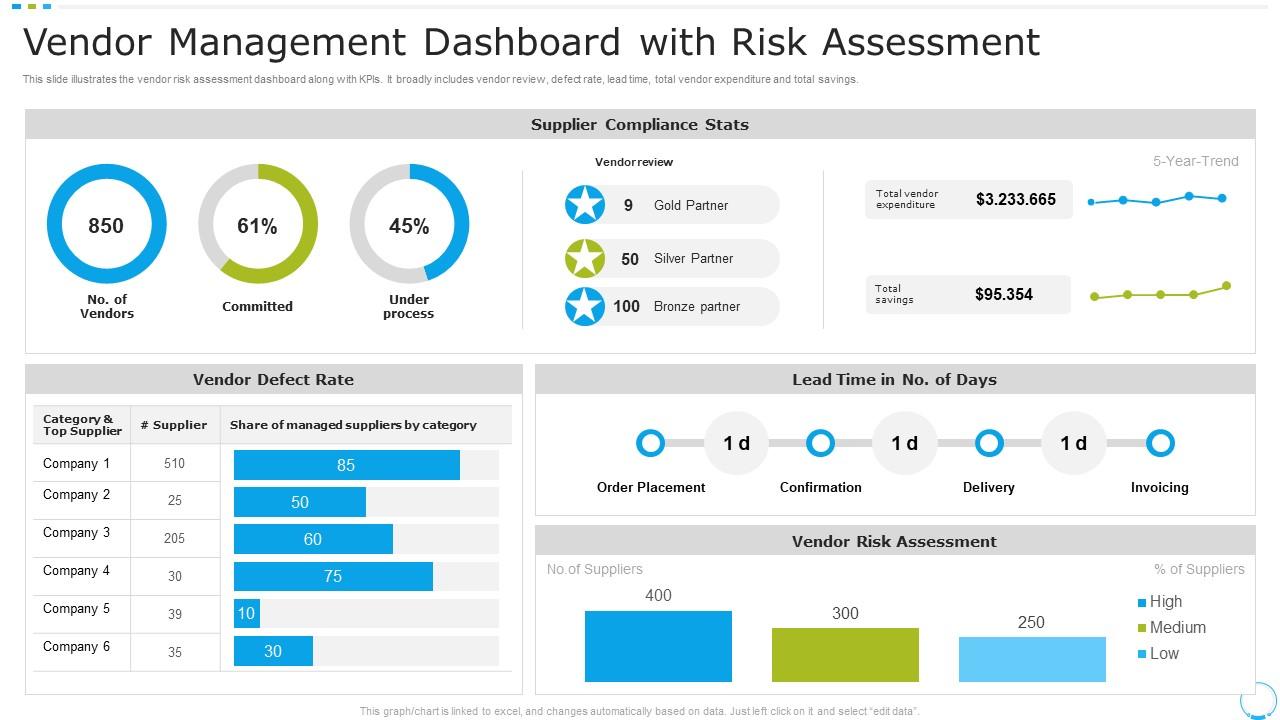
Managers need a quick way to understand the current vendor risk landscape. Dashboards can summarize vendor counts, risk levels, overdue assessments, open issues, upcoming reviews, and other relevant information.
Good reporting should support both high-level oversight and detailed investigation. For example, an executive may want to see the number of high-risk vendors, while a risk manager may need to open a specific vendor and review its assessment history.
Vendor Risk Management Software vs. Third Party Risk Management Platforms
The terms vendor risk management and third-party risk management often overlap, but organizations may use them with slightly different scopes.
Vendor risk management usually focuses on risks associated with suppliers and vendors. Third party risk management can cover a wider network of external relationships, including service providers, contractors, partners, technology providers, and other external entities.
| Area | Vendor Risk Management | Third Party Risk Management |
|---|---|---|
| Primary focus | Supplier and vendor risks | Broader external-party risks |
| Assessments | Vendor assessments | Assessments across third-party relationships |
| Monitoring | Vendor performance and risk | Ongoing third-party risk exposure |
| Typical users | Procurement, risk, compliance, and security teams | Risk, compliance, security, procurement, and business teams |
In practice, many third party risk management platforms include vendor risk capabilities as part of a broader risk program. The right scope depends on how your organization defines third parties and how much oversight your risk program requires.
How Vendor Risk Management Software Works
A typical vendor risk workflow starts when a business adds a new supplier to its system. The organization then gathers basic vendor information and determines the appropriate risk category.
- Vendor onboarding: Create a vendor profile and collect essential information.
- Risk classification: Determine the vendor’s risk level based on business-defined criteria.
- Due diligence: Collect questionnaires, documents, certifications, and other evidence.
- Risk assessment: Review responses and identify potential risks.
- Risk treatment: Assign remediation actions or other controls when needed.
- Ongoing monitoring: Track reviews, changes, documents, and open issues.
- Periodic reassessment: Reevaluate the vendor according to its risk level and organizational policy.
This lifecycle gives teams a consistent process instead of treating vendor risk as a one-time procurement task.
How to Choose the Best Vendor Risk Management Software
The best platform depends on your organization’s vendors, risk profile, compliance needs, and existing workflows. Therefore, businesses should evaluate software against actual processes rather than choosing a product based only on its feature list.
Consider Your Vendor Volume
A company managing 20 vendors may need a simpler workflow than an organization managing thousands of third parties. Consider how many vendor records, assessments, documents, and recurring reviews your team handles today.
Review Your Risk Categories
Determine which risks matter most to your business. Cybersecurity may be critical for a technology company, while operational continuity, financial stability, regulatory compliance, or data privacy may receive more attention in other industries.
Check Workflow Flexibility
Look for configurable assessments, approval steps, risk categories, notifications, and reporting. Flexible workflows can help the software adapt as your vendor program grows.
Evaluate Integrations
Vendor risk information often connects with procurement, finance, security, compliance, and business systems. Therefore, check whether the platform can integrate with the tools your team already uses.
Assess Reporting Needs
Ask whether the reporting features can answer practical questions. For example, can your team quickly identify high-risk vendors, overdue assessments, missing documents, and unresolved remediation tasks?
Common Mistakes to Avoid
Even good software cannot fix an unclear vendor risk process. Businesses should avoid several common mistakes when implementing a platform.
- Assessing every vendor the same way: Use risk-based processes instead of applying identical reviews to every supplier.
- Stopping after onboarding: Vendor risk can change, so ongoing monitoring matters.
- Collecting information without action: Assessment results should lead to clear decisions or remediation tasks.
- Ignoring business context: A technical risk score may not show the full operational impact of a vendor dependency.
- Keeping critical information in disconnected systems: Centralized records reduce the effort required to understand vendor status.
- Automating without oversight: Automated workflows should support responsible teams, not remove human review from important risk decisions.
NIST also emphasizes that supply chain risk management should integrate with broader organizational risk management activities. This reinforces the need to connect vendor assessments with actual business decisions rather than treating them as isolated compliance exercises. NIST’s supply chain risk management planning guidance provides additional context.
When Should You Consider Custom Vendor Risk Management Software?
Off-the-shelf software can work well when its workflows match your organization’s requirements. However, some businesses have specialized approval processes, complex vendor classifications, unique assessment rules, or integrations that standard platforms cannot handle easily.
In those cases, custom software can provide more control over workflows, data structures, dashboards, permissions, and integrations. For example, a company may want vendor risk assessments to automatically trigger different approval paths depending on vendor type, data access, or risk level.
Custom development can also make sense when vendor risk management needs to connect closely with procurement, finance, compliance, CRM, ERP, or internal reporting systems.
Important
Custom software should solve a clear workflow or integration problem. If a standard platform already meets your requirements, additional development may add unnecessary complexity.
For businesses that need broader purchasing workflows alongside vendor oversight, a purchase management system can also provide useful context around how procurement activities connect with supplier relationships.
Vendor Risk Management and Procurement
Vendor risk does not exist separately from procurement. The way a company selects, approves, contracts with, and reviews suppliers can directly affect its overall risk exposure.
For example, procurement teams can use vendor risk information when comparing suppliers or deciding which vendors require additional review before approval. Meanwhile, risk and compliance teams can use procurement data to understand the business importance of each relationship.
Automating related financial workflows can also reduce manual work around supplier transactions. For organizations managing supplier invoices, an automated invoice processing workflow can complement broader procurement and vendor management processes.
Benefits of Using Vendor Risk Management Software
Better visibility
Teams can see vendor information, assessments, risk levels, documents, and outstanding actions in one place.
More consistent assessments
Standardized questionnaires and workflows help teams apply a repeatable process across vendors.
Faster follow-up
Automated alerts and assigned tasks help teams respond to missing information and unresolved risks.
Stronger audit readiness
Organized records make it easier to demonstrate how vendor reviews, decisions, and remediation activities were handled.
Risk-based prioritization
Teams can spend more time on vendors that create greater potential business impact.
What to Look for in a Vendor Risk Management Platform
Before selecting a platform, create a short requirements list based on your actual vendor program. At minimum, evaluate vendor profiles, assessments, risk scoring, due diligence, document management, alerts, remediation tracking, reporting, permissions, and integrations.
Next, test the platform using a realistic vendor example. Add a vendor, complete an assessment, upload supporting documents, create a remediation task, and generate a report. This practical test can reveal workflow limitations that a product demonstration may not show.
Finally, consider scalability. Your vendor program may expand as your business adds suppliers, locations, services, and technology providers. A platform should support that growth without forcing your team to rebuild its processes from scratch.
Frequently Asked Questions
Frequently Asked Questions
What does vendor risk management software do?
Vendor risk management software helps businesses assess, classify, monitor, and manage risks associated with suppliers and other external vendors. It can also organize assessments, documents, alerts, remediation tasks, and reports.
What is the difference between vendor risk management and third party risk management?
Vendor risk management generally focuses on suppliers and vendors, while third party risk management can cover a broader range of external relationships, including service providers, contractors, partners, and technology providers.
What features should vendor risk management software include?
Important features include centralized vendor profiles, risk assessments, due diligence workflows, risk scoring, document management, automated alerts, remediation tracking, reporting, and integrations.
How often should vendors undergo risk assessments?
The right frequency depends on vendor risk, business impact, data access, regulatory requirements, and organizational policy. Higher-risk vendors may require more frequent reviews than lower-risk suppliers.
Can vendor risk management software integrate with ERP and procurement systems?
Many platforms support integrations with business systems. Integration can help connect vendor records, procurement activities, financial information, approvals, and risk workflows.
Conclusion
The best vendor risk management software should help your organization move from scattered vendor information to a structured, repeatable risk process. Look for capabilities such as centralized vendor profiles, risk assessments, due diligence, automated scoring, document management, alerts, remediation tracking, reporting, and integrations.
At the same time, consider the wider scope of your third-party relationships. If your organization manages suppliers, technology providers, contractors, and other external partners, third party risk management platforms may provide a broader framework for managing those relationships.
Most importantly, choose software around your actual workflows, risk requirements, and future needs. A well-designed system should make vendor oversight clearer, more consistent, and easier to manage as your business grows.
Build software around how your business works
If your vendor and procurement workflows require custom processes, integrations, or business-specific automation, custom software can help bring those workflows into one connected system.Talk to our team
