
Cloud Based Fleet Maintenance Software: 10 Features for Smarter Fleet Operations
Cloud based fleet maintenance software gives fleet teams one place to manage vehicles, inspections, repairs, service schedules, work orders, costs, and maintenance records. Instead of relying on spreadsheets, paper files, or disconnected systems, fleet managers can access current vehicle information from a centralized online platform. This approach can help organizations keep vehicles available, control maintenance work, and make better decisions from accurate data.
For public agencies and organizations that operate government vehicles, the need goes beyond routine maintenance. Government fleet management software must also support accountability, reporting, asset tracking, compliance processes, and long-term vehicle planning. In this guide, we will cover the key features, benefits, use cases, implementation considerations, and common mistakes to consider when choosing a cloud-based fleet maintenance solution.
What Is Cloud Based Fleet Maintenance Software?
Cloud based fleet maintenance software is an online system that helps organizations manage the maintenance lifecycle of vehicles and related assets. Because the software runs through the cloud, authorized users can access fleet information through an internet-connected device without keeping the entire system on a local computer.
In practice, the platform can bring vehicle records, preventive maintenance schedules, repair requests, inspections, work orders, parts, vendors, and maintenance costs into one system. As a result, fleet managers can see what needs attention without searching through separate spreadsheets or paper records.
The cloud model also makes it easier for multiple teams to work from the same information. For example, a fleet manager can review a vehicle’s maintenance history while a technician updates a work order from the maintenance facility.
Key takeaway
The main value of cloud based fleet maintenance software comes from connecting vehicle data, maintenance workflows, costs, and reporting in one accessible system.
Why Fleet Teams Are Moving to Cloud-Based Maintenance Systems
Traditional fleet maintenance processes often depend on spreadsheets, emails, paper inspection forms, and manual reminders. These methods can work for a very small fleet, but they become harder to manage as vehicle numbers and maintenance activity grow.
A cloud platform provides a more structured way to organize this information. For instance, managers can create maintenance schedules based on mileage, engine hours, dates, or other service requirements. Technicians can then receive work orders and record completed work in the same system.
In addition, centralized data gives managers a clearer view of maintenance spending and vehicle history. That information can support decisions about repairs, replacement planning, vendor performance, and fleet utilization.
Government organizations can also benefit from centralized records. The U.S. General Services Administration provides guidance and systems for federal motor vehicle management, including fleet management information systems that help agencies track vehicle operations and associated costs. GSA’s Motor Vehicle Policy Customer Guide provides current guidance for federal fleet managers.
10 Key Features of Cloud Based Fleet Maintenance Software
1. Centralized Vehicle Records
Every vehicle should have a complete digital profile. The profile can include the vehicle identification number, make and model, mileage, acquisition date, department, assigned location, warranty information, and current status.
More importantly, the system should connect maintenance history to each vehicle. Managers can then review previous repairs, inspections, parts, labor, and service dates without searching through multiple files.
2. Preventive Maintenance Scheduling
Preventive maintenance helps teams plan service before a vehicle develops a larger problem. A fleet maintenance platform can schedule recurring services based on mileage, engine hours, calendar dates, or other rules.
For example, a manager could create a recurring maintenance schedule for oil changes, tire inspections, brake checks, fluid checks, or other manufacturer-recommended services. The system can then help the team track upcoming tasks and overdue maintenance.
This proactive approach also helps reduce reliance on memory and manual calendar reminders.
3. Digital Work Order Management
Work orders connect maintenance requests with the people responsible for completing them. A good system should allow users to create, assign, prioritize, update, and close work orders.
Each work order can include the vehicle, reported problem, assigned technician, required parts, labor time, notes, status, and completion date. Therefore, managers can follow maintenance work from the initial request through completion.
For a deeper look at this workflow, see work order tracking software features.
4. Inspection and Service Tracking
Fleet teams need consistent inspection records to understand vehicle condition. Cloud based fleet maintenance software can provide digital inspection forms that technicians or drivers complete from a phone, tablet, or computer.
Teams can record defects, inspection results, comments, and follow-up tasks. If an inspection identifies a problem, the system can connect that issue to a maintenance work order.
As a result, inspection data becomes part of the vehicle’s ongoing maintenance history instead of remaining in a separate document.
5. Maintenance Cost Tracking
Maintenance costs can come from labor, parts, outside repair shops, tires, fluids, inspections, and other services. A centralized system can associate these expenses with individual vehicles and maintenance activities.
This makes it easier to identify vehicles that require frequent repairs or generate unusually high maintenance costs. Managers can also compare maintenance spending across departments, vehicle groups, or time periods.
Over time, these records can support more informed decisions about repairing or replacing vehicles.
6. Parts and Inventory Management
Maintenance teams need the right parts when a vehicle enters the shop. A fleet maintenance system can track parts used on work orders and provide visibility into inventory levels.
For example, the system can record which brake components, filters, batteries, tires, or other parts technicians use during repairs. Managers can then monitor stock and identify items that require replenishment.
This feature becomes especially useful for organizations that operate their own maintenance facilities and maintain a larger inventory.
7. Vendor and Repair Shop Management
Not every repair happens inside an organization’s own facility. Fleets often work with external repair shops, parts suppliers, towing providers, and other vendors.
Cloud software can store vendor information and connect external maintenance activity to specific vehicles or work orders. This creates a clearer record of where maintenance occurred and how much each service cost.
When vendor information becomes part of the same workflow, managers can review supplier activity without maintaining another standalone system. For related supplier workflows, see vendor management system features.
8. Maintenance History and Asset Reliability Tracking
A vehicle’s maintenance history can reveal patterns that individual repair records may not show. For example, repeated repairs on the same component may indicate that a vehicle requires closer attention or replacement planning.
A centralized maintenance history lets managers review service frequency, recurring problems, repair costs, and downtime. In addition, teams can use this information to compare vehicle reliability across an entire fleet.
Fleet managers can also connect maintenance information with broader asset management processes. See maintenance management system features for more information about managing asset reliability.
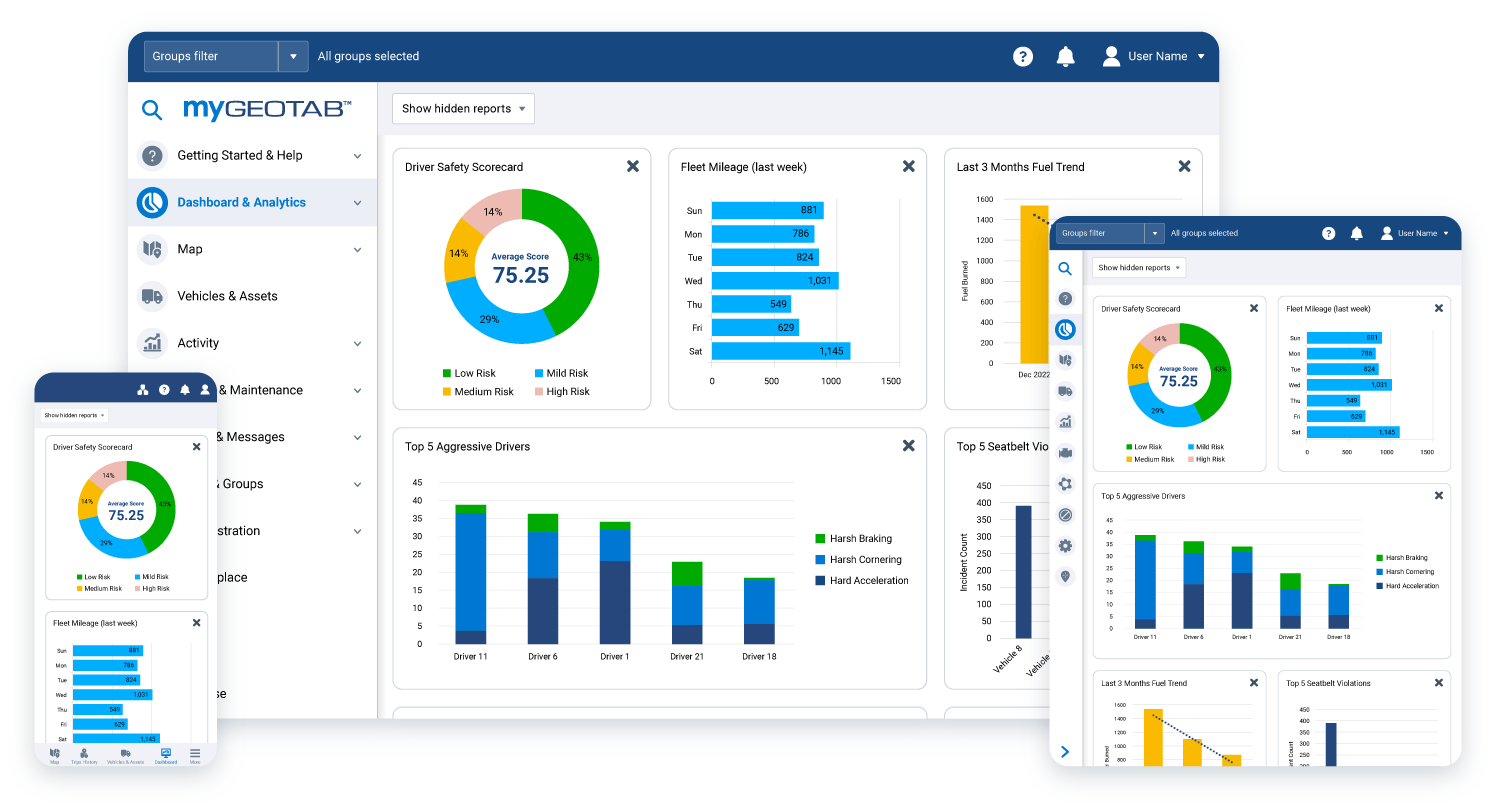
9. Fleet Maintenance Reporting and Dashboards
Fleet managers need more than individual records. They also need a high-level view of fleet performance.
Dashboards can bring important information together, such as open work orders, overdue services, maintenance costs, vehicle downtime, inspection results, and upcoming maintenance. Managers can then focus on issues that require attention instead of manually compiling reports.
Government organizations may have additional reporting requirements. The U.S. Department of Energy’s Federal Energy Management Program provides fleet management resources and tools for federal agencies, including fleet data and reporting resources. DOE’s fleet management and optimization resources provide additional information for federal fleet managers.
10. Mobile and Role-Based Access
Fleet maintenance rarely happens behind a single office desk. Technicians work in garages, drivers operate vehicles in the field, and managers may need information while away from the main facility.
Therefore, mobile-friendly access can make a major difference. Technicians can update work orders, users can submit maintenance requests, and managers can review fleet information from different locations.
Role-based permissions also help organizations control access. For example, technicians may update work orders, drivers may submit inspection reports, and managers may access cost reports and administrative settings.
How Government Fleet Management Software Differs
Government fleet management software serves many of the same maintenance needs as commercial fleet software. However, public-sector organizations may also need stronger controls around reporting, accountability, asset lifecycle management, and compliance.
For example, federal agencies manage vehicles under specific government requirements. The GSA’s current motor vehicle guidance covers areas such as acquisition, in-use management, disposal, and data reporting. Therefore, government fleet teams should evaluate software against their specific agency requirements rather than choosing a system based only on general maintenance features.
Government fleets may also include a wide range of vehicles, from administrative cars and service trucks to emergency, utility, and specialized vehicles. A flexible system should allow organizations to create different maintenance rules, departments, locations, and asset categories.
Important
Software does not automatically make an organization compliant. Government agencies should map their software workflows to the laws, policies, reporting requirements, and internal procedures that apply to their specific fleet.
Cloud-Based Fleet Maintenance Software vs. Spreadsheet Tracking
| Area | Spreadsheets | Cloud Fleet Maintenance Software |
|---|---|---|
| Vehicle records | Often stored across separate files | Centralized vehicle profiles |
| Maintenance reminders | Often require manual tracking | Scheduled maintenance workflows |
| Work orders | Manual updates and communication | Digital assignment and status tracking |
| Reporting | Manual data preparation | Centralized dashboards and reports |
| Remote access | Depends on file-sharing setup | Online access for authorized users |
| Maintenance history | Can become difficult to organize | Linked to individual vehicles and assets |
Spreadsheets still have a place in small operations. However, they can become harder to control when several people update records or when the fleet grows. A cloud platform can provide a more structured workflow by connecting records, tasks, users, and reports.
Key Benefits of Cloud Based Fleet Maintenance Software
Better Maintenance Planning
Scheduled maintenance gives teams a way to plan service before deadlines become urgent. Managers can see upcoming work and allocate technicians, parts, and service capacity accordingly.
More Complete Vehicle History
Centralized records make it easier to understand what happened to each vehicle over time. This information can help managers investigate recurring repairs and evaluate long-term maintenance needs.
Improved Visibility Across Teams
When drivers, technicians, supervisors, and fleet managers use the same system, everyone can work from the same vehicle information. Consequently, teams spend less time searching for updates.
Stronger Cost Control
Maintenance cost data can reveal where the fleet spends money. Managers can compare vehicles, departments, repair categories, and vendors to identify areas that deserve closer review.
More Organized Government Fleet Operations
For public-sector organizations, centralized fleet information can support internal reporting and operational oversight. The Department of Energy also provides federal fleet tools that track areas such as vehicle inventories, fuel consumption, and fleet performance. Federal fleet performance data from DOE shows how agencies can use structured fleet data for analysis and reporting.
How to Choose the Right Fleet Maintenance Software
Start by documenting how your team manages maintenance today. Identify where vehicle records live, how drivers report problems, how technicians receive work, how managers approve repairs, and how the organization tracks costs.
Next, turn those workflows into software requirements. Look for features that directly solve existing problems rather than selecting a platform based on a long feature list.
- Define your fleet size and vehicle types. Make sure the platform can support the number and variety of assets you operate.
- Map your maintenance workflow. Check how the system handles requests, inspections, approvals, work orders, repairs, and completion.
- Review reporting needs. Government and commercial organizations may require different reports, so confirm that the system can support your reporting process.
- Check user permissions. Make sure administrators can control what drivers, technicians, managers, and other users can view or change.
- Evaluate integrations. Consider whether the system needs to connect with accounting, fuel, telematics, GPS, procurement, inventory, or other business systems.
- Test the mobile experience. Field teams should be able to complete important tasks without depending on a desktop computer.
- Review data security and access controls. Ask how the provider manages user access, backups, authentication, and data protection.
Pro tip
Build your requirements around real maintenance workflows. A simple system that fits your team’s daily process can provide more value than a complex platform filled with features your team will not use.
Common Mistakes to Avoid
Choosing fleet software based only on the number of features can create problems later. Instead, focus on whether the platform fits your actual maintenance process.
Another common mistake involves moving old data without cleaning it first. Duplicate vehicle records, inconsistent mileage values, missing service dates, and outdated vendor information can reduce the value of a new system.
Teams should also avoid treating implementation as an IT-only project. Fleet managers, technicians, drivers, finance staff, and administrators may all use the system differently. Therefore, each group should have a clear role in the implementation process.
Finally, do not overlook reporting requirements. This matters even more for government organizations because fleet data may support internal oversight, audits, regulatory reporting, and long-term planning.
When Custom Fleet Maintenance Software Makes Sense
Off-the-shelf software can meet many common fleet maintenance needs. However, some organizations have workflows that do not fit standard processes.
For example, a government department may need custom approval chains, department-specific forms, unique asset fields, specialized reporting, or integrations with existing internal systems. A large organization may also need fleet maintenance to connect with procurement, finance, inventory, HR, or other enterprise workflows.
In those situations, custom ERP development can help create a system around the organization’s existing processes instead of forcing teams to change every workflow to match a standard product.
Frequently Asked Questions
Frequently Asked Questions
What is cloud based fleet maintenance software?
Cloud based fleet maintenance software is an online platform that helps organizations manage vehicle records, preventive maintenance, inspections, work orders, repairs, costs, vendors, and maintenance history from a centralized system.
What features should fleet maintenance software include?
Important features include vehicle records, preventive maintenance scheduling, work order management, inspections, maintenance history, cost tracking, parts management, vendor management, reporting, dashboards, and mobile access.
Can government agencies use cloud based fleet maintenance software?
Yes. Government agencies can use cloud-based systems to manage vehicle maintenance and fleet information. However, agencies should verify that the software supports their specific security, reporting, operational, and regulatory requirements.
How does fleet maintenance software help with preventive maintenance?
The software can track service intervals and create maintenance schedules based on dates, mileage, engine hours, or other rules. Teams can then monitor upcoming and overdue maintenance in one place.
Is cloud fleet software better than spreadsheets?
The right choice depends on fleet size and workflow complexity. Spreadsheets may work for simple operations, while cloud software provides more structured workflows, centralized records, permissions, maintenance scheduling, and reporting.
Final Thoughts
Cloud based fleet maintenance software can give fleet teams a centralized way to manage vehicles, maintenance schedules, inspections, repairs, costs, vendors, and service history. More importantly, it can connect daily maintenance work with the information managers need for planning and decision-making.
For organizations operating public-sector vehicles, government fleet management software should also support the specific reporting, accountability, compliance, and asset management requirements that apply to their fleet. Therefore, the best starting point is to document your current workflows, identify gaps, and then evaluate software against those real requirements.
Build software around how your business works
If your fleet operation needs custom workflows, integrations, reporting, or asset management features, a tailored ERP solution can help bring those processes into one system.Talk to our team
