
Top Property Management Systems: 10 Features to Compare in 2026
Top property management systems help landlords, property managers, and real estate businesses organize tenants, leases, rent collection, maintenance, expenses, accounting, and property records in one place. The right system can reduce manual work while giving managers a clearer view of day-to-day operations and financial performance.
However, property management software varies widely in its features and workflows. Some platforms focus on residential rentals, while others support commercial properties, larger portfolios, or specialized accounting needs. In this guide, we will compare the key features to look for, explain how property management accounting software fits into the workflow, discuss common implementation mistakes, and show how to choose a system that matches your portfolio.
What Are Property Management Systems?
Property management systems are software platforms designed to help organizations manage rental properties and the activities connected to them. Depending on the platform, they can handle tenant records, leases, rent payments, maintenance requests, property expenses, accounting, documents, communications, and reporting.
Instead of keeping tenant information in one spreadsheet, maintenance requests in email, and financial records in another application, a property management system can bring these workflows together. As a result, managers can work from a more complete view of each property and tenant.
For example, when a tenant submits a maintenance request, the manager can create a work order, assign it to a vendor, track the repair, record the cost, and keep the activity connected to the relevant property. This creates a useful link between operational and financial data.
Key takeaway
The best property management system is not simply the one with the most features. It is the one that supports your actual property, tenant, maintenance, payment, and accounting workflows.
Why Property Management Software Matters
Managing several properties manually becomes difficult because each property can generate many recurring tasks. Managers may need to track leases, collect rent, handle repairs, communicate with tenants, pay vendors, monitor expenses, and prepare financial reports.
As a portfolio grows, small gaps can create larger administrative problems. A missed renewal date, delayed maintenance request, or incorrectly recorded expense can affect both tenant service and financial reporting.
Property management software creates a central workspace for these activities. More importantly, it can connect operational events with financial records.
For instance, a repair request can become a work order, the work order can generate a vendor expense, and that expense can become part of the property’s financial history. This connection helps managers understand not only what happened but also what it cost.
10 Features to Look for in the Top Property Management Systems
1. Property and Unit Management
A property management platform should make it easy to organize properties, buildings, units, and related information. Managers should be able to see which units are occupied, vacant, under maintenance, or available for leasing.
The system should also support important property details such as addresses, unit types, amenities, ownership information, and property-specific notes. Therefore, managers can quickly find information without searching through separate files.
This becomes especially useful for businesses managing multiple buildings or properties with different operating requirements.
2. Tenant and Lease Management
Tenant records form the foundation of many property management workflows. A good system should store contact details, lease information, move-in dates, renewal dates, security deposits, payment history, and relevant documents.
Lease tracking also helps managers monitor important dates. For example, the system can help identify leases approaching expiration so the team can start renewal discussions at the right time.
For businesses that want a deeper look at tenant-focused workflows, see tenant management software features.
3. Online Rent and Payment Management
Rent collection is one of the most important recurring property management activities. Software can help managers track charges, payments, balances, overdue amounts, and payment history.
Depending on the platform, tenants may also receive online payment options. This can reduce manual payment tracking and give property managers a clearer view of outstanding balances.
However, payment functionality should match the organization’s banking, accounting, security, and payment-processing requirements. Managers should understand exactly how payments move through the system before choosing a platform.
4. Property Management Accounting Software
Property management accounting software connects rental operations with financial management. Instead of tracking rent, expenses, vendor payments, and property-level financial information separately, managers can organize these transactions within the same platform.
Useful accounting capabilities may include income and expense tracking, accounts payable, accounts receivable, general ledger functions, bank reconciliation, financial reporting, and property-level reporting.
This matters because property managers often need to understand financial performance at more than one level. They may need to review an individual unit, a building, a property group, or the entire portfolio.
The system should also help distinguish routine expenses from property improvements and other costs. For U.S. rental property owners, the IRS Publication 527 guidance on residential rental property explains rental income, common rental expenses, depreciation, and related reporting considerations. Software can organize financial records, but businesses should still apply the accounting and tax rules relevant to their situation.
5. Maintenance and Work Order Management
Maintenance can quickly become one of the busiest parts of property management. Tenants report problems, managers review requests, technicians or vendors perform repairs, and someone must track the cost and completion status.
A property management system should make this process easy to follow. Managers should be able to create maintenance requests, assign work, set priorities, add notes, attach relevant information, and close tasks after completion.
For example, a tenant might report a leaking faucet. The manager can create a work order, assign a plumber, record the repair cost, and maintain a history of the issue. As a result, future managers can see the property’s maintenance history without searching through old emails.
6. Vendor Management
Property managers often work with plumbers, electricians, cleaners, landscapers, contractors, security providers, and other service vendors. A centralized vendor record can keep contact information, service history, documents, payment information, and related activities organized.
Vendor management becomes even more useful when it connects with maintenance and accounting. Managers can see which vendor handled a repair and how much the organization paid for the service.
For related supplier workflows, vendor management system features provide useful context on organizing supplier information and activities.
7. Expense Tracking
Property expenses can come from maintenance, utilities, insurance, taxes, cleaning, landscaping, management fees, repairs, supplies, and other operating activities. A good property management system should help categorize and associate these expenses with the correct property or unit.
Accurate categorization makes financial reporting easier. It also helps managers understand which properties generate higher operating costs.
For example, a manager could compare maintenance expenses across several buildings and investigate why one property consistently requires more repair spending. The goal is not simply to record expenses but to make the data useful for decision-making.
See expense management system features for more information about organizing and controlling business expenses.
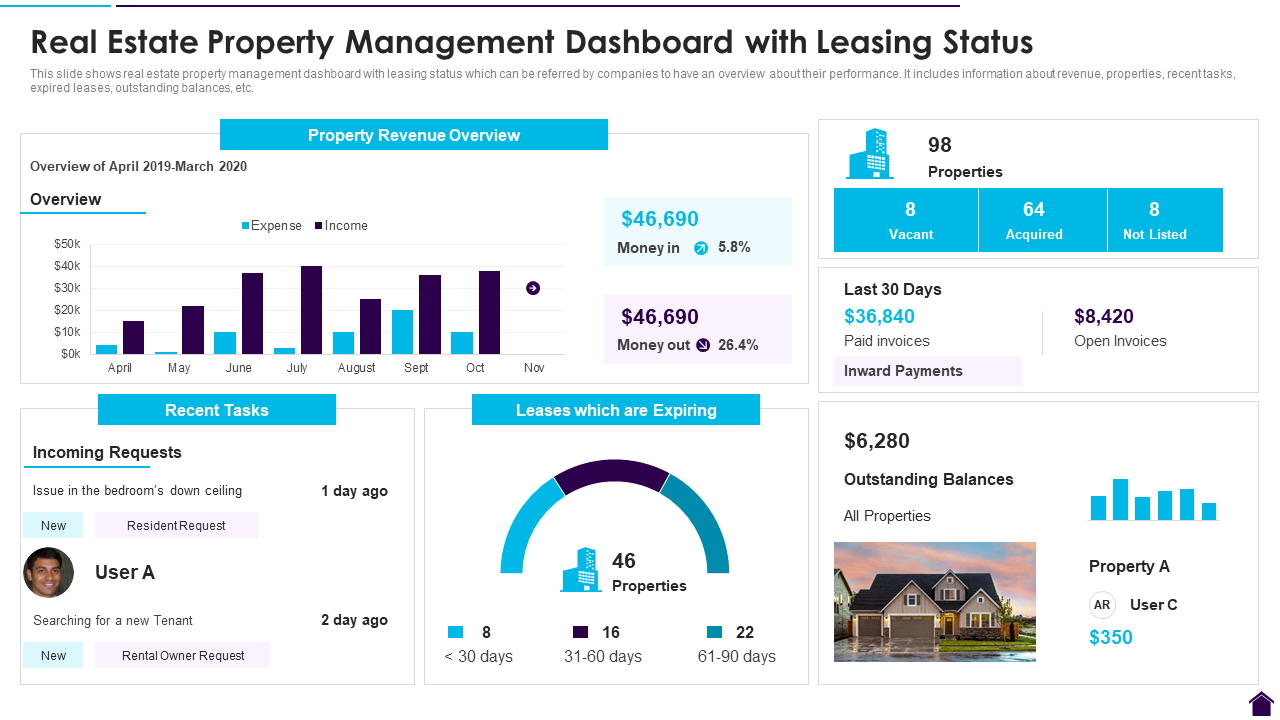
8. Reporting and Financial Dashboards
Property managers need reports that turn daily transactions into useful information. A property management platform may provide reports for rent collection, vacancies, income, expenses, maintenance, tenant balances, vendor spending, and property performance.
Dashboards can make this information easier to review. Instead of manually combining information from several spreadsheets, managers can view important figures from a centralized interface.
However, reporting needs differ between businesses. A small landlord may need simple income and expense reports, while a property management company may require property-level, owner-level, and portfolio-level reporting.
9. Document and Record Management
Property management creates a large amount of documentation. Lease agreements, inspection reports, invoices, maintenance records, tenant documents, vendor contracts, and property records all need organized storage.
A centralized document system can make these files easier to locate. Managers should also consider permissions so users can access only the information appropriate to their role.
In addition, look for search and filtering tools that help staff find documents quickly. A document system becomes less useful when users still need to search through folders manually to locate basic records.
10. Automation and Notifications
Automation can reduce repetitive administrative work. Property management software may automate reminders for lease renewals, rent due dates, maintenance tasks, inspections, invoices, and other recurring activities.
Notifications can also keep the right people informed. For example, a maintenance manager could receive an alert when a high-priority request arrives, while an accounting user could receive a notification about a vendor invoice awaiting review.
More importantly, automation should support the workflow rather than complicate it. Managers should be able to configure rules, permissions, and notifications according to how their organization actually works.
Top Property Management Systems: What Should You Compare?
When comparing property management systems, it helps to evaluate them across several practical categories rather than focusing on one feature.
| Area | What to Evaluate |
|---|---|
| Property management | Properties, buildings, units, occupancy, and property records |
| Tenant management | Tenant profiles, leases, renewals, deposits, and communications |
| Accounting | Income, expenses, payables, receivables, reconciliation, and reports |
| Maintenance | Requests, work orders, assignments, priorities, and repair history |
| Vendor management | Vendor records, services, documents, costs, and payment information |
| Reporting | Property, tenant, maintenance, financial, and portfolio reports |
| Automation | Reminders, notifications, recurring tasks, and approval workflows |
| Security | User roles, permissions, authentication, and data access controls |
For example, a small landlord may prioritize rent collection and basic tenant records. In contrast, a property management company with hundreds of units may need advanced accounting, maintenance workflows, vendor management, reporting, and integrations.
Cloud-Based vs. Traditional Property Management Software
Cloud-based property management software runs through an online environment, which can make information accessible to authorized users across different locations. This model can suit teams with remote staff, multiple offices, or property managers who spend much of their time in the field.
Traditional locally installed software may still fit organizations with specific infrastructure or operational requirements. However, managers should consider how users access the system, how updates work, how backups are handled, and how easily the platform can support multiple locations.
Rather than choosing software based only on whether it is cloud-based, evaluate the complete workflow. Security, usability, integrations, reporting, support, and data management all matter.
How Property Management Accounting Software Improves Financial Control
Accounting becomes more useful when it connects directly to property operations. A manager should not have to manually recreate every maintenance cost, vendor invoice, or tenant payment in a separate accounting workflow.
For instance, a completed repair can generate a cost associated with a particular property. The accounting team can then review the transaction alongside other expenses and include it in relevant financial reports.
Similarly, rent records can connect with tenant balances and property income. This creates a more complete picture of cash flow and operating performance.
Still, software does not replace proper financial processes. Teams should define approval rules, account structures, expense categories, reconciliation procedures, and reporting requirements before configuring the system.
Important
Property management software can organize financial information, but it should not be treated as a substitute for professional tax or accounting advice. Requirements can vary by location, ownership structure, and property type.
How to Choose the Right Property Management System
Start by documenting your current property management process. List the tasks your team performs from tenant onboarding through lease renewal, rent collection, maintenance, vendor payments, and financial reporting.
Next, identify the areas that create the most manual work. These areas should guide your software requirements.
- Define your property portfolio. Identify the number of properties, units, locations, and property types you manage.
- Map tenant workflows. Document how your team handles applications, leases, renewals, communications, deposits, and tenant requests.
- Review accounting needs. Decide whether you need basic expense tracking or a broader property management accounting workflow.
- Evaluate maintenance processes. Check how the system handles requests, work orders, vendors, approvals, and repair costs.
- Check reporting requirements. Make sure the system can produce the property, tenant, owner, and financial reports your organization needs.
- Review integrations. Consider connections with payment services, accounting platforms, banking systems, communication tools, and other business applications.
- Test usability. Have actual property managers and accounting users test the system before making a final decision.
- Check scalability. Choose a platform that can support your expected portfolio growth without forcing a major system change later.
Pro tip
Create a short list of your most important workflows before comparing software. Then test each platform against those workflows instead of comparing feature counts alone.
Common Property Management Software Mistakes
One common mistake is choosing a system because it offers a large number of features. More features do not always mean a better fit. If users struggle to understand the interface or the workflows do not match daily operations, adoption can suffer.
Another mistake involves overlooking accounting requirements. A system may handle tenants and maintenance well but provide limited financial functionality. Therefore, property managers should test accounting workflows before making a decision.
Data migration also deserves attention. Old spreadsheets may contain duplicate tenants, outdated properties, inconsistent categories, or incomplete financial records. Cleaning the data before migration can prevent those problems from moving into the new system.
Finally, organizations should avoid implementing software without clear user roles. Property managers, maintenance staff, accountants, vendors, and administrators may need different levels of access.
When Custom Property Management Software Makes Sense
Standard property management platforms can meet many common needs. However, some organizations operate with unique workflows that standard software cannot handle efficiently.
For example, a real estate company may need custom approval chains, specialized property reports, unique tenant workflows, complex accounting rules, or integrations with existing enterprise systems.
In these situations, custom ERP development can provide a way to build workflows around the organization’s existing processes. Instead of forcing every department into a standard workflow, a custom system can connect property management, finance, procurement, maintenance, and reporting in a way that matches business requirements.
Frequently Asked Questions
Frequently Asked Questions
What are the top property management systems?
The top property management systems are platforms that match an organization’s property, tenant, maintenance, payment, accounting, reporting, and workflow requirements. The right choice depends on portfolio size, property type, budget, and operational needs.
What features should a property management system have?
Important features include property and unit management, tenant records, lease tracking, rent collection, maintenance management, vendor management, accounting, expense tracking, reporting, document management, automation, and user permissions.
What is property management accounting software?
Property management accounting software helps track financial activity related to rental properties, including income, expenses, vendor payments, tenant balances, and property-level financial reporting.
Can property management software handle maintenance?
Yes. Many systems provide maintenance request and work order features. Managers can record tenant requests, assign tasks, track repairs, communicate with vendors, and associate maintenance costs with properties.
Should property management software include accounting?
It can be useful when property operations and financial records need to work together. However, the required accounting features depend on the organization’s portfolio, reporting process, ownership structure, and existing accounting tools.
Is custom property management software worth considering?
Custom software can make sense when an organization has specialized workflows, complex integrations, unique reporting needs, or processes that standard property management platforms cannot support effectively.
Final Thoughts
The top property management systems should make daily property operations easier while giving managers reliable information for financial and operational decisions. The most useful platforms connect property records, tenants, leases, payments, maintenance, vendors, expenses, and reporting instead of treating each workflow as a separate task.
Property management accounting software deserves particular attention because financial data affects both day-to-day control and long-term planning. Therefore, compare systems based on your actual portfolio, accounting requirements, maintenance workflows, reporting needs, integrations, and future growth.
Before choosing a platform, test the workflows that matter most to your team. A system that fits those processes clearly and consistently is more valuable than one that simply offers the longest feature list.
Build software around how your business works
If your property management operation needs custom workflows, accounting processes, integrations, or reporting, a tailored ERP solution can help bring those functions into one system.Talk to our team
