
App for Landscapers: 11 Features That Make Landscaping Jobs Easier
An app for landscapers helps landscaping businesses manage jobs, crews, customers, schedules, estimates, expenses, and field work from one place. Instead of relying on paper notes, spreadsheets, phone calls, and disconnected tools, a landscaping team can use one system to keep daily operations organized.
For a growing landscaping company, the right software for landscapers can make it easier to move from a new customer inquiry to an estimate, scheduled service, completed job, and follow-up. In this guide, we will cover the most useful features, how landscaping company software works, what to consider before choosing one, common mistakes to avoid, and when custom software may make more sense.
What Is an App for Landscapers?
An app for landscapers is business software designed to support the day-to-day work of landscaping companies. Depending on the platform, it can help with customer management, job scheduling, estimates, work orders, crew coordination, inventory, expenses, invoicing, and reporting.
Unlike a general business app, landscaping software can fit workflows that involve multiple job sites, mobile crews, recurring maintenance visits, equipment, materials, and changing schedules.
For example, a landscaping company might receive a request for weekly lawn maintenance. The office team can create the customer record, prepare an estimate, schedule recurring visits, assign a crew, record job details, and track billing information within the same system.
Key takeaway
The value of landscaping software comes from connecting related business tasks. A good system should reduce duplicate data entry while giving office staff and field crews access to the information they need.
Why Landscaping Companies Use Business Software
Landscaping businesses often manage several moving parts at the same time. A crew may visit one property for mowing, another for irrigation work, and another for a larger landscape installation. Meanwhile, the office may handle new leads, estimates, customer questions, purchasing, and invoices.
As a result, manual processes can make it harder to maintain accurate information. A scheduling change may not reach the crew quickly. An estimate may sit in an email thread. A customer request may remain in someone’s notes instead of the main customer record.
Software for landscapers brings these activities into a more organized workflow. It can also give managers a clearer view of upcoming work, active jobs, customer history, and business performance.
11 Features to Look for in an App for Landscapers
1. Customer and Contact Management
Customer management should form the foundation of a landscaping business app. The system should store names, contact details, property information, service history, notes, estimates, and related job records in one place.
For recurring landscaping services, this history becomes especially useful. Staff can review previous work before responding to a customer request, which helps them provide more informed service without searching through separate spreadsheets or messages.
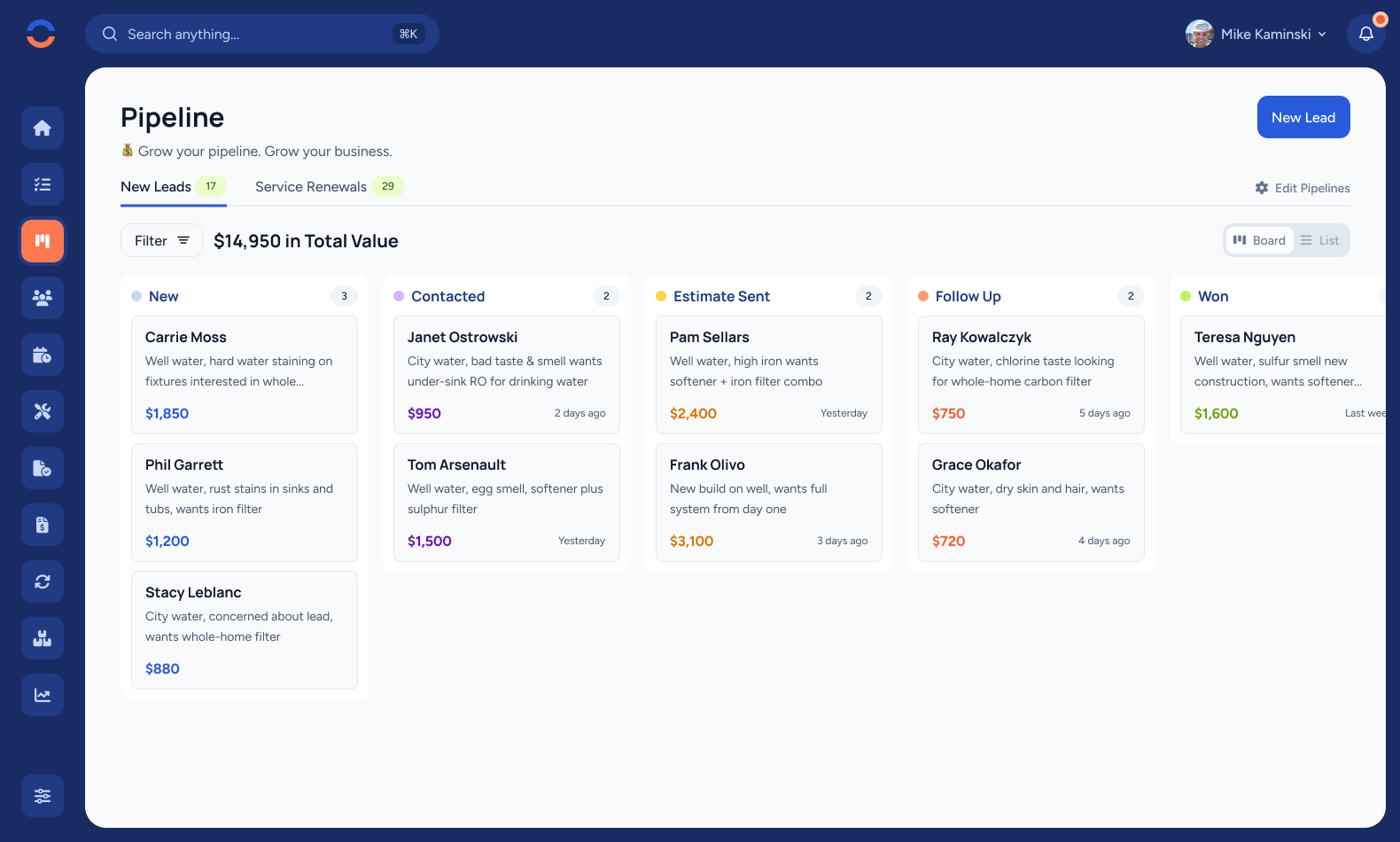
2. Lead and Sales Pipeline Management
Landscaping companies need a simple way to manage prospects before they become customers. A lead management feature can track inquiries from the first conversation through qualification, site visits, estimates, and approval.
For example, a new lead could move through stages such as New Inquiry, Site Visit, Estimate Sent, Follow-Up, Approved, and Scheduled. This gives the office team a clear view of opportunities that still need attention.
For a deeper look at managing opportunities, see Sales Pipeline Software.
3. Estimates and Quotes
Estimating is a major part of landscaping work, especially for installations, hardscaping, irrigation projects, and larger property improvements. A useful app should help teams create estimates with labor, materials, services, quantities, and pricing.
The goal is not simply to generate a document. The system should make it easier to maintain consistent pricing and connect approved estimates to the next stage of the workflow.
When an estimate becomes a job, the team should not need to re-enter the same customer and project information manually.
4. Job Scheduling
Scheduling becomes more complicated as a landscaping company adds customers and crews. An app should help managers see upcoming jobs, assign workers, manage recurring services, and adjust schedules when priorities change.
For example, a recurring lawn maintenance customer may need service every week, while a landscape installation may require several crew visits. The scheduling system should make these differences easy to manage.
Mobile access also matters because landscaping teams spend much of their working day away from the office. OSHA identifies motor vehicles, machinery, weather, chemicals, and other hazards among the risks associated with landscape and horticultural work, so clear job information and practical field communication can support better organization. OSHA’s landscaping hazards and solutions guidance provides additional safety information for employers and workers.
5. Work Order Management
Work orders turn planned services into actionable jobs. They can contain the customer, property, service type, assigned crew, scheduled date, instructions, materials, and job status.
This is particularly useful when a company handles many maintenance visits or service requests. Instead of relying on separate messages, employees can use the work order as the central reference for completing the job.
Businesses evaluating this capability can also explore work order management system features and how they support job tracking.
6. Crew and Field Coordination
Landscaping work happens in the field, so the office and crews need access to the same job information. A landscaping app can give workers details such as property instructions, service requirements, notes, assigned tasks, and job status.
Depending on the system, crews may also be able to update a job from a mobile device after completing their work. Therefore, the office can receive current information without waiting for paperwork to return.
Pro tip
Choose field software that keeps important job information easy to access. A complicated interface can slow crews down, especially when they need to update a job while working outdoors.
7. Inventory and Material Tracking
Landscaping projects often require materials such as plants, soil, mulch, fertilizer, irrigation components, stone, and other supplies. Inventory management helps businesses track what they have, what they need, and what has been allocated to specific jobs.
This becomes even more useful when the company manages multiple projects at once. Managers can reduce the risk of discovering that a required material is unavailable just before a crew starts work.
A CRM with inventory capabilities can also connect customer and project information with stock records. See CRM inventory management software features for a broader look at this connection.
8. Expense Tracking
Landscaping companies incur expenses across fuel, materials, equipment, repairs, supplies, and other operating costs. An app can help record these expenses and connect them to the appropriate job or business category.
Better expense records make it easier to understand where money goes. More importantly, they can help managers review project costs and identify areas that require closer control.
9. Customer Communication and Service History
Good customer service depends on context. When a customer asks about a previous service, a team member should be able to review the relevant history without searching through multiple systems.
A landscaping company app can keep communication notes, service records, estimates, work orders, and property details together. Consequently, different employees can respond with more consistent information.
For recurring services, this history can also help teams understand customer preferences, previous requests, and completed work.
10. Reporting and Business Dashboards
Managers need more than a list of open jobs. They also need visibility into business activity.
Useful reports can cover areas such as:
- Open and completed jobs
- Upcoming scheduled work
- Estimate status
- Customer activity
- Job costs and expenses
- Revenue by service or customer
- Outstanding invoices
These reports can help owners identify operational bottlenecks and make decisions using current business information rather than scattered records.
11. Mobile Access
Mobile access is one of the most important considerations for landscaping businesses because much of the work takes place away from the office. Field employees may need to view job instructions, update statuses, record notes, or communicate completed work from a phone or tablet.
However, mobile access should not mean simply shrinking a desktop application onto a phone. The interface should make common field tasks quick and easy to complete.
How Landscaping Company Software Can Improve Daily Operations
The biggest benefit of landscaping company software is the connection between different stages of work. Instead of treating sales, scheduling, field operations, expenses, and customer service as separate activities, the business can connect them.
From inquiry to estimate
A new customer inquiry can become a lead record, followed by a site visit and estimate. This creates a consistent process for handling new opportunities.
From estimate to job
Once a customer approves the work, the business can convert the relevant information into a scheduled job or work order instead of creating everything again.
From job to customer history
After completion, notes, service details, costs, and follow-up information can remain connected to the customer record.
As a result, the business creates a clearer operational trail from the first customer contact to completed service.
App for Landscapers vs. General Business Software
Not every landscaping company needs a highly specialized platform. A general CRM, project management system, or field service tool may work well for a smaller operation with simple requirements.
However, landscaping businesses often have workflows that general tools do not handle naturally. Recurring maintenance, property-specific instructions, crews working across different locations, estimates based on materials and labor, and field updates can require more specialized processes.
| Business need | General business software | Landscaping-focused software |
|---|---|---|
| Customer records | Usually supported | Supported with property and service context |
| Job scheduling | May require customization | Usually central to the workflow |
| Recurring maintenance | May need additional setup | Can fit recurring service workflows |
| Field updates | Depends on the platform | Often designed around mobile work |
| Landscaping-specific workflows | May require configuration | Can be built around industry processes |
Therefore, the right choice depends on how closely the software matches the company’s actual workflow, not simply how many features it lists.
What to Consider Before Choosing Software for Landscapers
Before selecting an app, map the current workflow from lead generation through completed work and payment. Then identify where employees lose time, duplicate information, or struggle to find important records.
Next, consider these questions:
- Can office staff and field crews access the information they need?
- Does the system support recurring landscaping services?
- Can estimates become jobs without duplicate data entry?
- Can managers assign and reschedule crews easily?
- Does the system track job-related expenses and materials?
- Can employees update job status from mobile devices?
- Can customer and property information remain connected to service history?
- Does the reporting provide useful information for managers?
- Can the system integrate with the other tools the company already uses?
Important
Do not choose software based only on the number of features. A system with fewer features may provide more value if it fits your team’s daily workflow and is easy for employees to use.
When Custom Landscaping Software Makes Sense
Off-the-shelf software can work well when a company has common requirements and is comfortable adapting its processes to the platform. However, growing landscaping businesses may eventually need workflows that standard applications cannot support without workarounds.
For example, a company might want a single system that combines customer records, property profiles, estimating, recurring scheduling, crew management, inventory, expenses, invoicing, and custom reporting.
In that situation, custom ERP development can provide a way to build workflows around the company’s existing processes instead of forcing employees to work around the limitations of a generic system.
The key question is whether customization solves a real operational problem. If the existing tools already handle the business well, custom development may add unnecessary complexity. On the other hand, if employees regularly maintain duplicate records or rely on manual workarounds, a tailored system may be worth evaluating.
Common Mistakes When Choosing a Landscaping App
Several mistakes can reduce the value of a new system. First, some companies focus heavily on the feature list without considering how employees will use the software every day.
Second, businesses sometimes overlook mobile usability. A system may look excellent on a desktop but prove difficult for crews working at customer properties.
Third, companies may add too many disconnected tools. Although each tool can solve one problem, employees then have to move information between multiple systems.
Finally, businesses should avoid ignoring data migration and user training. Even a capable platform can create problems if existing customer information is incomplete or employees do not understand the new workflow.
How to Get Started With a Landscaping Business App
Start with the processes that create the most operational friction. For many companies, that means customer management, estimates, scheduling, work orders, and field communication.
- Document your current workflow from lead to completed job.
- Identify repetitive tasks and duplicate data entry.
- List the information crews need while working in the field.
- Separate essential features from optional features.
- Test the system with real examples from your business.
- Train employees before making the system part of the daily workflow.
- Review usage and refine the process after implementation.
At the same time, keep safety-related information separate from assumptions about what software can replace. OSHA provides industry-specific resources covering hazards related to landscaping activities, including machinery, chemicals, vehicles, heat, tree care, and other risks. OSHA’s Landscape and Horticultural Services resources can help employers and workers understand those operational safety considerations.
Frequently Asked Questions
Frequently Asked Questions
What is the best app for landscapers?
The right app depends on your company’s workflow. Look for strong customer management, estimating, scheduling, work orders, crew coordination, mobile access, expense tracking, and reporting.
What should landscaping company software include?
Useful landscaping company software should connect customer records, estimates, scheduling, work orders, field updates, expenses, materials, communication, and reporting in a practical workflow.
Can an app help manage recurring lawn maintenance?
Yes. Software can help businesses organize recurring service schedules, assign crews, store property instructions, track completed visits, and maintain customer service history.
Do landscaping companies need mobile software?
Mobile access can be valuable because landscaping crews spend much of their time away from the office. A mobile-friendly system can help workers access instructions and update job information from the field.
When should a landscaping company consider custom software?
Consider custom software when standard tools cannot support important workflows, employees maintain duplicate records, or the company needs several business functions connected in one tailored system.
Final Thoughts
An app for landscapers can bring customer management, estimating, scheduling, work orders, crews, expenses, materials, and reporting into a more connected workflow. However, the right solution should match the way your landscaping company actually operates.
Start by identifying the processes that consume the most time or create the most errors. Then compare software based on usability, mobile access, workflow support, integrations, reporting, and room for future growth. For companies with specialized processes, custom development can also provide a way to create software around their specific operating model.
Build software around how your business works
If standard landscaping software does not fit your workflows, a custom business system can connect the processes your team relies on every day.Talk to our team
