
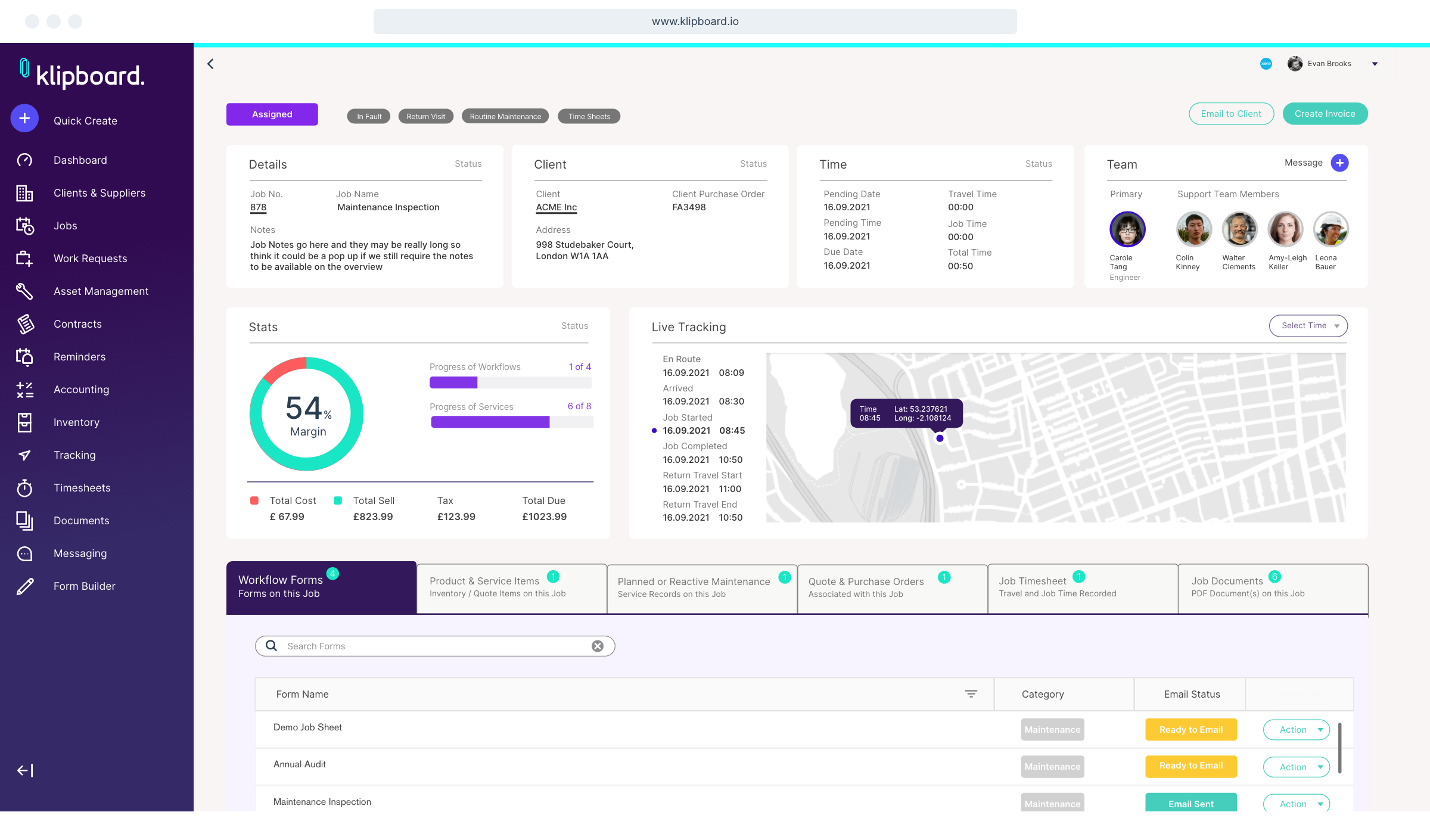
Field Service HVAC Software: 11 Features to Improve Service Operations
Field service hvac software helps HVAC companies manage technicians, service calls, work orders, scheduling, maintenance, customer records, and field operations from one system. Instead of coordinating jobs through spreadsheets, phone calls, paper forms, and disconnected apps, HVAC businesses can use centralized software to keep office and field teams aligned.
For growing HVAC contractors, the right management software for HVAC can also connect the full service workflow, from the first customer request to dispatch, diagnosis, repair, follow-up, and billing. In this guide, we will explain how field service HVAC software works, the key features to look for, its benefits and limitations, common mistakes, and how to choose a system that fits your business.
What Is Field Service HVAC Software?
Field service HVAC software is business management software designed for companies that install, inspect, maintain, and repair heating, ventilation, and air conditioning equipment at customer locations.
The software connects office operations with field work. For example, when a customer reports that an air conditioner is not cooling, an office employee can create a service request, check technician availability, schedule the visit, assign the job, and send the technician the relevant customer and equipment information.
After the visit, the technician can update the work order, record findings, add parts or labor, attach notes, and mark the job status. As a result, the office team can continue the billing or follow-up process without waiting for paper documents.
Key takeaway
The main purpose of field service HVAC software is to connect office and field workflows. The best system should make it easier to schedule work, give technicians useful job information, track service history, and maintain accurate business records.
Why HVAC Companies Need Field Service Management
HVAC businesses manage a different type of workflow than many office-based companies. Technicians spend much of their day traveling between customer locations, while office staff coordinate appointments, parts, customers, estimates, invoices, and urgent service requests.
Without a central system, information can become fragmented. A technician may receive instructions by phone, while customer history sits in a spreadsheet and equipment details remain on a paper form.
Management software for HVAC brings these activities together. Therefore, managers can gain a clearer view of open jobs, technician schedules, maintenance needs, and customer activity.
It can also support more consistent service records. This matters when a customer calls about the same HVAC unit several months after an earlier repair.
11 Features to Look for in Field Service HVAC Software
1. HVAC Job Scheduling
Scheduling is one of the most important features for an HVAC service business. The system should allow office staff to create appointments, assign technicians, manage time windows, and adjust schedules when emergencies or delays occur.
For example, an HVAC company may have several preventive maintenance visits planned for the morning and urgent cooling repairs in the afternoon. A scheduling system can help dispatchers see the workload and make assignments based on availability.
Recurring scheduling also matters for customers with maintenance agreements. Instead of creating every visit manually, the system can support a repeat service workflow.
2. Technician Dispatching
Dispatching connects scheduled jobs with field technicians. A dispatcher should be able to see which technicians have open capacity and assign work without relying on multiple phone calls.
Good dispatching also gives technicians the information they need before they arrive. This can include the customer address, service history, equipment details, job notes, and requested service.
In practice, this reduces unnecessary back-and-forth between the office and field team.
3. Work Order Management
Work orders give technicians a structured record of what needs to happen at a customer location. An HVAC work order may include the customer, property, equipment, issue, assigned technician, scheduled time, required parts, service notes, and job status.
A connected workflow can also make it easier to move from a service request to a completed job without entering the same information repeatedly.
For a broader look at work order processes, see work order management software features.
4. Equipment and Service History
HVAC service often depends on equipment history. A technician may need to know the unit model, previous repairs, maintenance visits, parts replaced, and earlier service notes before starting a job.
Therefore, management software for HVAC should connect equipment records with customer and service information. This gives technicians useful context instead of forcing them to start each visit with limited background information.
For example, if the same unit has required several repairs, its service history can help the team understand what happened during earlier visits and discuss appropriate next steps with the customer.
5. Preventive Maintenance Management
HVAC companies often handle both reactive repairs and planned maintenance. Preventive maintenance software can help teams organize recurring inspections and service visits before equipment develops a larger problem.
The system should support maintenance schedules, reminders, service tasks, and completion records. As a result, staff can manage recurring work without depending entirely on manual calendars.
Maintenance management also creates a useful service history. That record can help the company understand what work technicians completed on a particular asset over time.
For more information about maintenance workflows, explore maintenance management system features.
6. Mobile Access for Technicians
HVAC technicians work in the field, so mobile access should be a core part of the software experience. Technicians may need to view job details, update work orders, record notes, review equipment information, or communicate job progress from a phone or tablet.
However, mobile access should focus on practical field tasks. A technician should not have to navigate a complicated interface simply to update a job status.
Pro tip
Test the mobile workflow with actual technicians before selecting software. Ask them to complete common tasks such as opening a work order, adding notes, recording parts, and closing a service call.
7. Parts and Inventory Tracking
HVAC technicians may need filters, motors, capacitors, compressors, refrigerants, electrical components, and other parts for service work. Poor inventory visibility can create delays when a required component is unavailable.
Field service HVAC software can connect parts with work orders and inventory records. This helps businesses understand which materials technicians use and which items require replenishment.
Inventory tracking becomes even more useful when an HVAC company operates multiple service vehicles. Managers can monitor stock levels across locations or vehicles instead of relying on informal updates.
For businesses that want to connect inventory with customer and operational data, CRM inventory management software provides additional context.
8. Customer and Property Management
Customer management should go beyond storing a name and phone number. HVAC businesses can benefit from keeping property information, equipment records, service history, appointments, estimates, invoices, and communication notes connected to the customer.
This structure makes follow-up easier. For instance, when a customer calls about an air conditioning problem, the office employee can quickly review previous service information before scheduling the next visit.
9. Estimates, Invoices, and Payments
Many HVAC jobs require more than a simple service call. A technician may identify a repair that needs customer approval, recommend equipment replacement, or provide an estimate for additional work.
Connecting estimates with service records can reduce duplicate data entry. Once the customer approves the work, the business can move the job into the appropriate service workflow.
Similarly, invoice information can remain connected to the completed work order. This creates a clearer record of what the company performed and what the customer was charged for.
10. Service Reports and Documentation
Service documentation helps HVAC businesses maintain a clear record of completed work. Depending on the job, technicians may need to record equipment readings, parts used, repair notes, maintenance tasks, or customer comments.
Digital records make this information easier to search and share than paper forms. In addition, managers can use service reports to review recurring problems and monitor job completion.
HVAC businesses also need to consider regulatory requirements that apply to refrigerant handling. For example, the U.S. EPA explains that Section 608 of the Clean Air Act establishes requirements for stationary refrigeration and air conditioning, including technician certification and recordkeeping. Businesses operating under those rules can review the EPA Section 608 requirements to understand the applicable obligations.
11. Reporting and Performance Dashboards
Managers need visibility into more than today’s schedule. Reporting tools can help them review completed jobs, open work orders, recurring maintenance, technician activity, parts usage, customer activity, and revenue-related information.
For example, a manager might compare the number of completed service calls with open work orders. Another report might show which customers have upcoming maintenance visits.
More importantly, dashboards can bring these metrics into one place. Therefore, managers spend less time collecting information from separate spreadsheets.
How Field Service HVAC Software Improves the Service Workflow
A useful HVAC system should connect the entire service process rather than treating every task as a separate activity.
Step 1: Capture the service request
The office creates a customer and service request record with the issue, location, equipment information, and other relevant details.
Step 2: Schedule and dispatch
The dispatcher checks technician availability and assigns the job based on the company’s scheduling process.
Step 3: Complete the field work
The technician reviews the work order, performs the required service, records findings, and adds parts or labor information.
Step 4: Review and close the job
The office team reviews the completed work, handles the next billing or follow-up step, and keeps the service history updated.
Because the information stays connected, the company can create a more consistent process from the first customer call to job completion.
Management Software for HVAC: What Should You Prioritize?
Not every HVAC business needs the same feature set. A small company with a few technicians may need simple scheduling, customer records, work orders, and invoicing. A larger contractor may need advanced dispatching, inventory, maintenance contracts, reporting, and integrations.
Therefore, start by mapping your current workflow before comparing software. Identify where employees spend the most time, where information gets lost, and where customers experience delays.
| Business need | Basic software | Advanced HVAC software |
|---|---|---|
| Scheduling | Basic appointments | Dispatch, recurring jobs, and workload visibility |
| Work orders | Simple job records | Detailed field workflows and service history |
| Technician access | Limited or desktop-focused | Mobile field access |
| Equipment records | Basic customer notes | Equipment-specific service history |
| Reporting | Basic reports | Operational dashboards and custom reports |
Field Service HVAC Software vs. General Business Software
General project management or CRM software can handle some HVAC processes. However, these systems may require additional configuration when a company needs technician dispatch, equipment history, recurring maintenance, mobile work orders, and field-specific workflows.
On the other hand, HVAC-focused software may provide these functions as part of its core workflow. That can reduce the amount of customization required.
The right option depends on the company’s size and processes. A small HVAC contractor with straightforward operations may find a standard platform sufficient, while a growing company with complex field operations may need more specialized capabilities.
Common Mistakes When Choosing HVAC Management Software
Choosing software based only on a long feature list can create problems. Instead, evaluate how the system handles the tasks employees perform every day.
First, avoid ignoring technician usability. If field workers find the mobile interface difficult, the company may continue relying on phone calls and paper notes.
Next, check whether the software connects customer, equipment, and work order information. Separate records can recreate the same problems the new system should solve.
Also, consider data migration and integration requirements. If the company already uses accounting, payment, inventory, or communication tools, confirm that the new platform can work with the existing setup.
Important
Do not choose an HVAC software platform solely because it has the most features. A simpler system that your office staff and technicians use consistently can provide more practical value.
When Should an HVAC Business Consider Custom Software?
Off-the-shelf field service software can work well when its workflows match the company’s needs. However, some HVAC businesses develop processes that standard products cannot support without workarounds.
For example, a company might want one system that connects customer management, equipment records, dispatching, preventive maintenance, inventory, estimates, invoices, technician workflows, and custom reporting.
In that situation, custom ERP development can provide a way to build workflows around the company’s actual operating model. This approach can make sense when the business has unique processes, complex integrations, or specific reporting requirements.
However, customization should solve a clear business problem. If an existing platform already handles the company’s main processes effectively, custom development may add unnecessary cost and complexity.
How to Implement HVAC Field Service Software
Successful implementation starts with the workflow rather than the software. Before configuring the system, document how your team currently handles service requests, scheduling, dispatch, field work, parts, billing, and follow-up.
- Map the current HVAC service workflow.
- Identify repetitive tasks and duplicate data entry.
- Define the information technicians need in the field.
- Choose the core features your business needs first.
- Configure customer, equipment, technician, and work order records.
- Test the workflow with real service examples.
- Train office staff and technicians before full deployment.
- Review the process after implementation and improve weak points.
At the same time, make regulatory information part of your implementation planning where applicable. The EPA states that technicians who service stationary refrigeration and air conditioning equipment in ways that could release refrigerants generally need Section 608 certification. Its guidance also covers refrigerant management, service practices, recordkeeping, and related requirements. EPA’s Section 608 technician certification requirements provides the official details for businesses subject to these U.S. requirements.
Frequently Asked Questions
Frequently Asked Questions
What is field service HVAC software?
Field service HVAC software helps heating and cooling companies manage customers, service calls, scheduling, dispatching, work orders, technicians, equipment, maintenance, and field operations from a connected system.
What features should management software for HVAC include?
Important features include scheduling, dispatching, mobile technician access, work orders, equipment history, preventive maintenance, inventory, customer management, estimates, invoicing, documentation, and reporting.
Can HVAC software help with preventive maintenance?
Yes. HVAC software can organize recurring maintenance visits, service tasks, reminders, equipment records, and completion history so teams can manage planned service more consistently.
Why do HVAC technicians need mobile field service software?
Mobile access lets technicians review job information, update work orders, record service notes, track parts, and communicate job progress without returning to the office for every update.
When should an HVAC company consider custom software?
Custom software may make sense when standard tools cannot support important workflows, require too many workarounds, or cannot connect the systems and reports the business needs.
Final Thoughts
Field service HVAC software can help contractors connect scheduling, dispatching, work orders, technicians, equipment, maintenance, inventory, customer records, and reporting. More importantly, it can create a consistent workflow between the office and the field.
Start by identifying the processes that create the most delays or manual work. Then evaluate software based on mobile usability, scheduling, work order management, equipment history, integrations, reporting, and room for growth.
For businesses with specialized workflows, custom development can also provide a path to a system that matches their operating model. The goal should always be practical: give employees the information they need, keep jobs organized, and make service operations easier to manage.
Build software around how your business works
If standard HVAC management tools do not fit your workflows, a custom business system can connect the processes your team relies on every day.Talk to our team
