
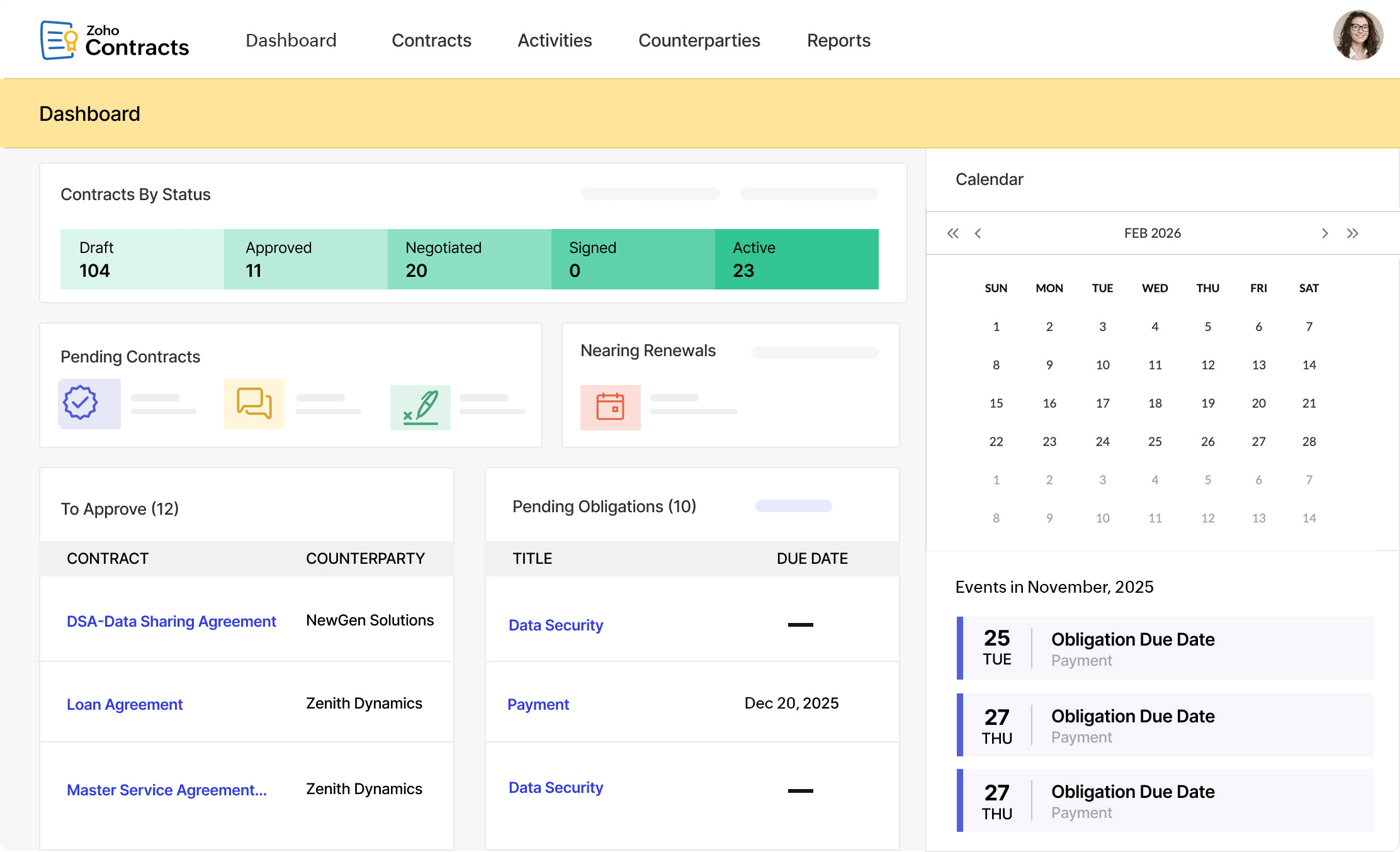
Contract Management Software: 10 Features for Smarter Contract Lifecycle Management
Contract management software helps businesses create, organize, track, and manage agreements throughout their entire lifecycle. Instead of relying on scattered files, email threads, spreadsheets, and manual reminders, teams can use one system to control contract workflows, approvals, deadlines, obligations, and renewals. As contract volumes grow, this centralized approach can make daily work easier and give teams better visibility into important agreements.
In this guide, we will explain how contract management software works, the key features businesses should look for, the stages of contract lifecycle management, common benefits and limitations, and practical considerations for choosing the right solution.
What Is Contract Management Software?
Contract management software is a business application that helps organizations manage contracts from creation and negotiation through approval, signing, monitoring, renewal, and expiration. It gives teams a structured place to store agreements and manage the tasks connected to them.
For example, a procurement team may use the software to manage supplier agreements, while sales teams may use it to track customer contracts. Legal, finance, operations, and management teams can also use the same system to review terms, monitor obligations, and find important documents.
In practice, contract management software can support both simple document organization and more advanced workflows. The exact capabilities depend on the platform, but modern systems often connect contract records with approvals, notifications, reporting, and other business processes.
Key takeaway
Contract management software is more than a digital filing cabinet. The right system helps businesses control the processes and deadlines surrounding each agreement.
Contract Management Software vs. Contract Lifecycle Management
Contract management software and contract lifecycle management are closely related, but they do not always mean exactly the same thing.
Contract management software refers to the technology used to organize and manage agreements. Contract lifecycle management, often called CLM, describes the broader process of managing contracts from the initial request through drafting, negotiation, approval, execution, monitoring, renewal, or termination.
According to ServiceNow, CLM covers the contract workflow from creation through ongoing management and reporting. Therefore, a CLM platform usually provides tools that support multiple stages rather than focusing only on document storage. ServiceNow’s overview of contract lifecycle management provides additional context on how these stages fit together.
In other words, contract management software can be the technology, while contract lifecycle management represents the broader operating process. Many modern platforms combine both concepts.
How Contract Lifecycle Management Works
A contract usually moves through several stages. The exact workflow varies by organization, but a practical contract lifecycle often includes the following steps.
1. Contract request
The process starts when someone identifies a need for an agreement. For example, a department may need a new supplier contract, customer agreement, partnership document, or service agreement.
A structured request process helps capture important information before drafting begins. This can include the contract type, involved parties, business purpose, expected value, and required approvals.
2. Drafting and authoring
Next, the responsible team prepares the agreement. Standard templates can help teams start with approved language instead of creating every contract from scratch.
Businesses can also maintain approved clauses and contract templates for different agreement types. This approach can improve consistency while reducing unnecessary manual work.
3. Review and negotiation
Legal, procurement, sales, finance, or other stakeholders may review the contract. They can suggest changes, discuss terms, and resolve issues before the organization approves the final version.
A centralized workflow makes it easier to track the latest version and identify who needs to review the agreement next.
4. Approval and execution
Once the parties agree on the terms, the contract moves through the required approval process and signing stage. A contract management system can route the document to the appropriate people and track its status.
5. Ongoing management
Signing does not end the contract lifecycle. Teams may still need to monitor service levels, payment terms, deliverables, milestones, obligations, and compliance requirements.
For supplier agreements, for example, procurement teams may need to monitor whether the supplier meets agreed performance requirements. Microsoft explains that CLM can support contract creation, negotiation, execution, and renewal within supplier management processes. Microsoft’s contract lifecycle management documentation provides an example of this approach.
6. Renewal, expiration, or termination
Finally, the business decides what happens when the agreement reaches its end date. Some contracts renew automatically, while others require review and approval before renewal.
Automated reminders can help teams prepare early rather than discovering an important renewal deadline after it has passed.
10 Key Features of Contract Management Software
1. Centralized contract repository
A centralized repository gives teams one place to store agreements and related documents. Users can organize contracts by customer, supplier, department, contract type, status, or other business fields.
This structure also makes it easier to locate the correct agreement when someone needs to review its terms.
2. Contract templates
Templates help teams create common agreements faster. Instead of starting from a blank document, users can select an approved template for a specific contract type.
However, templates should remain under appropriate legal and organizational control. Standardization helps with consistency, but businesses still need to review whether a template fits each situation.
3. Approval workflows
Different contracts often require different approval paths. A low-value supplier agreement may need fewer approvals than a major customer or partnership contract.
Workflow automation can route contracts to the right stakeholders based on predefined rules. As a result, teams can reduce unnecessary back-and-forth and maintain a clearer audit trail.
4. Version control
Contract negotiations can create multiple document versions. Without proper version control, users may accidentally review or sign an outdated file.
Contract management software can organize versions and help teams identify the current document. This becomes especially useful when several departments or external parties participate in negotiations.
5. Search and filtering
Search tools allow users to find contracts without manually opening folders and files. Businesses can search using information such as contract name, party, status, date, or other stored fields.
For organizations with hundreds or thousands of agreements, strong search capabilities can save considerable administrative effort.
6. Automated alerts and reminders
Important contract dates should not depend entirely on someone’s memory. Software can send reminders for renewal dates, expiration dates, review milestones, and other important events.
For example, a procurement manager could receive an alert several weeks before a supplier agreement expires. The team then has time to negotiate, renew, replace, or terminate the agreement.
7. Obligation tracking
Contracts often contain obligations for one or more parties. These may involve payments, deliverables, reporting, service levels, documentation, or other commitments.
Obligation tracking helps teams turn contract terms into actionable tasks. Therefore, employees can focus on what the organization needs to do after signing.
8. Reporting and dashboards
Reporting tools can give managers an overview of the contract portfolio. Useful reports may include contracts by status, upcoming renewals, agreements by department, supplier contracts, or contracts approaching expiration.
More importantly, reporting can help organizations identify patterns and areas that require attention.
9. Access controls
Not every employee needs access to every contract. Access controls allow businesses to limit sensitive agreements to authorized users or teams.
This feature matters when contracts contain confidential pricing, commercial terms, personal information, or other sensitive business details.
10. Integrations
Contract workflows rarely exist in isolation. Businesses may need contract information to connect with CRM, ERP, procurement, finance, document management, identity, or e-signature systems.
For example, a sales team may want customer contract information connected to its CRM record. Similarly, procurement teams may benefit when supplier contract information connects with purchasing workflows.
Pro tip
When evaluating integrations, focus on the business process rather than the number of available connectors. A few reliable integrations that remove manual data entry can be more valuable than a long list of unused options.
Benefits of Contract Management Software
The main value of contract management software comes from improving control over the entire contract process.
- Better organization: Teams can keep contracts and related information in a structured system.
- Faster retrieval: Search and filtering make it easier to locate agreements when needed.
- Fewer missed deadlines: Automated reminders can highlight important dates before they arrive.
- More consistent workflows: Standard templates and approval rules create repeatable processes.
- Improved visibility: Dashboards can show contract status, upcoming renewals, and other key information.
- Stronger collaboration: Teams can follow the same workflow instead of relying on disconnected email threads.
- Better oversight: Managers can review contract activity and identify agreements that need attention.
These benefits become more valuable as contract volume increases. A business with only a few agreements may manage them with simple tools, while a growing organization may need a structured system to keep contract operations under control.
How Contract Management Software Supports Different Teams
Contract management is not limited to the legal department. Several business functions can benefit from shared contract data and workflows.
| Team | Common Contract Needs |
|---|---|
| Legal | Review, negotiation, templates, approvals, and contract records |
| Procurement | Supplier agreements, renewals, obligations, and vendor terms |
| Sales | Customer agreements, approvals, signatures, and renewals |
| Finance | Payment terms, contract values, renewal dates, and financial obligations |
| Operations | Service commitments, deliverables, milestones, and performance tracking |
| Management | Portfolio visibility, reporting, risk monitoring, and decision support |
Because these teams often work with the same agreements, a shared system can reduce information gaps. For instance, procurement can manage a supplier contract while finance reviews its payment terms and operations tracks delivery obligations.
How to Choose Contract Management Software
The right platform depends on the size, complexity, and workflow of the organization. Before comparing products, document how your business currently handles contracts.
Start by identifying where delays and errors occur. Do employees struggle to find agreements? Do approvals remain stuck in email? Do teams miss renewal dates? Do different departments maintain separate copies of the same contract?
Next, evaluate software against those specific problems.
- Map your contract workflow: Document each step from request to renewal or termination.
- Define user roles: Determine which teams create, review, approve, manage, and access contracts.
- Check automation: Look for useful workflows, reminders, approvals, and recurring tasks.
- Review search and reporting: Make sure users can find contracts and generate useful reports.
- Evaluate security controls: Check permissions, access management, audit trails, and data protection capabilities.
- Assess integrations: Confirm that the platform can connect with the systems your teams already use.
- Consider scalability: Choose a system that can handle growing contract volume and additional workflows.
Most importantly, avoid choosing a platform based only on its feature count. A smaller set of well-designed features can serve your business better than a complex system that employees struggle to adopt.
Common Mistakes to Avoid
Relying on spreadsheets for everything
Spreadsheets can help track basic contract information, but they often become difficult to maintain as contract volume and stakeholder involvement increase.
Ignoring post-signature management
Signing the agreement is only one stage of the process. Businesses should also track obligations, performance, important dates, renewals, and other post-signature responsibilities.
Creating overly complex workflows
Automation should make work easier, not create unnecessary approval layers. Therefore, design workflows around real business requirements and remove steps that do not add meaningful control.
Skipping user adoption planning
Even a capable platform can struggle if employees do not understand how or when to use it. Provide clear processes, role-based training, and simple guidelines before moving all contract activity into the system.
Forgetting integration requirements
Contract data often overlaps with customer, supplier, purchasing, and financial information. If users must repeatedly copy data between systems, the organization may lose some of the efficiency gained from automation.
When Does a Business Need Contract Management Software?
There is no single contract volume that determines when a business needs dedicated software. Instead, consider the complexity of the process.
A company may benefit from contract management software when employees spend significant time searching for agreements, tracking renewal dates manually, coordinating approvals through email, or managing several versions of the same document.
It can also make sense when multiple departments share responsibility for contracts. In that situation, centralized workflows can give each team clearer visibility into its responsibilities.
Important
Contract software does not replace legal judgment. Businesses should still involve qualified legal or compliance professionals when contracts require specialized review.
Can Contract Management Software Be Customized?
Standard software can cover many common contract workflows. However, some businesses have unique approval rules, contract types, integrations, reporting requirements, or industry-specific processes.
In those cases, custom CRM development can help connect contract workflows with customer records and other business processes. A tailored system may also combine contract information with sales, procurement, finance, or operational data instead of forcing employees to manage each process separately.
For businesses that need broader process automation, custom ERP development can also be relevant when contracts connect closely with purchasing, suppliers, inventory, finance, or operations.
Frequently Asked Questions
Frequently Asked Questions
What is contract management software used for?
Contract management software helps businesses create, organize, review, approve, store, monitor, and renew contracts. It can also automate reminders, workflows, and reporting.
What is contract lifecycle management?
Contract lifecycle management is the process of managing an agreement from its initial request and drafting through negotiation, approval, execution, monitoring, renewal, expiration, or termination.
What features should contract management software have?
Important features include centralized storage, templates, approval workflows, version control, search, reminders, obligation tracking, reporting, access controls, and integrations.
Can contract management software track renewal dates?
Yes. Many contract management platforms let users store key dates and configure automated reminders for renewals, expirations, reviews, and other milestones.
Can contract management software integrate with CRM and ERP systems?
Many platforms provide integrations or APIs that connect contract data with CRM, ERP, procurement, finance, document management, and other business systems. The available options depend on the specific platform.
Conclusion
Contract management software gives businesses a structured way to manage agreements from creation through renewal or termination. By combining centralized contract storage with workflows, approvals, reminders, search, reporting, and access controls, it can make contract operations easier to manage and more visible across teams.
However, the best solution depends on how your organization handles contracts today. Start by mapping your existing process, identify the biggest gaps, and then evaluate platforms against those practical requirements. If standard software cannot support your workflows, a customized business system may provide a better way to connect contract management with your wider CRM, ERP, procurement, sales, and operational processes.
Build software around how your business works
If your contract workflows need to connect with broader business processes, a custom software solution can be designed around your team’s specific requirements.Talk to our team
