
Salesforce Customer Relationship Management: 9 Key Features and Benefits
Salesforce customer relationship management is a cloud-based approach to organizing customer data, managing sales activity, supporting customers, and coordinating interactions across teams. Instead of keeping contact details, conversations, opportunities, and service information in separate tools, Salesforce brings these activities into a connected CRM environment.
This matters because customer information becomes more useful when teams can access the right context at the right time. In this guide, we will explain how Salesforce CRM works, explore nine important features, discuss its benefits and limitations, compare it with custom CRM software, and outline practical considerations for implementation.
What Is Salesforce Customer Relationship Management?
Salesforce customer relationship management refers to using Salesforce’s CRM platform to manage relationships with prospects and customers throughout the customer lifecycle. CRM stands for customer relationship management, which covers the processes and technology businesses use to organize customer information and track interactions.
Salesforce organizes information through records and objects. In simple terms, you can think of an object as a structured category of information and a record as an individual entry within that category. This structure allows businesses to connect customer information with sales activities, service cases, marketing interactions, and other business processes.
Salesforce describes its CRM as a platform that helps businesses sell, service, market, analyze, and connect with customers. Its current CRM ecosystem includes capabilities for sales, service, marketing, commerce, analytics, integrations, and AI. Salesforce’s CRM basics guide provides an overview of how CRM data and objects work.
Key takeaway
Salesforce CRM is more than a contact database. It connects customer information with sales, service, marketing, automation, reporting, and other business processes.
How Does Salesforce CRM Work?
Salesforce CRM starts by collecting customer and prospect information in a central system. Teams can then use that information to manage interactions, update records, move opportunities through sales stages, handle service requests, and analyze performance.
For example, imagine a software company receives a new inquiry from a potential customer. A sales representative can create or update the prospect’s record, record communication, track the opportunity, schedule follow-ups, and move the deal through the company’s sales process.
Once the prospect becomes a customer, the same relationship can continue through service and account management processes. As a result, teams do not need to rebuild the customer’s history every time the relationship moves from sales to another department.
Salesforce also supports integrations and automation. Therefore, businesses can connect CRM information with other applications and automate selected workflows instead of handling every step manually.
9 Key Salesforce CRM Features
1. Contact and Account Management
Contact management provides a structured way to store information about prospects and customers. Depending on the business process, records can include contact details, account information, communication history, notes, activities, and related records.
Account management adds another layer by connecting individual contacts with the organizations they represent. This is particularly useful for B2B companies that manage several contacts within the same customer account.
More importantly, centralized customer information gives teams better context before they communicate with a prospect or customer.
2. Lead and Opportunity Management
Sales teams need more than a list of potential customers. They also need to understand where each prospect stands and what action should happen next.
Salesforce supports lead and opportunity management so teams can track prospects as they move through defined sales processes. Businesses can use stages, activities, follow-ups, and related information to maintain visibility over active opportunities.
For businesses that need a dedicated view of sales processes, sales pipeline software features can also provide useful context around deal stages, tracking, and sales visibility.
3. Customer Service and Case Management
Customer relationships continue after a sale. Therefore, service teams need access to relevant customer information when handling questions, problems, or support requests.
Salesforce service capabilities can help teams track customer cases, communicate with customers, access previous interactions, and organize support work. This creates a more connected experience because service representatives can work from customer context rather than starting with limited information.
For example, if a customer contacts support about an existing product issue, the representative can review relevant account information and previous interactions before responding.
4. Marketing and Customer Engagement
CRM data can also support marketing activities. Marketing teams can use customer and prospect information to organize audiences, coordinate campaigns, and understand engagement across customer journeys.
Salesforce’s current platform includes marketing capabilities that connect customer data with campaign and engagement activities. Its marketing documentation describes tools for data-driven customer experiences, targeted messaging, and multi-channel communication. Salesforce Marketing documentation explains these capabilities in more detail.
However, businesses should define their marketing requirements before choosing specific CRM modules. A small company may need only basic campaign and contact capabilities, while a larger organization may require complex journeys and integrations.
5. Workflow Automation
Manual CRM work can consume significant time when employees repeatedly perform the same actions. Salesforce provides automation and workflow capabilities that can help businesses standardize selected processes.
For example, an organization might configure an automated action when a sales opportunity reaches a specific stage. Another workflow could notify a team member when a customer case requires attention.
Automation works best when the underlying process is already clear. Otherwise, automating a poorly designed process can simply make the same problems happen faster.
6. Reports, Dashboards, and Analytics
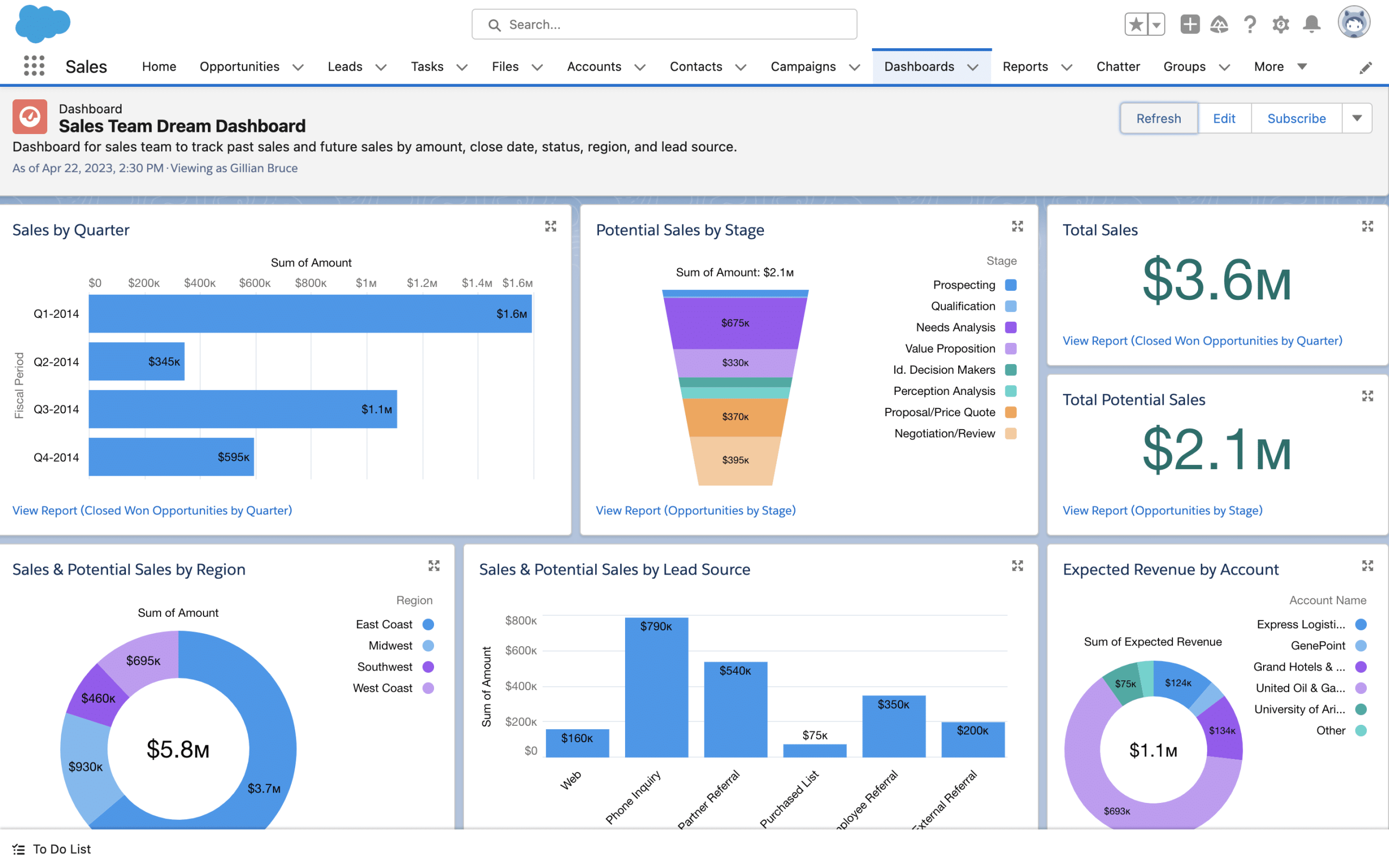
CRM data becomes more valuable when managers can turn it into useful business information. Salesforce provides reporting and dashboard capabilities that help teams examine sales activity, customer information, service performance, and other metrics.
For instance, a sales manager might use reports to review open opportunities, pipeline activity, or sales performance. Meanwhile, a service manager may need information about cases, response activity, or workload.
Because different departments ask different questions, businesses should define the decisions they want their reports to support before creating dashboards.
7. AI and Intelligent Assistance
Modern Salesforce CRM capabilities also include AI-powered functionality. AI can work with CRM data to support tasks such as generating content, summarizing information, identifying patterns, and recommending actions, depending on the Salesforce products and configuration a business uses.
The important point is that AI does not replace the need for clean business data. If customer records contain duplicates, missing fields, or inconsistent information, automated insights may become less useful.
Important
AI features should support a clear business process rather than become the reason for adopting a CRM. Start with the workflow and business problem, then determine where automation or AI can add value.
8. Integrations
Most businesses use more than one application. They may rely on accounting software, email platforms, customer support tools, ecommerce systems, communication applications, or internal databases.
CRM integrations can connect these systems so information can move between applications. This reduces the need for employees to copy data manually and can create more consistent workflows.
However, integration planning requires careful attention to data ownership, synchronization rules, permissions, error handling, and maintenance. A connection that works during initial setup may still need ongoing monitoring as business systems change.
9. Customization and Scalability
Every business has different sales stages, customer processes, approval rules, reporting needs, and data structures. Salesforce provides customization options that allow organizations to adapt CRM processes to their requirements.
That flexibility can be useful as a business grows. At the same time, excessive customization can make a CRM harder to maintain. Therefore, companies should distinguish between genuine business requirements and customizations that simply add complexity.
Benefits of Salesforce Customer Relationship Management
The value of Salesforce CRM depends on how well the platform matches a company’s processes and how consistently teams use it. Still, several potential benefits explain why businesses use CRM platforms.
Centralized customer information
Teams can work from shared customer records instead of relying on disconnected spreadsheets, inboxes, and personal notes.
Better sales visibility
Sales teams can track prospects and opportunities through defined stages and maintain a clearer view of active deals.
Improved team coordination
Sales, service, and other teams can access relevant customer information when their workflows require it.
Less repetitive work
Automation can reduce manual steps in selected workflows, allowing employees to focus on tasks that require human judgment.
More informed decisions
Reports and dashboards can turn CRM records into information that managers can use to monitor business activity.
Salesforce CRM vs. Custom CRM Software
Salesforce is a configurable CRM platform, but not every company has the same requirements. Some organizations can work effectively with standard CRM features and configuration. Others may need workflows, interfaces, integrations, or data structures that do not fit neatly into an off-the-shelf setup.
| Consideration | Salesforce CRM | Custom CRM |
|---|---|---|
| Starting point | Established CRM platform and features | Built around defined business requirements |
| Customization | Configuration and platform customization | Greater control over workflows and functionality |
| Implementation | Requires configuration, migration, and adoption planning | Requires design, development, testing, and deployment |
| Maintenance | Managed within the platform ecosystem | Business or development team manages the custom application |
| Best fit | Businesses that can align their processes with a configurable CRM platform | Businesses with highly specific workflows or specialized requirements |
A custom approach may make sense when a company needs highly specialized workflows or wants tighter control over how its CRM operates. In those cases, custom CRM development can provide a way to design functionality around specific business processes.
On the other hand, building custom software requires more planning and technical resources. Businesses should compare the long-term value of customization with the cost and effort required to build and maintain their own system.
How to Implement Salesforce CRM Successfully
CRM implementation involves more than creating user accounts and importing contacts. A successful rollout starts with business processes and data quality.
- Define business goals. Decide whether the primary objective involves sales visibility, customer service, marketing coordination, reporting, or another specific business need.
- Map current workflows. Document how leads, opportunities, customers, and service requests move through the organization today.
- Clean existing data. Remove unnecessary duplicates and correct inconsistent customer information before migration.
- Configure the CRM around real processes. Set up fields, stages, permissions, automation, and reports based on actual business requirements.
- Plan integrations carefully. Identify which systems need to exchange data and define how synchronization should work.
- Train users. Employees need practical guidance on how CRM workflows fit into their daily responsibilities.
- Measure adoption and results. Review whether teams use the system consistently and whether it supports the business goals defined at the beginning.
Data security should also remain part of the implementation plan. Businesses should define access rights, protect sensitive information, and establish appropriate governance processes. NIST’s security and privacy controls guidance provides a broader framework for thinking about security and privacy controls in information systems.
Common Salesforce CRM Implementation Mistakes
Even a capable CRM platform can create problems when companies implement it without a clear plan. Therefore, watch for these common issues:
- Moving poor data into the new system: A new CRM does not automatically fix inaccurate or duplicate records.
- Adding too many fields: Excessive data-entry requirements can reduce user adoption.
- Automating unclear processes: Automation should support a defined workflow rather than replace process design.
- Ignoring user needs: CRM configuration should reflect how employees actually work.
- Creating unnecessary customization: Custom features can add maintenance and training requirements.
- Skipping ongoing reviews: Business processes change, so CRM configurations should evolve with them.
For example, a company might configure dozens of mandatory fields because it wants detailed customer records. However, if sales representatives cannot complete those fields quickly, they may enter incomplete information or avoid the CRM altogether. A simpler workflow with a smaller set of useful fields may produce better-quality data.
When Should a Business Consider Salesforce CRM?
Salesforce can be worth evaluating when a business needs a structured way to manage customer relationships across multiple teams or growing sales and service operations. It can also make sense when a company needs integrations, reporting, automation, and a platform that can support changing requirements.
However, the right choice depends on the organization’s size, processes, budget, technical resources, integration requirements, and long-term goals.
A small business with a simple customer process may need only basic CRM functionality. In contrast, a larger organization with multiple sales teams, complex service processes, and numerous business systems may require a broader CRM implementation.
Frequently Asked Questions
Frequently Asked Questions
What is Salesforce customer relationship management?
Salesforce customer relationship management is the use of Salesforce CRM tools to organize customer data, manage sales and service activities, coordinate interactions, automate workflows, and analyze customer-related information.
Is Salesforce a CRM system?
Yes. Salesforce provides CRM capabilities for areas such as sales, customer service, marketing, commerce, analytics, integrations, and AI-powered workflows.
What are the main benefits of Salesforce CRM?
Key benefits can include centralized customer information, sales visibility, team collaboration, workflow automation, reporting, integrations, and support for customer service processes.
Can Salesforce CRM be customized?
Yes. Salesforce provides configuration and customization options for adapting CRM records, workflows, reports, permissions, and other capabilities to business requirements.
Should a business choose Salesforce or a custom CRM?
The answer depends on the company’s processes and requirements. Salesforce can provide an established CRM platform, while custom CRM software may suit organizations that need highly specialized workflows or functionality.
Final Thoughts
Salesforce customer relationship management provides a structured way to connect customer information with sales, service, marketing, automation, reporting, and other business processes. Its value comes from creating useful connections between data, people, and workflows rather than simply storing contact details.
Before implementation, businesses should define their goals, clean their data, map their processes, plan integrations, and involve users in the rollout. If standard CRM capabilities do not match specialized business requirements, a custom CRM approach can also be considered.
Build software around how your business works
If your customer management processes require functionality beyond standard CRM platforms, a custom approach can help align workflows, integrations, and business data with your specific requirements.Talk to our team
