
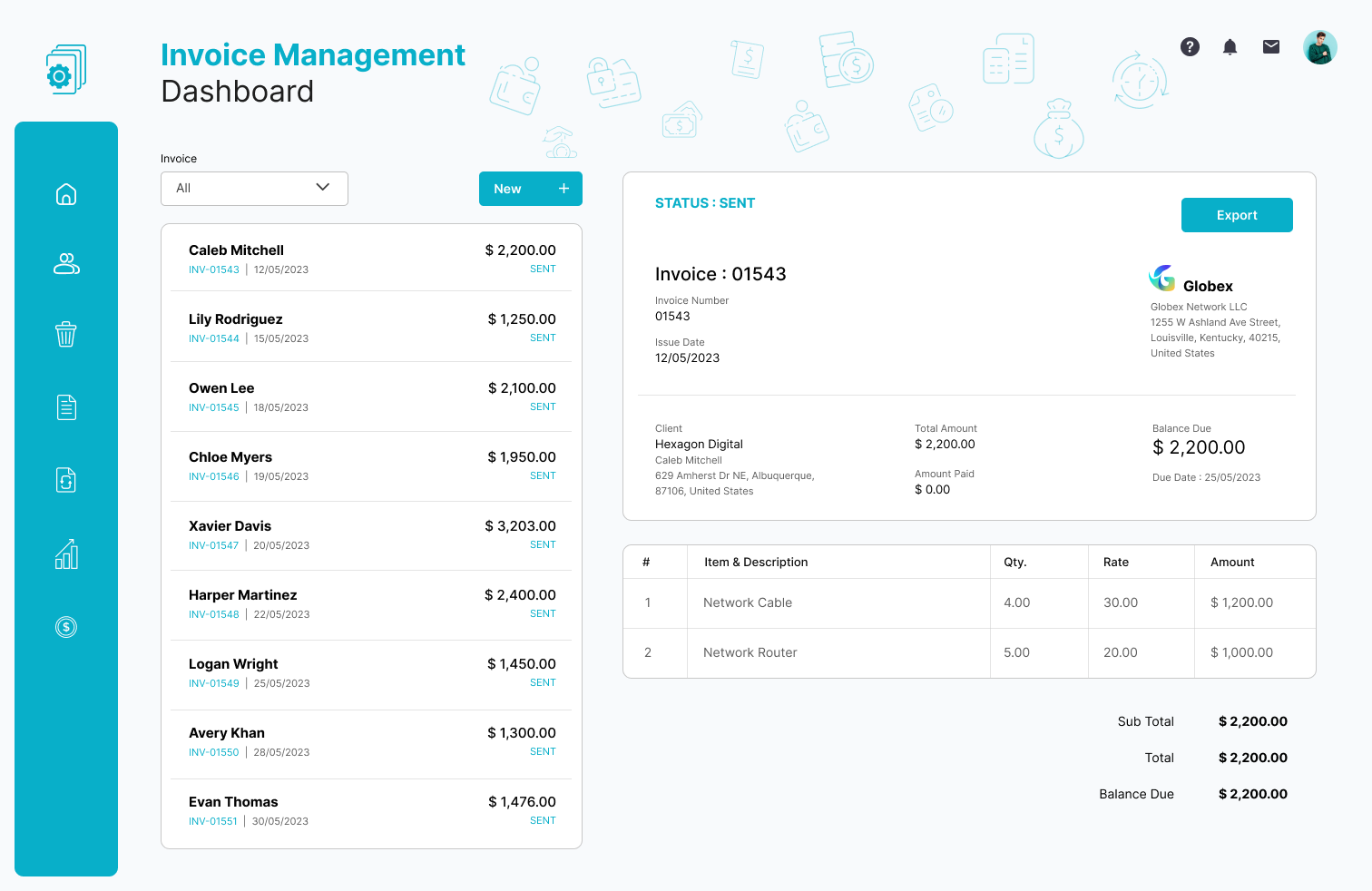
Best Invoicing Software: 10 Features to Look For in an Invoice System
Choosing the best invoicing software can make billing faster, reduce manual errors, and give your business a clearer view of what customers owe. Instead of creating invoices in spreadsheets or managing payment records across different tools, an invoice system can bring customer details, charges, due dates, payment tracking, and invoice history into one place.
However, not every invoicing solution offers the same features. The right choice depends on your business size, billing process, payment methods, reporting needs, and plans for growth. In this guide, we will cover the key features to look for, the benefits of digital invoicing, common mistakes to avoid, and practical steps for choosing software that fits your workflow.
What Is Invoicing Software?
Invoicing software helps businesses create, send, manage, and track invoices electronically. Depending on the platform, it can also handle payment reminders, recurring invoices, customer records, taxes, payment status, and financial reports.
An invoice normally lists the products or services sold, quantities, prices, payment terms, due dates, and the total amount owed. Modern invoicing tools turn this process into a repeatable workflow instead of requiring staff to create each document manually.
For example, a service business might save customer information and standard service rates in its system. When a project ends, the business can create an invoice using those details, send it electronically, and track whether the customer has paid.
Official QuickBooks documentation also describes invoices as records of what customers owe and explains how businesses can create, send, customize, and monitor invoices through an online system.
Why Businesses Use an Invoice System
Manual billing can become difficult as the number of customers and transactions increases. A spreadsheet may work for a small number of invoices, but it can become harder to track overdue payments, recurring charges, and invoice history as the business grows.
An invoice system creates a more organized billing process. Instead of keeping separate files for customers, invoices, payment status, and reminders, businesses can manage these activities from a central platform.
Key takeaway
The best invoicing software is not simply the tool that creates attractive invoices. It should support the complete billing workflow, from creating an invoice to recording payment and reviewing outstanding balances.
10 Features to Look for in the Best Invoicing Software
1. Professional Invoice Creation
The software should make it easy to create clear, professional invoices without starting from scratch each time. Look for customizable templates that allow you to add your business name, logo, contact details, payment terms, tax information, and preferred invoice format.
Templates also help maintain consistency. When every invoice follows the same structure, customers can quickly identify important information such as the amount due and payment deadline.
2. Customer Information Management
A useful invoicing platform should store customer information so you do not need to re-enter the same details for every invoice. Depending on the system, customer records may include names, addresses, contact information, billing details, and invoice history.
This feature becomes especially useful for businesses that bill the same customers regularly. It can also reduce typing errors and speed up invoice creation.
3. Automatic Invoice Numbering
Every invoice should have a clear identifier. Automatic invoice numbering helps maintain an organized record of sales and makes it easier to find a specific transaction later.
For example, instead of manually deciding whether the next invoice should be 1047 or 1048, the system can generate invoice numbers according to your configured sequence.
This small feature can make a significant difference when a business manages hundreds or thousands of invoices.
4. Recurring Invoices
Recurring billing is important for businesses that charge customers on a regular schedule. This includes subscriptions, maintenance services, retainers, memberships, and other ongoing arrangements.
With recurring invoices, you can define the billing frequency and let the system generate invoices according to that schedule. As a result, staff spend less time recreating the same documents every month.
If recurring revenue is a major part of your business, you may also benefit from dedicated subscription management software that connects recurring billing with broader customer and subscription workflows.
5. Payment Tracking
Creating an invoice is only one part of the billing process. You also need to know whether the customer has paid, partially paid, or missed the due date.
The best invoicing software should provide clear invoice statuses such as draft, sent, paid, partially paid, overdue, or canceled. This gives your team a quick view of outstanding receivables.
For businesses that need stronger financial visibility, payment tracking can also support better cash flow planning.
6. Automated Payment Reminders
Following up on overdue invoices manually takes time. A good invoice system can help by sending reminders based on the payment schedule you define.
For example, you might send one reminder before the due date and another after the invoice becomes overdue. The exact reminder schedule should match your customer relationships and payment policies.
Automation does not remove the need for human communication. Instead, it handles routine reminders while your team focuses on customers who need personal attention.
7. Online Payment Options
Customers are more likely to complete a payment smoothly when the invoice provides a clear payment path. Depending on the software and region, businesses may connect invoices with card payments, bank transfers, payment gateways, or other payment methods.
Before choosing a platform, check which payment methods it supports and whether additional transaction or processing fees apply.
For example, QuickBooks explains that its invoicing workflow can include online payment options and invoice status tracking, although available features depend on the plan and payment services used.
8. Tax and Discount Support
Businesses often need to apply taxes, discounts, adjustments, or different rates to invoices. Your software should make these calculations simple and transparent.
Look for flexible tax settings that match your operating region and business model. Also check whether the system lets you apply discounts at the invoice or line-item level when needed.
Important
Tax rules differ by location and business type. Configure your invoicing system according to the requirements that apply to your business and verify tax treatment with a qualified professional when necessary.
9. Reporting and Invoice History
Good reporting turns invoice data into useful business information. Instead of checking individual invoices, you can review outstanding balances, paid invoices, overdue accounts, and billing activity from reports.
Invoice history also helps when customers ask about previous charges or when your accounting team needs to verify a transaction.
The IRS, for example, identifies invoices and other supporting documents as important business records for documenting transactions and supporting entries in business records. Businesses should follow the recordkeeping requirements that apply to their jurisdiction and situation.
You can review the IRS guidance on business records for information about supporting documents and recordkeeping in the United States.
10. Integration With Other Business Systems
Invoicing rarely operates in isolation. Businesses may need to connect billing with accounting, CRM, inventory, project management, payment, or customer management processes.
For example, a sales team might create a customer in a CRM, a project team might record completed work, and the billing team might use that information to generate an invoice. When these systems communicate effectively, employees spend less time copying information between applications.
For businesses with complex workflows, custom ERP development can provide a way to connect invoicing with broader operational processes rather than forcing every department into disconnected tools.
Best Invoicing Software vs. Manual Billing
Both manual billing and invoicing software can work in the right circumstances. The difference usually comes down to volume, complexity, and how much automation your business needs.
| Area | Manual Billing | Invoicing Software |
|---|---|---|
| Invoice creation | Often requires repeated data entry | Templates and saved customer data speed up creation |
| Invoice tracking | May require spreadsheets or separate records | Statuses can be managed in one system |
| Recurring billing | Usually requires manual preparation | Can be automated when supported |
| Payment reminders | Usually manual | Can be scheduled automatically |
| Reporting | May require manual calculations | Reports can summarize invoice activity |
| Scalability | Becomes harder to manage as volume increases | Designed to support larger invoice volumes |
How to Choose the Right Invoice System
Choosing the best invoicing software starts with your actual billing workflow. Avoid selecting a platform based only on the number of features listed on its website.
Instead, consider these questions:
- How many invoices do you create each month?
- Do you bill customers once or on a recurring schedule?
- Which payment methods do your customers prefer?
- Do you need automated payment reminders?
- Do you need tax and discount calculations?
- Will multiple employees create or manage invoices?
- Do you need accounting or CRM integrations?
- Do you need mobile access?
- What reports does your finance team need?
- How much customization does your business require?
For instance, a freelancer with ten monthly clients may only need professional templates, payment tracking, and reminders. In contrast, a growing service company may need recurring billing, multiple users, customer records, reporting, payment integration, and connections with other business systems.
Cloud-Based vs. Desktop Invoicing Software
Cloud-based invoicing software runs online and usually allows users to access their billing information through a browser or supported mobile application. This can help teams work from different locations and keep billing information available across devices.
Desktop software runs locally on a computer or internal network. It may suit businesses with specific infrastructure or data requirements, but teams should consider how they will handle backups, updates, remote access, and collaboration.
Neither approach fits every business. Therefore, evaluate your team’s working environment, security requirements, connectivity, integrations, and support needs before choosing.
Common Mistakes When Choosing Invoicing Software
Choosing Based Only on Price
A low monthly price does not necessarily mean lower overall cost. A cheaper system may lack integrations, automation, reporting, or payment features that your business needs.
Instead, compare the total cost against the time your team spends creating invoices, following up on payments, and maintaining records.
Ignoring Payment Workflows
Some businesses focus heavily on invoice templates but overlook what happens after the invoice reaches the customer. Consider how customers will pay, how your team will confirm payments, and how overdue invoices will trigger follow-ups.
Buying Too Many Features
More features do not automatically create a better system. Extra tools can increase complexity and make training harder.
Therefore, identify the features your business needs now and the capabilities you may realistically need as it grows.
Forgetting Data and Record Management
Invoices contain valuable financial and customer information. Make sure you understand how the platform stores, exports, backs up, and protects your data.
Also check whether you can export invoice records if you later change software. Data portability can make future transitions much easier.
When Should You Switch to Invoicing Software?
You may be ready for dedicated invoicing software when billing starts consuming too much administrative time or when your current process makes it difficult to track payments.
Common signs include:
- You create many invoices manually every month.
- You frequently search spreadsheets to find invoice details.
- Customers ask for invoices you cannot quickly locate.
- Your team forgets to follow up on overdue payments.
- You repeatedly enter the same customer information.
- You manage recurring invoices manually.
- You need clearer reports about outstanding payments.
- Your billing process does not connect with other business systems.
When these problems appear regularly, an invoice system can help create a more consistent and manageable process.
How Invoicing Software Fits Into a Larger Business Workflow
Invoicing works best when it connects naturally with the rest of your business. A customer might begin with a sales inquiry, move into a project, receive products or services, and then receive an invoice.
For example, a contractor could use a project system to track completed work, customer information to prepare the bill, and invoicing software to issue the final charge. A company that sells products may also connect billing with inventory and order information.
This is why integration matters as a business grows. Your invoice system should reduce duplicate work rather than create another isolated database.
If you also manage operational expenses, connecting billing with broader financial workflows can provide better visibility. For related planning, see expense management system features and how they support financial control.
Frequently Asked Questions
Frequently Asked Questions
What is the best invoicing software for a small business?
The right option depends on your invoice volume, payment methods, recurring billing needs, reporting requirements, and integrations. Small businesses should prioritize simple invoice creation, payment tracking, reminders, and an easy customer management process.
What should an invoice system include?
A useful invoice system should include invoice creation, customer records, automatic numbering, payment tracking, reminders, recurring invoices, reporting, tax support, and payment options. Integration capabilities can also become important as your business grows.
Can invoicing software automate recurring invoices?
Many invoicing platforms support recurring invoices. This feature allows businesses to schedule invoices for customers who receive the same type of charge on a regular basis.
Does invoicing software track overdue invoices?
Many modern invoicing systems can show invoice statuses and identify overdue balances. Some also support automatic reminders, although available features vary by platform and plan.
Can invoicing software connect with other business systems?
Yes. Depending on the platform, invoicing software can integrate with accounting, CRM, payment, inventory, project management, and ERP systems. Businesses with specialized workflows may also consider custom software integration.
Final Thoughts
The best invoicing software should make billing easier from start to finish. Look beyond invoice templates and focus on customer records, recurring billing, payment tracking, reminders, reporting, integrations, and data management.
Most importantly, choose an invoice system that matches the way your business actually works. A simple business may need only core billing features, while a growing organization may need deeper integration with its financial and operational systems.
By evaluating your current workflow first, you can choose software that reduces repetitive work, improves invoice visibility, and gives your team a more organized way to manage customer payments.
Build software around how your business works
If standard invoicing tools do not fit your billing workflow, a custom business system can connect invoicing with the processes your team already uses.Talk to our team
