
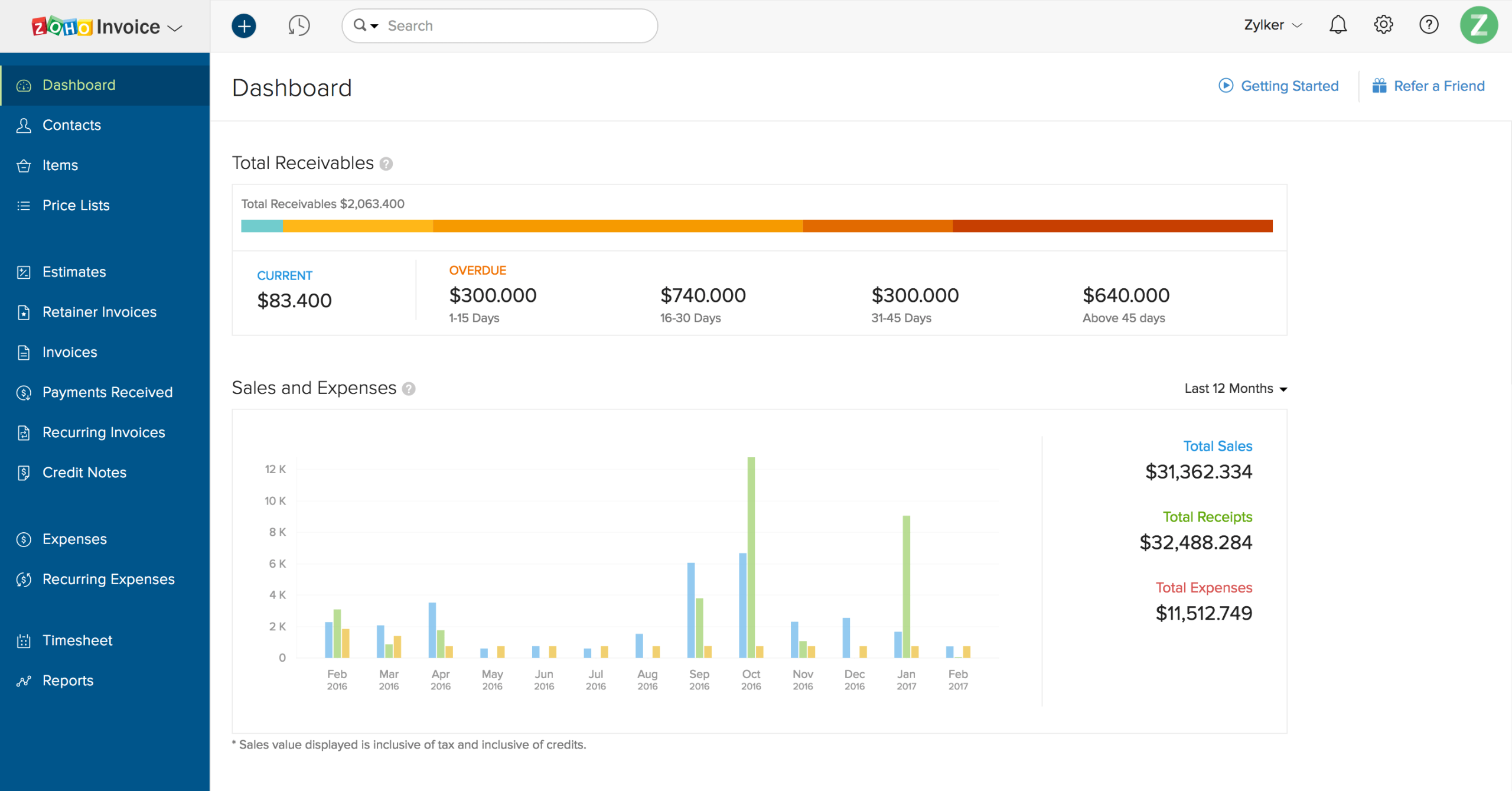
Billing System: 10 Essential Features for Faster, More Accurate Business Billing
A billing system helps businesses create invoices, record sales, track payments, manage customer billing details, and keep financial transactions organized. Instead of handling every bill manually, businesses can use a centralized system to standardize billing and reduce repetitive work. For growing companies, a reliable billing process also makes it easier to monitor outstanding payments and maintain accurate transaction records.
Modern business billing software can do much more than generate invoices. It can connect billing with customer information, expenses, inventory, subscriptions, payment records, and broader business workflows. In this guide, we will explain how a billing system works, its key features, major benefits, common use cases, important selection factors, and mistakes to avoid.
What Is a Billing System?
A billing system is software that helps a business manage the process of charging customers for products or services. Depending on the business model, it may create invoices, calculate totals, apply taxes or discounts, record payments, track unpaid balances, and store transaction histories.
For example, a service company can use a billing system to create an invoice after completing a project. A retailer may use it to record product sales, while a subscription business may use it to generate recurring charges.
In practice, the system creates a structured workflow from the moment a customer receives a charge to the point when the business records the payment. As a result, teams spend less time switching between spreadsheets, documents, email threads, and separate payment records.
Key takeaway
A billing system is not simply an invoice generator. It can act as a central point for creating charges, tracking payments, organizing billing records, and supporting financial workflows.
How Does a Billing System Work?
Although billing workflows vary by business, most systems follow a similar process.
- Customer or transaction data is added: The system stores customer details, products, services, prices, quantities, and other relevant information.
- A bill or invoice is created: The system calculates the amount due based on the selected products or services.
- Taxes, discounts, or adjustments are applied: Businesses can include applicable charges or reductions before finalizing the bill.
- The invoice reaches the customer: The business can send the invoice through its chosen communication channel.
- The payment is recorded: Once the customer pays, the business updates the transaction status.
- Records are maintained: The system keeps transaction information for reporting, reconciliation, and future reference.
This workflow creates a consistent billing process. More importantly, it gives business owners a clearer view of what customers owe, what they have paid, and which transactions still require attention.
10 Essential Features of a Billing System
1. Invoice Creation
Invoice creation is one of the core functions of any billing system. Users should be able to create professional invoices without entering the same information repeatedly.
A useful system can include customer details, invoice numbers, product or service descriptions, quantities, prices, taxes, discounts, payment terms, and due dates. Templates can also help businesses maintain a consistent format across invoices.
2. Automated Billing Calculations
Manual calculations can create avoidable mistakes, especially when an invoice contains multiple products, services, discounts, or taxes. Business billing software can calculate totals automatically based on the information entered by the user.
For example, if a customer purchases five items at different prices, the system can calculate the subtotal and apply the required adjustments. This reduces the need for manual arithmetic and makes the billing workflow more consistent.
3. Payment Tracking
Creating an invoice is only one part of the billing process. Businesses also need to know whether customers have paid.
A billing system can organize invoices according to their payment status, such as paid, unpaid, partially paid, overdue, or pending. Therefore, finance and administrative teams can quickly identify transactions that need attention.
4. Customer Billing Records
Customer information should not remain scattered across spreadsheets and email conversations. A centralized billing system can keep customer profiles and their related invoices, payments, and transaction histories together.
This makes it easier to answer questions such as when an invoice was issued, how much the customer paid, and which balance remains outstanding.
5. Recurring Billing
Recurring billing can be useful for businesses that charge customers on a regular schedule. Examples include subscription services, maintenance contracts, retainers, memberships, and recurring service plans.
Instead of creating each invoice manually, a system can follow a predefined billing schedule. This helps reduce repetitive administrative work and makes recurring charges easier to manage.
For businesses focused on recurring revenue, subscription management software can also provide useful capabilities for handling ongoing customer subscriptions.
6. Tax and Discount Management
Different transactions may require different pricing rules. A billing system should make it simple to apply discounts, taxes, fees, or other adjustments where appropriate.
However, businesses should configure these settings carefully. Tax requirements can vary by jurisdiction and business activity, so software settings should support the company’s actual accounting and tax processes rather than replace professional tax guidance.
7. Invoice and Receipt History
Businesses need reliable records of their financial transactions. A billing system can maintain invoice and receipt histories so users can find previous transactions when customers ask questions or teams need to review financial activity.
The IRS notes that businesses should maintain records that clearly show income and expenses, with supporting documents such as invoices and receipts helping substantiate business transactions. The IRS recordkeeping guidance provides further information about maintaining business records.
8. Reporting and Financial Insights
Billing data becomes more useful when businesses can turn it into reports. A billing system may provide reports for sales, invoices, payments, outstanding balances, and other transaction categories.
These reports can help managers identify unpaid invoices, review billing activity, and understand where revenue comes from. In addition, organized billing records can support broader financial reporting processes.
For businesses that also need to monitor spending, expense management system features can complement the billing process by helping teams organize outgoing business expenses.
9. Inventory and Product Information
Product-based businesses often need billing and inventory information to work together. When a customer purchases an item, the business may need to record the sale while also updating available stock.
Connecting these workflows can reduce duplicate data entry. For businesses that manage large product catalogs or warehouses, a warehouse management system can support the operational side of inventory control.
10. Integration With Other Business Systems
A billing system becomes more useful when it can exchange information with other business applications. Depending on the business, integrations may connect billing with CRM, ERP, accounting, inventory, payment, or customer service systems.
For example, a CRM can provide customer and sales information while the billing system handles invoices and payment records. An ERP can connect financial workflows with purchasing, inventory, operations, and other departments.
If your business needs a billing workflow that does not fit standard software, custom ERP development can provide a way to connect billing with broader business processes.
Benefits of Using Business Billing Software
Businesses adopt billing software for different reasons, but several benefits apply across many industries.
Less manual work
Automated calculations, invoice templates, recurring billing, and payment status updates can reduce repetitive administrative tasks.
Fewer billing errors
Standardized calculations and reusable customer information can reduce common data-entry and calculation mistakes.
Better payment visibility
Teams can see which invoices remain unpaid and which transactions have already been completed.
Centralized records
Invoices, receipts, customer billing information, and payment histories can remain organized in one system.
Easier reporting
Structured billing data makes it easier to review transaction activity and create useful financial reports.
In addition, digital records can make transaction information easier to search and organize. The IRS explains that electronic accounting and financial records still need to provide a complete and accurate record of business data. Its guidance on recording business transactions explains how electronic systems fit into business recordkeeping.
Billing System vs. Manual Billing
Small businesses sometimes begin with spreadsheets, word-processing templates, or manually prepared invoices. These methods can work when transaction volume remains low. However, they can become harder to manage as customers and transactions increase.
| Area | Manual Billing | Billing System |
|---|---|---|
| Invoice creation | Often manual | Template-based and streamlined |
| Calculations | More manual entry | Automated calculations |
| Payment tracking | Separate spreadsheets or records | Centralized status tracking |
| Customer history | May require manual searching | Stored with billing records |
| Reporting | Often requires manual preparation | Can use structured billing data |
The right choice depends on transaction volume, business complexity, budget, and existing workflows. A small business with only a few invoices each month may not need a complex platform. Meanwhile, a growing company with multiple billing processes may benefit from greater automation and integration.
When Should a Business Use a Billing System?
A billing system can make sense when manual billing starts consuming too much time or creates problems that are difficult to control.
Consider adopting one if your team regularly deals with large numbers of invoices, recurring charges, multiple payment statuses, complex pricing, customer billing histories, or frequent billing errors.
It can also help when several employees manage billing and need access to the same information. Instead of keeping separate files, the team can work from a centralized source of billing data.
Pro tip
Do not choose billing software based only on invoice templates. First map your complete billing workflow, including how you create charges, approve invoices, collect payments, handle adjustments, and report financial activity.
How to Choose the Right Billing System
Before selecting business billing software, define what your business actually needs. The right system should fit your workflow rather than force your team to create unnecessary workarounds.
Consider your billing volume
Estimate how many invoices and transactions your business processes each month. Also consider how quickly that number may grow. A system that works for a small customer base may become restrictive as transaction volume increases.
Review payment workflows
Determine how customers usually pay and how your team records those payments. Then check whether the software supports the payment methods and workflows you actually use.
Check integration requirements
List the systems that currently store customer, sales, inventory, accounting, or operational information. Next, determine which integrations you need. Good integration can reduce duplicate entry and help departments work from consistent data.
Evaluate reporting needs
Think beyond basic invoice lists. Decide whether you need reports for outstanding balances, sales, payment activity, customer billing history, recurring charges, or other financial information.
Think about security and access
Billing records contain sensitive business and customer information. Therefore, consider user permissions, authentication, backups, data protection, audit trails, and access controls when evaluating software.
Common Billing System Mistakes to Avoid
Even good software cannot fix an unclear billing process. Businesses should address the workflow as well as the technology.
- Using inconsistent invoice information: Standardize customer details, product names, pricing, and payment terms.
- Ignoring overdue invoices: Define a process for reviewing and following up on unpaid balances.
- Keeping duplicate records: Avoid entering the same customer or transaction data across multiple disconnected systems.
- Skipping user permissions: Give employees access based on their responsibilities.
- Failing to review reports: Billing data becomes more valuable when teams regularly review outstanding balances and transaction activity.
- Choosing software without considering growth: Evaluate future transaction volume and integration requirements before making a long-term decision.
Billing System Use Cases Across Different Businesses
Billing requirements vary by industry, but the basic purpose remains similar: create accurate charges and maintain organized payment records.
- Professional services: Create invoices for consulting, design, development, legal, or other services.
- Retail businesses: Record product sales and generate receipts or invoices.
- Contractors: Bill customers for projects, materials, labor, or completed work.
- Subscription businesses: Manage recurring charges based on billing schedules.
- Property businesses: Track recurring charges and customer or tenant payments.
- Maintenance companies: Bill customers for scheduled services, repairs, or maintenance plans.
Because each industry handles billing differently, businesses should focus on workflow flexibility. A system that supports configurable products, services, pricing, payment terms, and integrations can adapt more easily to different operating models.
Frequently Asked Questions
Frequently Asked Questions
What is the main purpose of a billing system?
The main purpose is to help businesses create bills or invoices, track payments, maintain transaction records, and organize customer billing information.
What is business billing software?
Business billing software is an application that helps companies manage invoicing, payment tracking, customer billing records, recurring charges, and related financial workflows.
Can a billing system handle recurring payments?
Many billing systems support recurring billing. This can help businesses manage subscriptions, retainers, memberships, maintenance plans, and other scheduled charges.
Can billing software integrate with CRM or ERP systems?
Yes. Depending on the software, billing can connect with CRM, ERP, accounting, inventory, payment, and other business applications to reduce duplicate data entry and connect workflows.
When should a small business switch from manual billing to software?
A business should consider the switch when manual invoicing takes significant time, payment tracking becomes difficult, billing errors increase, or the company needs better reporting and centralized records.
Final Thoughts
A billing system can bring structure to one of the most important administrative processes in a business. By centralizing invoices, customer billing information, payment statuses, transaction records, and reports, it can help teams spend less time on repetitive billing tasks and more time managing the business.
However, the right solution depends on your billing volume, payment workflow, industry, integrations, reporting needs, and plans for growth. Start by mapping your current process, identify the areas that create the most manual work, and then select business billing software that addresses those specific needs.
Build software around how your business works
If standard billing tools do not match your workflows, a custom ERP solution can connect billing with the other systems your business already uses.Talk to our team
