
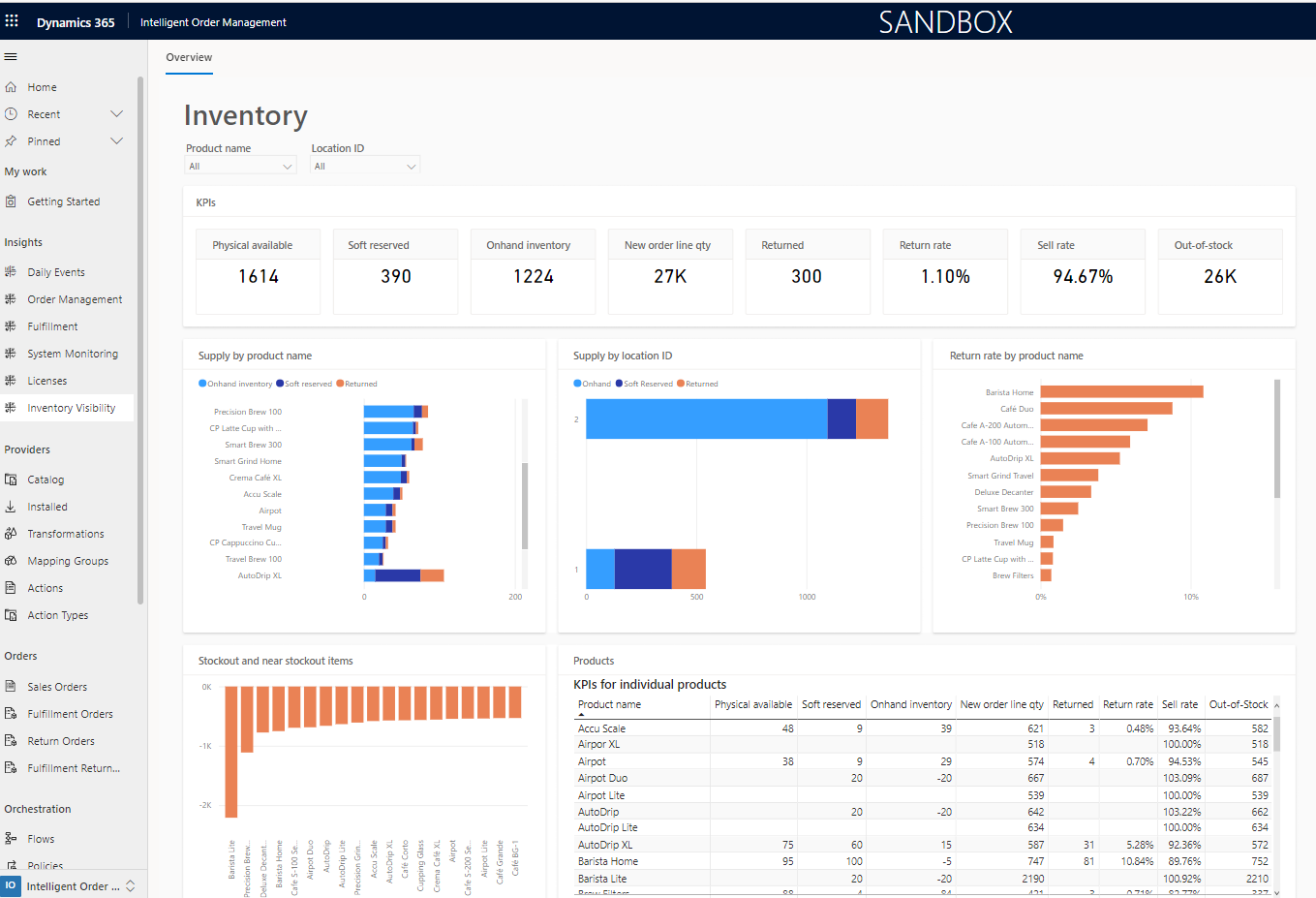
Stock Management Software: 10 Features for Better Stock Control
Stock management software helps businesses track products, monitor stock levels, manage stock movements, and know when to reorder. Instead of relying on spreadsheets or manual counts, businesses can use a centralized system to maintain more accurate inventory records, reduce stock shortages, and make better purchasing decisions. A well-designed stock control software solution can also connect purchasing, sales, warehouses, and reporting in one workflow.
In this guide, we’ll explain how stock management software works, the key features businesses should look for, its main benefits, common stock control mistakes, and how to choose a solution that fits your operations.
What Is Stock Management Software?
Stock management software is a business system that helps companies record, track, and control the products and materials they keep in stock. It can track inventory as items arrive, move between locations, get reserved, get sold, or leave the business.
For example, a wholesaler may use the system to track products across several warehouses. A retailer may use it to monitor items available for sale. Meanwhile, a manufacturer may use it to track raw materials, work-in-progress items, and finished goods.
In practice, the goal is simple: businesses need to know what they have, where it is, how much is available, and when they need more. Good inventory records also help businesses compare physical stock with system records and identify discrepancies.
The Australian Government’s inventory management guidance explains that effective inventory management helps businesses understand what stock they have, what they need to order, and when they need to restock.
How Does Stock Management Software Work?
Stock management software records inventory activity as stock moves through the business. First, a business creates product records with details such as item names, SKUs, quantities, suppliers, prices, and storage locations.
Next, the system records incoming stock when products arrive. When employees sell, issue, transfer, return, or adjust inventory, the system updates the relevant quantities.
As a result, managers can view current stock information without checking several spreadsheets or asking different teams for separate updates.
For example, consider a business that receives 100 units of a product. The system adds those units to the selected warehouse. If the business sells 15 units, the available quantity falls to 85. If another 20 units move to a different location, the system can record the transfer and show the new balance for each location.
Microsoft’s inventory documentation similarly describes inventory quantities changing through purchases, sales, transfers, and inventory adjustments. Microsoft Learn’s inventory management documentation provides further detail on these processes.
10 Key Features of Stock Management Software
1. Real-Time Stock Tracking
Real-time stock tracking gives teams a current view of available inventory. Instead of waiting for someone to update a spreadsheet, employees can check stock information directly in the system.
This becomes especially useful when multiple people handle inventory. Sales teams can check availability, warehouse staff can confirm quantities, and purchasing teams can review stock before placing new orders.
Key takeaway
Accurate stock visibility helps teams make decisions using the same inventory information instead of separate records.
2. SKU and Product Management
A good stock management system should make it easy to create and organize product records. Businesses can assign SKUs, product names, categories, units of measure, supplier details, and other relevant information.
Clear product records also reduce confusion between similar items. For businesses with many variants, the system can distinguish products by attributes such as size, model, color, or packaging.
3. Low-Stock Alerts
Low-stock alerts help businesses identify products that need attention before they run out. Instead of checking every item manually, teams can receive alerts when inventory reaches a defined threshold.
For example, a retailer may set a reorder point for a popular product. When available stock reaches that level, the purchasing team can review demand and decide whether to place another order.
However, reorder points should reflect actual business conditions. Supplier lead times, demand patterns, seasonal changes, and safety stock requirements can all affect when a business should reorder.
4. Purchase and Receiving Management
Stock control works best when purchasing and inventory records stay connected. When new goods arrive, employees should be able to record the receipt and update stock quantities without creating duplicate records.
This connection also helps purchasing teams compare ordered quantities with received quantities. If a supplier sends fewer items than expected, the business can record the difference and investigate it before closing the transaction.
Therefore, businesses should look for stock management software that connects purchase orders, receiving, and inventory updates where those workflows are important to the operation.
5. Multi-Location Inventory Management
Businesses with multiple warehouses, stores, offices, or storage areas need more than one overall stock number. They need to know where inventory sits.
Multi-location functionality lets teams view stock by warehouse or location. It can also support transfers between locations, helping managers understand both total inventory and location-specific availability.
This feature becomes particularly valuable for growing businesses. Without location-level tracking, employees may see that a product exists somewhere in the business but still struggle to determine whether it is available at the location that needs it.
6. Stock Transfers and Adjustments
Inventory changes for many reasons beyond sales and purchases. Products may move between warehouses, arrive damaged, get lost, or require a correction after a physical count.
Stock control software should therefore provide a clear way to record transfers and adjustments. Each change should include enough information for managers to understand why the quantity changed.
This creates a clearer history of inventory activity and makes it easier to investigate unusual differences.
7. Barcode and Scanning Support
Barcode scanning can make stock operations faster and reduce manual data entry. Instead of typing a product code, an employee can scan an item and bring up the relevant product record.
Businesses can use scanning during receiving, picking, transfers, stock counts, and other warehouse activities. The exact scanning capabilities vary between software products, so businesses should confirm whether the system supports their existing barcode setup and devices.
8. Stock Counts and Reconciliation
Even with automated tracking, businesses still need to compare system quantities with physical inventory. Regular stock counts can reveal damaged goods, missing items, data-entry errors, and other discrepancies.
Stock management software can help employees record physical counts and compare them with system quantities. Managers can then review differences and make controlled adjustments.
For businesses that manage large inventories, cycle counting can also help teams check selected groups of products regularly instead of waiting for one large annual count.
9. Inventory Reports and Analytics
Reports turn stock data into information that managers can use. Useful reports may show current stock, low-stock products, stock movement, slow-moving items, inventory valuation, purchase activity, or differences between physical and recorded quantities.
For example, a manager may discover that some products sell quickly while others remain in storage for long periods. That information can influence future purchasing decisions.
More importantly, reporting can help businesses move beyond simply asking, “How much stock do we have?” They can also ask, “Which products need attention, where are they stored, and what should we do next?”
10. Integration With Other Business Systems
Stock management rarely operates alone. Inventory often connects with purchasing, sales, accounting, customer management, warehouse operations, and production.
When these systems share information, businesses can reduce duplicate data entry and create more connected workflows. For example, a sale can update available inventory, while a purchase receipt can increase stock quantities.
Businesses with more complex processes may benefit from an integrated ERP platform. For organizations that need inventory, purchasing, sales, and other workflows in one tailored system, custom ERP development can provide an option for building software around specific operational requirements.
Stock Management Software vs. Stock Control Software
The terms stock management software and stock control software often overlap. Both can refer to systems that help businesses monitor inventory, record stock movements, manage quantities, and maintain better control over products.
| Area | Stock Management Software | Stock Control Software |
|---|---|---|
| Main focus | Managing inventory processes and information | Maintaining accurate stock levels and movements |
| Typical features | Tracking, purchasing, reporting, transfers, alerts | Counts, adjustments, stock levels, reorder points |
| Best suited for | Businesses managing broader inventory workflows | Businesses focused on stock accuracy and control |
In practice, a modern system can support both purposes. Therefore, businesses should focus less on the label and more on the actual features, workflows, integrations, and reporting capabilities included in the software.
Benefits of Using Stock Management Software
The right system can improve several parts of day-to-day inventory operations.
- Better stock visibility: Teams can access current inventory information from a centralized system.
- Fewer manual updates: Automated inventory transactions can reduce repetitive spreadsheet work.
- Faster replenishment decisions: Low-stock alerts and reorder points can help purchasing teams act earlier.
- Improved inventory accuracy: Recorded stock movements create a clearer history of changes.
- Better warehouse coordination: Location-level information helps teams understand where products are stored.
- Stronger reporting: Managers can identify slow-moving products, stock differences, and purchasing patterns.
- Scalable operations: Centralized inventory records can support businesses as product ranges and locations grow.
However, software alone does not guarantee accurate inventory. Teams still need clear processes for receiving, issuing, transferring, counting, and adjusting stock.
Common Stock Management Mistakes to Avoid
Relying Only on Spreadsheets
Spreadsheets can work for very small inventories. However, they become harder to maintain as product counts, locations, transactions, and users increase.
Multiple versions can also create confusion. Therefore, businesses should consider a centralized system when manual records start causing delays or inconsistencies.
Ignoring Physical Stock Counts
A digital record does not prove that the physical stock matches the system. Regular counts help businesses identify differences and correct records.
As a result, stock counts should remain part of the inventory process even when a business uses automated software.
Setting Poor Reorder Points
A reorder point should reflect actual demand and supplier lead time. Setting the threshold too low can increase the risk of shortages, while setting it too high can leave excessive stock sitting in storage.
Businesses should review reorder points when demand, suppliers, delivery times, or seasonal patterns change.
Failing to Record Stock Movements
Every important stock movement should have a clear record. Unrecorded transfers, returns, damaged goods, and adjustments can quickly create differences between physical inventory and system quantities.
Therefore, businesses should define who can make adjustments and what information employees must provide when they do so.
How to Choose the Right Stock Management Software
Start by documenting how inventory moves through your business. Identify how you receive products, store them, transfer them, sell them, return them, count them, and reorder them.
Then compare software based on those real workflows rather than choosing a product only because it has a long feature list.
Define your inventory requirements
List your products, locations, users, units of measure, suppliers, and common stock transactions.
Check tracking capabilities
Confirm that the software can track the product details and stock movements your business actually needs.
Review replenishment tools
Look for reorder points, low-stock alerts, purchasing workflows, and other tools that support timely replenishment.
Evaluate reporting
Make sure managers can access the reports needed for purchasing, stock control, warehouse operations, and planning.
Consider integrations
Check whether the software can connect with your sales, accounting, purchasing, CRM, ERP, or warehouse systems.
Test usability
Employees should be able to complete common stock tasks without unnecessary complexity. A system that teams struggle to use can undermine otherwise useful features.
How Stock Management Connects With Other Business Operations
Inventory affects more than the warehouse. Purchasing needs stock information to decide what to order. Sales teams need availability information before promising products to customers. Finance teams may also need accurate inventory records for business reporting.
Likewise, manufacturers need stock visibility across raw materials, work-in-progress, and finished goods. Businesses that manage customer relationships alongside inventory may also connect their stock records with CRM workflows.
For example, CRM inventory management software can bring customer and inventory information closer together when sales activity and stock availability need to work as part of the same process.
Warehouse-focused businesses may also need deeper location, receiving, picking, and storage workflows. In those cases, a warehouse management system can address operational requirements beyond basic stock tracking.
Similarly, purchasing and inventory teams often depend on accurate purchase orders. Connecting stock planning with purchase order management software can help businesses keep procurement and stock records aligned.
Manufacturers may need another layer of coordination because inventory feeds directly into production. A manufacturing management system can help businesses manage production workflows alongside materials and finished products.
When Should a Business Use Stock Management Software?
A business may benefit from stock management software when inventory becomes difficult to track manually. Warning signs include frequent stock discrepancies, repeated stockouts, excess inventory, slow purchasing decisions, multiple storage locations, or employees maintaining separate inventory records.
Growth can also create a need for better stock control. A spreadsheet that works for a small product range may become difficult to manage when the business adds more SKUs, warehouses, sales channels, or employees.
However, not every business needs the same level of functionality. A small operation with a limited product range may need basic stock tracking, while a distributor or manufacturer may require multi-location management, barcode scanning, purchasing integration, detailed reporting, and automated replenishment.
Frequently Asked Questions
What is stock management software used for?
Stock management software helps businesses track inventory quantities, record stock movements, manage locations, monitor low-stock items, support replenishment, and generate inventory reports.
What is stock control software?
Stock control software helps businesses maintain accurate stock levels and monitor inventory movements. The term often overlaps with stock management software, although specific features vary by product.
Can stock management software track multiple warehouses?
Many stock management systems support multiple warehouses or storage locations. Businesses should confirm that the software can track transfers and location-level quantities if they operate across several sites.
Does stock management software replace physical stock counts?
No. Software can maintain digital records, but physical counts remain useful for identifying discrepancies, damaged goods, missing items, and recording errors.
Can stock management software integrate with an ERP system?
Yes, depending on the software. Inventory can connect with purchasing, sales, accounting, production, CRM, and ERP workflows. Businesses should review available integrations and data-sharing capabilities before selecting a system.
Conclusion
Stock management software gives businesses a structured way to track inventory, control stock levels, monitor movements, and improve replenishment decisions. Features such as real-time tracking, low-stock alerts, multi-location support, stock counts, reporting, and integrations can make inventory operations easier to manage.
However, the right solution depends on how your business handles stock. Start with your actual workflows, identify where manual processes create problems, and then choose software that supports those requirements without adding unnecessary complexity.
Build software around how your business works
If your inventory, purchasing, warehouse, and business workflows require a tailored system, custom ERP software can help bring those processes together in one solution.Talk to our team
