
Workplace Scheduling: 9 Best Practices for Smarter Employee Scheduling
Workplace scheduling is the process of planning when employees work, assigning shifts, managing availability, and making sure the right people are available when the business needs them. A clear schedule helps teams understand their responsibilities, reduces coverage gaps, and gives managers better control over daily operations.
However, workplace scheduling becomes difficult when managers rely on spreadsheets, chat messages, or last-minute changes. This is especially true for businesses with multiple shifts, changing employee availability, part-time workers, or teams that operate across different locations. In this guide, we will cover how workplace scheduling works, its key benefits, nine practical best practices, common mistakes, and how scheduling software can make the process easier.
What Is Workplace Scheduling?
Workplace scheduling involves creating and managing employee work schedules based on business needs, employee availability, roles, skills, and working hours. A schedule may show regular working hours, rotating shifts, overtime, days off, breaks, and open shifts that still need coverage.
For example, a retail store may need employees for morning, afternoon, and evening shifts. A healthcare business may need different staff members available throughout the day. Similarly, a field service company may need to assign employees based on their skills, availability, and job locations.
Therefore, workplace scheduling is more than choosing a start and end time. It connects employee availability with the operational coverage a business needs.
Key takeaway
Effective workplace scheduling balances business coverage with employee availability, skills, working hours, and time-off needs.
Why Does Workplace Scheduling Matter?
A poorly planned schedule can create gaps, overlapping shifts, excessive overtime, and confusion about responsibilities. Meanwhile, a structured schedule gives employees a clear view of when and where they need to work.
Workplace scheduling also affects several connected business processes. For example, accurate schedules can make time tracking easier because managers can compare planned shifts with actual hours worked. Businesses can connect scheduling with an employee time tracking system to keep scheduling and attendance information more closely aligned.
In addition, scheduling can help managers identify staffing shortages before they become operational problems. Instead of discovering an uncovered shift shortly before work begins, managers can review coverage and make changes earlier.
9 Best Practices for Effective Workplace Scheduling
1. Start With Business Coverage Needs
Begin by identifying when the business needs employees and how many people each period requires. Do not start by assigning employees randomly and then try to make the schedule fit the business.
For example, a restaurant may need more staff during lunch and dinner than during quieter hours. A customer support team may need stronger coverage during peak call periods. By identifying demand first, managers can build schedules around actual operational requirements.
Next, separate essential coverage from optional staffing. This makes it easier to decide which shifts require immediate attention when availability changes.
2. Track Employee Availability
Employee availability should form a core part of the scheduling process. Managers need to know which days employees can work, their preferred hours, approved time off, and any recurring availability limits.
Keeping this information in one place reduces unnecessary back-and-forth. It also helps managers avoid assigning shifts that employees cannot reasonably cover.
For customer-facing businesses, availability can also affect appointment-based work. An appointment scheduling system can help businesses coordinate customer bookings with employee availability when services require a specific staff member.
3. Match Shifts With Skills
Availability alone does not determine whether someone should receive a shift. Managers should also consider the skills and responsibilities required for each position.
For instance, a technical support shift may require someone with specific product knowledge. A construction task may require an employee with the right trade skills. A healthcare shift may require staff with particular qualifications.
Therefore, workplace scheduling should answer two questions: “Who is available?” and “Who is qualified for this shift?”
This approach can prevent situations where a schedule appears fully staffed but lacks the skills needed to complete the work.
4. Give Employees Clear Schedule Visibility
Employees should have an easy way to see their upcoming shifts. They should not have to search through old messages or ask a manager every time they need to confirm their schedule.
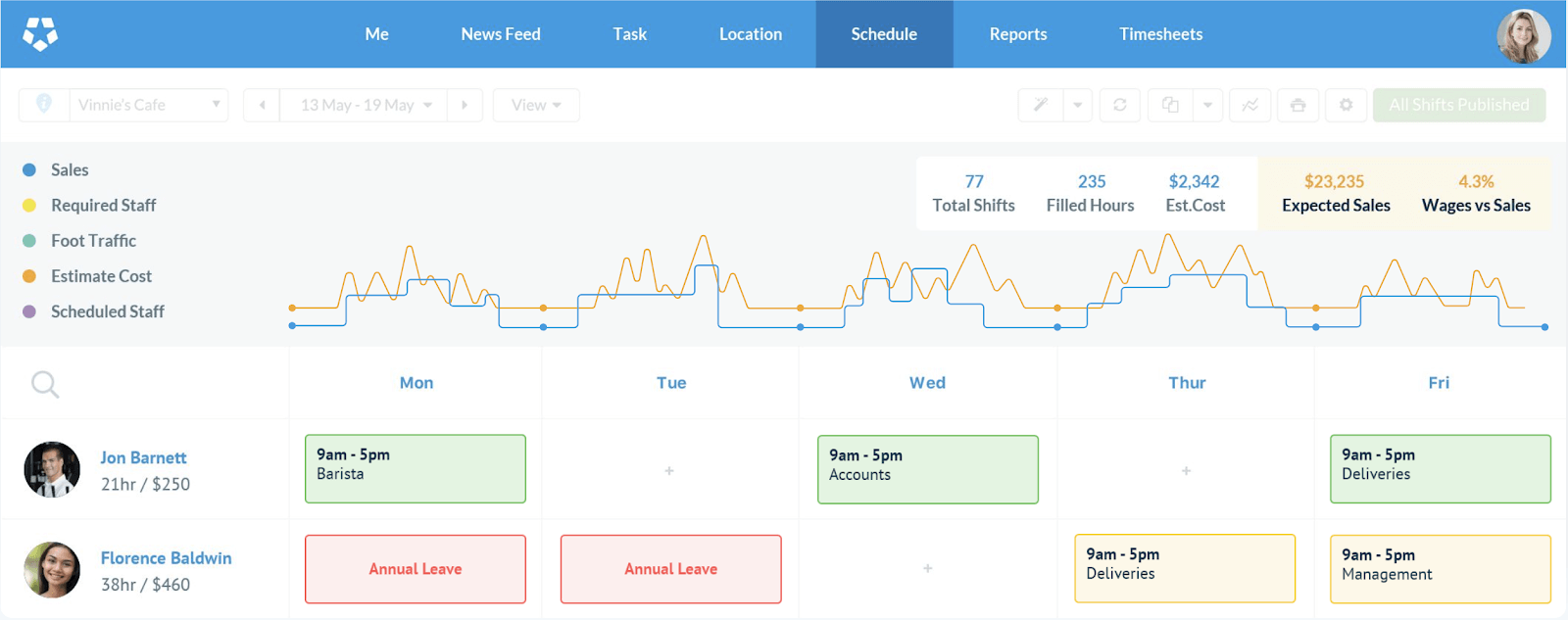
Digital scheduling tools can provide a central schedule where employees view their shifts, availability, and approved time off. For example, Microsoft Teams Shifts supports schedule creation and gives employees options to view schedules and request changes or open shifts. Microsoft’s Shifts documentation explains how the feature supports scheduling and team coordination.
As a result, better schedule visibility can reduce avoidable communication and give employees more ownership over schedule-related requests.
5. Plan for Time Off and Schedule Changes
Schedules rarely remain unchanged. Employees request vacations, call in sick, swap shifts, or become unavailable for unexpected reasons.
For that reason, managers should build a process for handling changes instead of treating every adjustment as an emergency. A clear workflow can define who approves time off, who can swap shifts, and how managers handle uncovered work.
For example, an employee could submit a time-off request through the scheduling system. The manager could then review coverage before approving the request. If the absence creates a gap, the manager can assign an available employee or publish an open shift.
6. Avoid Unnecessary Overtime
Scheduling managers should monitor planned hours before publishing shifts. Otherwise, small changes can gradually push employees beyond their normal working hours.
Overtime rules vary by location and employee classification, so businesses should review the laws that apply to their workforce. In the United States, for example, the U.S. Department of Labor explains that covered nonexempt employees generally qualify for overtime after more than 40 hours in a workweek under the Fair Labor Standards Act, subject to applicable rules and exemptions. The U.S. Department of Labor’s FLSA guidance provides additional information.
In addition, some states and local jurisdictions have scheduling-related requirements that go beyond federal rules. Businesses should therefore avoid treating one scheduling policy as suitable for every location.
Important
Scheduling software can help identify potential overtime or coverage issues, but businesses still need to apply the employment laws and workplace agreements relevant to their employees.
7. Keep Schedule Changes Organized
Last-minute changes can quickly create confusion when managers communicate through multiple channels. One employee may receive a text, another may receive an email, and someone else may hear about the change in person.
Instead, use a central scheduling process. When a shift changes, update the schedule and notify the affected employees through the appropriate channel.
Similarly, keep a clear record of schedule requests, approvals, swaps, and changes. This creates better visibility for managers and employees.
Businesses can also connect scheduling with broader workflow management processes when scheduling forms part of a larger operational workflow.
8. Review Actual Hours Against Planned Hours
A schedule represents planned work, but employees may work different hours in practice. Someone may arrive late, stay longer to finish a task, leave early, or take an additional shift.
Managers should therefore compare scheduled hours with actual hours worked. This comparison can reveal recurring staffing problems, unexpected overtime, or shifts that consistently require more coverage.
Over time, these patterns can help managers create more realistic schedules. For example, if a particular shift regularly runs beyond its planned end time, the manager can investigate the workload rather than repeatedly extending the same employee’s shift.
9. Use Scheduling Data to Improve Future Plans
Workplace scheduling should not stop when the schedule gets published. Managers can use historical information to improve future scheduling decisions.
Look for patterns such as frequent shift swaps, recurring understaffing, high overtime, or periods when employees regularly request changes. These patterns can point to problems in the scheduling process.
For example, if employees frequently request changes to a particular shift, the manager may need to review its timing or staffing requirements. Similarly, repeated open shifts may indicate that the business needs additional coverage or a different staffing model.
Manual Scheduling vs. Scheduling Software
Small teams may manage schedules with spreadsheets or shared documents. However, manual scheduling becomes harder as the number of employees, locations, shifts, and changes increases.
| Area | Manual scheduling | Scheduling software |
|---|---|---|
| Schedule creation | Managers enter and update shifts manually | Managers create and adjust schedules in one system |
| Employee availability | Often tracked separately | Can be included in the scheduling workflow |
| Schedule changes | May require multiple messages | Updates can be centralized |
| Time-off requests | Often handled through separate processes | Can be connected to schedule management |
| Schedule visibility | Depends on how information gets shared | Employees can access a central schedule |
Modern workforce management tools can also consider availability, skills, working hours, and other scheduling constraints. For example, Microsoft documents scheduling features that help managers create and update staff shifts while giving employees tools to view schedules and request changes. Microsoft’s staff scheduling documentation provides an example of this approach.
However, software does not automatically solve poor scheduling practices. Managers still need clear rules, accurate employee information, and a process for reviewing schedule quality.
What Features Should Workplace Scheduling Software Include?
The right features depend on the business, but several capabilities can make schedule management more practical.
Shift planning
Managers should be able to create shifts, assign employees, adjust working hours, and review coverage from a central interface.
Availability management
Employees and managers should be able to maintain availability information so schedules reflect real working constraints.
Time-off management
Managers can review requests and consider staffing coverage before approving absences.
Shift swaps
Employees can request or coordinate shift changes through a defined process instead of relying on scattered messages.
Notifications
Schedule updates should reach affected employees quickly so they know when a shift changes.
Time tracking integration
Connecting scheduled shifts with actual working hours can help managers compare planned and recorded time.
Reporting
Reports can help managers identify overtime, coverage gaps, frequent changes, and other scheduling patterns.
Common Workplace Scheduling Mistakes
Even businesses with a scheduling system can make avoidable mistakes. The most common problems usually come from incomplete information or inconsistent processes.
- Ignoring employee availability: Assigning shifts without checking availability can create unnecessary conflicts.
- Focusing only on coverage: A schedule may look complete while assigning employees to roles that do not match their skills.
- Making too many last-minute changes: Frequent changes can create confusion and make it harder for employees to plan their time.
- Using disconnected tools: Keeping schedules, time-off requests, and attendance records in separate systems can increase administrative work.
- Failing to review actual hours: Managers may miss recurring overtime or understaffing if they only look at planned schedules.
Instead, businesses should establish clear scheduling rules and review the process regularly. More importantly, employees should know where to find their schedules and how to request changes.
How to Choose a Workplace Scheduling Approach
The right approach depends on the size and complexity of the workforce. A small team with predictable hours may only need a shared calendar or simple scheduling tool. A larger operation with multiple shifts may need dedicated workforce management software.
Consider these questions before choosing a solution:
- How many employees need to be scheduled?
- How many shifts or locations do you manage?
- Do employees have changing availability?
- How often do shifts change?
- Do employees need to request time off or swap shifts?
- Do managers need to track planned and actual hours?
- Does scheduling need to connect with payroll, time tracking, CRM, ERP, or other business systems?
If scheduling is tightly connected to other operational processes, a custom business application may make sense. For example, a company with unique scheduling rules may need scheduling functionality that works alongside its customer, employee, or operational data rather than forcing managers to maintain separate systems.
When Should a Business Consider Custom Scheduling Software?
Off-the-shelf scheduling tools can work well when a business has common scheduling needs. However, custom development may become relevant when standard tools cannot handle important business rules.
For example, a business may need to schedule employees based on specific skills, locations, customer assignments, approval rules, contract requirements, or complex availability patterns. In that situation, a custom solution can connect scheduling with the company’s existing processes and data.
Custom software can also make sense when managers currently move information between several systems. A centralized platform can reduce duplicate data entry and create a more consistent workflow.
Pro tip
Do not start with features. Start by mapping how your business creates shifts, checks availability, handles changes, records time, and reviews coverage. Then identify which parts need automation.
Frequently Asked Questions
Frequently Asked Questions
What is workplace scheduling?
Workplace scheduling is the process of planning employee work hours, assigning shifts, managing availability, and maintaining adequate staffing coverage.
What is the difference between workplace scheduling and employee scheduling?
The terms often describe the same process. Workplace scheduling can refer to the broader planning process, while employee scheduling usually focuses specifically on assigning individual employees to shifts.
How can workplace scheduling reduce scheduling problems?
A structured scheduling process can centralize availability, time-off requests, shift assignments, changes, and coverage information. This gives managers better visibility and reduces avoidable communication gaps.
What should managers consider when creating employee schedules?
Managers should consider business demand, employee availability, skills, working hours, time off, shift coverage, overtime rules, and any applicable workplace agreements or local requirements.
Can workplace scheduling software integrate with time tracking?
Yes. Many business systems can connect scheduling with time tracking so managers can compare planned shifts with actual hours and identify differences that need attention.
Conclusion
Effective workplace scheduling gives businesses a structured way to match employee availability and skills with operational demand. The process works best when managers plan coverage first, maintain accurate availability information, handle time off consistently, monitor working hours, and review schedule changes.
For small teams, a simple scheduling process may be enough. As operations become more complex, scheduling software can centralize shifts, availability, time-off requests, changes, and reporting. When standard tools cannot support unique business rules, custom software can provide a more tailored approach.
Build software around how your business works
If your scheduling process depends on unique workflows, approvals, employee rules, or integrations, a custom business system can bring those processes into one platform.Talk to our team
