
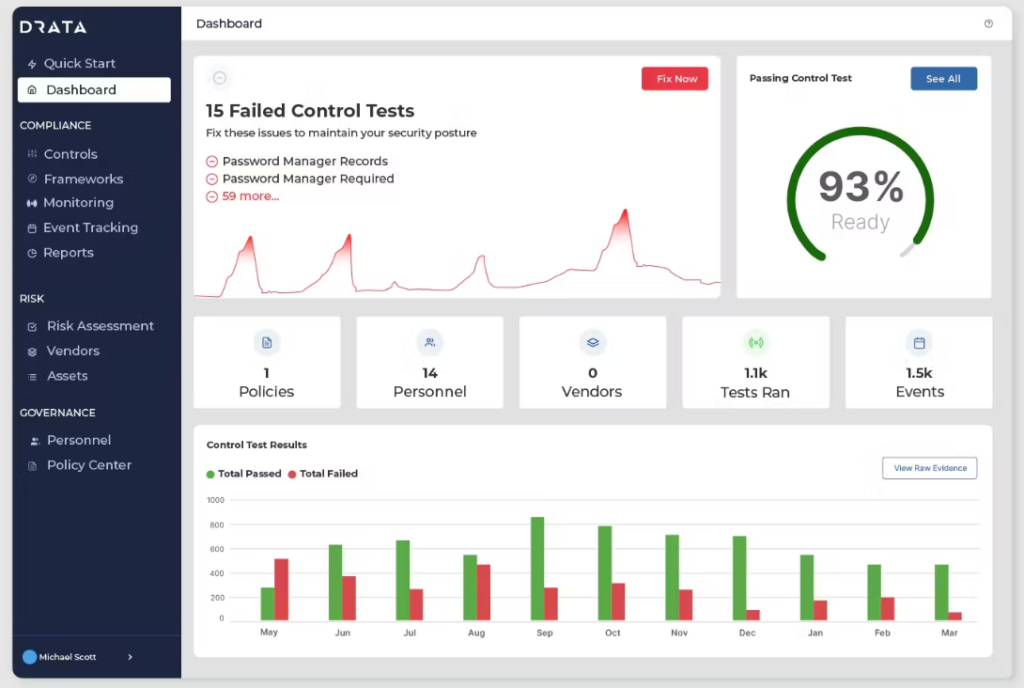
Compliance Management System: 10 Features for Smarter Compliance Management
A compliance management system gives businesses a structured way to identify requirements, assign responsibilities, monitor controls, manage risks, and keep evidence ready for reviews or audits. Instead of relying on spreadsheets, emails, and scattered documents, teams can use a central system to organize compliance activities and respond to changing requirements.
In practice, a strong compliance management system connects policies, obligations, controls, tasks, evidence, risks, and reporting. This guide explains how these systems work, the key features to look for, the benefits they can provide, and the mistakes businesses should avoid when implementing one.
What Is a Compliance Management System?
A compliance management system is a structured framework that helps an organization manage its legal, regulatory, contractual, internal, and industry-specific obligations. It brings compliance activities into one organized process so teams can identify what they need to follow, determine who owns each requirement, and track whether the required controls are working.
Importantly, a compliance management system is more than a document repository. It should support the full compliance cycle, from identifying an obligation to assigning a control, collecting evidence, reviewing performance, addressing gaps, and improving the process.
For example, a healthcare company may need to manage privacy requirements, employee training, security controls, vendor obligations, and audit evidence. Rather than tracking each area separately, the business can connect these activities within one compliance framework.
Key takeaway
Compliance management is an ongoing business process. The right software helps teams turn that process into a repeatable, visible, and measurable workflow.
How Does a Compliance Management System Work?
Although implementations vary by industry, most systems follow a similar cycle. First, the organization identifies the laws, regulations, standards, contracts, and internal policies that apply to its operations.
Next, the team maps those requirements to specific controls and assigns ownership. The system can then track tasks, deadlines, evidence, reviews, exceptions, and corrective actions.
Meanwhile, compliance monitoring software can help teams watch control performance and identify activities that need attention. As a result, managers can focus on gaps instead of manually checking every spreadsheet or email thread.
- Identify requirements: Document the rules, standards, policies, and obligations that apply to the business.
- Assess risk: Determine which requirements create the greatest operational or regulatory exposure.
- Map controls: Connect requirements to policies, procedures, safeguards, and responsible teams.
- Assign ownership: Give each task or control a clear owner and deadline.
- Collect evidence: Store documents, approvals, test results, training records, and other supporting evidence.
- Monitor performance: Track control status, exceptions, overdue activities, and emerging compliance issues.
- Improve continuously: Review results and update controls when requirements, risks, or business processes change.
10 Key Features of a Compliance Management System
1. Centralized Compliance Requirements
A centralized requirements library gives teams one place to organize applicable obligations. Users can categorize requirements by regulation, department, business process, location, or risk area.
This structure also reduces the chance of losing important requirements across disconnected documents. More importantly, it makes ownership easier to understand.
2. Regulatory and Policy Tracking
Compliance requirements can change over time. Therefore, businesses need a practical way to record changes, review their impact, and update internal policies or controls.
A system can maintain information about requirements and connect them to the policies and processes they affect. Teams can then review what needs to change instead of searching through multiple files.
3. Risk Assessment and Risk Registers
Not every compliance issue carries the same level of risk. A compliance management system should help teams assess risks, document their potential impact, assign owners, and track mitigation activities.
For example, a business may classify a missing security control as a high-priority risk while treating a minor documentation gap as a lower-priority issue. This approach helps teams use their time where it matters most.
For organizations managing third-party exposure, a dedicated vendor risk management software workflow can also complement broader compliance processes.
4. Compliance Monitoring
Compliance monitoring software helps organizations track whether controls, policies, and required activities remain on schedule and operate as expected.
Instead of waiting for an audit to reveal a problem, teams can monitor exceptions, overdue reviews, failed checks, and incomplete tasks during normal operations. This creates a more proactive approach to compliance.
For technology-related risks, continuous monitoring also plays an important role in risk management. The NIST Risk Management Framework, for example, includes continuous monitoring as part of its risk management process.
5. Evidence and Document Management
Compliance teams often need evidence to demonstrate that a control exists and that employees or systems followed the required process. A centralized evidence repository makes this information easier to locate.
The system may store policies, certificates, approval records, test results, training documentation, audit evidence, and related files. It can also connect evidence to specific requirements or controls.
Businesses that handle large volumes of operational records can strengthen this process by using a structured records management system alongside compliance workflows.
6. Task and Workflow Management
Compliance involves many recurring activities. These may include policy reviews, control testing, employee certifications, risk assessments, vendor checks, and corrective actions.
Workflow management turns these activities into assigned tasks with owners, deadlines, statuses, and escalation rules. As a result, teams have a clearer view of what requires attention.
7. Audit Management
A compliance management system can help teams prepare for internal and external audits by organizing evidence, assigning audit tasks, tracking findings, and documenting corrective actions.
Instead of rebuilding an evidence package whenever an audit begins, teams can maintain compliance information throughout the year. This makes audit preparation a continuous activity rather than a last-minute project.
8. Training and Attestation Tracking
Some compliance requirements depend on employee awareness and training. The system should therefore help organizations track required courses, completion dates, acknowledgments, certifications, and policy attestations.
For organizations with broader employee training workflows, a training management system can provide additional structure for assigning and monitoring learning activities.
9. Reporting and Dashboards
Compliance leaders need more than a list of open tasks. They need a clear view of compliance status, overdue actions, control gaps, risk levels, audit findings, and ownership.
Dashboards can bring these indicators together and make reporting easier for managers. For example, a compliance manager might use a dashboard to identify departments with overdue control reviews or unresolved findings.
10. Asset and Control Tracking
Compliance requirements often depend on the assets, systems, locations, or equipment involved in a business process. Therefore, teams may need to connect compliance controls with specific assets.
For example, a company may need to confirm that certain equipment receives required inspections or that specific technology assets follow security controls. A structured asset management software process can help maintain the underlying asset information that compliance workflows depend on.
Why Businesses Use Compliance Management Software
Manual compliance processes can become difficult to manage as an organization grows. Requirements increase, more employees become involved, and evidence becomes harder to organize.
A compliance management system can bring these activities into a single workflow. Consequently, businesses can improve visibility and reduce the amount of time employees spend searching for information.
- Better visibility: Managers can see compliance status, ownership, risks, and outstanding tasks in one place.
- Fewer manual checks: Automated reminders and workflows can reduce repetitive follow-up.
- Stronger accountability: Every requirement or control can have a defined owner.
- Faster audit preparation: Evidence remains organized instead of being collected from scratch.
- Improved risk management: Teams can prioritize compliance gaps based on risk and impact.
- More consistent processes: Standard workflows help departments follow the same compliance procedures.
Compliance Management System vs. Compliance Monitoring Software
The terms are closely related, but they do not always describe exactly the same scope.
| Area | Compliance Management System | Compliance Monitoring Software |
|---|---|---|
| Primary focus | Managing the broader compliance lifecycle | Monitoring compliance status and controls |
| Requirements | Identify, organize, and map obligations | Track relevant checks and requirements |
| Risk management | Assess and manage compliance-related risks | Highlight exceptions and control issues |
| Evidence | Collect and organize compliance evidence | Monitor evidence or control status |
| Workflows | Manage tasks, approvals, audits, and remediation | Focus on recurring checks and monitoring |
| Reporting | Provide broader compliance and risk reporting | Provide monitoring and exception reporting |
In practice, compliance monitoring software can form one part of a larger compliance management system. The right combination depends on the organization’s regulatory environment, risk profile, size, and existing processes.
How to Choose the Right Compliance Management System
Start with your compliance requirements rather than the feature list. Before comparing products, identify the regulations, standards, policies, departments, controls, and reporting needs that the system must support.
Then evaluate potential software against the following areas:
- Ease of use: Employees should be able to complete tasks without extensive technical knowledge.
- Workflow flexibility: The system should support your approval, review, escalation, and remediation processes.
- Reporting: Look for dashboards and reports that match the information managers actually need.
- Integration: Consider whether the system can connect with the tools that already hold relevant business data.
- Scalability: Make sure the system can support additional requirements, users, locations, and workflows as the business grows.
- Security: Review access controls, permissions, authentication, audit trails, and data protection capabilities.
- Customization: Consider how easily the platform can adapt to industry-specific requirements and internal processes.
Pro tip
Do not choose software only because it contains a long feature list. Map your top compliance workflows first, then check whether each product can support those workflows with minimal manual work.
Compliance Management Best Practices
Software alone does not create an effective compliance program. Instead, businesses should combine technology with clear ownership, documented processes, regular reviews, and management oversight.
First, assign an owner to every major requirement and control. Next, define how often each control needs review and what evidence proves that the control works.
In addition, establish a process for handling exceptions. When a control fails, the team should document the issue, assess the risk, assign corrective action, and track the resolution through completion.
Organizations should also review their compliance framework whenever there are major changes to regulations, business operations, technology, suppliers, or organizational structure. ISO 37301 provides an international framework for establishing, implementing, evaluating, maintaining, and improving a compliance management system. The standard applies across organizations of different sizes and sectors. ISO 37301 compliance management system requirements provide a useful reference for organizations designing a formal compliance framework.
Common Mistakes to Avoid
Relying Only on Spreadsheets
Spreadsheets can work for simple tracking, but they can become difficult to maintain as requirements and users increase. Version control, ownership, reminders, and audit trails can become harder to manage.
Ignoring Ownership
A requirement without a clear owner can easily become an overdue task. Therefore, every important control should have someone responsible for reviewing and maintaining it.
Focusing Only on Audits
Compliance should not become a project that starts a few weeks before an audit. Instead, teams should maintain evidence, review controls, and resolve issues throughout the year.
Automating a Broken Process
Automation cannot fix an unclear workflow. Before automating, document the current process, remove unnecessary steps, define responsibilities, and then configure the software around the improved workflow.
Forgetting Employee Adoption
A system only delivers value when employees use it consistently. Keep workflows simple, provide appropriate training, and explain why each compliance task matters.
When Should a Business Implement a Compliance Management System?
A business should consider dedicated compliance software when manual tracking starts creating operational risk or consuming significant administrative time. Growth can make this need more obvious because more employees, locations, suppliers, systems, and regulations create additional compliance relationships.
It can also make sense when a business faces recurring audits, operates in a heavily regulated industry, manages multiple compliance frameworks, or needs stronger evidence and reporting.
For smaller organizations, a simple system may be enough. However, companies with complex requirements may benefit from a more configurable platform that integrates compliance, risk, document, training, and workflow data.
Important
A compliance management system supports compliance work, but it does not replace legal advice or professional interpretation of regulations. Organizations should determine which requirements apply to their specific operations.
Frequently Asked Questions
What is the main purpose of a compliance management system?
Its main purpose is to help an organization identify obligations, manage compliance risks, assign controls, track tasks, collect evidence, monitor performance, and report compliance status from a structured system.
What is compliance monitoring software?
Compliance monitoring software helps teams track controls, requirements, exceptions, deadlines, and other indicators that show whether compliance activities remain on track.
Can a compliance management system help with audits?
Yes. It can organize evidence, assign audit tasks, track findings, document corrective actions, and provide reports that make audit preparation more structured.
Is compliance management software useful for small businesses?
It can be useful when compliance requirements, audits, evidence, or recurring tasks become difficult to manage manually. Smaller businesses can choose a simpler system that matches their actual needs.
How does compliance software support risk management?
It can connect requirements with risks and controls, assign risk owners, track mitigation tasks, monitor exceptions, and provide visibility into unresolved compliance issues.
Final Thoughts
A compliance management system gives businesses a structured way to manage requirements, risks, controls, evidence, audits, and corrective actions. More importantly, it helps move compliance from scattered administrative work into a repeatable business process.
The right solution should match the organization’s actual compliance workflows. Start by identifying the requirements you need to manage, the risks you need to control, the evidence you need to maintain, and the reports your teams need. Then choose or build software that supports those processes without adding unnecessary complexity.
Build software around how your business works
If your compliance workflows require custom processes, integrations, dashboards, or business rules, a tailored software solution can help bring them together in one system.Talk to our team
