
General Contractor Software: 11 Features That Keep Projects, Costs, and Crews on Track
General contractor software brings project planning, job costs, subcontractor coordination, documents, schedules, and field updates into one organized system. Instead of managing critical details across spreadsheets, email threads, paper files, and separate apps, contractors can use one platform to keep project information connected. This makes general contractor software useful for firms that manage multiple jobs, coordinate subcontractors, track budgets, and need better visibility from the office to the jobsite.
In this guide, we will explain what general contractor software does, the key features to look for, how general contractor management software supports daily operations, and what to consider before choosing or building a system.
What Is General Contractor Software?
General contractor software is a business management platform designed to help contractors organize the operational and financial side of construction projects. It can connect estimating, project planning, purchasing, work orders, documentation, cost tracking, communication, and reporting within a shared system.
The exact features vary by platform. However, the goal remains similar: give project managers, office staff, contractors, and field teams access to the information they need without relying on disconnected tools.
For example, a project manager may need to check the current budget while a site supervisor needs the latest task details. Meanwhile, an office administrator may need purchase information or project documents. A centralized system lets each person work from the same project data.
Key takeaway
General contractor software works best when it connects the office, field, financial, and project sides of construction instead of treating each function as a separate process.
Why Do General Contractors Need Construction Management Software?
General contractors often coordinate many moving parts at once. A single project can involve owners, architects, subcontractors, suppliers, field workers, project managers, and office teams. At the same time, the contractor must keep schedules, costs, materials, documents, and job requirements aligned.
Without a central system, information can become scattered. A schedule might live in one spreadsheet, purchase details in email, work updates in messaging apps, and project documents in cloud folders.
As a result, teams can spend too much time looking for information instead of acting on it. General contractor management software reduces this problem by connecting related processes and creating a central source of project information.
For contractors handling several active projects, this visibility becomes even more useful. Managers can review project status, identify pending tasks, monitor spending, and follow up on issues without switching between multiple systems.
11 Features to Look for in General Contractor Software
1. Project Management
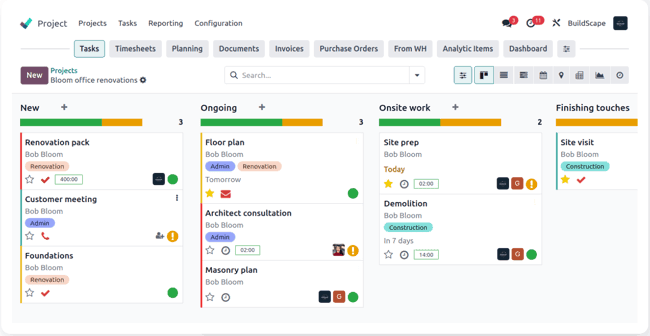
Project management should sit at the center of a general contractor software platform. It should let teams create projects, assign responsibilities, define milestones, track tasks, and monitor progress.
A useful system should also make it easy to see what needs attention. For example, a project manager could view overdue tasks, upcoming milestones, open issues, and current project activity from one dashboard.
Construction teams that want to explore this capability in more detail can also review project management software features that help teams organize ongoing work.
2. Estimating and Bid Management
Before a contractor can manage a project, the company needs to estimate the work accurately. Estimating features help teams organize labor, materials, subcontractor costs, overhead, and other project expenses.
The system should make it easy to turn estimates into active projects when a bid becomes a contract. This reduces duplicate data entry and creates a smoother transition from preconstruction to project execution.
For contractors focused heavily on bidding, dedicated estimating software for contractors can provide additional insight into the estimating process.
3. Cost and Budget Tracking
Construction margins can change as project costs develop. Therefore, general contractor software should help teams compare planned costs with actual spending.
A useful cost management module can organize budgets by project, category, phase, or cost code. Managers can then monitor committed costs, actual expenses, and remaining budget amounts.
For example, if material costs rise during a project, the team can identify the impact sooner instead of discovering the issue only after project completion.
Construction financial management platforms also demonstrate how connecting budgets, contracts, costs, and field progress can give project teams a more complete view of project finances. Procore’s project financial management overview provides one example of this approach.
4. Scheduling and Task Management
A construction schedule does more than show dates. It helps teams understand what needs to happen, who owns each task, and how one activity affects another.
General contractor software should support project schedules, task assignments, deadlines, milestones, and progress updates. It should also make changes visible to the people who depend on them.
For instance, if a subcontractor finishes a task later than planned, the project manager can update dependent activities and communicate the change instead of relying on outdated schedules.
5. Subcontractor Management
General contractors often work with multiple subcontractors across different projects. Managing those relationships through scattered spreadsheets can make it difficult to track responsibilities, documents, contacts, and current work.
General contractor management software can centralize subcontractor information and connect each company to relevant projects or tasks.
This can include subcontractor contacts, assigned work, project documents, agreements, insurance information, and communication history. The exact capabilities depend on the software and the contractor’s workflow.
6. Purchase Orders and Procurement
Materials and services can represent a significant part of project spending. Therefore, procurement needs to stay connected to the project budget and schedule.
Purchase order management features can help teams create purchase orders, track suppliers, monitor order status, and connect purchases with projects.
This is particularly useful when several projects require materials at the same time. Instead of maintaining separate purchase records, the team can organize procurement information by project and supplier.
Contractors can also explore purchase order management software features for a closer look at procurement workflows.
7. Work Order Management
Work orders turn project requirements into actionable work. They can define what needs to happen, who should handle it, where the work takes place, and when it should happen.
General contractor software can connect work orders with projects, tasks, teams, and status updates. This gives managers a clearer picture of active and completed work.
For example, a site manager could create a work order for a concrete repair, assign it to the responsible team, add notes, and update the status after completion.
For a deeper look at this workflow, see work order management system features.
8. Document Management
Construction projects generate many documents. Plans, contracts, specifications, purchase records, change documents, reports, permits, and other files may need to remain accessible throughout the project.
A document management feature gives teams a structured place to store and retrieve project information. Search, permissions, file organization, version control, and project-level access can make a major difference to daily workflows.
Most importantly, teams should know which document represents the current version. Otherwise, employees may act on outdated information.
9. Field Updates and Mobile Access
Construction work does not happen only in the office. Project managers, supervisors, and other team members may need to update tasks, review information, or submit notes while working at a jobsite.
Mobile access allows field teams to interact with the system without returning to a desktop for every update.
Useful mobile functions may include task updates, photos, notes, work orders, document access, and project status updates. The objective is simple: capture information where the work happens.
10. Safety and Compliance Tracking
Safety should remain a separate management priority, even when software combines it with broader project workflows. Contractors may need to organize inspections, training records, incident information, safety documentation, and other compliance-related activities.
For contractors operating in the United States, OSHA provides construction-specific standards, compliance resources, and guidance covering areas such as falls, excavation, electrical hazards, and other jobsite risks. Contractors can review the OSHA construction industry resources for applicable requirements and guidance.
Software can help organize safety information, but it does not replace professional safety practices or legal requirements. Instead, it should support the processes a contractor already follows.
11. Reporting and Dashboards
Construction managers need more than raw data. They need a clear view of what that data means for current projects.
Reporting features can turn project information into useful summaries. Depending on the system, dashboards may show project status, budget performance, open work orders, purchasing activity, overdue tasks, or subcontractor activity.
For example, a project manager could review several active projects from one dashboard and then open an individual project for more detail. This approach helps managers move from a high-level view to a specific issue quickly.
General Contractor Software vs. General Contractor Management Software
The terms general contractor software and general contractor management software often describe similar solutions. However, the word “management” usually emphasizes the broader operational side of running projects.
| Area | General Contractor Software | General Contractor Management Software |
|---|---|---|
| Project tracking | Tracks projects, tasks, and milestones | Connects project tracking with broader workflows |
| Costs | Tracks budgets and expenses | Connects financial data with project operations |
| Subcontractors | Stores contacts and assignments | Coordinates subcontractor activity across projects |
| Field operations | Supports work updates and job information | Connects field updates with office workflows |
| Reporting | Provides project-level reports | Provides broader operational visibility |
In practice, the distinction matters less than the actual feature set. When evaluating software, contractors should focus on whether the platform supports their real workflows rather than choosing a product based only on its name.
How to Choose the Right General Contractor Software
Start by mapping your current workflow. Identify how your team handles estimates, project setup, scheduling, purchasing, subcontractors, field updates, documents, costs, and reporting.
Next, identify the gaps. If your team spends hours copying information between spreadsheets, that process deserves attention. Similarly, if managers cannot quickly determine project status or current spending, the software should address that problem.
Consider these factors before making a decision:
- Project and task management capabilities
- Budget and cost tracking
- Estimating and bid workflows
- Subcontractor coordination
- Purchase order and procurement workflows
- Document management
- Mobile and field access
- Reporting and dashboards
- User permissions and access controls
- Integration options
- Ease of implementation and employee adoption
- Ability to customize workflows as the company grows
Pro tip
Do not evaluate software by counting features alone. A smaller feature set that matches your actual construction workflow can be more useful than a large system filled with tools your team never uses.
When Should a Contractor Consider Custom Software?
Off-the-shelf software can work well when a contractor’s processes closely match the platform’s built-in workflows. However, some companies operate differently because of their project types, approval processes, reporting requirements, or internal systems.
Custom software becomes worth considering when the business needs workflows that standard platforms cannot support without complicated workarounds.
For example, a contractor may need a system that connects project management with a specific accounting platform, uses custom approval rules, provides specialized dashboards, or handles unique subcontractor workflows.
Custom development can also make sense when a company wants multiple departments to work within one tailored system rather than maintaining separate tools. In that case, the development process should begin with workflow mapping and clear business requirements rather than simply recreating every existing spreadsheet.
Common Mistakes When Implementing Contractor Software
Even capable software can fail to deliver value if the implementation does not match the team’s working habits.
- Choosing too many features at once: Start with the workflows that create the most operational friction.
- Ignoring field teams: A system that works only for office staff may leave important jobsite information outside the platform.
- Keeping duplicate records: Multiple versions of project information can create confusion. Define where the official record lives.
- Skipping user training: Employees need clear processes and practical training before they can use a new system consistently.
- Failing to define ownership: Every important workflow should have a clear owner who maintains data quality and follows up on outstanding tasks.
Therefore, successful implementation depends on both technology and process. The software should simplify the workflow rather than add another layer of administration.
What Does a General Contractor Software Workflow Look Like?
A typical workflow can connect the major stages of a construction project.
- Estimate: The contractor prepares the project estimate and bid.
- Set up the project: The approved estimate becomes an active project with its budget, schedule, contacts, and documents.
- Plan the work: Managers create tasks, milestones, work orders, and responsibilities.
- Coordinate procurement: Teams create purchase orders and track required materials or services.
- Manage subcontractors: Assigned companies receive relevant responsibilities and project information.
- Update the field: Supervisors record progress, notes, issues, and other job information.
- Monitor costs: Managers compare spending and commitments with the project budget.
- Report progress: Dashboards and reports give managers a current view of project performance.
- Close the project: Teams organize final documentation, outstanding work, costs, and project records.
The value comes from connecting these steps. When information flows from one stage to the next, teams spend less time re-entering data and more time managing the project itself.
Important
Software should support construction management, not replace professional judgment. Safety decisions, contractual obligations, financial controls, and regulatory requirements still require appropriate human oversight.
Frequently Asked Questions
What does general contractor software do?
General contractor software helps contractors manage projects, schedules, costs, subcontractors, purchasing, work orders, documents, field updates, and reports from a centralized system.
What is general contractor management software?
General contractor management software is a broader construction management solution that connects project operations, financial information, field activities, subcontractors, documents, and reporting.
Can general contractor software manage subcontractors?
Many platforms include subcontractor management features such as contact records, assignments, project documents, responsibilities, and status tracking. Available features vary by platform.
What features should small general contractors look for?
Small contractors should focus on project management, estimating, cost tracking, scheduling, purchasing, subcontractor coordination, document management, mobile access, and reporting.
When should a construction company build custom software?
Custom software may make sense when standard products cannot support important workflows, integrations, approval rules, reporting requirements, or business-specific processes without significant workarounds.
Final Thoughts
General contractor software can bring project management, estimating, costs, purchasing, subcontractors, work orders, documents, field updates, and reporting into one connected workflow. The right system should make information easier to access and help teams act on project issues sooner.
However, contractors should start with their processes rather than a feature checklist. Define the problems you need to solve, identify the information your teams need, and then evaluate whether an existing platform or custom solution fits those requirements.
Build software around how your business works
If your construction business needs workflows that standard software cannot support, a custom solution can connect project operations, approvals, reporting, and integrations around your specific processes.Talk to our team
